- Home
- Oracle
- Primavera P6 Enterprise Project Portfolio Management 8 Essentials
- Oracle.1z0-567.v2019-06-23.q43
- Question 42
Valid 1z0-567 Dumps shared by EduDump.com for Helping Passing 1z0-567 Exam! EduDump.com now offer the newest 1z0-567 exam dumps, the EduDump.com 1z0-567 exam questions have been updated and answers have been corrected get the newest EduDump.com 1z0-567 dumps with Test Engine here:
Access 1z0-567 Dumps Premium Version
(84 Q&As Dumps, 35%OFF Special Discount Code: freecram)
<< Prev Question Next Question >>
Question 42/43
Select the true statement regarding role proficiency.
Correct Answer: C
Explanation/Reference:
Resources: Roles
A number of roles can be set for the resource, with one role set to be the primary (default) role.

On this tab you can also assign a resource's proficiency in a given role. This skill level ranges from 1 -
Master to 5 - Inexperienced and can be used to select the right person with the right level of skills for a
given task.
Note:
Example:
The Search icon is new. This one lets you search and locate resources using a sophisticated filter. You
can search on a wide range of criteria, including date range, role, proficiency.
For example, in the following screenshot we are searching for all resources with Developer as the Primary
Role with Proficiency of Master
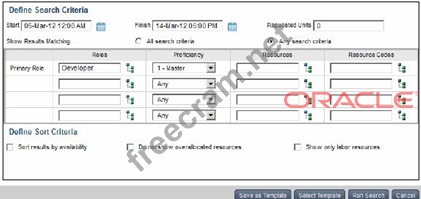
Note 2: A resource skill level is a resource's role proficiency.
Resources: Roles
A number of roles can be set for the resource, with one role set to be the primary (default) role.
On this tab you can also assign a resource's proficiency in a given role. This skill level ranges from 1 -
Master to 5 - Inexperienced and can be used to select the right person with the right level of skills for a
given task.
Note:
Example:
The Search icon is new. This one lets you search and locate resources using a sophisticated filter. You
can search on a wide range of criteria, including date range, role, proficiency.
For example, in the following screenshot we are searching for all resources with Developer as the Primary
Role with Proficiency of Master
Note 2: A resource skill level is a resource's role proficiency.


- Question List (43q)
- Question 1: You are an implementation consultant responding to the requi...
- Question 2: Identify one filter enhancement in P6 R8....
- Question 3: When assigning a user to a user-interface view, deselecting ...
- Question 4: Identify the true statement regarding project templates....
- Question 5: Identify the true statement regarding user security profiles...
- Question 6: Identify two business use case for templates....
- Question 7: You are a portfolio manager looking for a new portfolio that...
- Question 8: Select the true statement regarding currencies....
- Question 9: You are an application administrator. You have been asked by...
- Question 10: Where are risk response plans captured?...
- Question 11: You are meeting with a customer and demonstrating the Resour...
- Question 12: Identify this icon: (Exhibit)
- Question 13: Calculated project user-defined fields __________and________...
- Question 14: Identify one new feature in Release 8 related to Resource Ma...
- Question 15: Yon are working with a customer that has had a legacy Primav...
- Question 16: You are an application administrator that has been asked to ...
- Question 17: Select two true statements about the Portfolio Analysis tab ...
- Question 18: Identify the key benefit of the Plan Resources view....
- Question 19: What are two benefits of designating a resource as inactive?...
- Question 20: Select the true statement regarding project security profile...
- Question 21: Identify the true statement regarding currencies....
- Question 22: Identify the true statement regarding a Capacity Planning ch...
- Question 23: You are creating a new portfolio scenario. You are attemptin...
- Question 24: The two global profiles that are hard-coded in the system an...
- Question 25: Identify the best definition of the EPS....
- Question 26: You received an e-mail from a portfolio manager asking you t...
- Question 27: You are in a governance organization that has established a ...
- Question 28: You are a project manager working with a cross-functional pr...
- Question 29: You are a project manager on a fixed-bid contract. This cont...
- Question 30: Identify three best practice uses of Notebook topics....
- Question 31: In your project, cost and work effort is not subject to chan...
- Question 32: Where are workflows accessed?
- Question 33: Your customer wants to take advantage of capacity planning i...
- Question 34: Identify two formats available in the Capacity Planning char...
- Question 35: You are a portfolio manager. You opened a portfolio and you ...
- Question 36: A Physical % complete activity has an original duration of 1...
- Question 37: You are a project manager addressing risk responses in your ...
- Question 38: When is "Store Period Performance" usually performed?...
- Question 39: You are a program manager for a group of 10+ projects. You a...
- Question 40: An activity is to be completed within a fixed time period an...
- Question 41: This graphic is an example of a ___________. (Exhibit)...
- Question 42: Select the true statement regarding role proficiency....
- Question 43: You are developing a reporting strategy for a customer who r...
