Valid 220-1101 Dumps shared by EduDump.com for Helping Passing 220-1101 Exam! EduDump.com now offer the newest 220-1101 exam dumps, the EduDump.com 220-1101 exam questions have been updated and answers have been corrected get the newest EduDump.com 220-1101 dumps with Test Engine here:
Access 220-1101 Dumps Premium Version
(865 Q&As Dumps, 35%OFF Special Discount Code: freecram)
<< Prev Question Next Question >>
Question 165/315
A user with a self-configured, static IP address cannot connect to the internet. The technician runs an ipconfig command and receives the following output:
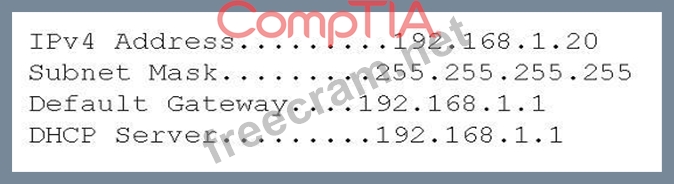
Which of the following should the technician edit?
Which of the following should the technician edit?
Correct Answer: D
The correct answer is D. Default gateway.
A default gateway is the device that connects a local network to other networks, such as the internet. A default gateway is usually a router or a modem that has an IP address on the same subnet as the local network. A default gateway is necessary for a device to communicate with devices outside its local network.
In this case, the user has a self-configured, static IP address of 192.168.1.20, which belongs to the subnet
192.168.1.0/24 (with a subnet mask of 255.255.255.0). However, the default gateway is set to 192.168.0.1, which belongs to a different subnet (192.168.0.0/24). This means that the user's device cannot reach the default gateway, and therefore cannot connect to the internet.
The technician should edit the default gateway to match the correct subnet of the user's device, such as
192.168.1.1 or 192.168.1.254, depending on the configuration of the network.
Reference: CompTIA A+ Core 1 Sample Questions and Study Guide
A default gateway is the device that connects a local network to other networks, such as the internet. A default gateway is usually a router or a modem that has an IP address on the same subnet as the local network. A default gateway is necessary for a device to communicate with devices outside its local network.
In this case, the user has a self-configured, static IP address of 192.168.1.20, which belongs to the subnet
192.168.1.0/24 (with a subnet mask of 255.255.255.0). However, the default gateway is set to 192.168.0.1, which belongs to a different subnet (192.168.0.0/24). This means that the user's device cannot reach the default gateway, and therefore cannot connect to the internet.
The technician should edit the default gateway to match the correct subnet of the user's device, such as
192.168.1.1 or 192.168.1.254, depending on the configuration of the network.
Reference: CompTIA A+ Core 1 Sample Questions and Study Guide


- Question List (315q)
- Question 1: Which of the following internet connection types would be th...
- Question 2: Which of the following cloud service models is most likely t...
- Question 3: A software developer used client-side virtualization on a se...
- Question 4: An insurance company wants to implement cloud computing and ...
- Question 5: An office manager reports that a printer is experiencing per...
- Question 6: A regularly used laser printer is printing vertical lines on...
- Question 7: A company issued smartphones to users who work from home. Th...
- Question 8: A desktop support technician is tasked with upgrading a lapt...
- Question 9: A user frequently edits large files and saves them locally o...
- Question 10: A user's mobile device can back up classified files to an ex...
- Question 11: A technician is installing a WAP in the company break room. ...
- Question 12: A technician is installing a wireless access point and is re...
- Question 13: Which of the following devices would a punchdown tool most l...
- Question 14: To control costs a company provides a limited number or user...
- Question 15: An organization has some computers running macOS and some co...
- Question 16: A technician tries installing different toners to fix a prin...
- Question 17: A technician receives a phone call from a traveling sales re...
- Question 18: A user recently connected multiple monitors to a dock and wo...
- Question 19: An end user reports that the time and date on a desktop rese...
- Question 20: An online retailer is working to support increased sales and...
- Question 21: A technician is on site troubleshooting a customer's laptop....
- Question 22: Which of the following standards supports MIMO technology?...
- Question 23: A technician is asked to set up a new laptop for a coworker....
- Question 24: A technician is configuring a workstation to be used as a VM...
- Question 25: A user's smartphone battery capacity has started going from ...
- Question 26: An administrator is responding to a network server outage. T...
- Question 27: A user is printing a part with a thermoplastic polyurethane ...
- Question 28: A technician receives several error alerts on a server after...
- Question 29: A user's computer is experiencing poor performance. A techni...
- Question 30: A user plugs in a laptop to the corporate network and the la...
- Question 31: After a new network printer is installed and added to the pr...
- Question 32: A drive failed on a server that was leveraging a RAID disk c...
- Question 33: A technician needs to add storage to a workstation. The work...
- Question 34: A user reports a tablet restarts on its own every five to te...
- Question 35: A customer's laptop is making clicking sounds in the area wh...
- Question 36: A technician is troubleshooting a laptop that has a blank LC...
- Question 37: A technician is configuring a desktop computer, and the hard...
- 1 commentQuestion 38: A technician is using a PAN to connect a group of users on a...
- Question 39: A technician installed a new router at a small office. After...
- Question 40: A users wireless laptop stopped working A technician replace...
- Question 41: A technician is troubleshooting a computer that is not compl...
- Question 42: A technician is working on a critical warehouse machine that...
- Question 43: An application developer formats and reconfigures a developm...
- Question 44: A technician is troubleshooting an issue involving lines app...
- Question 45: A technician recently installed a new printer that is being ...
- Question 46: A customer is reporting that some of the keys at the bottom ...
- Question 47: An administrator notices that on an intermittent basis the v...
- Question 48: A help desk technician thinks a desktop PC has failed due to...
- Question 49: A user's desktop PC shuts down suddenly every few hours. A t...
- Question 50: A user reports that when pressing a radio button on a tablet...
- Question 51: A technician is installing a network interface card in a des...
- Question 52: Which of the following is a method that can be used to secur...
- Question 53: A remote user reports connectivity issues with the local int...
- Question 54: While implementing a non-carrier-grade wireless backhaul, a ...
- Question 55: A user purchased a new smartphone and headset and is trying ...
- Question 56: Which of the following ports allows for secure communication...
- Question 57: A technician is setting up a laptop with an encrypted hard d...
- Question 58: A user is having an issue with the touch screen on a mobile ...
- Question 59: Which of the following describes the BEST use case for a cli...
- Question 60: A user brings an older laptop to the help desk and reports i...
- Question 61: Users report that all copies produced on a copter have a sol...
- Question 62: A developer is requesting permission to utilize client-side ...
- Question 63: A technician is commissioning a workstation that is required...
- Question 64: A technician replaced a motherboard on a server, and now the...
- Question 65: A technician is replacing a ribbon on a printer that produce...
- Question 66: A laptop is displaying vertical lines in different colors on...
- Question 67: A technician is upgrading a legacy wireless router for a hom...
- Question 68: A user has been having issues charging a laptop after turnin...
- Question 69: Which of the following handles touch-screen operation on a m...
- Question 70: Which of the following is the maximum distance Cat 5, Cat 5e...
- Question 71: A university student was able to boot from a live Linux CD o...
- Question 72: A small ISP has hired a new technician Joe, the new technici...
- Question 73: The Chief Executive Officer wants to ensure company data is ...
- Question 74: Which of the following is considered a connectionless protoc...
- Question 75: A laptop's external webcam software is running, but it shows...
- Question 76: Which of the following network services allows a networked d...
- Question 77: A customer reports that a computer is never able to reach mo...
- Question 78: A technician is attempting to connect the wired LANs at two ...
- Question 79: A technician is configuring a SOHO network. During testing, ...
- Question 80: A technician is tasked with upgrading a laptop's RAM. Which ...
- Question 81: A user reports that a laptop's display is too dim. Which of ...
- Question 82: A technician is troubleshooting a thermal receipt printer th...
- Question 83: A user attempts to connect a laptop to a projector but recei...
- Question 84: A user would like a removable storage device that is secure....
- Question 85: A user indicates that a laptop is not performing well. A tec...
- Question 86: A startup is looking to immediately expand its data center b...
- Question 87: Which of the following network devices is used to separate b...
- Question 88: A customer wants to archive a large number of photos and doe...
- Question 89: A user requested upgrades to a company-issued laptop to incr...
- Question 90: A startup company is outgrowing its current office space and...
- Question 91: A laptop does not have any audio output from the built-in sp...
- Question 92: A company wants to give third-party developers access to the...
- Question 93: Which of the following display types is available for laptop...
- Question 94: A laser printer is making humming and grinding noises, and t...
- Question 95: A field technician has been dispatched to a site with an int...
- Question 96: A user entered a help desk ticket stating the latest calenda...
- Question 97: A technician has verified full system functionality and impl...
- Question 98: A classroom projector, which is turned on, displays a flashi...
- Question 99: A user is unable to connect a mobile phone while in a car. H...
- Question 100: A technician is upgrading a desktop's storage with the faste...
- Question 101: A company would like to take advantage of the cost savings o...
- Question 102: A virtual file server in the cloud is configured to automati...
- Question 103: A user's Windows computer started running slowly after the i...
- Question 104: Which of the following explains how using a cloud infrastruc...
- Question 105: A graphic designer wants to upgrade to the fastest possible ...
- Question 106: A user reports that a printer is leaving streaks on printed ...
- Question 107: A technician is troubleshooting a point-of-sale primer that ...
- Question 108: Which of the following are default ports for HTTP and HTTPS ...
- Question 109: A technician is setting up network printers in a new office ...
- Question 110: Several users who share a multifunction printer in an office...
- Question 111: An engineer is building a workstation that requires the foll...
- Question 112: A user's smartphone loses its charge rapidly. The user also ...
- Question 113: A user who is facilitating a videoconference reports that th...
- Question 114: Which of the following cloud models maintains access, even w...
- Question 115: A company needs to support a 10Gbps throughput. Which of the...
- Question 116: A new HD webcam's image only updates one or two times per se...
- Question 117: A technician is upgrading the Wi-Fi card on a laptop. Which ...
- Question 118: A technician recently discovered me root cause of an applica...
- Question 119: Which of the following translates a hostname to IP addresses...
- Question 120: A home user has purchased a subscription for a service that ...
- Question 121: A user on a SOHO network is unable to watch online videos, e...
- Question 122: A user reboots a machine. On rebooting, the user hears one b...
- Question 123: A technician wants to deploy a .msl package lo a corporate n...
- Question 124: A business purchased a new multifunction printer that will b...
- Question 125: A customer reports that, after a technician replaced a lapto...
- Question 126: Which of the following is most likely used to control door a...
- Question 127: Which of the following would be BEST reason to use a virtual...
- Question 128: An online retailer would like to add capacity to support inc...
- Question 129: A company recently enabled two-factor authentication in orde...
- Question 130: Which of the following is the most likely use case for clien...
- Question 131: After a company upgraded its network infrastructure, a user'...
- Question 132: A technician is troubleshooting intermittent fuzzy video on ...
- Question 133: A technician is troubleshooting poor printing quality on an ...
- Question 134: A customer called the help desk to request information about...
- 1 commentQuestion 135: A customer is using a satellite internet connection that is ...
- Question 136: A VM was set up to deny access to the host computer and any ...
- Question 137: Which of the following allows a switch to be divided into se...
- Question 138: An IT manager is evaluating ticket resolution times. While r...
- Question 139: A user added a heater underneath a desk, and now an external...
- Question 140: A technician is attempting to fix a computer that does not t...
- Question 141: A technician is troubleshooting an unresponsive touchscreen ...
- Question 142: A user is installing a new display on a desktop computer tha...
- Question 143: A team is having issues with paper jams on a printer that th...
- Question 144: Given the following output from a cable tester: = Open =1234...
- Question 145: A user reports being unable to access the network. A help de...
- Question 146: A technician is installing multiple plain old telephone serv...
- Question 147: When a user's workstation is turned on, a message displays i...
- Question 148: A technician is upgrading a faulty motherboard that was orde...
- Question 149: A user with an older laptop is unable to connect to the offi...
- Question 150: A technician plans to upgrade a laptop's RAM from 4GB to 16G...
- Question 151: A technician is attempting to log in to a local company port...
- Question 152: A technician needs to fix a Cat 5 cable issue. The cable, wh...
- Question 153: A technician is installing a storage solution for a computer...
- Question 154: A company wants to use client-side visualization for applica...
- Question 155: A technician is diagnosing several device issues reported by...
- Question 156: After a heavily used color laser printer was serviced to rem...
- Question 157: A technician receives an alert indicating all VMs are down. ...
- Question 158: A technician needs to determine where a printer is connected...
- Question 159: A new VolP solution is being implemented at a corporate offi...
- Question 160: After a technician replaced a printer's ink cartridges, all ...
- Question 161: A customer's Windows tablet PC was dropped and is no longer ...
- Question 162: Which of the following describes the operational difference ...
- Question 163: Which of the following describes the difference between a DN...
- Question 164: A user on the marketing team uses various multimedia applica...
- 1 commentQuestion 165: A user with a self-configured, static IP address cannot conn...
- Question 166: A technician verifies the slow boot time and slow OS perform...
- Question 167: A company gives users microSD cards to install on smartphone...
- Question 168: A technician installed new firmware on the company's laser p...
- Question 169: A technician wants to stress test multiple applications whil...
- Question 170: A technician is setting up a device to use two-factor authen...
- Question 171: A technician is troubleshooting a PC that makes grinding noi...
- Question 172: Which of the following is the primary function of a DNS serv...
- Question 173: A technician is setting up three web servers foe a retail co...
- Question 174: A technician is installing the RAM for a graphs workstation....
- Question 175: A user connected a laptop to a projector. The image on the s...
- Question 176: A company's cloud server has recently become unresponsive du...
- Question 177: Which of the following is a characteristic of cloud computin...
- Question 178: A technician needs to fix a computer that received a non-spe...
- Question 179: A technician is troubleshooting a burning smell on a desktop...
- Question 180: Which of the following cables should be used to terminate ST...
- Question 181: An administrator wants to replace a fiber-optic cable. Which...
- Question 182: A technician responds to a help desk ticket that indicates a...
- Question 183: A user returns to work after a two-week vacation and cannot ...
- Question 184: When a user touches or swipes across an external touch scree...
- Question 185: A user connects a smartphone to a laptop. Which of the follo...
- Question 186: A customer reports a network connectivity issue. A technicia...
- Question 187: Which of the following components houses the MX record?...
- Question 188: Which of the following external monitor connections provides...
- Question 189: A client wants to connect an external keyboard to an Android...
- Question 190: A printer is leaving vertical black lines on every print job...
- Question 191: A company is deploying tablets to all branch offices. The co...
- Question 192: A customer has a Wi-Fi-capable laptop to use when traveling ...
- Question 193: A technician needs to assign an IP address to a Windows PC, ...
- Question 194: A restaurant calls the support line about its 3in (2.5cm) po...
- Question 195: A technician identified an issue on a workstation, obtained ...
- Question 196: Which of the following describes the main difference between...
- Question 197: When a user tries to print a document on a laser printer, ve...
- Question 198: A user acquired a new workstation and is attempting to open ...
- Question 199: A company laptop uses a docking station with an integrated N...
- Question 200: Which of the following devices is capable of dynamically dis...
- Question 201: A user reports that a laptop correctly connects to the inter...
- Question 202: A technician needs to recommend an internet connection for a...
- Question 203: A printer technician receives a support request for a laser ...
- Question 204: The IT department issued a corporate smartphone to a user, b...
- Question 205: A technician is installing new power supplies for the applic...
- Question 206: A technician responds to a user who has reported that a lapt...
- Question 207: Which of the following is the best example of SaaS?...
- Question 208: A technician assembled a new PC. After a few minutes, the co...
- Question 209: Which of the following best describes the type of cloud a he...
- Question 210: A user's laptop keyboard is not working properly. A technici...
- Question 211: A technician needs to configure a multifunction printer that...
- Question 212: Which of the following server roles does RADIUS perform?...
- Question 213: A technician is designing a new laptop for a local construct...
- Question 214: A system administrator has been tasked with allowing SMTP tr...
- Question 215: Laura, a customer, has instructed you to configure her home ...
- Question 216: A network engineer recently deployed a new application serve...
- 1 commentQuestion 217: A network administrator was notified that laptop users are u...
- Question 218: A technician is reviewing the following network settings for...
- Question 219: While using a popular videoconferencing program, the user se...
- Question 220: A salesperson is using a weather application on a mobile dev...
- Question 221: A user is looking for a way to increase the total RAM in a s...
- Question 222: A computer with a recently replaced CPU will not pass POST. ...
- Question 223: A user, who is attempting to give a presentation via a proje...
- Question 224: A user needs a technician's help connecting a laptop to a pr...
- Question 225: Which of the following should the label on a network jack fa...
- Question 226: A company wants to save money by leveraging the cloud while ...
- Question 227: A user wants a second monitor installed on a laptop. The VGA...
- Question 228: Which of the following protocols provides the fastest bandwi...
- Question 229: A user's Windows PC is unable to connect to the network at a...
- Question 230: A user's laptop will not turn on for a meeting in a conferen...
- Question 231: Which of the following scenarios best illustrate a need for ...
- Question 232: Which of the following is the best reason to set up a virtua...
- Question 233: A sales team user is attending a conference and wants a mobi...
- Question 234: A video game developer is requesting a new desktop computer ...
- Question 235: A user's mobile phone gets really hot to the touch and does ...
- 1 commentQuestion 236: A technician is troubleshooting a network issue and needs to...
- 1 commentQuestion 237: A technician is conducting the following tests on a laptop w...
- Question 238: A technician is troubleshooting a workgroup printer that has...
- Question 239: Which of the following allows several websites from differen...
- Question 240: A user attempted to install an application on a desktop, and...
- Question 241: A laptop's external webcam software is running, but neither ...
- Question 242: A technician is troubleshooting a computer that has a loud s...
- Question 243: Which of the following types of devices MOST often uses a Th...
- Question 244: A user submitted a ticket to report an issue with a new prin...
- Question 245: A technician needs to increase the available RAM on a virtua...
- Question 246: Every time a user tries to print a multipage document, the u...
- Question 247: A printer's output is producing solid black sheets without d...
- Question 248: An integrated webcam on a user's laptop broke, so a technici...
- Question 249: A technician is troubleshooting a laptop that displays a bla...
- Question 250: Which of the following concepts would be used by an online r...
- Question 251: A technician is setting up a new laptop for a user who wants...
- Question 252: A technician is trying to fix a computer that fails to boot ...
- Question 253: A user's laptop is experiencing severe slowdowns when operat...
- Question 254: Which of the following cloud models allows an organization t...
- Question 255: Which of the following cloud models provides hardware enviro...
- Question 256: The motherboard on a user's company laptop was recently repl...
- 1 commentQuestion 257: A technician is relocating a router access point farther awa...
- Question 258: A technician received a help desk ticket from a user who is ...
- Question 259: A technician needs to install RAM into a rackmount server th...
- Question 260: A user's phone overheated earlier in the day, which caused t...
- Question 261: An engineer is installing a 500W power supply in a server th...
- Question 262: A technician is upgrading a computer OS from Windows 7 to Wi...
- Question 263: A network technician needs to connect into the console of a ...
- Question 264: A user wants to create a VM on a computer. Which of the foll...
- Question 265: A user tripped on an Ethernet cable and disconnected it from...
- Question 266: After an IT department implements SSL redirection, users rep...
- Question 267: A technician is troubleshooting a wireless network issue tha...
- Question 268: A systems administrator is attempting to resolve a ticket re...
- Question 269: A technician is troubleshooting connectivity issues and need...
- Question 270: A technician recently reinstalled a previously virtualized a...
- Question 271: Which of the following are benefits of application virtualiz...
- Question 272: A technician just finished building a new PC and needs to in...
- Question 273: Which of the following cables should be used when connecting...
- Question 274: A technician needs to upgrade the power supply of a workstat...
- Question 275: A company uses legacy accounting software, and no replacemen...
- Question 276: An integrated webcam on a user's laptop broke, so a technici...
- Question 277: A user reports the following: I. When accessing large images...
- Question 278: A user receives the following error when trying to reboot a ...
- Question 279: A user submitted a support ticket that states all of the pri...
- Question 280: A technician is troubleshooting a PC that has been experienc...
- Question 281: A user installs a GPU and notices the screen resolution and ...
- Question 282: A technician is working with a vendor to resolve an issue th...
- Question 283: An IT technician is working on a help desk ticket concerning...
- Question 284: A user calls the help desk about a 4K monitor that will not ...
- Question 285: Which of the following scenarios best illustrate a need for ...
- Question 286: Which of the following is the PRIMARY security concern with ...
- Question 287: A user reports limited or no connectivity on a laptop. A tec...
- Question 288: A technician is troubleshooting an old desktop system that r...
- Question 289: A thermal punier that is used 10 print order buckets m a fac...
- Question 290: A technician needs to improve a workstation's overall respon...
- Question 291: A user called the help desk to report an issue with a laptop...
- Question 292: Which of the following video cables can carry an audio signa...
- Question 293: A user states that when docking a laptop, network drives are...
- Question 294: A laptop has been returned for a screen repair. The owner in...
- Question 295: A technician is troubleshooting a projector that will not di...
- Question 296: A user wants to overclock a GPU but is concerned about poten...
- Question 297: A user is researching hard drives to upgrade a PC and has de...
- Question 298: A technician is installing a power supply in a workstation t...
- Question 299: A user's desktop computer slows down after a few minutes of ...
- Question 300: A customer reports that access to the network fileshare has ...
- Question 301: A SOHO customer would like to purchase network hardware to e...
- Question 302: A technician is upgrading memory on a laptop that is experie...
- Question 303: A technician is setting up a projector for a videoconferenci...
- Question 304: An engineer is troubleshooting a missing new drive in Window...
- Question 305: A hardware technician is configuring a laptop, and the netwo...
- Question 306: A user tries to turn on a computer but gets the following er...
- Question 307: A frequently used projector continuously shows a message to ...
- Question 308: Which of the following is the best example of when to use vi...
- Question 309: Which of the following wireless technologies is used by mobi...
- Question 310: A technician is installing a USB Wi-Fi card. Which of the fo...
- Question 311: A user is unable to use a drawing stylus on a smartphone. Th...
- Question 312: Which of the following network types would be used in a serv...
- Question 313: An engineer is experiencing unexpected reboots on a graphics...
- Question 314: A colleague has a laptop that has been working as expected f...
- Question 315: A technician is setting up a home network with the following...

Recent Comments (The most recent comments are at the top.)
Analysis of the Output:
IPv4 Address: 192.168.1.20 (which seems fine for a private network)
Subnet Mask: 255.255.255.255 (this is incorrect)
This mask allows only one usable IP (itself), meaning the PC cannot communicate with other devices, including the gateway.
Default Gateway: 192.168.1.1 (which is correct for a typical home or office network)
DHCP Server: 192.168.1.1 (this confirms the network has DHCP enabled)
Solution:
The technician should change the subnet mask to 255.255.255.0, which is standard for a network using 192.168.1.x addresses.
Steps to Fix:
Open Network and Sharing Center.
Go to Adapter Settings > Right-click on the network adapter > Properties.
Select Internet Protocol Version 4 (TCP/IPv4) > Click Properties.
Change the Subnet Mask to 255.255.255.0.
Save and restart the network adapter.
Once the subnet mask is corrected, the computer should be able to communicate with the gateway and access the internet. 🚀