<< Prev Question Next Question >>
Question 2/40
Drag and Drop Question
A company develops and deploys AI-enabled Power Platform solutions across multiple environments. Environment access is controlled through security groups.
The development team requires Power Platform environments to store, manage, and share the solutions across the company.
All developers require access to the same environment. The environment must be subject to ALM controls.
You need to set up the environments.
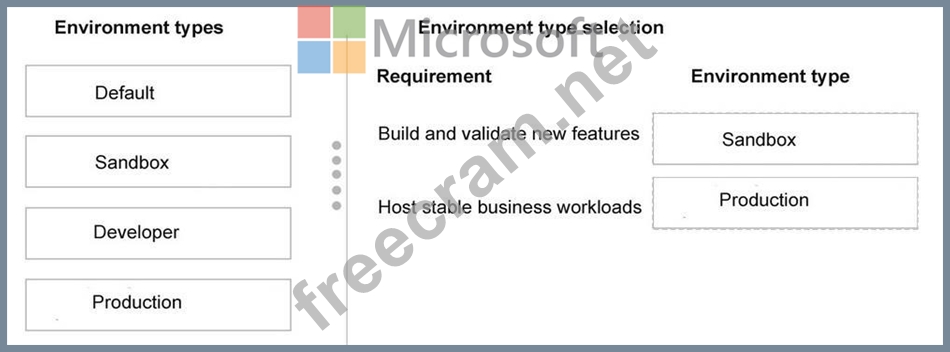
Which environment types should you use? To answer, move the appropriate environment types to the correct requirements. You may use each environment type once, more than once, or not at all. You may need to move the split bar between panes or scroll to view content.
NOTE: Each correct selection is worth one point.
A company develops and deploys AI-enabled Power Platform solutions across multiple environments. Environment access is controlled through security groups.
The development team requires Power Platform environments to store, manage, and share the solutions across the company.
All developers require access to the same environment. The environment must be subject to ALM controls.
You need to set up the environments.
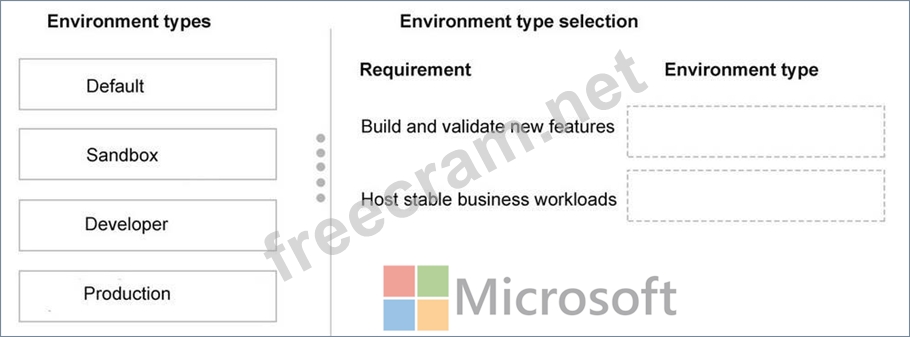
Which environment types should you use? To answer, move the appropriate environment types to the correct requirements. You may use each environment type once, more than once, or not at all. You may need to move the split bar between panes or scroll to view content.
NOTE: Each correct selection is worth one point.