- Home
- Cisco
- Implementing Cisco Video Network Devices (CIVND)
- Cisco.210-065.v2019-02-22.q235
- Question 187
Valid 210-065 Dumps shared by ExamDiscuss.com for Helping Passing 210-065 Exam! ExamDiscuss.com now offer the newest 210-065 exam dumps, the ExamDiscuss.com 210-065 exam questions have been updated and answers have been corrected get the newest ExamDiscuss.com 210-065 dumps with Test Engine here:
Access 210-065 Dumps Premium Version
(210 Q&As Dumps, 35%OFF Special Discount Code: freecram)
<< Prev Question Next Question >>
Question 187/235
On the Cisco VCS-E, what is the default port number for the H.323 connection on the first traversal zone between a Cisco VCS-C and Cisco VCS-E?
Correct Answer: D
Explanation/Reference:
Explanation:
Task 9: Configuring the Traversal Zone
The traversal zone configuration defines a connection between the VCS Control and VCS Expressway platforms.
■ A traversal zone connection allows firewall traversal for signaling and media between the two platforms.
■ The VCS Control is configured with a traversal client zone, and the VCS Expressway with a traversal server zone.
To configure the traversal zone:
1. Go to Configuration > Zones > Zones.
2. Click New.
3. Configure the fields as follows (leave all other fields with default values):
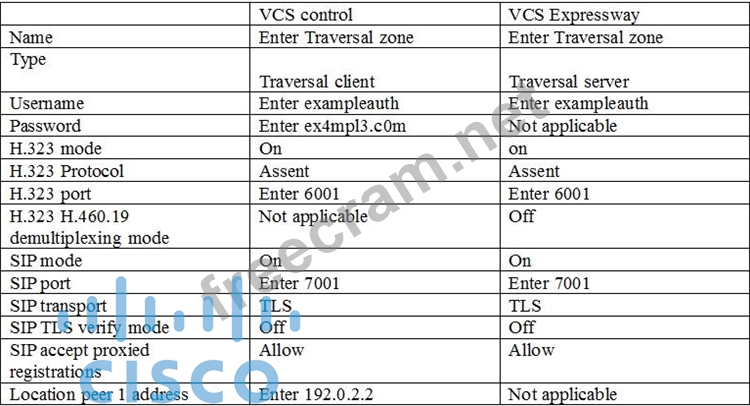
4. click create zone.
Exp2: D = Zones > Traversal Zone > H.323 port, typically 6001 for first traversal zone, 6002 for second etc.
Reference: http://www.cisco.com/c/dam/en/us/td/docs/telepresence/infrastructure/vcs/config_guide/X8-1/ Cisco-VCS-Basic-Configuration-Control-with-Expressway-Deployment-Guide-X8-1.pdf
http://www.cisco.com/c/dam/en/us/td/docs/telepresence/infrastructure/vcs/config_guide/X8-2/Cisco-VCS- IP-Port-Usage-for-Firewall-Traversal-Deployment-Guide-X8-2.pdf
Explanation:
Task 9: Configuring the Traversal Zone
The traversal zone configuration defines a connection between the VCS Control and VCS Expressway platforms.
■ A traversal zone connection allows firewall traversal for signaling and media between the two platforms.
■ The VCS Control is configured with a traversal client zone, and the VCS Expressway with a traversal server zone.
To configure the traversal zone:
1. Go to Configuration > Zones > Zones.
2. Click New.
3. Configure the fields as follows (leave all other fields with default values):
4. click create zone.
Exp2: D = Zones > Traversal Zone > H.323 port, typically 6001 for first traversal zone, 6002 for second etc.
Reference: http://www.cisco.com/c/dam/en/us/td/docs/telepresence/infrastructure/vcs/config_guide/X8-1/ Cisco-VCS-Basic-Configuration-Control-with-Expressway-Deployment-Guide-X8-1.pdf
http://www.cisco.com/c/dam/en/us/td/docs/telepresence/infrastructure/vcs/config_guide/X8-2/Cisco-VCS- IP-Port-Usage-for-Firewall-Traversal-Deployment-Guide-X8-2.pdf


- Question List (235q)
- Question 1: The user of a Cisco TelePresence MX300 wants to control the ...
- Question 2: Conference solution for video streaming: (Choose two)...
- Question 3: You want to find a list of all recent call attempts on a Cis...
- Question 4: An engineer must pull logs from a Cisco EX90 Codec for a Cal...
- Question 5: Video conference bridges accomplish their conferencing funct...
- Question 6: Which level of AES encryption does Cisco Unified Presence an...
- Question 7: Which Cisco TelePresence Multipoint Control Unit Layout view...
- Question 8: Which component provides flexible options for storing video ...
- Question 9: Refer to the exhibit. (Exhibit) An administrator is attempti...
- Question 10: A user is currently on a Cisco TelePresence call using a Tou...
- Question 11: An engineer is configuring VIP mode for a Cisco TelePresence...
- Question 12: A customer requests a configuration that enables users to ea...
- Question 13: How can you see ongoing call statistic on endpoint?...
- Question 14: Which three items should be considered when restoring a back...
- Question 15: How many participants if you have 20 licenses screen?...
- Question 16: Which type of Cisco VCS log shows call routing decisions tha...
- Question 17: In locally managed mode, what is the maximum number of 720p ...
- Question 18: What CLI command will enable access to the presentation devi...
- Question 19: ECDS is a solution that provides which of the following bene...
- Question 20: Which two features are available on a Cisco TelePresence Ser...
- Question 21: Which three options can initiate scheduled or rendezvous mee...
- Question 22: Which two layout or switching modes are supported with the C...
- Question 23: A network engineer is setting up a Cisco TelePresence Conten...
- Question 24: When a user attempts to sign in with a Jabber Video for Cisc...
- Question 25: Which two standards are supported for streaming live video o...
- Question 26: A technician is trying to troubleshoot real-time call inform...
- Question 27: Which two methods are used to navigate the menu options of a...
- Question 28: An engineer is deploying a Cisco TelePresence Touch 8 contro...
- Question 29: An engineer needs to configure a mobile device that register...
- Question 30: A new Cisco TelePresence MCU 5300 is being installed. The cu...
- Question 31: How does a Cisco TCS process incoming video calls?...
- Question 32: An engineer wants to manually assign the IP address on an Ci...
- Question 33: Which three of these are functions of the Cisco TelePresence...
- Question 34: Cascading feature with TP Conductor and TP Server has 2 limi...
- Question 35: Which two methods can be used to retrieve the status of a Ci...
- Question 36: Which two methods can be used to set the default call protoc...
- Question 37: Which two tools can be used to extract traces from a Cisco U...
- Question 38: Endpoint for immersive telepresence:...
- Question 39: You connect the camera cable to...
- Question 40: On a Cisco C-Series codec, where would a technician go to co...
- Question 41: How would an administrator reset a Cisco VCS Control applian...
- Question 42: Which light is recommended by cisco?...
- Question 43: An engineer wants to convert analog live video, streaming it...
- Question 44: An engineer is deploying Cisco Digital Media Players through...
- Question 45: Which four characteristics are associated with video? (Choos...
- Question 46: An engineer is configuring a Cisco TelePresence System endpo...
- Question 47: Which means this command: set audio aec enable?...
- Question 48: An end user is in Cisco TelePresence session with a remote p...
- Question 49: A network engineer wants to check the local system call ID o...
- Question 50: A client requires a versatile desktop video system that supp...
- Question 51: Refer to the exhibit. (Exhibit) You are deploying a Cisco VC...
- Question 52: Which two actions must take place for proper operation when ...
- Question 53: An engineer is backing up a VCS configuration. Which two met...
- Question 54: Which type of lighting is recommended for Cisco TelePresence...
- Question 55: An executive in XYZ Corporation wants to purchase a desktop ...
- Question 56: Refer to the exhibit. (Exhibit) The numbers on the floor pla...
- Question 57: Which three products are compatible with Digital Media Manag...
- Question 58: Which two Cisco TelePresence collaboration endpoints can imp...
- Question 59: The command xCommand Security FIPSMode Activate is issued to...
- Question 60: A Cisco engineer needs to provide digital media for the lobb...
- Question 61: A voice engineer installed and configured Cisco TMSXE in a W...
- Question 62: Refer to the exhibit. (Exhibit) Which option performs a fact...
- Question 63: Which desktop endpoint supports 802.3af PoE?...
- Question 64: Which personal Cisco TelePresence unit can be used as a repl...
- Question 65: In the web interface for a Cisco VCS or Expressway running X...
- Question 66: A customer wants a Cisco TelePresence MCU solution that supp...
- Question 67: An engineer is consistently seeing tickets in the Cisco TMS ...
- Question 68: Which function does BFCP provide?...
- Question 69: Which feature does Cisco VCS use to escalate a point-to-poin...
- Question 70: Which two statements about PoE support on Cisco Video Survei...
- Question 71: An engineer must ensure that a user can create content playl...
- Question 72: Which three features does a Cisco TelePresence Content Serve...
- Question 73: Which of the following will allow you to add a multipoint ca...
- Question 74: An engineer wants to know if there is a way to determine the...
- Question 75: Which command causes a Cisco VCS to drop registrations for c...
- Question 76: The microphone on a Cisco TelePresence System 3000 is switch...
- Question 77: A customer reports that in a CTS1300 room, a microphone swit...
- Question 78: Refer to the exhibit. When a user cannot log into the Cisco ...
- Question 79: On a video endpoint running TC software, which two SIP setti...
- Question 80: A customer wants to enable existing remote Cisco Jabber user...
- Question 81: Which codec is most suitable for a video streaming solution?...
- Question 82: Your customer reports that they have had unwanted calls rout...
- Question 83: Which optional feature is available for some video endpoints...
- Question 84: Refer to the exhibit. (Exhibit) Management would like to fin...
- Question 85: An engineer encounters video quality issues with an endpoint...
- Question 86: A network engineer is installing a Cisco TelePresence MX200 ...
- Question 87: The features that Telepresence Server has and MCU don't have...
- Question 88: In order to perform a password recovery for the admin user o...
- Question 89: An important Cisco TelePresence video multipoint call is in ...
- Question 90: While trying to register to Cisco UCM, a Cisco IP phone repo...
- Question 91: Which ad hoc multipoint feature is supported only when prope...
- Question 92: Which CTS software-based endpoint is an ideal solution for a...
- Question 93: When placing a Multiway call through a Cisco TelePresence Co...
- Question 94: What technology use for pair iPad and cisco room system:...
- Question 95: Refer to the exhibit. When this alarm is seen, what is the m...
- Question 96: A customer is looking for a Cisco TelePresence Immersive Sys...
- Question 97: A network administrator is troubleshooting a video issue fro...
- Question 98: A technician enters the diag system normal command for a Cis...
- Question 99: Refer to the exhibit. (Exhibit) Which system tab can be used...
- Question 100: A customer requires scheduled Cisco TelePresence video confe...
- Question 101: In which two locations can you find registration information...
- Question 102: Which three video endpoints can you set back to factory rese...
- Question 103: When you are on a call that is hosted on a Cisco TelePresenc...
- Question 104: An engineer is using a cascading feature with Cisco TelePres...
- Question 105: You are troubleshooting an issue and you need to connect to ...
- Question 106: Which call control device does the Cisco DX650 use?...
- Question 107: What is the proper procedure to manually reset a password on...
- Question 108: Which MCU supports the use of a lobby screen?...
- Question 109: Which function does FECC provide?...
- Question 110: A network engineer wants to quickly view any issues that may...
- Question 111: Refer to the exhibit. (Exhibit) Which CLI command should be ...
- Question 112: A Cisco EX60 is connected to the network, but users cannot m...
- Question 113: A manager requires multiparty video meetings with presentati...
- Question 114: Your customer has an EX60 at a home-office that is doing dir...
- Question 115: A network administrator is asked to configure a video confer...
- Question 116: Which technology can be used to pair an iPad with a Cisco ro...
- Question 117: A Cisco TelePresence EX Series desktop endpoint failed to re...
- Question 118: A new Cisco DX650 is not registering in the Cisco Communicat...
- Question 119: An engineer is connecting a VISCA cable. What is the purpose...
- Question 120: When an administrator schedules a conference, which three de...
- Question 121: Which option is an immersive endpoint?...
- Question 122: Which two feature keys are valid for both Cisco TelePresence...
- Question 123: Refer to the exhibit. (Exhibit) For Cisco TelePresence endpo...
- Question 124: Which two Cisco TelePresence protocols are supported for con...
- Question 125: Which codec represents video that is supported by Cisco Tele...
- Question 126: An end user using C series codec wants to change the partici...
- Question 127: A customer has a data and VoIP converged network and would l...
- Question 128: Which two methods can you use to update the configuration au...
- Question 129: Which type of conference must be booked through Cisco TMS wi...
- Question 130: Which bridge solution requires Cisco TelePresence Conductor?...
- Question 131: What is the maximum number of servers that a Cisco TelePrese...
- Question 132: A company is investigating the purchase of desktop video end...
- Question 133: A network engineer wants to perform a factory reset on a Cis...
- Question 134: A company just acquired cisco MCU 5300 for multi videoconfer...
- Question 135: Refer to the exhibit. (Exhibit) The customer recently connec...
- Question 136: A Cisco TelePresence Server is operating in locally managed ...
- Question 137: How to monitor events and alarms generated on CUCM?...
- Question 138: In a Cisco TelePresence conference that is hosted on a Cisco...
- Question 139: Which option is the Cisco recommended layout if cascading is...
- Question 140: When you add third party call what button you should press?...
- Question 141: An immersive video room requires acoustic remediation becaus...
- Question 142: What do you call the process when one bridge calls into anot...
- Question 143: You want to output SIP messaging to the console of a Cisco T...
- Question 144: An end user reports that the video they are receiving from a...
- Question 145: An engineer needs to configure cascading to support addition...
- Question 146: Refer to the exhibit. (Exhibit) A network engineer is attemp...
- Question 147: Cisco DX Series endpoints run on which operating system?...
- Question 148: Cisco inline power was replaced by which IEEE standard?...
- Question 149: If you use MSE 8710 how many ports by using 720p and softwar...
- Question 150: You are checking a DHCP server configuration for video endpo...
- Question 151: Refer to the exhibit. (Exhibit) Acoustic measurements for am...
- Question 152: An engineer is configuring mobile and remote access. Which t...
- Question 153: A video engineer has opened a ticket with Cisco TAC for supp...
- Question 154: Refer to the exhibit. (Exhibit) A call with a destination al...
- Question 155: Illumination for immersive telepresence:...
- Question 156: A video engineer needs to locate the running version of the ...
- Question 157: Which two endpoints support the multisite option? (Choose tw...
- Question 158: Jabber fail login with logs. What DNS SRV record need to res...
- Question 159: An engineer wants to stream Cisco TelePresence high-definiti...
- Question 160: An engineer needs to connect an external display to a Cisco ...
- Question 161: Which all-in-one dual-screen solution can be used for an ave...
- Question 162: In a Cisco TelePresence MX300 G2, what is the minimum bandwi...
- Question 163: An engineer is deploying a Cisco Media Experience Engine 350...
- Question 164: Which three Cisco TelePresence endpoints support hosting emb...
- Question 165: Which three features are supported by the Cisco Video Survei...
- Question 166: A customer wants to record Cisco TelePresence conferences wi...
- Question 167: Which path should you follow to initiate a Cisco Telepresenc...
- Question 168: An engineer is configuring a live stream from a multiparty c...
- Question 169: A desktop video endpoint is needed that can support a Precis...
- Question 170: Which option is the embedded component that enables endpoint...
- Question 171: A customer wants to know the options that are available when...
- Question 172: Your customer reports that new A/V equipment that plays movi...
- Question 173: When outside of the network, Cisco Jabber uses which of the ...
- Question 174: Components of Digital Media Suite for created playlists:...
- Question 175: What is the min distance for 52" monitor?...
- Question 176: Refer to the exhibit. (Exhibit) Which kind of profile is sho...
- Question 177: Which option describes how to configure SNMP settings on a C...
- Question 178: Which Cisco feature upscales SD and low-bandwidth video part...
- Question 179: A customer wants to purchase a video endpoint that supports ...
- Question 180: Which type of packet-oriented network has the characteristic...
- Question 181: Endpoints for immersive telepresence: (Choose three.)...
- Question 182: Which conference types can occur at anytime without the need...
- Question 183: Which Cisco DX series endpoint supports PoE?...
- Question 184: Refer to the exhibit. (Exhibit) An employee is reviewing the...
- Question 185: A customer owns three Codian 5300 MCUs with several video en...
- Question 186: Which Cisco DMS component is used for content recording?...
- Question 187: On the Cisco VCS-E, what is the default port number for the ...
- Question 188: Refer to the exhibit. (Exhibit) Which tab can be used in ord...
- Question 189: Which Cisco video endpoints run on the Android operating sys...
- Question 190: An engineer sees a video camera icon on the Cisco IP phone s...
- Question 191: Which three Cisco TelePresence endpoints are considered imme...
- Question 192: Which video input port is available on a Cisco DX80?...
- Question 193: Which two of these support an ad-hoc conference call? (Choos...
- Question 194: When you configure a zone for firewall traversal, which type...
- Question 195: XConfigurator Cameras Camera 1 Brightness Level 1 command ha...
- Question 196: Customer collaboration refers primarily to which of the foll...
- Question 197: Refer to the exhibit. (Exhibit) In the SDP that is displayed...
- Question 198: An engineer is receiving several Cisco TMS email alerts for ...
- Question 199: A video engineer configured Cisco TMS to allow conference sc...
- Question 200: Refer to the exhibit. (Exhibit) An H.323 endpoint that is re...
- Question 201: I release a value of acoustic 25 db at a distance of 1 foot....
- Question 202: Refer to the exhibit. (Exhibit) A company would like to add ...
- Question 203: Which standard will support call forwarding?...
- Question 204: Which CLI command must be used to configure the network sett...
- Question 205: A company acquired immersive Cisco TelePresence devices and ...
- Question 206: Which kind of cable is used to daisy chain one PrecisionHD c...
- Question 207: Which two codecs are supported on the Cisco Video Surveillan...
- Question 208: Which DHCP option is used by video endpoints to locate the C...
- Question 209: Which of the following first provided centralized call contr...
- Question 210: When you sign in at jabber what is the SIP message are used?...
- Question 211: In a Multiway call escalation, which SIP message is sent fro...
- Question 212: Refer to the exhibit. Users in a Cisco TelePresence room rep...
- Question 213: Refer to the exhibit. You are troubleshooting an issue invol...
- Question 214: An engineer is deploying a Cisco TelePresence Content Server...
- Question 215: A company wants to enable a mobile user to connect to the co...
- Question 216: Which Cisco MCU feature allows a video participant to dial i...
- Question 217: Refer to the exhibit. (Exhibit) A technician is reviewing th...
- Question 218: In this item, you will need to use all information presented...
- Question 219: An administrator is troubleshooting an endpoint with TC firm...
- Question 220: A user is unable to make a video call from an endpoint that ...
- Question 221: Refer to the exhibit. Which option enables you to create a s...
- Question 222: To which Ethernet port on a Cisco TelePresence System (500/1...
- Question 223: Which three standards are supported for streaming live video...
- Question 224: An engineer is configuring a Cisco TelePresence MX300 for re...
- Question 225: Which of these devices supports POE 802.1af?...
- Question 226: A network administrator is manually configuring a Cisco Tele...
- Question 227: Which function does a Cisco TCS recording alias perform?...
- Question 228: Cisco TelePresence Immersive Endpoint devices support a feat...
- Question 229: Which command returns the Cisco VCS to its factory default s...
- Question 230: Which two video endpoints can you set back to factory reset ...
- Question 231: Refer to the exhibit. (Exhibit) Which configuration element ...
- Question 232: On a Cisco EX90, if the camera is tilted downward toward the...
- Question 233: Which two options are characteristics of Cisco Jabber? (Choo...
- Question 234: A Cisco SX20 is registered to Cisco Unified Communications M...
- Question 235: A Cisco TelePresence System 1300 Series endpoint is in the p...
