Valid 200-301 Dumps shared by ExamDiscuss.com for Helping Passing 200-301 Exam! ExamDiscuss.com now offer the newest 200-301 exam dumps, the ExamDiscuss.com 200-301 exam questions have been updated and answers have been corrected get the newest ExamDiscuss.com 200-301 dumps with Test Engine here:
Access 200-301 Dumps Premium Version
(1255 Q&As Dumps, 35%OFF Special Discount Code: freecram)
<< Prev Question Next Question >>
Question 748/887
Lab Simulation 33
Guidelines
This is a lab item in which tasks will be performed on virtual devices.
- Refer to the Tasks tab to view the tasks for this lab item.
- Refer to the Topology lab to access the device console(s) and perform the tasks.
- Console access is available for all required devices by clicking the device icon or using the tab(s) above the console window.
- All necessary preconfigurations have been applied.
- Do not change the enable password or hostname for any device.
- Save your configurations to NVRAM before moving to the next item.
- Click Next at the bottom of the screen to submit this lab and move to the next question.
- When Next is clicked, the lab closes and cannot be reopened.
Topology
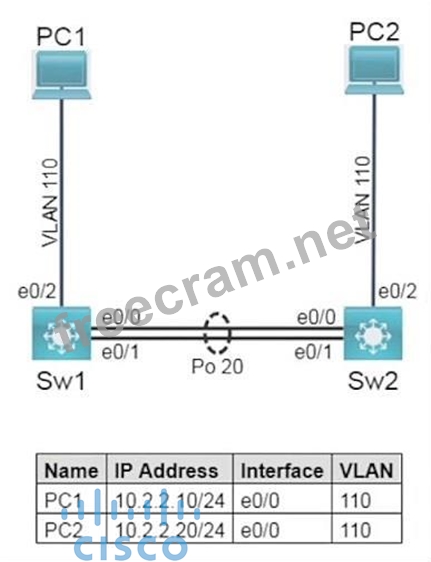
Tasks
Task 1
Configure trunks between Sw1 and Sw2 on ports E0/0 and E0/1 using the IEEE standard frame tagging method.
- Add VLAN 99 as untagged on the trunk ports.
- Only extend VLAN 110 and the untagged VLAN across the trunk.
- Verify that PC1 is capable of pinging PC2.
Task 2
On Sw1 and Sw2, use IEEE 802.3ad link aggregation.
- Combine E0/0 and E0/1 into a single logical link while leaving the trunk configurations intact.
- Assign number 20 to the link.
- Both links must negotiate aggregation.
Guidelines
This is a lab item in which tasks will be performed on virtual devices.
- Refer to the Tasks tab to view the tasks for this lab item.
- Refer to the Topology lab to access the device console(s) and perform the tasks.
- Console access is available for all required devices by clicking the device icon or using the tab(s) above the console window.
- All necessary preconfigurations have been applied.
- Do not change the enable password or hostname for any device.
- Save your configurations to NVRAM before moving to the next item.
- Click Next at the bottom of the screen to submit this lab and move to the next question.
- When Next is clicked, the lab closes and cannot be reopened.
Topology
Tasks
Task 1
Configure trunks between Sw1 and Sw2 on ports E0/0 and E0/1 using the IEEE standard frame tagging method.
- Add VLAN 99 as untagged on the trunk ports.
- Only extend VLAN 110 and the untagged VLAN across the trunk.
- Verify that PC1 is capable of pinging PC2.
Task 2
On Sw1 and Sw2, use IEEE 802.3ad link aggregation.
- Combine E0/0 and E0/1 into a single logical link while leaving the trunk configurations intact.
- Assign number 20 to the link.
- Both links must negotiate aggregation.
Correct Answer:
Task 1:
Sw1:
interface e0/0
switchport mode trunk
switchport trunk encapsulation dot1q
switchport trunk allowed vlan 110,99
switchport trunk native vlan 99
interface e0/1
switchport mode trunk
switchport trunk encapsulation dot1q
switchport trunk allowed vlan 110,99
switchport trunk native vlan 99
Sw2:
interface e0/0
switchport mode trunk
switchport trunk encapsulation dot1q
switchport trunk allowed vlan 110,99
switchport trunk native vlan 99
interface e0/1
switchport mode trunk
switchport trunk encapsulation dot1q
switchport trunk allowed vlan 110,99
switchport trunk native vlan 99
Task 2:
Sw1:
interface range e0/0 - e0/1
channel-group 1 mode active
interface Port-channel1
no shutdown
Sw2:
interface range e0/0 - e0/1
channel-group 1 mode active
interface Port-channel1
no shutdown
Sw1:
interface e0/0
switchport mode trunk
switchport trunk encapsulation dot1q
switchport trunk allowed vlan 110,99
switchport trunk native vlan 99
interface e0/1
switchport mode trunk
switchport trunk encapsulation dot1q
switchport trunk allowed vlan 110,99
switchport trunk native vlan 99
Sw2:
interface e0/0
switchport mode trunk
switchport trunk encapsulation dot1q
switchport trunk allowed vlan 110,99
switchport trunk native vlan 99
interface e0/1
switchport mode trunk
switchport trunk encapsulation dot1q
switchport trunk allowed vlan 110,99
switchport trunk native vlan 99
Task 2:
Sw1:
interface range e0/0 - e0/1
channel-group 1 mode active
interface Port-channel1
no shutdown
Sw2:
interface range e0/0 - e0/1
channel-group 1 mode active
interface Port-channel1
no shutdown


- Question List (887q)
- Question 1: Which benefit does network automation provide for IT adminis...
- Question 2: Refer to the exhibit. The router R1 is in the process of bei...
- Question 3: Refer to the exhibit. A network engineer must configured com...
- Question 4: Which two statements about eBGP neighbor relationships are t...
- Question 5: How to verify SSH connections was secured?...
- Question 6: Drag and Drop Question Drag and drop the SNMP components fro...
- Question 7: How does CAPWAP communicate between an access point in local...
- Question 8: You have the Class B network 172.16.0.0/16 and want to creat...
- Question 9: A technician receives a report of network slowness and the i...
- Question 10: A device detects two stations transmitting frames at the sam...
- Question 11: What is a feature of WPA?
- Question 12: Drag and Drop Question Refer to the exhibit. An engineer is ...
- Question 13: Which PoE mode enables powered-devices detection and guarant...
- Question 14: Refer to the exhibit. A network engineer must configure the ...
- Question 15: Which components are contained within a virtual machine?...
- Question 16: What is a characteristic of a SOHO network?...
- Question 17: Refer to the exhibit. How many JSON objects are presented? (...
- Question 18: Drag and Drop Question Drag and drop the characteristic from...
- Question 19: An engineer must configure a WLAN using the strongest encryp...
- Question 20: Which sequence begins a unique local IPv6 address in binary ...
- Question 21: You have two paths for the 10.10.10.0 network - one that has...
- Question 22: Which syslog severity level is considered the most severe an...
- Question 23: Refer to the exhibit. The switch cat9k-acc-1 connects users ...
- Question 24: Lab Simulation 66 Please use the "Tasks" and "Topology" tabs...
- Question 25: Refer to the exhibit. An engineer must configure GigabitEthe...
- Question 26: An engineer must configure interswitch VLAN communication be...
- Question 27: Refer to the exhibit. A packet that is sourced from 172.16.3...
- Question 28: Which feature or protocol determines whether the QOS on the ...
- Question 29: Several new coverage cells are required to improve the Wi-Fi...
- Question 30: What is the difference between 1000BASE-LX/LH and 1000BASE-Z...
- Question 31: A new DHCP server has been deployed in a corporate environme...
- Question 32: Refer to the exhibit. A network engineer started to configur...
- Question 33: What is a difference between local AP mode and FlexConnect A...
- Question 34: Which NTP type designates a router without an external refer...
- Question 35: Which two statements are true for multicast MAC address dire...
- Question 36: By default, which virtual MAC address does HSRP group 14 use...
- Question 37: Drag and Drop Question Drag and drop the IPv6 address from t...
- Question 38: Refer to the exhibit. An engineer is creating a secure presh...
- Question 39: Which two types of information are held in the mac address t...
- Question 40: How does automation leverage data models to reduce the opera...
- Question 41: Which concern is addressed with the use of private IPv4 addr...
- Question 42: Drag and Drop Question Refer to the exhibit. Drag and drop t...
- Question 43: Which interface is used to send traffic to the destination n...
- Question 44: Drag and Drop Question Drag and drop the DNS lookup commands...
- Question 45: Which security element uses a combination of one-time passwo...
- Question 46: Drag and Drop Question Drag and drop the statements about ne...
- Question 47: Which command prevents passwords from being stored in the co...
- Question 48: Lab Simulation 51 Please use the "Tasks" and "Topology" tabs...
- Question 49: SIMULATION 70 Please use the "Tasks" and "Topology" tabs to ...
- Question 50: Which command must you use to test DNS connectivity?...
- Question 51: How will Link Aggregation be implemented on a Cisco Wireless...
- Question 52: Which Layer 2 switch function encapsulates packets for diffe...
- Question 53: Using direct sequence spread spectrum, which three 2.4-GHz c...
- Question 54: Which role do predictive AI models play in network load bala...
- Question 55: Which two statements correctly describe RADIUS? (Choose two)...
- Question 56: Refer to the exhibit. Which configuration parameter is preve...
- Question 57: Refer to the exhibit. What does the host do when using the I...
- Question 58: Which selections must be used on the WLC when implementing a...
- Question 59: Refer to the exhibit. All routers in the network are configu...
- Question 60: Refer to the exhibit. After applying this configuration to r...
- Question 61: An engineer is configuring a switch port that is connected t...
- Question 62: An engineer just installed network 10.120.10.0/24. Which con...
- Question 63: Drag and Drop Question Drag and drop the network topology ar...
- Question 64: Drag and Drop Question Drag and drop the IPv6 addresses from...
- Question 65: Refer to the exhibit. An engineer must add a subnet for a ne...
- Question 66: A router has two static routes to the same destination netwo...
- Question 67: Which authentication method requires the user to provide a p...
- Question 68: Which command can you enter to configure an IPV6 floating st...
- Question 69: Refer to the exhibit. A network engineer is updating the con...
- Question 70: Refer to the exhibit. IPv6 must be implemented on R1 to the ...
- Question 71: Which two features are provided by Ansible in network automa...
- Question 72: What must be considered before deploying virtual machines?...
- Question 73: Refer to the exhibit. Which command configures a floating st...
- Question 74: Lab Simulation 24 Guidelines This is a lab item in which tas...
- Question 75: Which device performs stateful inspection of traffic?...
- Question 76: What is the temporary state that switch ports always enter i...
- Question 77: What is represented by the word "IDS" within this JSON schem...
- Question 78: Refer to the exhibit. When an administrator executes the sho...
- Question 79: Drag and Drop Question Drag and drop the HTTP verbs from the...
- Question 80: Which design element is a best practice when deploying an 80...
- Question 81: What event has occurred if a router sends a notice level mes...
- Question 82: What is the main purpose of SSH management access?...
- Question 83: Drag and Drop Question Drag and drop the characteristic from...
- Question 84: Which statement describes virtualization on containers?...
- Question 85: Which cipher is supported for wireless encryption only with ...
- Question 86: Refer to the exhibit. Users in your office are complaining t...
- Question 87: What is represented by the word "R29" within this JSON schem...
- Question 88: Refer to the exhibit. What is the metric of the route to the...
- Question 89: Refer to the exhibit. Router R4 is dynamically learning the ...
- Question 90: Refer to the exhibit. An engineer is updating the R1 configu...
- Question 91: How do servers connect to the network in a virtual environme...
- Question 92: Refer to the exhibit. Which settings must be verified on wor...
- Question 93: Drag and Drop Question Drag and drop the characteristic from...
- Question 94: Refer to the exhibit. Clients on the WLAN are required to us...
- Question 95: Drag and Drop Question Drag and drop the IPv6 address from t...
- Question 96: What are two characteristics of Telnet? (Choose two.)...
- Question 97: Which type of API allows SDN controllers to dynamically make...
- Question 98: What is a reason why an administrator would choose to implem...
- Question 99: Which command on a port enters the forwarding state immediat...
- Question 100: Drag and Drop Question Drag and drop the networking paramete...
- Question 101: Lab Simulation 53 Please use the "Tasks" and "Topology" tabs...
- Question 102: Refer to the exhibit. Which two commands were used to create...
- Question 103: Refer to the exhibit. What is the next hop address for traff...
- Question 104: Refer to the exhibit. An engineer configured the New York ro...
- Question 105: which command is used to know the duplex speed of serial lin...
- Question 106: Which protocol does an IPv4 host use to obtain a dynamically...
- Question 107: The clients and DHCP server reside on different subnets. Whi...
- Question 108: What is the purpose of a CNAME record?...
- Question 109: What is represented by the word "FW18" within this JSON sche...
- Question 110: What is an enhancement implemented in WPA3?...
- Question 111: How do UTP and STP cables compare?...
- Question 112: Which two components are needed to create an Ansible script ...
- Question 113: How are the switches in a spine-and-leaf topology interconne...
- Question 114: Refer to the exhibit. How much OSPF be configured on the Gig...
- Question 115: What are two facts that differentiate optical-fiber cabling ...
- Question 116: Which encryption mode is used when a packet is sent from a s...
- Question 117: What is the purpose of the service-set identifier?...
- Question 118: Which NTP command configures the local device as an NTP refe...
- Question 119: Refer to the exhibit. Switch AccSw1 has just been added to t...
- Question 120: Refer to the exhibit. What is the next step to complete the ...
- Question 121: After you configure the Loopback0 interface, which command c...
- Question 122: Refer to the exhibit. If R1 receives a packet destined to 17...
- Question 123: What is a reason to implement IPv4 private addressing?...
- Question 124: What occurs to frames during the process of frame flooding?...
- Question 125: Which WLC interface provides out-of-band management in the C...
- Question 126: What are two benefits of controller-based networking compare...
- Question 127: What mechanism carries multicast traffic between remote site...
- Question 128: Drag and Drop Question Drag and drop the IPv6 address from t...
- Question 129: Refer to the exhibit. What is the cause of the issue? (Exhib...
- Question 130: Lab Simulation 15 Guidelines This is a lab item in which tas...
- Question 131: Which statement about VLAN configuration is true?...
- Question 132: Which information is used to install the best route to a des...
- Question 133: When configuring an EtherChannel bundle, which mode enables ...
- Question 134: Refer to the exhibit. Which configuration enables SW2 to est...
- Question 135: What are two benefits that the UDP protocol provide for appl...
- Question 136: Refer to the exhibit. What is the correct next hop for route...
- Question 137: Which IP address is used when an administrator must open a w...
- Question 138: Network security team noticed that an increasing number of e...
- Question 139: What are two benefits of using VTP in a switching environmen...
- Question 140: SIMULATION 74 Please use the "Tasks" and "Topology" tabs to ...
- Question 141: Which command entered on a switch configured with Rapid PVST...
- Question 142: By default, how long will the switch continue to know a work...
- Question 143: What is a characteristic of a Layer 2 switch?...
- Question 144: Refer to the exhibit. What is the result if Gig1/11 receives...
- Question 145: Refer to the exhibit. Of the routes learned with dynamic rou...
- Question 146: What is the primary purpose of a recursive query in DNS?...
- Question 147: Drag and Drop Question Drag and drop the characteristic from...
- Question 148: Refer to the exhibit. An administrator is tasked with config...
- Question 149: What is the purpose of configuring different levels of syslo...
- Question 150: Drag and Drop Question Drag and drop the Cisco Wireless LAN ...
- Question 151: What is a reason to implement LAG on a Cisco WLC?...
- Question 152: What is a similarity between 1000BASE-LX and 1000BASE-T stan...
- Question 153: Which IPsec encryption mode is appropriate when the destinat...
- Question 154: An email user has been lured into clicking a link in an emai...
- Question 155: Refer to the exhibit. Which command must be issued to enable...
- Question 156: Refer to the exhibit. Which switch becomes the root bridge? ...
- Question 157: A network engineer must configure two new subnets using the ...
- Question 158: Refer to the exhibit. A secondary route is required on route...
- Question 159: Refer to the exhibit. Which two commands when used together ...
- Question 160: Refer to the exhibit. Which Command do you enter so that R1 ...
- Question 161: An engineer must configure an OSPF neighbor relationship bet...
- Question 162: Refer to the exhibit. Load-balanced traffic is coming in fro...
- Question 163: Which resource is able to be shared among virtual machines d...
- Question 164: Which AP mode is used in a wireless mesh deployment?...
- Question 165: An engineer is installing a new wireless printer with a stat...
- Question 166: Which EtherChannel mode must be configured when using LAG on...
- Question 167: Which cable type must be used when connecting two like devic...
- Question 168: Refer to the exhibit. Which address will the client contact ...
- Question 169: How must a switch interface be configured when an AP is in F...
- Question 170: Which 802.11 frame type is indicated by a probe response aft...
- Question 171: Refer to the exhibit. SW2 is replaced because of a hardware ...
- Question 172: Which two QoS tools provides congestion management? ( Choose...
- Question 173: Which service is missing when RADIUS is selected to provide ...
- Question 174: Which two statements about NTP operations are true? (Choose ...
- Question 175: Refer to the exhibit. Which next-hop IP address does Router1...
- Question 176: What is the benefit of using FHRP (First Hop Redundancy Prot...
- Question 177: Which two of these functions do routers perform on packets? ...
- Question 178: Which network action occurs within the data plane?...
- Question 179: Which WLC port connects to a switch to pass normal access-po...
- Question 180: An on-site service desk technician must verify the IP addres...
- Question 181: Which WPA3 mode uses SHA-256 for authentication and key mana...
- Question 182: Refer to the exhibit. On R1 which routing protocol is in use...
- Question 183: Refer to the exhibit. The loopback IP of R3 has been learned...
- Question 184: What is the main capability of multifactor authentication?...
- Question 185: A network engineer must configure the router R1 GigabitEther...
- Question 186: What is the function of a DNS zone transfer?...
- Question 187: When should an engineer implement a collapsed-core architect...
- Question 188: SIMULATION 72 Please use the "Tasks" and "Topology" tabs to ...
- Question 189: Which two cable types must be used to connect an access poin...
- Question 190: Refer to the exhibit The IPv6 address for the LAN segment on...
- Question 191: Refer to the exhibit. A network engineer updates the existin...
- Question 192: Refer to the exhibit. Which switch becomes the root of the s...
- Question 193: Refer to the exhibit. An engineer built a new L2 LACP EtherC...
- Question 194: What is a characteristic of frame switching?...
- Question 195: Refer to the exhibit. With a reference bandwidth of 100 Gb o...
- Question 196: When a site-to-site VPN is configured which IPsec mode provi...
- Question 197: Refer to the exhibit. The IPv6 address for the LAN segment o...
- Question 198: What are two port types used by a Cisco WLC for out-of-band ...
- Question 199: What is a function of MAC learning on a switch?...
- Question 200: For which two protocols can PortFast alleviate potential hos...
- Question 201: Drag and Drop Question Drag and drop the IPv6 address from t...
- Question 202: What is the definition of backdoor malware?...
- Question 203: Which security protocol is appropriate for a WPA3 implementa...
- Question 204: Why is a first-hop redundancy protocol implemented?...
- Question 205: Refer to the exhibit. The administrator must configure a flo...
- Question 206: What is a characteristic of an SSID in wireless networks?...
- Question 207: In which way does generative AI aid network simulations?...
- Question 208: Refer to the exhibit. Packets received by the router from BG...
- Question 209: Which interface condition is occurring in this output? (Exhi...
- Question 210: How does Cisco DNA Center gather data from the network?...
- Question 211: Drag and Drop Question Drag and drop the statements about de...
- Question 212: Drag and Drop Question Drag and drop the benefits of a cisco...
- Question 213: Which additional component does Digest Authentication use wi...
- Question 214: What is a DNS lookup operation?...
- Question 215: To improve corporate security, an organization is planning t...
- Question 216: What are two behaviors of a point-to-point WAN topology? (Ch...
- Question 217: Drag and Drop Question Drag and drop the AAA terms from the ...
- Question 218: When using Rapid PVST+, which command guarantees the switch ...
- Question 219: Refer to the exhibit. An engineer is asked to insert the new...
- Question 220: What is the purpose of using First Hop Redundancy Protocol i...
- Question 221: Which command must you enter to guarantee that an HSRP route...
- Question 222: Drag and Drop Question Drag and drop the application protoco...
- Question 223: Refer to the exhibit. An OSPF neighbor relationship must be ...
- Question 224: Which interface IP address serves as the tunnel source for C...
- Question 225: A Cisco engineer is configuring a WLC interface to handle RA...
- Question 226: Which command must be entered when a device is configured as...
- Question 227: Drag and Drop Question Refer to the exhibit. Drag and drop t...
- Question 228: Refer to the exhibit. After you apply the given configuratio...
- Question 229: Refer to the exhibit. What commands are needed to add a subi...
- Question 230: Which element of a virtualization solution manages virtualiz...
- Question 231: Drag and Drop Question Drag and drop the functions of AAA su...
- Question 232: Drag and Drop Question Drag and drop the functions of SNMP f...
- Question 233: Refer to the exhibit. Which command set configures ROUTER-1 ...
- Question 234: Which interface enables communication between a program on t...
- Question 235: What are two descriptions of three-tier network topologies? ...
- Question 236: Refer to the exhibit. All switches are configured with the d...
- Question 237: What differentiates the TCP and UDP protocols?...
- Question 238: How is AI used to identify issues within network traffic?...
- Question 239: How is a configuration change made to a wireless AP in light...
- Question 240: Which keyword in a NAT configuration enables the use of one ...
- Question 241: Why choose Cisco DNA Center for automated lifecycle manageme...
- Question 242: Refer to the exhibit. The P2P Blocking Action option is disa...
- Question 243: What is a characteristic of an SSID in wireless networks?...
- Question 244: Which device segregates a network into separate zones that h...
- Question 245: What is a function of a northbound API in an SDN environment...
- Question 246: Refer to the exhibit. What is the issue with the interface G...
- Question 247: Which technology supports the stateless assignment of IPv6 a...
- Question 248: How does a Cisco IP phone handle untagged traffic that it re...
- Question 249: A switch is forwarding a frame out of all interfaces except ...
- Question 250: Refer to the exhibit. An engineer is configuring a new Cisco...
- Question 251: Which protocol is used in Software Defined Access (SDA) to p...
- Question 252: Refer to the exhibit. Which configuration establishes a Laye...
- Question 253: Which two functions does a WLC perform in the lightweight ac...
- Question 254: A manager asks a network engineer to advise which cloud serv...
- Question 255: What must a network administrator consider when deciding whe...
- Question 256: What is a benefit of using a Cisco Wireless LAN Controller?...
- Question 257: What is the main difference between traditional networks and...
- Question 258: What is a function of Opportunistic Wireless Encryption in a...
- Question 259: What is the collapsed layer in collapsed core architectures?...
- Question 260: Lab Simulation 7 Guidelines This is a lab item in which task...
- Question 261: Drag and Drop Question Drag and drop the RF terms from the l...
- Question 262: What is an advantage of Cisco DNA Center versus traditional ...
- Question 263: What does traffic shaping do?
- Question 264: Which benefit does automation provide in network management?...
- Question 265: Lab Simulation 11 Guidelines This is a lab item in which tas...
- Question 266: Which interface on the WLC is used exclusively as a DHCP rel...
- Question 267: Refer to the exhibit. VoIP is being implemented in the netwo...
- Question 268: Drag and Drop Question Drag and drop the device behaviors fr...
- Question 269: Which two statements about the purpose of the OSI model are ...
- Question 270: Refer to the exhibit. A network engineer configures the CCNA...
- Question 271: What differentiates device management enabled by Cisco DNA C...
- Question 272: Router R1 must send all traffic without a matching routing-t...
- Question 273: Where does the configuration reside when a helper address is...
- Question 274: Which command is used to enable LLDP globally on a Cisco IOS...
- Question 275: What is represented in line 2 within this JSON schema? (Exhi...
- Question 276: An engineer must update the configuration on two PCs in two ...
- Question 277: Refer to the exhibit. Routers R1 and R2 are configured with ...
- Question 278: Drag and Drop Question Drag and drop the characteristic from...
- Question 279: Drag and Drop Question Drag and drop the characteristic from...
- Question 280: What describes a northbound REST API for SDN?...
- Question 281: Which characteristic differentiates the concept of authentic...
- Question 282: Refer to the exhibit. User traffic originating within site B...
- Question 283: Which statement about RADIUS security is true?...
- Question 284: What are two benefits of private IPv4 addressing? (Choose tw...
- Question 285: A project objective is to minimize the association time to t...
- Question 286: Which cable type must be used to interconnect one switch usi...
- Question 287: Lab Simulation 34 Guidelines This is a lab item in which tas...
- Question 288: Refer to the exhibit. An engineer must configure a floating ...
- Question 289: Refer to Exhibit. An engineer is configuring the NEW York ro...
- Question 290: Lab Simulation 68 Please use the "Tasks" and "Topology" tabs...
- Question 291: Drag and Drop Question Drag and drop the descriptions of sec...
- Question 292: Lab Simulation 28 Guidelines This is a lab item in which tas...
- Question 293: Which two protocols are used by an administrator for authent...
- Question 294: Drag and Drop Question Drag and drop the TCP and UDP charact...
- Question 295: A network engineer is implementing a corporate SSID for WPA3...
- Question 296: Which command can you enter to determine the addresses that ...
- Question 297: Refer to the exhibit. The loopback1 interface of the Atlanta...
- Question 298: Refer to the exhibit. Which rule does the DHCP server use wh...
- Question 299: Why implement VRRP?
- Question 300: Refer to the exhibit. IPv6 is being implemented within the e...
- Question 301: Refer to the exhibit. Which functionalities will this SSID h...
- Question 302: Which signal frequency appears 60 times per minute?...
- Question 303: Which statement about static routes is true?...
- Question 304: Which two statements about data VLANs on access ports are tr...
- Question 305: Drag and Drop Question Drag and drop the characteristic from...
- Question 306: Which QoS feature drops traffic that exceeds the committed a...
- Question 307: Refer to the exhibit. Which address and mask combination rep...
- Question 308: What is the function of the controller in a software-defined...
- Question 309: Which two pieces of information can you determine from the o...
- Question 310: Which two primary drivers support the need for network autom...
- Question 311: Refer to the exhibit. Which entry is the longest prefix matc...
- Question 312: Refer to the exhibit. Which two commands must be added to up...
- Question 313: Refer to the exhibit. Which VLAN ID is associated with the d...
- Question 314: Which two functions are performed by the core layer in a thr...
- Question 315: Which feature on the Cisco Wireless LAN Controller when enab...
- Question 316: Refer to the exhibit. The network engineer is configuring ro...
- Question 317: Drag and Drop Question Drag and drop the 802.11 wireless sta...
- Question 318: When you enable PortFast on a switch port, the port immediat...
- Question 319: What are two similarities between UTP Cat 5e and Cat 6a cabl...
- Question 320: Drag and Drop Question Drag and drop the characteristics of ...
- Question 321: Which QoS per-hop behavior changes the value of the ToS fiel...
- Question 322: Drag and Drop Question Drag and drop the functions of DHCP f...
- Question 323: Lab Simulation 54 Please use the "Tasks" and "Topology" tabs...
- Question 324: Drag and Drop Question Drag and drop the statement about net...
- Question 325: What is a similarity between OM3 and OM4 fiber optic cable?...
- Question 326: What is a characteristic of private IPv4 addressing?...
- Question 327: Lab Simulation 37 Guidelines This is a lab item in which tas...
- Question 328: Which two descriptions of TACACS+ are true? (Choose two.)...
- Question 329: Refer to the exhibit. If the network environment is operatin...
- Question 330: Drag and Drop Question Drag and drop the AAA functions from ...
- Question 331: Which two features introduced in SNMPv2 provide the ability ...
- Question 332: Refer to the exhibit. Which two prefixes are included in thi...
- Question 333: Refer to the exhibit. The iPv6 address for the LAN segment o...
- Question 334: Drag and Drop Question Drag the IPv6 DNS record types from t...
- Question 335: SIMULATION 73 Please use the "Tasks" and "Topology" tabs to ...
- Question 336: Refer to exhibit. What Administrative distance has route to ...
- Question 337: Which state is bypassed in Rapid PVST+ when PortFast is enab...
- Question 338: Refer to the exhibit. How does router R1 handle traffic to 1...
- Question 339: What are two characteristics of an SSID? (Choose two.)...
- Question 340: Which solution is appropriate when mitigating password attac...
- Question 341: Refer to the exhibit. An administrator configures four switc...
- Question 342: Lab Simulation 47 Guidelines This is a lab item in which tas...
- Question 343: Refer to the exhibit. Which set of commands must be applied ...
- Question 344: Which port security violation mode drops traffic from unknow...
- Question 345: How does encryption protect the wireless network?...
- Question 346: Which two characteristics are representative of a link-state...
- Question 347: Refer to the exhibit. The ntp server 192.168.0.3 command has...
- Question 348: What are two benefits of private IPv4 IP addresses? (Choose ...
- Question 349: An application in the network is being scaled up from 300 se...
- Question 350: Which two statements correctly describe distance-vector rout...
- Question 351: in Which way does a spine and-leaf architecture allow for sc...
- Question 352: An administrator is configuring a Cisco Catalyst switch so t...
- Question 353: If all OSPF routers in a single area are configured with the...
- Question 354: Drag and Drop Question An engineer is configuring an encrypt...
- Question 355: Refer to the exhibit. What is preventing host A from reachin...
- Question 356: Which statement describes the process ID that is used to run...
- Question 357: Which two minimum parameters must be configured on an active...
- Question 358: Drag and Drop Question A network engineer is configuring an ...
- Question 359: Refer to the exhibit. PC A is communicating with another dev...
- Question 360: What is the role of SNMP in the network?...
- Question 361: Refer to the exhibit. Router R1 receives static routing upda...
- Question 362: Why does an administrator choose to implement a remote acces...
- Question 363: How does frame switching function on a switch?...
- Question 364: What OSPF command, when configured, will include all interfa...
- Question 365: Which NAT function can map multiple inside addresses to a si...
- Question 366: Which two protocols does the internet layer in the TCP/IP mo...
- Question 367: What is represented by the word "firewall" within this JSON ...
- Question 368: What is the expected outcome when an EUI-64 address is gener...
- Question 369: Refer to the exhibit. Which two events occur on the interfac...
- Question 370: Refer to the exhibit. What is the metric for the route learn...
- Question 371: Where are the real-time control functions processed in a spl...
- Question 372: Which function generally performed by a traditional network ...
- Question 373: Which technology allows for multiple operating systems to be...
- Question 374: Refer to the exhibit. What are the two steps an engineer mus...
- Question 375: Refer to the exhibit. Which password must an engineer use to...
- Question 376: An engineer configured an OSPF neighbor as a designated rout...
- Question 377: Which effect does the switchport trunk native vlan 10 comman...
- Question 378: Refer to the exhibit. R5 is the current DR on the network, a...
- Question 379: Refer to the exhibit. The IPv6 address for the LAN segment o...
- Question 380: What is an expected outcome when network management automati...
- Question 381: Refer to the exhibit. Which configuration enables DHCP addre...
- Question 382: An engineer is configuring remote access to a router from IP...
- Question 383: An engineer is configuring data and voice services to pass t...
- Question 384: Drag and Drop Question Drag and drop the characteristic from...
- Question 385: Which three statements about MAC addresses are correct? (Cho...
- Question 386: What is the role of nonoverlapping channels in a wireless en...
- Question 387: Refer to the exhibit. Which two statements about the interfa...
- Question 388: How do generative models support network design testing?...
- Question 389: What is a function of a remote access VPN?...
- Question 390: Which type of traffic Is sent with pure iPsec?...
- Question 391: What is a function of MAC address learning?...
- Question 392: Lab Simulation 21 Guidelines This is a lab item in which tas...
- Question 393: Which network plane is centralized and manages routing decis...
- Question 394: What is represented by the word "fe5/42" within this JSON sc...
- Question 395: Which technology must be implemented to configure network de...
- Question 396: Refer to the exhibit. What is the effect of this configurati...
- Question 397: Refer to the exhibit. A network engineer must update the con...
- Question 398: What is a difference between an IPv6 multicast address and a...
- Question 399: Lab Simulation 36 Guidelines This is a lab item in which tas...
- Question 400: What is the function of "off-the-shell" switches in a contro...
- Question 401: Which WAN topology has the highest degree of reliability?...
- Question 402: Which of the following dynamic routing protocols are Distanc...
- Question 403: What are two features of the DHCP relay agent? (Choose two.)...
- Question 404: Which syslog message logging level displays interface line p...
- Question 405: What is a network appliance that checks the state of a packe...
- Question 406: Drag and Drop Question Refer to Exhibit. The IP address conf...
- Question 407: Which protocol is used for secure remote CLI access?...
- Question 408: Which command should you enter to verify the priority of a r...
- Question 409: Refer to the exhibit. To which device does Router1 send pack...
- Question 410: Lab Simulation 40 Guidelines This is a lab item in which tas...
- Question 411: Which definition describes JWT in regard to REST API securit...
- Question 412: Refer to the exhibit. Which command must be executed for Gi1...
- Question 413: Refer to the Exhibit. After the switch configuration the pin...
- Question 414: Refer to the exhibit. Packets received by the router from BG...
- Question 415: If router R1 knows a static route to a destination network a...
- Question 416: Which two tasks can help you gather relevant facts when you ...
- Question 417: Lab Simulation 16 Guidelines This is a lab item in which tas...
- Question 418: Refer to the exhibit. Users need to connect to the wireless ...
- Question 419: Refer to the exhibit. What does router R1 use as its OSPF ro...
- Question 420: Refer to the exhibit. Considering default routing protocol c...
- Question 421: How is the native VLAN secured in a network?...
- Question 422: Refer to the exhibit. Which switch becomes the root bridge? ...
- Question 423: Which HTTP status code is returned after a successful REST A...
- Question 424: What is the function of a controller in controller-based net...
- Question 425: A network administrator wants the syslog server to filter in...
- Question 426: Refer to the exhibit. A network engineer is configuring a WL...
- Question 427: Refer to the exhibit. Which route must be configured on R1 s...
- Question 428: Which mode must be used to configure EtherChannel between tw...
- Question 429: Which type of IPv6 address is similar to a unicast address b...
- Question 430: What are the two main capabilities of tunnel mode in IPsec s...
- Question 431: Which type of ipv6 address is publicly routable in the same ...
- Question 432: Refer to the exhibit. During initial configuration testing, ...
- Question 433: Refer to the exhibit. Which action by the router when a pack...
- Question 434: Which switch port configuration must be configured when conn...
- Question 435: Which two statements about exterior routing protocols are tr...
- Question 436: What is the purpose of the Cisco DNA Center controller?...
- Question 437: Which type of wireless encryption is used for WPA2 in pre-sh...
- Question 438: Which two VLAN IDs indicate a default VLAN? (Choose two.)...
- Question 439: A packet from a company's branch office is destined to host ...
- Question 440: What is the maximum number of concurrent Telnet sessions tha...
- Question 441: Drag and Drop Question Drag and drop the application protoco...
- Question 442: Which is a fact related to FTP?...
- Question 443: Which statement about the inside interface configuration in ...
- Question 444: Which protocol is implemented when an organization must veri...
- Question 445: Lab Simulation 5 Guidelines This is a lab item in which task...
- Question 446: Lab Simulation 1 Guidelines This is a lab item in which task...
- Question 447: Which architecture supports centralized firmware updates and...
- Question 448: PC1 tries to send traffic to newly installed PC2. The PC2 MA...
- Question 449: How does a Cisco Unified Wireless network respond to Wi-Fi c...
- Question 450: Drag and Drop Question Drag and drop the SNMP manager and ag...
- Question 451: Which subnet address is for the IP address 172.19.20.23/28?...
- Question 452: Which command should you enter to view the error log in an E...
- Question 453: Refer to the exhibit. How should the configuration be update...
- Question 454: A network architect is considering whether to implement Cisc...
- Question 455: What is the RFC 4627 default encoding for JSON text?...
- Question 456: Lab Simulation 2 Guidelines This is a lab item in which task...
- Question 457: Which feature is mandatory when configuring a new SSID for a...
- Question 458: What is the role of disaggregation in controller-based netwo...
- Question 459: Which interface is used to send traffic to the destination n...
- Question 460: Which default condition must be considered when an encrypted...
- Question 461: A router received three destination prefixes: 10.0.0.0/8, 10...
- Question 462: A network administrator enabled port security on a switch in...
- Question 463: Drag and Drop Question Drag and drop the use cases of device...
- Question 464: Which global command encrypts all passwords in the running c...
- Question 465: Refer to the exhibit. A network engineer started to change d...
- Question 466: What happens when a switch receives a frame with a destinati...
- Question 467: Which IPv6 address range is suitable for anycast addresses f...
- Question 468: What does a switch search for in the CAM table when forwardi...
- Question 469: A client experiences slow throughput from a server that is d...
- Question 470: What is a characteristic of private IPv4 addressing?...
- Question 471: What is a characteristic of encryption in wireless networks?...
- Question 472: What is the primary purpose of private address space?...
- Question 473: Drag and Drop Question Drag and drop the IPv6 address descri...
- Question 474: What is the benefit of using private IPv4 addressing?...
- Question 475: Drag and Drop Question Drag and drop the characteristics of ...
- Question 476: Lab Simulation 19 Guidelines This is a lab item in which tas...
- Question 477: Which set of methods is supported with the REST API?...
- Question 478: What are two reasons to configure PortFast on a switch port ...
- Question 479: What is a characteristic of cloud-based network topology?...
- Question 480: What is represented by the word "switch" within this JSON sc...
- Question 481: What does WPA3 provide in wireless networking?...
- Question 482: Which two command sequences must you configure on a switch t...
- Question 483: Refer to the exhibit. A network engineer must configure rout...
- Question 484: What are two benefits provided by network automation? (Choos...
- Question 485: An engineer must configure R1 for a new user account. The ac...
- Question 486: What is a capability of FTP in network management operations...
- Question 487: Lab Simulation 64 Please use the "Tasks" and "Topology" tabs...
- Question 488: When a site-to-site VPN is used, which protocol is responsib...
- Question 489: Under what condition would a FlexConnect wireless architectu...
- Question 490: A router running EIGRP has learned the same route from two d...
- Question 491: Which interface is used to send traffic to the destination n...
- Question 492: Refer to the exhibit. The IPv6 address for the LAN segment o...
- Question 493: Refer to the exhibit. An engineer is updating the management...
- Question 494: Refer to the exhibit. An engineer is configuring a Layer 3 p...
- Question 495: In which two circumstances are private IPv4 addresses approp...
- Question 496: What is the benefit of configuring PortFast on an interface?...
- Question 497: Refer to the exhibit. What is the effect of this configurati...
- Question 498: Drag and Drop Question Drag and drop the traffic types from ...
- Question 499: Which set of 2.4 GHz nonoverlapping wireless channels is sta...
- Question 500: What is the path for traffic sent from one user workstation ...
- Question 501: Which type of IPv4 address type helps to conserve the global...
- Question 502: What are two differences between optical-fiber cabling and c...
- Question 503: Which two wireless security stewards use Counter Mode Cipher...
- Question 504: Refer to the exhibit. Which two values does router R1 use to...
- Question 505: What are two reasons that cause late collisions to increment...
- Question 506: Why are API keys used to enforce rate limiting?...
- Question 507: Refer to the exhibit. The My_WLAN wireless LAN was configure...
- Question 508: Which action is taken by a switch port enabled for PoE power...
- Question 509: Refer to the exhibit. Which prefix did router R1 learn from ...
- Question 510: What is a function of TFTP in network operations?...
- Question 511: What is the role of the root port in a switched network?...
- Question 512: Refer to the exhibit. A packet is being sent across router R...
- Question 513: Refer to the exhibit. Which next hop is used to route packet...
- Question 514: What is a zero-day exploit?
- Question 515: Refer to the exhibit. An administrator must configure interf...
- Question 516: Which interface condition is occurring in this output? (Exhi...
- Question 517: Which technique can you use to route IPv6 traffic over an IP...
- Question 518: Which Rapid PVST+ feature should be configured on a switch p...
- Question 519: Drag and Drop Question Drag and drop the common functions fr...
- Question 520: Refer to the exhibit. Which command provides this output? (E...
- Question 521: What are two functions of a Layer 2 switch? (Choose two)...
- Question 522: Refer to the exhibit. All routers in the network are configu...
- Question 523: Which type of information resides on a DHCP server?...
- Question 524: Which command can you enter to allow Telnet to be supported ...
- Question 525: Drag and Drop Question Drag and drop the HTTP methods used w...
- Question 526: What should a network administrator consider when deciding t...
- Question 527: Which interface condition is occurring in this output? (Exhi...
- Question 528: Which set of action satisfy the requirement for multi-factor...
- Question 529: Refer to the exhibit. Which interface does a packet take to ...
- Question 530: Which protocol does an access point use to draw power from a...
- Question 531: Which configuration command can you apply to a HSRP router s...
- Question 532: What is the role of community strings in SNMP operations?...
- Question 533: Refer to the exhibit. Which type of configuration is represe...
- Question 534: What is the authoritative source for an address lookup?...
- Question 535: Refer to the exhibit. A VTY password has been set to Labtest...
- Question 536: What are two functions of a server on a network? (Choose two...
- Question 537: What is a characteristic of encryption in wireless networks?...
- Question 538: Which action does the router take as it forwards a packet th...
- Question 539: Refer to the exhibit. How was the prefix 192.168.0.0/30 lear...
- Question 540: Refer to the exhibit. An engineer must document all Wi-Fi se...
- Question 541: Refer to the exhibit. The network administrator wants VLAN 6...
- Question 542: Drag and Drop Question Drag and drop the characteristic from...
- Question 543: What is a syslog facility?
- Question 544: Router A learns the same route from two different neighbors,...
- Question 545: Which access layer threat-mitigation technique provides secu...
- Question 546: Which result occurs when PortFast is enabled on an interface...
- Question 547: What is the root port in STP?
- Question 548: Drag and Drop Question Refer to the exhibit. OSPF is running...
- Question 549: Assuming a subnet mask of 255.255.248.0, three of the follow...
- Question 550: What are two common types of copper cable?...
- Question 551: What is represented by the word "R20" within this JSON schem...
- Question 552: Which NTP type designates a router without an external reefr...
- Question 553: What is a characteristic of encryption in wireless networks?...
- Question 554: Refer to the exhibit. When PC 1 sends a packet to PC2,the pa...
- Question 555: A network administrator is asked to configure VLANS 2, 3 and...
- Question 556: Refer to the exhibit. The user has connectivity to devices o...
- Question 557: A network administrator enters the following command on a ro...
- Question 558: Which technology is a critical component of a cloud-based ar...
- Question 559: Why do large OSPF networks use a hierarchical design? (Choos...
- Question 560: What is a characteristic of private IPv4 addressing?...
- Question 561: Refer to the exhibit. The default-information originate comm...
- Question 562: How does NAT overloading provide one-to-many address transla...
- Question 563: Which function does an SNMP agent perform?...
- Question 564: What does a switch use to build its MAC address table?...
- Question 565: How does automation affect network management processes?...
- Question 566: In which two ways does a password manager reduce the chance ...
- Question 567: What are two examples of multifactor authentication? (Choose...
- Question 568: What is the purpose of an SSID?...
- Question 569: Which type of security program is violated when a group of e...
- Question 570: Drag and Drop Question Drag and drop the QoS congestion mana...
- Question 571: What is the MAC address used with VRRP as a virtual address?...
- Question 572: Drag and Drop Question Drag and drop the AAA features from t...
- Question 573: Which two authentication types are used to validate user cre...
- Question 574: How do TCP and UDP differ in the way that they establish a c...
- Question 575: What is a characteristic of RSA?...
- Question 576: Refer to the exhibit. Which type of JSON data is shown? (Exh...
- Question 577: What is the primary purpose of a First Hop Redundancy Protoc...
- Question 578: Which statement about SNMPv2 is true?...
- Question 579: Drag and Drop Question Drag and drop the Wi-Fi terms from th...
- Question 580: Refer to the exhibit. An access list is required to permit t...
- Question 581: On workstations running Microsoft Windows, which protocol pr...
- Question 582: Which management security process is invoked when a user log...
- Question 583: Which two host addresses are reserved for private use within...
- Question 584: Which function does the range of private IPv4 addresses perf...
- Question 585: How does MAC learning function on a switch?...
- Question 586: What software defined architecture plane assists network dev...
- Question 587: A customer wants to provide wireless access to contractors u...
- Question 588: Refer to the exhibit. If configuring a static default route ...
- Question 589: Which two WAN architecture options help a business scalabili...
- Question 590: Which two outcomes are predictable behaviors for HSRP? (Choo...
- Question 591: Which option is the benefit of implementing an intelligent D...
- Question 592: Which architecture is best for Small offices with minimal wi...
- Question 593: SIP-based Call Admission Control must be configured in the C...
- Question 594: Which type of address is shared by routers in a HSRP impleme...
- Question 595: Which protocol does a REST API use to communicate?...
- Question 596: Refer to the exhibit. A Cisco WLC administrator is creating ...
- Question 597: What is a specification for SSIDS?...
- Question 598: What is a characteristic of private IPv4 addressing?...
- Question 599: Refer to the exhibit. Shortly after SiteA was connected to S...
- Question 600: What is the purpose of classifying network traffic in QoS?...
- Question 601: Drag and Drop Question Drag each route source from the left ...
- Question 602: Which protocol supports sharing the VLAN configuration betwe...
- Question 603: Which command should you enter to configure a device as an N...
- Question 604: When the LAG configuration is updated on a Cisco WLC, which ...
- Question 605: A user configured OSPF and advertised the Gigabit Ethernet i...
- Question 606: R1 has learned route 10.10.10.0/24 via numerous routing prot...
- Question 607: A DHCP pool has been created with the name CONTROL. The pool...
- Question 608: Which protocol does Ansible use to push modules to nodes in ...
- Question 609: How do predictive models enhance network resource allocation...
- Question 610: Drag and Drop Question Drag the descriptions of device manag...
- Question 611: Refer to the exhibit. The iPv6 address for the LAN segment o...
- Question 612: Which protocol should be used to transfer large files on a c...
- Question 613: Refer to the exhibit. What is the prefix length for the rout...
- Question 614: When is the most appropriate time to escalate an issue that ...
- Question 615: Two switches are connected and using Cisco Dynamic Trunking ...
- Question 616: Refer to the exhibit. Which path is used by the router for i...
- Question 617: What describes the functionality of southbound APIs?...
- Question 618: Which two services can be provided by a wireless controller?...
- Question 619: Lab Simulation 41 Guidelines This is a lab item in which tas...
- Question 620: What is a benefit of VRRP?
- Question 621: Refer to the exhibit. An engineer assigns IP addressing to t...
- Question 622: What is a benefit of using private IPv4 addressing?...
- Question 623: Which command can you enter to verify that a router is synce...
- Question 624: Which mode allows access points to be managed by Cisco Wirel...
- Question 625: Which type of VPN connection is used when an employee access...
- Question 626: What is a similarity between global and unique local IPv6 ad...
- Question 627: How does frame switching function on a switch?...
- Question 628: Which mode must be set for Aps to communicate to a Wireless ...
- Question 629: When is the PUT method used within HTTP?...
- Question 630: Refer to the exhibit. A network engineer must configure NETC...
- Question 631: What interconnection cable can you use when you use a MDI co...
- Question 632: Refer to the exhibit. Connections must be blocked from PC2 t...
- Question 633: What is the function of the control plane?...
- Question 634: Which AP mode serves as the primary hub in a point-to-multip...
- Question 635: Which two actions influence the EIGRP route selection proces...
- Question 636: Under which condition is TCP preferred over UDP?...
- Question 637: Which feature can validate address requests and filter out i...
- Question 638: Why would a network administrator implement the HSRP protoco...
- Question 639: A network administrator needs to aggregate 4 ports into a si...
- Question 640: Which technology is appropriate for communication between an...
- Question 641: What are two fundamentals of virtualization? (Choose two.)...
- Question 642: When a client and server are not on the same physical networ...
- Question 643: If a router has four interfaces and each interface is connec...
- Question 644: How are API keys used to enforce rate limiting?...
- Question 645: Which IOS troubleshooting tool should you use to direct syst...
- Question 646: Refer to the exhibit. The entire MAC address table for SW1 i...
- Question 647: What is a role of wireless controllers in an enterprise netw...
- Question 648: Refer to the exhibit. Which plan must be Implemented to ensu...
- Question 649: What is a characteristic of private IPv4 addressing?...
- Question 650: Drag and Drop Question Drag and drop the characteristic from...
- Question 651: Drag and Drop Question Drag and drop the characteristics fro...
- Question 652: Refer to the exhibit. With which metric does router R1 learn...
- Question 653: Lab Simulation 52 Please use the "Tasks" and "Topology" tabs...
- Question 654: A network engineer starts to implement a new wireless LAN by...
- Question 655: What is the command to see assigned address in DHCP?...
- Question 656: Which WPA3 enhancement protects against hackers viewing traf...
- Question 657: Refer to the exhibit. A network engineer must configure the ...
- Question 658: Refer to the exhibit. According to the output, which paramet...
- Question 659: Lab Simulation 26 Guidelines This is a lab item in which tas...
- Question 660: Drag and Drop Question Drag and drop the TCP or UDP details ...
- Question 661: A Cisco IP phone receive untagged data traffic from an attac...
- Question 662: What is the difference between controller-based networks and...
- Question 663: What is the same for both copper and fiber interfaces when u...
- Question 664: Refer to the exhibit. Traffic sourced from the loopback0 Int...
- Question 665: What is the central role of a hypervisor in a virtualized en...
- Question 666: Refer to the exhibit. The static routes were implemented on ...
- Question 667: Which feature of Digest Authentication prevents credentials ...
- Question 668: Which two statements about IPv6 router advertisement message...
- Question 669: How does AI contribute to network traffic analysis?...
- Question 670: Lab Simulation 14 Guidelines This is a lab item in which tas...
- Question 671: Which two network actions occur within the data plane? (Choo...
- Question 672: Which port security violation mode allows from valid MAC add...
- Question 673: Which interface condition is occurring in this output? (Exhi...
- Question 674: Refer to the exhibit. PC A is communicating with another dev...
- Question 675: Refer to the exhibit. An administrator must connect SW_1 and...
- Question 676: Refer to the exhibit. A company is configuring a failover pl...
- Question 677: What is a characteristic of an SSID in wireless networks?...
- Question 678: Which two spanning-tree states are bypassed on an interface ...
- Question 679: Refer to the exhibit. Which routes are configured with their...
- Question 680: Which AP feature provides a captive portal for users to auth...
- Question 681: Which role does machine learning play in identifying network...
- Question 682: Drag and Drop Question Drag and drop the DHCP snooping terms...
- Question 683: Refer to the exhibit. Routers R1, R2, and R3 use a protocol ...
- Question 684: What does an SDN controller use as a communication protocol ...
- Question 685: An administrator must secure the WLC from receiving spoofed ...
- Question 686: What is a function of Wireless LAN Controller?...
- Question 687: Which two statements about fiber cable are true? (Choose two...
- Question 688: A security administrator wants to profile endpoints and gain...
- Question 689: Refer to the exhibit. An extended ACL has been configured an...
- Question 690: Refer to the exhibit. An engineer assumes a configuration ta...
- Question 691: How does Rapid PVST+ create a fast loop-free network topolog...
- Question 692: What is a function of Layer 3 switches?...
- Question 693: Which of the following is the JSON encoding of a dictionary ...
- Question 694: What role does a hypervisor provide for each virtual machine...
- Question 695: What are two requirements for an HSRP group? (Choose two.)...
- Question 696: Which configuration is needed to generate an RSA key for SSH...
- Question 697: A network administrator must to configure SSH for remote acc...
- Question 698: Lab Simulation 9 Guidelines This is a lab item in which task...
- Question 699: (Exhibit)
- Question 700: Which path does a router choose when it receives a packet wi...
- Question 701: Refer to the exhibit. An IPv6 address must be obtained autom...
- Question 702: Refer to the exhibit. Only four switches are participating i...
- Question 703: What is the difference between SNMP traps and SNMP polling?...
- Question 704: A network administrator is evaluating network security in th...
- Question 705: Lab Simulation 17 Guidelines This is a lab item in which tas...
- Question 706: Which technology is used to improve web traffic performance ...
- Question 707: An engineer must configure traffic for a VLAN that is untagg...
- Question 708: A corporate office uses four floors in a building. - Floor 1...
- Question 709: What is a recommended approach to avoid co-channel congestio...
- Question 710: Drag and Drop Question Drag and drop the Ansible features fr...
- Question 711: According to security best practices, which two actions must...
- Question 712: How does HSRP provide first hop redundancy?...
- Question 713: What is a DHCP client?
- Question 714: Drag and Drop Question Drag and drop the REST API call metho...
- Question 715: Refer to the exhibit. An administrator is configuring a new ...
- Question 716: What is an Ansible inventory?
- Question 717: Refer to the exhibit. Which switch becomes the root bridge? ...
- Question 718: What is a characteristic of private IPv4 addressing?...
- Question 719: Refer to the exhibit. Which command configures OSPF on the p...
- Question 720: Refer to the exhibit. If the router Cisco returns the given ...
- Question 721: Lab Simulation 6 Guidelines This is a lab item in which task...
- Question 722: What is the difference between the TCP and UDP protocols?...
- Question 723: Which set of conditions comprises a successful ping attempt ...
- Question 724: Refer to the exhibit. The SW1 and SW2 Gi0/0 ports have been ...
- Question 725: Drag and Drop Question Drag and drop the steps in a standard...
- Question 726: Refer to the exhibit. With which metric was the route to hos...
- Question 727: What is the difference regrading reliability and communicati...
- Question 728: In which situation would the use of a static route be approp...
- Question 729: What is the primary different between AAA authentication and...
- Question 730: Refer to the exhibit. Two new switches are being installed. ...
- Question 731: Which 802.11 management frame type is sent when a client roa...
- Question 732: Drag and Drop Question Drag and drop the DHCP snooping terms...
- Question 733: An engineer must configure a core router with a floating sta...
- Question 734: What criteria is used first during the root port selection p...
- Question 735: Drag and Drop Question Drag and drop the SNMP components fro...
- Question 736: When a switch receives a frame from an unknown source MAC ad...
- Question 737: Which statement about slow inter VLAN forwarding is true?...
- Question 738: Lab Simulation 30 Guidelines This is a lab item in which tas...
- Question 739: What are two reasons a switch experiences frame flooding? (C...
- Question 740: Which networking function occurs on the data plane?...
- Question 741: What is a function of store-and forward switching?...
- Question 742: Refer to the exhibit. Which IPv6 configuration is required f...
- Question 743: Which communication interaction takes place when a southboun...
- Question 744: What is the role of syslog level 7 in network device health ...
- Question 745: Refer to the exhibit. A packet sourced from 172.18.33.2 is d...
- Question 746: A default route must be configured to temporarily use a loca...
- Question 747: In an SDN architecture, which function of a network node is ...
- Question 748: Lab Simulation 33 Guidelines This is a lab item in which tas...
- Question 749: Drag and Drop Question Drag and drop the IPv6 address type c...
- Question 750: How does MAC learning function?...
- Question 751: Which interface condition is occurring in this output? (Exhi...
- Question 752: Drag and Drop Question Drag and drop the statements about de...
- Question 753: Which condition must be met before an NMS handles an SNMP tr...
- Question 754: Which two features can dynamically assign IPv6 addresses? (C...
- Question 755: What are two reasons to implement IPv4 private addressing on...
- Question 756: On a live network, which two commands will verify the operat...
- Question 757: Which two security elements support password-less authentica...
- Question 758: Refer to the exhibit. A multivendor network exists and the c...
- Question 759: Drag and Drop Question Drag the descriptions of IP protocol ...
- Question 760: Refer to the exhibit. What is the metric for the route to th...
- Question 761: SIMULATION 69 Please use the "Tasks" and "Topology" tabs to ...
- Question 762: Refer to the exhibit. Host A sent a data frame destined for ...
- Question 763: What is a function performed by a web server?...
- Question 764: Which interface condition is occurring in this output? (Exhi...
- Question 765: Which fact must the engineer consider when implementing IPse...
- Question 766: Which command is necessary to permit SSH or Telnet access to...
- Question 767: When troubleshooting client DNS issues, which two tasks must...
- Question 768: What happens when an 802.11a node broadcasts within the rang...
- Question 769: Drag and Drop Question Drag and drop the statements about ac...
- Question 770: Refer to the exhibit. How many arrays are present in the JSO...
- Question 771: Which PoE mode enables powered-device detection and guarante...
- Question 772: What is a link-local all-nodes IPv6 multicast address?...
- Question 773: Drag and Drop Question Refer to the exhibit. Drag and drop t...
- Question 774: Refer to the exhibit. Which two statements are true about th...
- Question 775: Refer to the exhibit. The IPv6 address for the LAN segment o...
- Question 776: Refer to the exhibit. An engineer is configuring an EtherCha...
- Question 777: Lab Simulation 23 Guidelines This is a lab item in which tas...
- Question 778: Refer to the exhibit. Which switch becomes the root bridge? ...
- Question 779: Refer to the exhibit. Which action must be taken so that nei...
- Question 780: What is represented by the word "port" within this JSON sche...
- Question 781: Which type does a port become when it receives the best BPDU...
- Question 782: What is a characteristic of an SSID in wireless networks?...
- Question 783: Refer to the exhibit. Which feature is enabled by this confi...
- Question 784: Which command can you enter to configure an IPv6 floating st...
- Question 785: Refer to the exhibit. Which configuration issue is preventin...
- Question 786: Which effete does the aaa new-model configuration command ha...
- Question 787: Lab Simulation 50 Guidelines This is a lab item in which tas...
- Question 788: How do TCP and UDP differ in the way they guarantee packet d...
- Question 789: Refer to the exhibit. Router OldR is replacing another route...
- Question 790: Which command is used to verify your OSPFv3 neighbor adjacen...
- Question 791: Refer to the exhibit. Which configuration must be applied to...
- Question 792: What is a characteristic of encryption in wireless networks?...
- Question 793: Which option best describes an API?...
- Question 794: Drag and Drop Question Drag and drop the RF terms from the l...
- Question 795: Refer to the exhibit. Which routing protocol has the best ad...
- Question 796: An engineer must configure a /30 subnet between two routers....
- Question 797: Refer to the graphic. R1 is unable to establish an OSPF neig...
- Question 798: Refer to the exhibit. All interfaces are in the same VLAN. A...
- Question 799: What is the subnet address of 192.168.1.42 255.255.255.248?...
- Question 800: What is a characteristic of an SSID in wireless networks?...
- Question 801: Refer to the exhibit. A network engineer must replicate the ...
- Question 802: In software-defined architecture, which place handles switch...
- Question 803: Refer to the exhibit. A Cisco engineer creates a new WLAN ca...
- Question 804: Drag and Drop Question Drag and drop the Qos features from t...
- Question 805: Refer to the exhibit. Local access for R4 must be establishe...
- Question 806: Refer to the exhibit. Which action is expected from SW1 when...
- Question 807: Lab Simulation 46 Guidelines This is a lab item in which tas...
- Question 808: What are two characteristics of the distribution layer in a ...
- Question 809: Refer to the exhibit. The entire Marketing-SW1 MAC address t...
- Question 810: When the active router in an HSRP group fails, which router ...
- Question 811: Refer to the exhibit. Web traffic is coming in from the WAN ...
- Question 812: Which type of DNS record is used to specify the mail server ...
- Question 813: Drag and Drop Question Drag and drop the TCP/IP protocols fr...
- Question 814: Refer to the exhibit. An engineer ts building a new Layer 2 ...
- Question 815: Which type of address is the public IP address of a NAT devi...
- Question 816: Which encryption method is used by WPA3?...
- Question 817: Refer to the exhibit. How many objects are present in the gi...
- Question 818: Which security program element involves installing badge rea...
- Question 819: What is the central role of a hypervisor in a virtualized en...
- Question 820: What are two benefits for using private IPv4 addressing? (Ch...
- Question 821: Refer to the exhibit. Each router must be configured with th...
- Question 822: Which port type does a lightweight AP use to connect to the ...
- Question 823: Which statement describes the effect of the overload keyword...
- Question 824: SIMULATION 75 Please use the "Tasks" and "Topology" tabs to ...
- Question 825: Which NAT type is used to translate a single inside address ...
- Question 826: Which IPsec mode encapsulates the entire IP packet?...
- Question 827: Which statement correctly compares traditional networks and ...
- Question 828: Refer to the exhibit. What two conclusions should be made ab...
- Question 829: A network engineer must configure an access list on a new Ci...
- Question 830: Which three encapsulation layers in the OSI model are combin...
- Question 831: What occurs when overlapping Wi-Fi channels are implemented?...
- Question 832: Refer to the exhibit. How will router R1 handle packets dest...
- Question 833: What is the difference regarding reliability and communicati...
- Question 834: What are two functions of DHCP servers? (Choose two.)...
- Question 835: Refer to the exhibit. A network administrator configures the...
- Question 836: Which device protects an internal network from the Internet?...
- Question 837: Which AP mode is used for capturing wireless traffic and for...
- Question 838: Drag and Drop Question Refer to the exhibit. An engineer is ...
- Question 839: Refer to the exhibit. Which configuration enables an EtherCh...
- Question 840: Which two northbound APIs are found in a software-defined ne...
- Question 841: Refer to the exhibit. A network engineer is in the process o...
- Question 842: Which three are the components of SNMP? (Choose three)...
- Question 843: In a cloud-computing environment what is rapid elasticity?...
- Question 844: What causes a port to be placed in the err-disabled state?...
- Question 845: Refer to the exhibit. Which per-hop QoS behavior is R1 apply...
- Question 846: What is represented by the word "LB20" within this JSON sche...
- Question 847: Refer to the exhibit. Users will be using a preconfigured se...
- Question 848: Refer to the exhibit. Router R1 Fa0/0 cannot ping router R3 ...
- Question 849: What are two disadvantages of a full-mesh topology? (Choose ...
- Question 850: A network administrator plans an update to the WI-FI network...
- Question 851: Refer to the exhibit. A public IPv6 address must be configur...
- Question 852: What are two benefits of network automation? (Choose two)...
- Question 853: Refer to the exhibit. The routers R1-LAB and R2-LAB are conf...
- Question 854: How do traditional campus device management and Cisco DNA Ce...
- Question 855: Refer to the exhibit. What does apple represent within the J...
- Question 856: What is the function of generative AI in network operations?...
- Question 857: Lab Simulation 35 Guidelines This is a lab item in which tas...
- Question 858: Refer to the exhibit. An engineer is checking the routing ta...
- Question 859: Drag and Drop Question Drag and drop the characteristic from...
- Question 860: Which type of access list compares source and destination IP...
- Question 861: Refer to the exhibit. PC1 regularly sends 1800 Mbps of traff...
- Question 862: Drag and Drop Question Drag and drop the REST principles fro...
- Question 863: Refer to the exhibit. Host A switch interface is configured ...
- Question 864: Refer to the exhibit. Which switch in this configuration wil...
- Question 865: Which fact must the engineer consider when implementing sysl...
- Question 866: How do AAA operations compare regarding user identification,...
- Question 867: What is the primary effect of the spanning-tree port fast co...
- Question 868: Refer to the exhibit. Which tasks must be performed on the D...
- Question 869: Two switches have been implemented and all interfaces are at...
- Question 870: What is the function of a DNS forwarder?...
- Question 871: After installing a new Cisco ISE server, which task must the...
- Question 872: What is the default port-security behavior on a trunk link?...
- Question 873: Which implementation provides the strongest encryption combi...
- Question 874: Which two REST API status-code classes represent errors? (Ch...
- Question 875: What is a function of the core and distribution layers in a ...
- Question 876: Which command is used to verify the DHCP relay agent address...
- Question 877: Drag and Drop Question Refer to the exhibit. Drag and drop t...
- Question 878: Drag and Drop Question Drag and drop the characteristic from...
- Question 879: In a cloud-computing environment, what is rapid elasticity?...
- Question 880: What are two characteristics of a public cloud implementatio...
- Question 881: Which access point mode relies on a centralized controller f...
- Question 882: Refer to the exhibit. The switches are connected via a Cat5 ...
- Question 883: Drag and Drop Question Drag and drop the statements about AA...
- Question 884: On a corporate network, hosts on the same VLAN can communica...
- Question 885: Refer to the exhibit. Router R2 is configured with multiple ...
- Question 886: Which script paradigm does Puppet use?...
- Question 887: Refer to the exhibit. Which command would you use to configu...
