- Home
- UiPath
- UiPath Certified Professional Automation Business Analyst Professional v1.0
- UiPath.UiPath-ABAv1.v2025-12-23.q69
- Question 8
Valid UiPath-ABAv1 Dumps shared by EduDump.com for Helping Passing UiPath-ABAv1 Exam! EduDump.com now offer the newest UiPath-ABAv1 exam dumps, the EduDump.com UiPath-ABAv1 exam questions have been updated and answers have been corrected get the newest EduDump.com UiPath-ABAv1 dumps with Test Engine here:
Access UiPath-ABAv1 Dumps Premium Version
(173 Q&As Dumps, 35%OFF Special Discount Code: freecram)
<< Prev Question Next Question >>
Question 8/69
Sequence the steps correctly for the creation of a new process app in UiPath Process Mining.
Instruction: Drag the Description found on the left and drop on the correct Step found on the right.
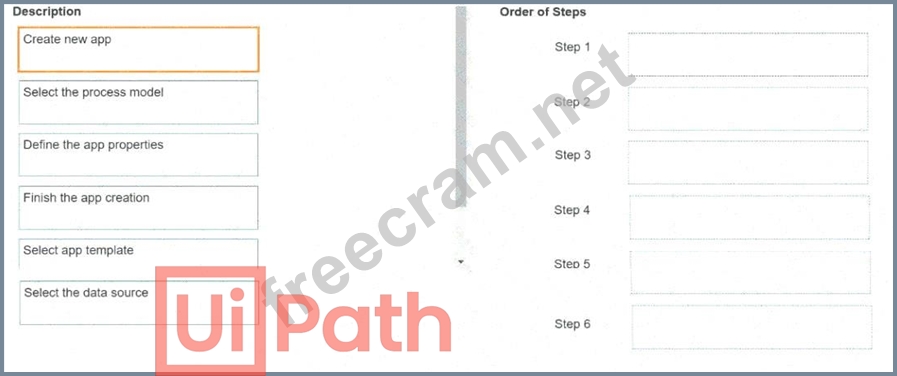
Instruction: Drag the Description found on the left and drop on the correct Step found on the right.
Correct Answer:
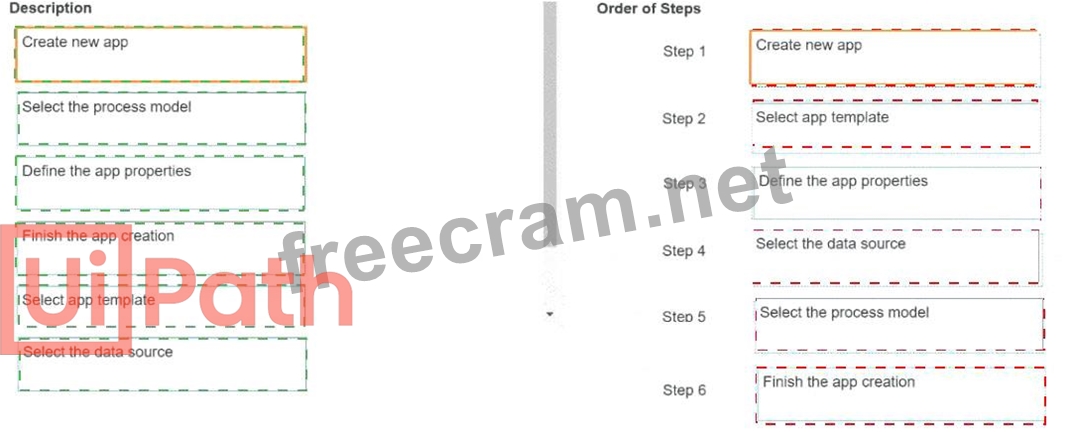
Explanation:
Step 1
Create new app
Step 2
Select app template
Step 3
Define the app properties
Step 4
Select the data source
Step 5
Select the process model
Step 6
Finish the app creation
According to UiPath Process Mining's documentation for creating a new app, the steps are:
1## Create new app:
* Initiate the process by creating a new app in the Process Mining environment.
2## Select the app template:
* Choose a suitable template based on the app's goal (e.g., analysis dashboards, standard views).
3## Select the data source:
* Define the data source, linking the app to the correct data set (such as event logs or system exports).
4## Select the process model:
* Choose or create the process model that aligns with your business process.
5## Define the app properties:
* Configure the app's settings, properties, and any specific parameters.
6## Finish the app creation:
* Finalize and save the new app, making it ready for analysis and further customization.
References:
UiPath Process Mining documentation: Creating Apps
UiPath Academy: Process Mining modules and tutorials.


- Question List (69q)
- Question 1: In UiPath Insights, what does the Processes template display...
- Question 2: What does Test data represent?
- 1 commentQuestion 3: When prioritizing the processes to be automated based on the...
- Question 4: Which of the following best describes the differences betwee...
- Question 5: What is the relationship between UiPath Al Center and UiPath...
- Question 6: Which of the following is the correct order of steps in the ...
- Question 7: From a Document Understanding perspective what kind of docum...
- Question 8: Sequence the steps correctly for the creation of a new proce...
- Question 9: What is the order of steps in the Document Understanding pro...
- Question 10: In UiPath Studio ReFramework, what can be the output from th...
- Question 11: What are some business scenarios in which I will use transac...
- Question 12: What does a Business Logic Translation Table do?...
- Question 13: How can you allocate licenses in the Automation Cloud?...
- Question 14: What is the purpose of Opportunity Assessment?...
- Question 15: What is the difference between training an ML model using a ...
- Question 16: What is the result of a Business Rule Exception in the proce...
- Question 17: How can UiPath Communications Mining help organizations impr...
- Question 18: How are changes usually categorized in terms of implementati...
- Question 19: How can a Business Analyst measure the success of an automat...
- Question 20: By default, what is the key role of a Performer or Consumer ...
- Question 21: Which of the below are deployment models that UiPath offers?...
- Question 22: Select the statement that best describes an UiPath process....
- Question 23: Which of the following types of Assets are available in UiPa...
- Question 24: When prioritizing the processes to be automated based on the...
- Question 25: Which of the following can be considered major components of...
- Question 26: How can you improve the accuracy of information extracted us...
- Question 27: What is a process in the context of an automation implementa...
- Question 28: In which phase of the automation lifecycle does Task Mining ...
- Question 29: Can an attended user run multiple processes in parallel in A...
- Question 30: What is a key feature of Orchestrator?...
- Question 31: Which of the following can be found in the Process Overview ...
- Question 32: In the context of automation development, what role does Tas...
- Question 33: According to UiPath's best practices, when should the test s...
- Question 34: What are the common Communications Mining analytics use case...
- Question 35: Which of the following statements is true about UiPath Commu...
- Question 36: Which type of automation is most commonly used in Customer S...
- Question 37: Which of the following is considered a Thin Client?...
- Question 38: How many samples are recommended to train a custom ML model ...
- Question 39: According to best practices, what is the approach a Business...
- Question 40: What is the purpose of using the Test Cases template to crea...
- Question 41: When does a queue item get the 'Deleted' status?...
- Question 42: What is UiPath AI Center primarily used for?...
- Question 43: Which of the following are one of the three features offered...
- Question 44: What are the environments that the UiPath Platform provides ...
- Question 45: What stages are involved in the Automation Change Control Pr...
- Question 46: Which of the following needs to be filled in the Process Ass...
- Question 47: What kind of document is a contract?...
- Question 48: In which of the following situations would attended automati...
- Question 49: What is the purpose of the Test Scenarios Document'?...
- Question 50: UiPath Process Mining offers the feature of simulating autom...
- Question 51: In the pilot phase for automation, what is the activity that...
- Question 52: Which types of changes can occur post-implementation in an a...
- Question 53: In which phase of the model training process are the Shuffle...
- Question 54: When starting a project with UiPath Process Mining, you can ...
- Question 55: What is the primary goal of task analysis in the context of ...
- Question 56: How can attended process execution be scheduled?...
- Question 57: What are the 2 ways to document processes in UiPath Task Cap...
- Question 58: What is the correct order of the stages of Process Documenta...
- Question 59: Which of the following are one of the three features offered...
- Question 60: Which of the following are structured documents that can be ...
- Question 61: When an application stops responding, what should it be trea...
- Question 62: Which of the following data is ingested by Insights?...
- Question 63: What is an unattended automation process?...
- Question 64: What is the difference between the roles of attended and una...
- Question 65: Which one represents a characteristic of long-running workfl...
- Question 66: Which of the following statements is true considering Attend...
- Question 67: What tool is recommended to track the testing effort?...
- Question 68: What is UiPath Process Mining?
- Question 69: What are the current technical limitations of Task Mining th...
