- Home
- Microsoft
- Administering Information Security in Microsoft 365
- Microsoft.SC-401.v2025-12-08.q67
- Question 1
Valid SC-401 Dumps shared by EduDump.com for Helping Passing SC-401 Exam! EduDump.com now offer the newest SC-401 exam dumps, the EduDump.com SC-401 exam questions have been updated and answers have been corrected get the newest EduDump.com SC-401 dumps with Test Engine here:
Access SC-401 Dumps Premium Version
(275 Q&As Dumps, 35%OFF Special Discount Code: freecram)
Next Question >>
Question 1/67
HOTSPOT
You have a Microsoft SharePoint Online site that contains the following files.

Users are assigned roles for the site as shown in the following table.
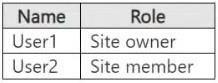
Which files can User1 and User2 open? To answer, select the appropriate options in the answer area.
NOTE: Each correct selection is worth one point.

You have a Microsoft SharePoint Online site that contains the following files.
Users are assigned roles for the site as shown in the following table.
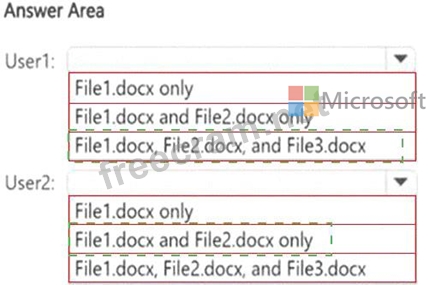
Which files can User1 and User2 open? To answer, select the appropriate options in the answer area.
NOTE: Each correct selection is worth one point.
Correct Answer:
Explanation:
Let's break it down:
File1.docx # DLP action = None
No DLP restrictions, so it is fully accessible to both User1 (owner) and User2 (member).
File2.docx # DLP action = Matched by DLP
"Matched" means the DLP policy detected sensitive content but has not blocked access. Instead, it may generate an alert or policy tip.
Both User1 and User2 can still open this file.
File3.docx # DLP action = Blocked by DLP
"Blocked" means the DLP policy actively restricts access or sharing of the file.
User2 (member) cannot open this file.
However, User1 (site owner) can open it because site collection admins and owners always retain full control over content, even if a DLP rule applies.
Ref: Microsoft Purview DLP policy tips and enforcement
# DLP policies do not prevent SharePoint/OneDrive site collection admins (owners) from accessing content.
# Final Answer Table:
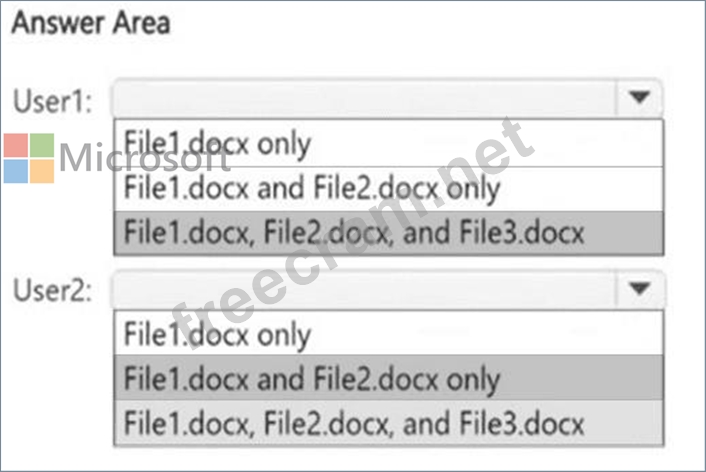
User1 (Site Owner): File1.docx, File2.docx, File3.docx
User2 (Site Member): File1.docx, File2.docx


- Question List (67q)
- Question 1: HOTSPOT You have a Microsoft SharePoint Online site that con...
- Question 2: You have Microsoft 365 E5 subscription. You create two alert...
- Question 3: HOTSPOT You have a Microsoft 365 E5 subscription. You receiv...
- Question 4: You have a Microsoft 365 E5 subscription that contains a Mic...
- Question 5: You have a Microsoft 365 subscription that contains the devi...
- Question 6: You have a Microsoft 365 E5 subscription that uses Microsoft...
- Question 7: You have a Microsoft 365 subscription that contains a sensit...
- Question 8: You have a data loss prevention (DIP) policy that has the ad...
- Question 9: You have a Microsoft 365 £5 subscription that contains the g...
- Question 10: You have a new Microsoft 365 E5 tenant. You need to create a...
- Question 11: You have a Microsoft 365 E5 subscription. You create a data ...
- Question 12: You are planning a data loss prevention (DLP) solution that ...
- Question 13: You have a Microsoft 365 £5 subscription. You need to preven...
- Question 14: You have a Microsoft 365 E5 subscription that contains four ...
- Question 15: You have a Microsoft 365 E5 subscription that has a sensitiv...
- Question 16: Note: This question is part of a series of questions that pr...
- Question 17: Note: This question is part of a series of questions that pr...
- Question 18: You have a Microsoft 365 E5 subscription that contains three...
- Question 19: DRAG DROP You have a Microsoft 365 E5 subscription that has ...
- Question 20: You have the files shown in the following table. (Exhibit) Y...
- Question 21: HOTSPOT You have a Microsoft 365 E5 subscription that uses M...
- Question 22: Your company has a Microsoft 365 tenant. The company perform...
- Question 23: You have Microsoft 365 E5 subscription that uses data loss p...
- Question 24: You have a Microsoft 365 E5 subscription that contains a use...
- Question 25: You have a Microsoft 36S ES subscription. You plan to use th...
- Question 26: Your company has offices in multiple countries. The company ...
- Question 27: You have a Microsoft J65 ES subscription. You need to create...
- Question 28: Note: This question is part of a series of questions that pr...
- Question 29: You need to test Microsoft Purview Advanced Message Encrypti...
- Question 30: You have a Microsoft 365 E5 subscription that contains a Mic...
- Question 31: You have a Microsoft 365 E5 subscription. You need to create...
- Question 32: DRAG DROP You need to create a trainable classifier that can...
- Question 33: You have a data loss prevention (DLP) policy configured for ...
- Question 34: You have a Microsoft J65 E5 subscription. You plan to implem...
- Question 35: You need to meet the retention requirement for the users' Mi...
- Question 36: You have a Microsoft J65 E5 subscription that contains a use...
- Question 37: You have a Microsoft 365 E5 subscription. You plan to implem...
- Question 38: You have a Microsoft SharePoint Online site named Site1 that...
- Question 39: You have a Microsoft 365 subscription. You create and run a ...
- Question 40: HOTSPOT You have a Microsoft 365 E5 subscription that contai...
- Question 41: You need to meet the technical requirements for the creation...
- Question 42: You need to create a retention policy to delete content afte...
- Question 43: HOTSPOT You plan to create a custom sensitive information ty...
- Question 44: You have a Microsoft 365 E5 subscription that uses Microsoft...
- Question 45: Note: This question is part of a series of questions that pr...
- Question 46: You have a Microsoft 365 ES subscription. A security manager...
- Question 47: You implement Microsoft 36S Endpoint data loss pi event ion ...
- Question 48: You have a Microsoft 36S ES subscription You plan to create ...
- Question 49: You have two Microsoft 365 subscriptions named Contoso and F...
- Question 50: You have a Microsoft J65 subscription linked to a Microsoft ...
- Question 51: You have a Microsoft 365 E5 subscription. You need to review...
- Question 52: You have a Microsoft 365 E5 subscription. Users access their...
- Question 53: You have a Microsoft 365 IS subscription that contains the r...
- Question 54: You have 4 Microsoft 565 E5 subscription that contains two M...
- Question 55: You have a Microsoft 365 E5 subscription. You have a file na...
- Question 56: You have a Microsoft 365 E5 subscription that contains a Mic...
- Question 57: HOTSPOT You have a Microsoft 365 E5 subscription that contai...
- Question 58: You have a Microsoft 565 E5 tenant that uses Microsoft Teams...
- Question 59: You have a Microsoft 36S subscription. In Microsoft Exchange...
- Question 60: You have a Microsoft 365 subscription. Auditing is enabled. ...
- Question 61: You have a Microsoft 365 E5 subscription that contains a use...
- Question 62: You have a Microsoft 36S ES subscription You need to impleme...
- Question 63: HOTSPOT You have a Microsoft 365 E5 subscription that contai...
- Question 64: You have a Microsoft 365 subscription. Users have devices th...
- Question 65: You have a Microsoft 365 E5 subscription that contains a tra...
- Question 66: You have a Microsoft 365 E5 subscription that contains a Mic...
- Question 67: You have a Microsoft 36515 subscription tha1 contains a Micr...
