<< Prev Question Next Question >>
Question 7/44
You have a Microsoft 365 E5 tenant.
Data loss prevention (DLP) policies are applied to Exchange email, SharePoint sites, and OneDrive accounts locations.
You need to use PowerShell to retrieve a summary of the DLP rule matches from the last seven days.
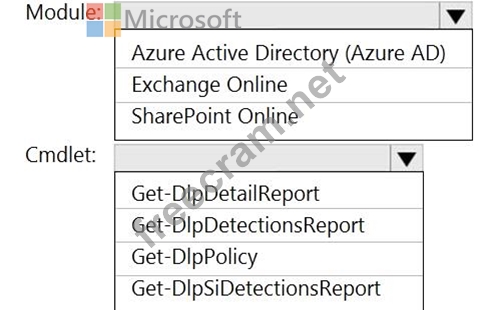
Which PowerShell module and cmdlet should you use? To answer, select the appropriate options in the answer area.
NOTE: Each correct selection is worth one point.
Data loss prevention (DLP) policies are applied to Exchange email, SharePoint sites, and OneDrive accounts locations.
You need to use PowerShell to retrieve a summary of the DLP rule matches from the last seven days.
Which PowerShell module and cmdlet should you use? To answer, select the appropriate options in the answer area.
NOTE: Each correct selection is worth one point.


Recent Comments (The most recent comments are at the top.)
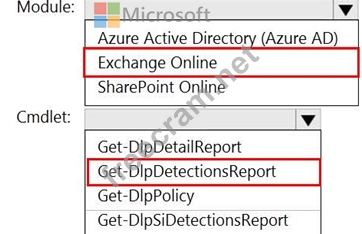
Exchange Online and Get-DlpDetectionsReport.
“ Use the Get-DlpDetectionsReport cmdlet to list a summary of Data Loss Prevention (DLP) rule matches for Exchange Online, SharePoint Online and OneDrive for Business in your cloud-based organization for the last 30 days.”