- Home
- Microsoft
- Microsoft Identity and Access Administrator
- Microsoft.SC-300.v2025-12-05.q153
- Question 79
Valid SC-300 Dumps shared by ExamDiscuss.com for Helping Passing SC-300 Exam! ExamDiscuss.com now offer the newest SC-300 exam dumps, the ExamDiscuss.com SC-300 exam questions have been updated and answers have been corrected get the newest ExamDiscuss.com SC-300 dumps with Test Engine here:
Access SC-300 Dumps Premium Version
(346 Q&As Dumps, 35%OFF Special Discount Code: freecram)
<< Prev Question Next Question >>
Question 79/153
You have a Microsoft Entra tenant that contains the users shown in the following table:
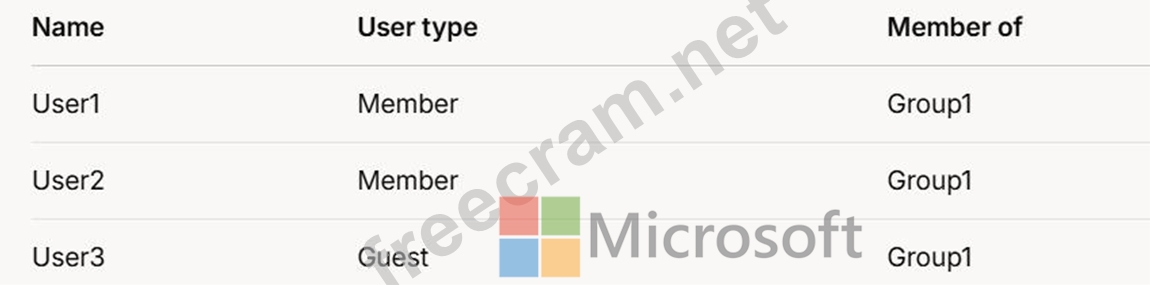
User1 is the owner of Group1.
You create an access review that has the following settings:
What to review: Teams + Groups
Scope: All users
Group: Group1
Reviewers: Users review their own access
Which users can perform access reviews for User3?
User1 is the owner of Group1.
You create an access review that has the following settings:
What to review: Teams + Groups
Scope: All users
Group: Group1
Reviewers: Users review their own access
Which users can perform access reviews for User3?
Correct Answer: B
Comprehensive and Detailed In-Depth
Let's break this down step by step based on the Microsoft Entra access review settings and the principles outlined in Microsoft Identity and Access Administrator documentation.
Understanding the Access Review Settings:
What to review: Teams + GroupsThis indicates that the access review is evaluating memberships in Teams and Groups within the Microsoft Entra tenant. Since the group specified is Group1, the review focuses on Group1 membership.
Scope: All usersThe scope defines who is being reviewed. "All users" in this
Let's break this down step by step based on the Microsoft Entra access review settings and the principles outlined in Microsoft Identity and Access Administrator documentation.
Understanding the Access Review Settings:
What to review: Teams + GroupsThis indicates that the access review is evaluating memberships in Teams and Groups within the Microsoft Entra tenant. Since the group specified is Group1, the review focuses on Group1 membership.
Scope: All usersThe scope defines who is being reviewed. "All users" in this


- Question List (153q)
- Question 1: You have a Microsoft 365 subscription. You need to ensure th...
- Question 2: You need to implement the planned changes and technical requ...
- Question 3: You have an Azure AD tenant. You perform the tasks shown in ...
- Question 4: You have an Azure AD tenant that contains the users shown in...
- Question 5: You have an Azure Active Directory (Azure AD) tenant that ha...
- Question 6: You configure a new Microsoft 365 tenant to use a default do...
- Question 7: You have a Microsoft 365 tenant that has 5,000 users. One hu...
- Question 8: You have an Azure subscription that contains a user named Us...
- Question 9: You have a Microsoft Entra tenant that contains two groups n...
- Question 10: You have a Microsoft 365 tenant. The Sign-ins activity repor...
- Question 11: You have an Azure Active Directory (Azure AD) tenant named c...
- Question 12: You have a Microsoft Entra tenant that contains the identiti...
- Question 13: You have a Microsoft Entra tenant that contains a terms of u...
- Question 14: You have a Microsoft 365 E5 subscription that contains three...
- Question 15: You have a Microsoft Entra tenant that uses Microsoft Entra ...
- Question 16: You need to meet the authentication requirements for leaked ...
- Question 17: Note: This question is part of a series of questions that pr...
- Question 18: Note: This question is part of a series of questions that pr...
- Question 19: You have Microsoft Entra tenant that contains a group named ...
- Question 20: You have an Azure Active Directory (Azure AD) tenant that co...
- Question 21: SIMULATION Task 6 You need to implement additional security ...
- Question 22: Your network contains an on-premises Active Directory Domain...
- Question 23: Your on-premises network contains an Active Directory domain...
- Question 24: You have an Azure subscription that contains the resources s...
- Question 25: You have a Microsoft 365 E5 subscription. You need to perfor...
- Question 26: You have an Azure AD tenant and an Azure web app named App1....
- Question 27: You need to configure the MFA settings for users who connect...
- Question 28: You have an Azure AD tenant that contains two users named Us...
- Question 29: You have an Azure AD tenant that contains the users shown in...
- Question 30: You need to sync the ADatum users. The solution must meet th...
- Question 31: You need to meet the technical requirements for the probabil...
- Question 32: You have a Microsoft Entra tenant. You need to query risky u...
- Question 33: You have an Azure subscription that contains the following v...
- Question 34: You have an Azure subscription that contains the resources s...
- Question 35: You have an Azure Active Directory (Azure AD) tenant named c...
- Question 36: Note: This question is part of a series of questions that pr...
- Question 37: You have a Microsoft 365 E5 subscription that contains a Mic...
- Question 38: Note: This question is part of a series of questions that pr...
- Question 39: You have an Azure subscription that contains the resources s...
- Question 40: You need to configure the detection of multi-staged attacks ...
- Question 41: You have an Azure AD tenant that contains a user named Admin...
- Question 42: You have a Microsoft 365 tenant. The Azure Active Directory ...
- Question 43: You need to meet the technical requirements for the probabil...
- Question 44: You have an Azure Active Directory (Azure AD) tenant named c...
- Question 45: You have a Microsoft 365 subscription that contains three us...
- Question 46: You have a Microsoft 365 E5 subscription that contains two u...
- Question 47: You have an Azure Active Directory (Azure AD) tenant that sy...
- Question 48: You have an Azure Active Directory (Azure AD) tenant that us...
- Question 49: You have an Azure AD tenant You open the risk detections rep...
- Question 50: You have an Azure subscription that contains a virtual machi...
- Question 51: You have a Microsoft 365 tenant that uses the domain named f...
- Question 52: You have three Azure subscriptions that are linked to a sing...
- Question 53: You need to implement on-premises application and SharePoint...
- Question 54: You have a hybrid Microsoft 365 subscription that contains t...
- Question 55: You use Azure Monitor to analyze Azure Active Directory (Azu...
- Question 56: You have an Azure subscription named Sub1. You plan to deplo...
- Question 57: You need to resolve the issue of I-.Group1. What should you ...
- Question 58: You have a Microsoft Entra tenant that contains the users sh...
- Question 59: Your company has an Azure Active Directory (Azure AD) tenant...
- Question 60: You have an Azure subscription that contains a storage accou...
- Question 61: You have an Azure Active Directory (Azure AD) tenant named c...
- Question 62: You have an Azure AD tenant that contains a user named User1...
- Question 63: You have an on-premises Microsoft Exchange organization that...
- Question 64: You have a Microsoft 365 E5 subscription. You need to create...
- Question 65: Your company has an Azure Active Directory (Azure AD) tenant...
- Question 66: Your company has a Microsoft Entra tenant that contains a us...
- Question 67: You have an Azure Active Directory (Azure AD) tenant that co...
- Question 68: Your network contains an on-premises Active Directory domain...
- Question 69: You have an Azure AD tenant that has multi-factor authentica...
- Question 70: You have an Azure subscription, a Google Cloud Platform (GCP...
- Question 71: You have an Azure Active Directory (Azure AD) tenant named c...
- Question 72: You have a Microsoft 365 E5 subscription that uses Microsoft...
- Question 73: You have an Azure Active Directory (Azure AD) tenant that co...
- Question 74: Your on-premises network contains an Active Directory Domain...
- Question 75: Note: This question is part of a series of questions that pr...
- Question 76: You have a Microsoft Entra tenant. You need to create a Cond...
- Question 77: You have a Microsoft 365 tenant. You need to identify users ...
- Question 78: Your network contains an on premises Active Directory domain...
- Question 79: You have a Microsoft Entra tenant that contains the users sh...
- Question 80: You have a Microsoft 365 E5 subscription. You deploy a third...
- Question 81: You use Azure Monitor to analyze Azure Active Directory (Azu...
- Question 82: You work for a company named Contoso, Ltd. that has a Micros...
- Question 83: You have a Microsoft 365 tenant. You need to Identity users ...
- Question 84: You have an Azure AD tenant that contains the users shown in...
- Question 85: Note: This question is part of a series of questions that pr...
- Question 86: You have an Azure Active Directory (Azure AD) tenant that sy...
- Question 87: Your network contains an Active Directory forest named conto...
- Question 88: You have a Microsoft Entra tenant that has a Microsoft Entra...
- Question 89: You have a Microsoft 365 E5 subscription that contains the g...
- Question 90: Note: This question is part of a series of questions that pr...
- Question 91: SIMULATION Task 7 You need to lock out accounts for five min...
- Question 92: You have an Azure Active Directory (Azure AD) tenant. For th...
- Question 93: You have an Azure subscription that is linked to a Microsoft...
- Question 94: You have an Azure Active Directory (Azure AD) tenant named c...
- Question 95: You have an Azure AD tenant that uses Azure AD Identity Prot...
- Question 96: You have an Azure subscription. You need to create two custo...
- Question 97: You have an Azure Active Directory (Azure AD) tenant. You op...
- Question 98: You have a Microsoft Entra tenant. You configure self-servic...
- Question 99: You have a Microsoft Entra tenant. You need to ensure that o...
- Question 100: You need to support the planned changes and meet the technic...
- Question 101: You have a Microsoft 365 subscription that contains a user n...
- Question 102: You have an Azure subscription. You need to use Microsoft En...
- Question 103: Your company has an Azure Active Directory (Azure AD) tenant...
- Question 104: Your network contains an on-premises Active Directory domain...
- Question 105: SIMULATION Task 2 You need to implement a process to review ...
- Question 106: You have a Microsoft 365 tenant. The Azure Active Directory ...
- Question 107: You have a Microsoft 365 subscription. You plan to deploy an...
- Question 108: Your company has a Microsoft 365 tenant. All users have comp...
- Question 109: You have a Microsoft 365 tenant named contoso.com. Guest use...
- Question 110: You have a Microsoft 365 E5 subscription. You need to be abl...
- Question 111: You have a Microsoft 365 tenant and an Active Directory doma...
- Question 112: You have an Azure Ad tenant that contains the users show in ...
- Question 113: You have an Azure subscription. From Entitlement management,...
- Question 114: You create a new Microsoft 365 E5 tenant. You need to ensure...
- Question 115: A user named User1 attempts to sign in to the tenant by ente...
- Question 116: You have an Azure subscription named Sub1 ilia1 contains a s...
- Question 117: You have an Azure Active Directory (Azure AD) tenant named c...
- Question 118: You have a Microsoft 365 tenant. The Azure Active Directory ...
- Question 119: You have a Microsoft 36S subscription. The subscription cont...
- Question 120: You have an Azure subscription named Sub1 that contains a vi...
- Question 121: You have an Azure subscription that contains a user named Us...
- Question 122: You have a Microsoft Entra tenant named contoso.com that con...
- Question 123: You need to identify which roles to use for managing role as...
- Question 124: You have an Azure Active Directory (Azure AD) tenant that co...
- Question 125: Note: This question is part of a series of questions that pr...
- Question 126: You create a conditional access policy that blocks access wh...
- Question 127: You need to create the LWGroup1 group to meet the management...
- Question 128: You have a Microsoft 365 tenant. All users have mobile phone...
- Question 129: You have a Microsoft 365 E5 subscription. You need to ensure...
- Question 130: You have an Azure AD tenant You configure User consent setti...
- Question 131: You have an Azure AD tenant that contains the users shown in...
- Question 132: Your company recently implemented Azure Active Directory (Az...
- Question 133: You have a Microsoft 365 tenant. You configure a conditional...
- Question 134: Your network contains an on-premises Active Directory domain...
- Question 135: SIMULATION You implement the planned changes for SSPR. What ...
- Question 136: You have an Azure Active Directory (Azure AD) tenant. You ne...
- Question 137: You have an Azure Active Directory (Azure AD) tenant that co...
- Question 138: You have a Microsoft Entra tenant that contains the users sh...
- Question 139: You have an Azure subscription. You are evaluating enterpris...
- Question 140: You have a Microsoft 365 tenant. All users have mobile phone...
- Question 141: Your network contains an on-premises Active Directory domain...
- Question 142: You have a Microsoft 365 E5 subscription that contains three...
- Question 143: You have a Microsoft 365 tenant. All users have computers th...
- Question 144: You need to track application access assignments by using Id...
- Question 145: You have an Azure Active Directory Premium P2 tenant. You cr...
- Question 146: You have an Azure Active Directory (Azure AD) tenant named c...
- Question 147: You have a Microsoft Entra tenant that contains a user named...
- Question 148: You have an Azure Active Directory (Azure AD) tenant that co...
- Question 149: You have an Azure Active Directory (Azure AD) tenant that co...
- Question 150: You need to allocate licenses to the new users from A Datum....
- Question 151: You have an Azure subscription that contains a virtual machi...
- Question 152: You have a Microsoft 365 subscription that contains the foll...
- Question 153: You create a Log Analytics workspace. You need to implement ...
