Valid SC-200 Dumps shared by EduDump.com for Helping Passing SC-200 Exam! EduDump.com now offer the newest SC-200 exam dumps, the EduDump.com SC-200 exam questions have been updated and answers have been corrected get the newest EduDump.com SC-200 dumps with Test Engine here:
Access SC-200 Dumps Premium Version
(415 Q&As Dumps, 35%OFF Special Discount Code: freecram)
<< Prev Question Next Question >>
Question 80/179
You plan to connect an external solution that will send Common Event Format (CEF) messages to Azure Sentinel.
You need to deploy the log forwarder.
Which three actions should you perform in sequence? To answer, move the appropriate actions form the list of actions to the answer area and arrange them in the correct order.
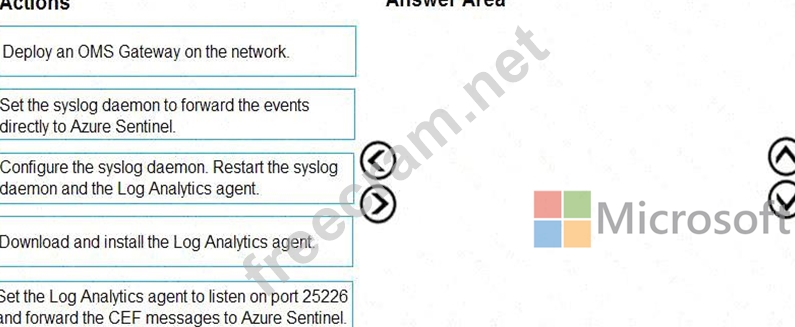
You need to deploy the log forwarder.
Which three actions should you perform in sequence? To answer, move the appropriate actions form the list of actions to the answer area and arrange them in the correct order.
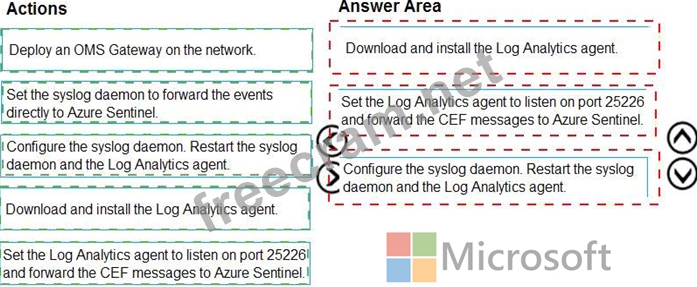
Correct Answer:
Explanation:
Reference:
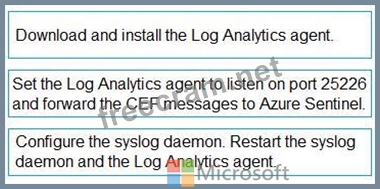
For CEF ingestion, Microsoft Sentinel uses a Linux "log forwarder" that runs the Log Analytics agent (OMS agent) and a syslog daemon (rsyslog/syslog-ng). The documented deployment flow is: first install the Log Analytics agent on the forwarder and connect it to your Sentinel workspace (Workspace ID/Key). Next, configure the agent to listen on TCP/UDP port 25226 -the port the OMS agent uses to receive CEF- translated syslog messages locally-and forward them to the connected workspace (this forwarding is inherent once the agent is connected). Then configure the syslog daemon to receive the external product's CEF events on the chosen syslog port (commonly 514) and forward them locally to 127.0.0.1:25226 . Finally, restart rsyslog/syslog-ng and the OMS agent to apply changes. You do not forward events "directly to Sentinel" from syslog; the agent handles transport to the workspace. An OMS Gateway is only required when the forwarder has no direct Internet access and isn't part of the standard, minimal-effort path. This sequence ensures reliable, supported ingestion of CEF messages into Microsoft Sentinel with the least administrative overhead.


- Question List (179q)
- Question 1: Note: This question is part of a series of questions that pr...
- Question 2: You have a Microsoft 365 subscription that uses Microsoft De...
- Question 3: You have a Microsoft 365 subscription that uses Microsoft De...
- Question 4: You have an Azure Sentinel deployment in the East US Azure r...
- Question 5: You have a Microsoft Sentinel workspace named Workspaces1. T...
- Question 6: You need to create an advanced hunting query to investigate ...
- Question 7: You have a Microsoft 365 subscription that uses Microsoft Pu...
- Question 8: You have a Microsoft Sentinel workspace named Workspaces You...
- Question 9: You have an Azure subscription that uses Microsoft Defender ...
- Question 10: You have an on-premises Windows 11 Pro device named Device1 ...
- Question 11: You have a Microsoft 365 subscription that uses Microsoft Co...
- Question 12: You have a Microsoft Sentinel workspace. You plan to visuali...
- Question 13: You have a Microsoft 365 E5 subscription that contains the h...
- Question 14: You have an Azure subscription that contains an Azure logic ...
- Question 15: You need to complete the query for failed sign-ins to meet t...
- Question 16: You create a custom analytics rule to detect threats in Azur...
- Question 17: You have a Microsoft 365 subscription. You plan to use Micro...
- Question 18: You have 50 Microsoft Sentinel workspaces. You need to view ...
- Question 19: You have an Azure Sentinel workspace. You need to test a pla...
- Question 20: The issue for which team can be resolved by using Microsoft ...
- Question 21: You need to ensure that the Group1 members can meet the Micr...
- Question 22: Note: This question is part of a series of questions that pr...
- Question 23: You have an Azure subscription that contains an Microsoft Se...
- Question 24: You have a Microsoft 365 subscription that uses Microsoft De...
- Question 25: You have an Azure subscription that uses Microsoft Sentinel....
- Question 26: Your network contains an on-premises Active Directory Domain...
- Question 27: You have a Microsoft 365 subscription that uses Microsoft De...
- Question 28: You need to implement Microsoft Sentinel queries for Contoso...
- Question 29: You have a Microsoft 365 E5 subscription that uses Microsoft...
- Question 30: You have a Microsoft 365 subscription that has Microsoft 365...
- Question 31: You have an Azure subscription. You plan to implement an Mic...
- Question 32: You have a Microsoft Sentinel workspace named Workspace1. Yo...
- Question 33: You are configuring Microsoft Cloud App Security. You have a...
- Question 34: You are investigating a potential attack that deploys a new ...
- Question 35: From Azure Sentinel, you open the Investigation pane for a h...
- Question 36: You have a Microsoft 365 E5 subscription. You have 1,000 Win...
- Question 37: You have an Azure subscription that contains a resource grou...
- Question 38: You receive an alert from Azure Defender for Key Vault. You ...
- Question 39: You have a playbook in Azure Sentinel. When you trigger the ...
- Question 40: Your company uses Azure Security Center and Azure Defender. ...
- Question 41: You have a Microsoft 365 E5 subscription. You need to config...
- Question 42: You have a Microsoft 365 E5 subscription that contains 500 W...
- Question 43: You have an Azure subscription that uses Microsoft Sentinel....
- Question 44: You have an on-premises datacenter that contains a custom we...
- Question 45: You have a Microsoft 365 subscription that contains 1,000 Wi...
- Question 46: You have 500 on-premises Windows 11 devices that use Microso...
- Question 47: You have a Microsoft Sentinel workspace that has a default d...
- Question 48: You have an Azure subscription that contains a user named Us...
- Question 49: You have a custom Microsoft Sentinel workbook named Workbook...
- Question 50: You have a Microsoft Sentinel workspace named SW1. You need ...
- Question 51: You have a Microsoft 365 subscription that uses Microsoft Se...
- Question 52: You create an Azure subscription named sub1. In sub1, you cr...
- Question 53: You have a Microsoft Sentine1 workspace that contains a cust...
- Question 54: You have a Microsoft 365 E5 subscription that uses Microsoft...
- Question 55: You have an Azure subscription named Sub1 and a Microsoft 36...
- Question 56: You have an Azure subscription named Sub1 that is linked to ...
- Question 57: You have an Azure subscription that contains a Log Analytics...
- Question 58: You need to modify the anomaly detection policy settings to ...
- Question 59: You have a Microsoft 365 E5 subscription that contains 200 W...
- Question 60: You need to build a KQL query in a Microsoft Sentinel worksp...
- Question 61: You have a Microsoft 365 subscription that uses Microsoft De...
- Question 62: You have a Microsoft 365 E5 subscription that contains two u...
- Question 63: You use Azure Security Center. You receive a security alert ...
- Question 64: Note: This question is part of a series of questions that pr...
- Question 65: You have a Microsoft Sentinel workspace that contains an Azu...
- Question 66: You have an Azure subscription that contains the users shown...
- Question 67: You have a Microsoft Sentinel workspace that has User and En...
- Question 68: You have a Microsoft 365 E5 subscription that uses Microsoft...
- Question 69: You have an Azure subscription that uses Microsoft Defender ...
- Question 70: You have a Microsoft 365 subscription that uses Microsoft De...
- Question 71: Your company has an on-premises network that uses Microsoft ...
- Question 72: Your on-premises network contains an Active Directory Domain...
- Question 73: You have an Azure subscription that contains a Microsoft Sen...
- Question 74: You have a Microsoft 365 E5 subscription that uses Microsoft...
- Question 75: You have an Azure subscription that uses Microsoft Sentinel ...
- Question 76: You have a Microsoft Sentinel workspace named Workspacel tha...
- Question 77: You need to ensure that the configuration of HuntingQuery1 m...
- Question 78: You are responsible for responding to Azure Defender for Key...
- Question 79: You have a Microsoft Sentinel workspace. You enable User and...
- Question 80: You plan to connect an external solution that will send Comm...
- Question 81: You have an Azure subscription that contains a Microsoft Sen...
- Question 82: You need to implement the Defender for Cloud requirements. W...
- Question 83: You have 100 Azure subscriptions that have enhanced security...
- Question 84: You have a Microsoft Sentinel workspace named Workspace1 and...
- Question 85: You have an Azure subscription that uses Microsoft Sentinel....
- Question 86: Note: This question is part of a series of questions that pr...
- Question 87: Your company stores the data for every project in a differen...
- Question 88: You have a Microsoft 365 subscription that uses Microsoft De...
- Question 89: You have a Microsoft 365 E5 subscription that is linked to a...
- Question 90: You have a Microsoft Sentinel workspace named sws1. You need...
- Question 91: You have a Microsoft Sentinel workspace. You need to create ...
- Question 92: You have an Azure subscription that has Azure Defender enabl...
- Question 93: You have a Microsoft 365 subscription that uses Microsoft 36...
- Question 94: You have a Microsoft 365 E5 subscription that uses Microsoft...
- Question 95: You have a Microsoft 365 subscription that uses Microsoft Pu...
- Question 96: You have a Microsoft 365 E5 subscription that uses Microsoft...
- Question 97: You need to meet the Microsoft Defender for Cloud Apps requi...
- Question 98: You have a Microsoft 365 E5 subscription that uses Microsoft...
- Question 99: You have an Azure Sentinel deployment. You need to query for...
- Question 100: You create a new Azure subscription and start collecting log...
- Question 101: You have a Microsoft 365 E5 subscription that uses Microsoft...
- Question 102: You need to assign a role-based access control (RBAC) role t...
- Question 103: Note: This question is part of a series of questions that pr...
- Question 104: You have a Microsoft 365 E5 subscription and a Microsoft Sen...
- Question 105: You have a Microsoft Sentinel playbook that is triggered by ...
- Question 106: You have an Azure subscription that uses Microsoft Defender ...
- Question 107: You have five on-premises Linux servers. You have an Azure s...
- Question 108: You have a Microsoft 365 subscription that uses Microsoft 36...
- Question 109: You have a Microsoft subscription that has Microsoft Defende...
- Question 110: You have a Microsoft 365 subscription that uses Azure Defend...
- Question 111: Note: This question is part of a series of questions that pr...
- Question 112: You have an Azure subscription that contains 50 virtual mach...
- Question 113: You have an Azure subscription that uses Microsoft Defender ...
- Question 114: You have a Microsoft 365 E5 subscription. You need to search...
- Question 115: You have a Microsoft 365 E5 subscription that uses Microsoft...
- Question 116: You have an on-premises network. You have a Microsoft 365 E5...
- Question 117: You have a Microsoft 365 E5 subscription that uses Microsoft...
- Question 118: You have a Microsoft Sentinel workspace that contains a cust...
- Question 119: You have an Azure subscription that contains 100 Linux virtu...
- 1 commentQuestion 120: You are informed of an increase in malicious email being rec...
- Question 121: You need to implement Azure Sentinel queries for Contoso and...
- Question 122: You have a Microsoft Sentinel workspace named workspace1 and...
- Question 123: You need to update the threat intelligence list to include t...
- Question 124: You have a Microsoft 365 E5 subscription. Automated investig...
- Question 125: You have an Azure Functions app that generates thousands of ...
- Question 126: You have an Azure subscription named Sub1. Sub1 contains a M...
- Question 127: You use Azure Sentinel. You need to use a built-in role to p...
- Question 128: You have a third-party security information and event manage...
- Question 129: You are informed of a new common vulnerabilities and exposur...
- Question 130: You have the following advanced hunting query in Microsoft 3...
- Question 131: You have a Microsoft Sentinel workspace named Workspace1 tha...
- Question 132: You need to implement the query for Workbook1 and Webapp1. T...
- Question 133: You provision Azure Sentinel for a new Azure subscription. Y...
- Question 134: You receive a security bulletin about a potential attack tha...
- Question 135: You have a Microsoft 365 E5 subscription that contains a dat...
- Question 136: You use Azure Defender. You have an Azure Storage account th...
- Question 137: You have an Azure subscription that contains two users named...
- Question 138: Your company has a single office in Istanbul and a Microsoft...
- Question 139: You implement Safe Attachments policies in Microsoft Defende...
- Question 140: You manage the security posture of an Azure subscription tha...
- Question 141: You need to implement the Azure Information Protection requi...
- Question 142: You have an Azure subscription that contains a user named Us...
- Question 143: You have a Microsoft Sentinel workspace. You need to configu...
- Question 144: You have a Microsoft Sentinel workspace You develop a custom...
- Question 145: You have 1,000 on-premises Windows 11 Pro devices that are o...
- Question 146: You have an Azure subscription that contains a user named Us...
- Question 147: You have the resources shown in the following table. (Exhibi...
- Question 148: You have the following SQL query. (Exhibit)...
- Question 149: You need to monitor the password resets. The solution must m...
- Question 150: You have a Microsoft 365 subscription that uses Microsoft De...
- Question 151: You deploy Azure Sentinel. You need to implement connectors ...
- Question 152: You have a Microsoft Sentinel workspace named SW1. In SW1. y...
- Question 153: Your company uses Microsoft Defender for Endpoint. The compa...
- Question 154: You have a Microsoft 365 subscription that uses Microsoft De...
- Question 155: You have an Azure subscription named Sub1 and an Azure DevOp...
- Question 156: You have a suppression rule in Azure Security Center for 10 ...
- Question 157: You need to configure the Microsoft Sentinel integration to ...
- Question 158: You have a Microsoft Sentinel workspace named sws1. You need...
- Question 159: You have an Azure subscription that has the enhanced securit...
- Question 160: You have a Microsoft 365 E5 subscription that uses Microsoft...
- Question 161: You have a Microsoft 365 subscription that uses Microsoft De...
- Question 162: You are configuring Azure Sentinel. You need to send a Micro...
- Question 163: You have a Microsoft 365 subscription. You have 1,000 Window...
- Question 164: You open the Cloud App Security portal as shown in the follo...
- Question 165: You have a Microsoft 365 subscription. You have 1,000 Window...
- Question 166: Note: This question is part of a series of questions that pr...
- Question 167: You have a Microsoft 365 subscription that uses Microsoft De...
- Question 168: You need to create a query to investigate DNS-related activi...
- Question 169: You have a custom Microsoft Defender XDR detection rule that...
- Question 170: You need to ensure that the processing of incidents generate...
- Question 171: You have an Azure subscription that uses Microsoft Defender ...
- Question 172: You have a Microsoft Sentinel workspace that uses the Micros...
- Question 173: You need to recommend a solution to meet the technical requi...
- Question 174: You need to use an Azure Resource Manager template to create...
- Question 175: You have a Microsoft 365 subscription that uses Microsoft De...
- Question 176: You need to implement Azure Defender to meet the Azure Defen...
- Question 177: You have a Microsoft 365 E5 subscription that is linked to a...
- Question 178: The issue for which team can be resolved by using Microsoft ...
- Question 179: You have two Microsoft Entra tenants named Tenantl and Tenan...
