Valid SC-200 Dumps shared by EduDump.com for Helping Passing SC-200 Exam! EduDump.com now offer the newest SC-200 exam dumps, the EduDump.com SC-200 exam questions have been updated and answers have been corrected get the newest EduDump.com SC-200 dumps with Test Engine here:
Access SC-200 Dumps Premium Version
(415 Q&As Dumps, 35%OFF Special Discount Code: freecram)
<< Prev Question Next Question >>
Question 12/179
You have a Microsoft Sentinel workspace.
You plan to visualize data from Microsoft SharePoint Online and OneDrive sites.
You need to create a KQL query for the visual. The solution must meet the following requirements:
* Select all workloads as a single operation.
* Include two parameters named Operations and Users.
* In the results, exclude empty values for the site URLs.
How should you complete the query? To answer, select the appropriate options in the answer area. NOTE:
Each correct selection is worth one point.
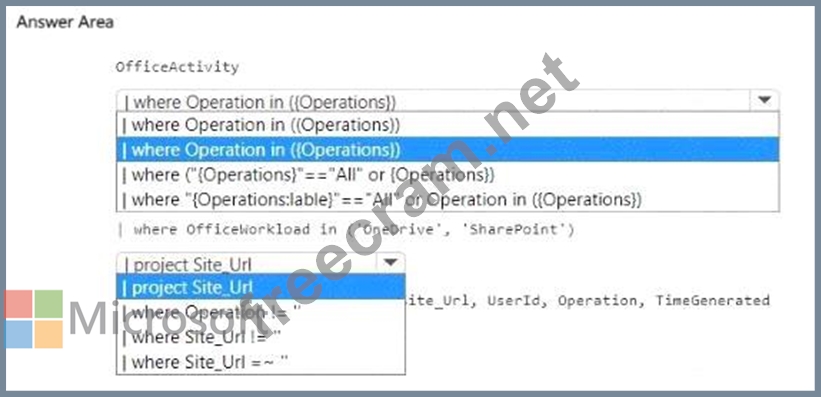
You plan to visualize data from Microsoft SharePoint Online and OneDrive sites.
You need to create a KQL query for the visual. The solution must meet the following requirements:
* Select all workloads as a single operation.
* Include two parameters named Operations and Users.
* In the results, exclude empty values for the site URLs.
How should you complete the query? To answer, select the appropriate options in the answer area. NOTE:
Each correct selection is worth one point.
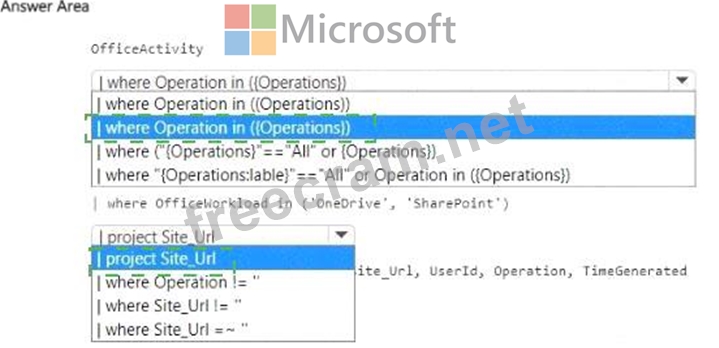
Correct Answer:
Explanation:
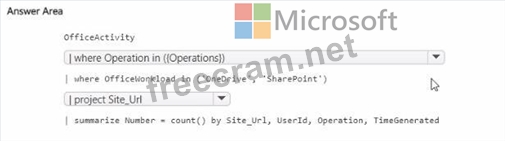
In Microsoft Sentinel workbooks, parameters can be referenced directly in KQL. For multi-select parameters that include an All option, the recommended pattern is to check the parameter's label for "All" and otherwise filter by the selected values. Hence:
where ( " {Operations:label} " == " All " or Operation in ({Operations})) This lets the visual treat All as a single choice while still supporting one or many explicit operations.
You also need a Users parameter, so you'd typically include:
| where UserId in ({Users})
Because the data source is OfficeActivity , to scope to SharePoint and OneDrive activity:
| where OfficeWorkload in ( ' OneDrive ' , ' SharePoint ' )
Finally, to exclude empty site URLs , filter out blanks:
| where Site_Url != ' '
Putting it together (for context):
OfficeActivity
| where ( " {Operations:label} " == " All " or Operation in ({Operations}))
| where OfficeWorkload in ( ' OneDrive ' , ' SharePoint ' )
| where UserId in ({Users})
| where Site_Url != ' '
| project Site_Url, UserId, Operation, TimeGenerated


- Question List (179q)
- Question 1: Note: This question is part of a series of questions that pr...
- Question 2: You have a Microsoft 365 subscription that uses Microsoft De...
- Question 3: You have a Microsoft 365 subscription that uses Microsoft De...
- Question 4: You have an Azure Sentinel deployment in the East US Azure r...
- Question 5: You have a Microsoft Sentinel workspace named Workspaces1. T...
- Question 6: You need to create an advanced hunting query to investigate ...
- Question 7: You have a Microsoft 365 subscription that uses Microsoft Pu...
- Question 8: You have a Microsoft Sentinel workspace named Workspaces You...
- Question 9: You have an Azure subscription that uses Microsoft Defender ...
- Question 10: You have an on-premises Windows 11 Pro device named Device1 ...
- Question 11: You have a Microsoft 365 subscription that uses Microsoft Co...
- Question 12: You have a Microsoft Sentinel workspace. You plan to visuali...
- Question 13: You have a Microsoft 365 E5 subscription that contains the h...
- Question 14: You have an Azure subscription that contains an Azure logic ...
- Question 15: You need to complete the query for failed sign-ins to meet t...
- Question 16: You create a custom analytics rule to detect threats in Azur...
- Question 17: You have a Microsoft 365 subscription. You plan to use Micro...
- Question 18: You have 50 Microsoft Sentinel workspaces. You need to view ...
- Question 19: You have an Azure Sentinel workspace. You need to test a pla...
- Question 20: The issue for which team can be resolved by using Microsoft ...
- Question 21: You need to ensure that the Group1 members can meet the Micr...
- Question 22: Note: This question is part of a series of questions that pr...
- Question 23: You have an Azure subscription that contains an Microsoft Se...
- Question 24: You have a Microsoft 365 subscription that uses Microsoft De...
- Question 25: You have an Azure subscription that uses Microsoft Sentinel....
- Question 26: Your network contains an on-premises Active Directory Domain...
- Question 27: You have a Microsoft 365 subscription that uses Microsoft De...
- Question 28: You need to implement Microsoft Sentinel queries for Contoso...
- Question 29: You have a Microsoft 365 E5 subscription that uses Microsoft...
- Question 30: You have a Microsoft 365 subscription that has Microsoft 365...
- Question 31: You have an Azure subscription. You plan to implement an Mic...
- Question 32: You have a Microsoft Sentinel workspace named Workspace1. Yo...
- Question 33: You are configuring Microsoft Cloud App Security. You have a...
- Question 34: You are investigating a potential attack that deploys a new ...
- Question 35: From Azure Sentinel, you open the Investigation pane for a h...
- Question 36: You have a Microsoft 365 E5 subscription. You have 1,000 Win...
- Question 37: You have an Azure subscription that contains a resource grou...
- Question 38: You receive an alert from Azure Defender for Key Vault. You ...
- Question 39: You have a playbook in Azure Sentinel. When you trigger the ...
- Question 40: Your company uses Azure Security Center and Azure Defender. ...
- Question 41: You have a Microsoft 365 E5 subscription. You need to config...
- Question 42: You have a Microsoft 365 E5 subscription that contains 500 W...
- Question 43: You have an Azure subscription that uses Microsoft Sentinel....
- Question 44: You have an on-premises datacenter that contains a custom we...
- Question 45: You have a Microsoft 365 subscription that contains 1,000 Wi...
- Question 46: You have 500 on-premises Windows 11 devices that use Microso...
- Question 47: You have a Microsoft Sentinel workspace that has a default d...
- Question 48: You have an Azure subscription that contains a user named Us...
- Question 49: You have a custom Microsoft Sentinel workbook named Workbook...
- Question 50: You have a Microsoft Sentinel workspace named SW1. You need ...
- Question 51: You have a Microsoft 365 subscription that uses Microsoft Se...
- Question 52: You create an Azure subscription named sub1. In sub1, you cr...
- Question 53: You have a Microsoft Sentine1 workspace that contains a cust...
- Question 54: You have a Microsoft 365 E5 subscription that uses Microsoft...
- Question 55: You have an Azure subscription named Sub1 and a Microsoft 36...
- Question 56: You have an Azure subscription named Sub1 that is linked to ...
- Question 57: You have an Azure subscription that contains a Log Analytics...
- Question 58: You need to modify the anomaly detection policy settings to ...
- Question 59: You have a Microsoft 365 E5 subscription that contains 200 W...
- Question 60: You need to build a KQL query in a Microsoft Sentinel worksp...
- Question 61: You have a Microsoft 365 subscription that uses Microsoft De...
- Question 62: You have a Microsoft 365 E5 subscription that contains two u...
- Question 63: You use Azure Security Center. You receive a security alert ...
- Question 64: Note: This question is part of a series of questions that pr...
- Question 65: You have a Microsoft Sentinel workspace that contains an Azu...
- Question 66: You have an Azure subscription that contains the users shown...
- Question 67: You have a Microsoft Sentinel workspace that has User and En...
- Question 68: You have a Microsoft 365 E5 subscription that uses Microsoft...
- Question 69: You have an Azure subscription that uses Microsoft Defender ...
- Question 70: You have a Microsoft 365 subscription that uses Microsoft De...
- Question 71: Your company has an on-premises network that uses Microsoft ...
- Question 72: Your on-premises network contains an Active Directory Domain...
- Question 73: You have an Azure subscription that contains a Microsoft Sen...
- Question 74: You have a Microsoft 365 E5 subscription that uses Microsoft...
- Question 75: You have an Azure subscription that uses Microsoft Sentinel ...
- Question 76: You have a Microsoft Sentinel workspace named Workspacel tha...
- Question 77: You need to ensure that the configuration of HuntingQuery1 m...
- Question 78: You are responsible for responding to Azure Defender for Key...
- Question 79: You have a Microsoft Sentinel workspace. You enable User and...
- Question 80: You plan to connect an external solution that will send Comm...
- Question 81: You have an Azure subscription that contains a Microsoft Sen...
- Question 82: You need to implement the Defender for Cloud requirements. W...
- Question 83: You have 100 Azure subscriptions that have enhanced security...
- Question 84: You have a Microsoft Sentinel workspace named Workspace1 and...
- Question 85: You have an Azure subscription that uses Microsoft Sentinel....
- Question 86: Note: This question is part of a series of questions that pr...
- Question 87: Your company stores the data for every project in a differen...
- Question 88: You have a Microsoft 365 subscription that uses Microsoft De...
- Question 89: You have a Microsoft 365 E5 subscription that is linked to a...
- Question 90: You have a Microsoft Sentinel workspace named sws1. You need...
- Question 91: You have a Microsoft Sentinel workspace. You need to create ...
- Question 92: You have an Azure subscription that has Azure Defender enabl...
- Question 93: You have a Microsoft 365 subscription that uses Microsoft 36...
- Question 94: You have a Microsoft 365 E5 subscription that uses Microsoft...
- Question 95: You have a Microsoft 365 subscription that uses Microsoft Pu...
- Question 96: You have a Microsoft 365 E5 subscription that uses Microsoft...
- Question 97: You need to meet the Microsoft Defender for Cloud Apps requi...
- Question 98: You have a Microsoft 365 E5 subscription that uses Microsoft...
- Question 99: You have an Azure Sentinel deployment. You need to query for...
- Question 100: You create a new Azure subscription and start collecting log...
- Question 101: You have a Microsoft 365 E5 subscription that uses Microsoft...
- Question 102: You need to assign a role-based access control (RBAC) role t...
- Question 103: Note: This question is part of a series of questions that pr...
- Question 104: You have a Microsoft 365 E5 subscription and a Microsoft Sen...
- Question 105: You have a Microsoft Sentinel playbook that is triggered by ...
- Question 106: You have an Azure subscription that uses Microsoft Defender ...
- Question 107: You have five on-premises Linux servers. You have an Azure s...
- Question 108: You have a Microsoft 365 subscription that uses Microsoft 36...
- Question 109: You have a Microsoft subscription that has Microsoft Defende...
- Question 110: You have a Microsoft 365 subscription that uses Azure Defend...
- Question 111: Note: This question is part of a series of questions that pr...
- Question 112: You have an Azure subscription that contains 50 virtual mach...
- Question 113: You have an Azure subscription that uses Microsoft Defender ...
- Question 114: You have a Microsoft 365 E5 subscription. You need to search...
- Question 115: You have a Microsoft 365 E5 subscription that uses Microsoft...
- Question 116: You have an on-premises network. You have a Microsoft 365 E5...
- Question 117: You have a Microsoft 365 E5 subscription that uses Microsoft...
- Question 118: You have a Microsoft Sentinel workspace that contains a cust...
- Question 119: You have an Azure subscription that contains 100 Linux virtu...
- 1 commentQuestion 120: You are informed of an increase in malicious email being rec...
- Question 121: You need to implement Azure Sentinel queries for Contoso and...
- Question 122: You have a Microsoft Sentinel workspace named workspace1 and...
- Question 123: You need to update the threat intelligence list to include t...
- Question 124: You have a Microsoft 365 E5 subscription. Automated investig...
- Question 125: You have an Azure Functions app that generates thousands of ...
- Question 126: You have an Azure subscription named Sub1. Sub1 contains a M...
- Question 127: You use Azure Sentinel. You need to use a built-in role to p...
- Question 128: You have a third-party security information and event manage...
- Question 129: You are informed of a new common vulnerabilities and exposur...
- Question 130: You have the following advanced hunting query in Microsoft 3...
- Question 131: You have a Microsoft Sentinel workspace named Workspace1 tha...
- Question 132: You need to implement the query for Workbook1 and Webapp1. T...
- Question 133: You provision Azure Sentinel for a new Azure subscription. Y...
- Question 134: You receive a security bulletin about a potential attack tha...
- Question 135: You have a Microsoft 365 E5 subscription that contains a dat...
- Question 136: You use Azure Defender. You have an Azure Storage account th...
- Question 137: You have an Azure subscription that contains two users named...
- Question 138: Your company has a single office in Istanbul and a Microsoft...
- Question 139: You implement Safe Attachments policies in Microsoft Defende...
- Question 140: You manage the security posture of an Azure subscription tha...
- Question 141: You need to implement the Azure Information Protection requi...
- Question 142: You have an Azure subscription that contains a user named Us...
- Question 143: You have a Microsoft Sentinel workspace. You need to configu...
- Question 144: You have a Microsoft Sentinel workspace You develop a custom...
- Question 145: You have 1,000 on-premises Windows 11 Pro devices that are o...
- Question 146: You have an Azure subscription that contains a user named Us...
- Question 147: You have the resources shown in the following table. (Exhibi...
- Question 148: You have the following SQL query. (Exhibit)...
- Question 149: You need to monitor the password resets. The solution must m...
- Question 150: You have a Microsoft 365 subscription that uses Microsoft De...
- Question 151: You deploy Azure Sentinel. You need to implement connectors ...
- Question 152: You have a Microsoft Sentinel workspace named SW1. In SW1. y...
- Question 153: Your company uses Microsoft Defender for Endpoint. The compa...
- Question 154: You have a Microsoft 365 subscription that uses Microsoft De...
- Question 155: You have an Azure subscription named Sub1 and an Azure DevOp...
- Question 156: You have a suppression rule in Azure Security Center for 10 ...
- Question 157: You need to configure the Microsoft Sentinel integration to ...
- Question 158: You have a Microsoft Sentinel workspace named sws1. You need...
- Question 159: You have an Azure subscription that has the enhanced securit...
- Question 160: You have a Microsoft 365 E5 subscription that uses Microsoft...
- Question 161: You have a Microsoft 365 subscription that uses Microsoft De...
- Question 162: You are configuring Azure Sentinel. You need to send a Micro...
- Question 163: You have a Microsoft 365 subscription. You have 1,000 Window...
- Question 164: You open the Cloud App Security portal as shown in the follo...
- Question 165: You have a Microsoft 365 subscription. You have 1,000 Window...
- Question 166: Note: This question is part of a series of questions that pr...
- Question 167: You have a Microsoft 365 subscription that uses Microsoft De...
- Question 168: You need to create a query to investigate DNS-related activi...
- Question 169: You have a custom Microsoft Defender XDR detection rule that...
- Question 170: You need to ensure that the processing of incidents generate...
- Question 171: You have an Azure subscription that uses Microsoft Defender ...
- Question 172: You have a Microsoft Sentinel workspace that uses the Micros...
- Question 173: You need to recommend a solution to meet the technical requi...
- Question 174: You need to use an Azure Resource Manager template to create...
- Question 175: You have a Microsoft 365 subscription that uses Microsoft De...
- Question 176: You need to implement Azure Defender to meet the Azure Defen...
- Question 177: You have a Microsoft 365 E5 subscription that is linked to a...
- Question 178: The issue for which team can be resolved by using Microsoft ...
- Question 179: You have two Microsoft Entra tenants named Tenantl and Tenan...
