<< Prev Question Next Question >>
Question 6/26
You have a database named DB1. The schema is stored in a GitHub repository as an SDK style SQL database project.
You use a feature branch workflow to deploy changes to DB1
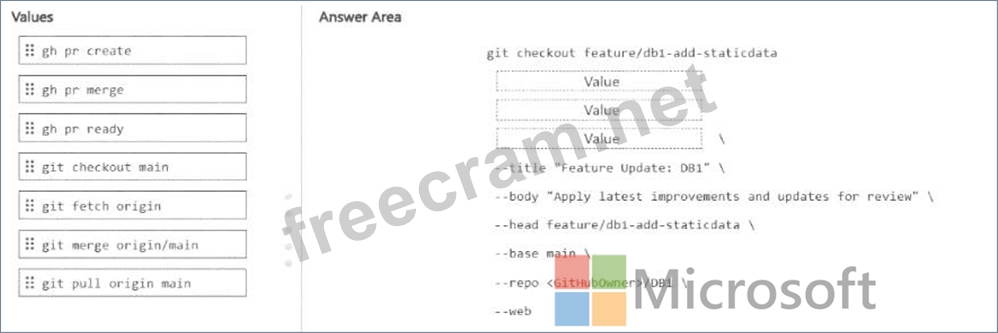
You need to update the local feature branch with the latest changes to main, and then create a pull request to merge the feature branch into main for review.
How should you complete the GitHub CLI script? To answer, drag the appropriate values to the correct targets. Each value may be used once, more than once, or not at all. You may need to drag the split bar between panes or scroll to view content.
NOTE: Each correct selection is worth one point.
You use a feature branch workflow to deploy changes to DB1
You need to update the local feature branch with the latest changes to main, and then create a pull request to merge the feature branch into main for review.
How should you complete the GitHub CLI script? To answer, drag the appropriate values to the correct targets. Each value may be used once, more than once, or not at all. You may need to drag the split bar between panes or scroll to view content.
NOTE: Each correct selection is worth one point.


