Valid AZ-104 Dumps shared by ExamDiscuss.com for Helping Passing AZ-104 Exam! ExamDiscuss.com now offer the newest AZ-104 exam dumps, the ExamDiscuss.com AZ-104 exam questions have been updated and answers have been corrected get the newest ExamDiscuss.com AZ-104 dumps with Test Engine here:
Access AZ-104 Dumps Premium Version
(428 Q&As Dumps, 35%OFF Special Discount Code: freecram)
<< Prev Question Next Question >>
Question 101/108
You have two Azure subscriptions named Sub1 and Sub2. Sub1 is in a management group named MG1. Sub2 is in a management group named MG2.
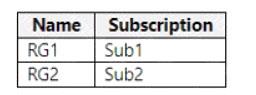
You have the resource groups shown in the following table.
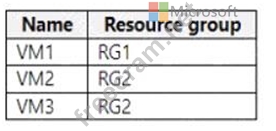
You have the virtual machines shown in the following table.
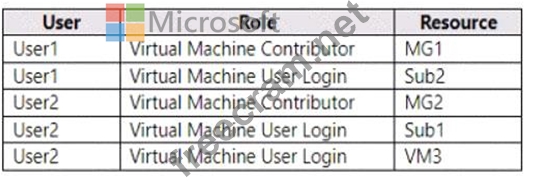
You assign roles to users as shown in the following table.
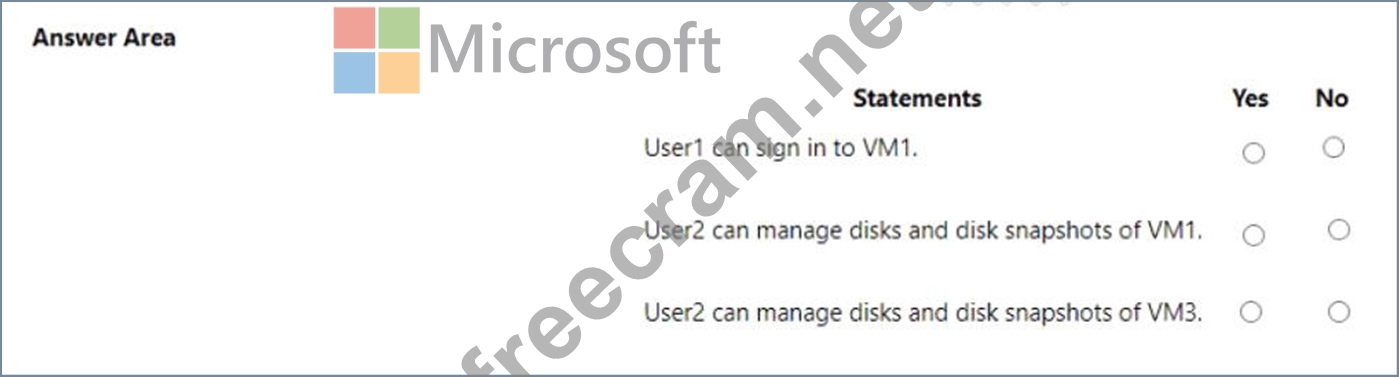
For each of the following statements, select Yes if the statement is true. Otherwise, select No.
NOTE: Each correct selection is worth one point.
You have the resource groups shown in the following table.
You have the virtual machines shown in the following table.
You assign roles to users as shown in the following table.
For each of the following statements, select Yes if the statement is true. Otherwise, select No.
NOTE: Each correct selection is worth one point.
Correct Answer:
Explanation
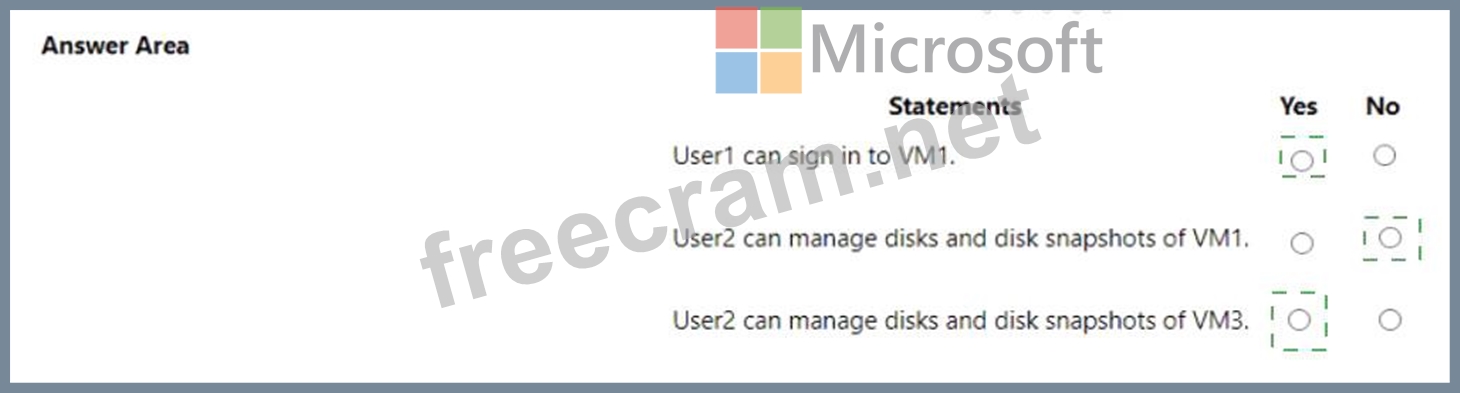
User 1 can sign in to VMI. = YES
Explanation: User 1 has the Virtual Machine User Login role assigned at the scope of RG1. This role allows the user to sign in to virtual machines in the resource group using Azure AD credentials. VMI is a virtual machine in RG1, so User 1 can sign in to it.
User 2 can manage disks and disk snapshots of VMI. = NO
Explanation: User 2 has the Disk Snapshot Contributor role assigned at the scope of MG2. This role allows the user to manage disk snapshots in the management group. However, VMI is not in MG2, but in RG1, which is in MG1. Therefore, User 2 does not have the permission to manage disks and disk snapshots of VMI.
User 2 can manage disks and disk snapshots of VM3. = YES
Explanation: User 2 has the Disk Snapshot Contributor role assigned at the scope of MG2. This role allows the user to manage disk snapshots in the management group. VM3 is a virtual machine in RG3, which is in Sub2, which is in MG2. Therefore, User 2 has the permission to manage disks and disk snapshots of VM3.


- Question List (108q)
- Question 1: You deploy an Azure Kubernetes Service (AKS) cluster that ha...
- Question 2: Note: This question is part of a series of questions that pr...
- Question 3: You have an Azure subscription that contains an Azure Direct...
- Question 4: You are evaluating the connectivity between the virtual mach...
- Question 5: You deploy Azure virtual machines to three Azure regions. Ea...
- Question 6: You have an Azure subscription that contains multiple virtua...
- 1 commentQuestion 7: You have an Azure subscription that contains the resources s...
- Question 8: Your company has an Azure subscription named Subscription1. ...
- 1 commentQuestion 9: You have an Azure subscription. You plan to deploy a storage...
- Question 10: Note: This question is part of a series of questions that pr...
- Question 11: You have an Azure Active Directory (Azure AD) tenant named c...
- Question 12: You need to add VM1 and VM2 to the backend poo! of LB1. What...
- Question 13: You need to ensure that you can grant Group4 Azure RBAC read...
- Question 14: You have an Azure subscription named Subscroption1. In Subsc...
- Question 15: You need to meet the technical requirement for VM4. What sho...
- 1 commentQuestion 16: You have the following custom role-based access control (RBA...
- Question 17: Which blade should you instruct the finance department audit...
- Question 18: You have an Azure subscription that contains the virtual mac...
- Question 19: You need to configure the alerts for VM1 and VM2 to meet the...
- Question 20: You need to prepare the environment to meet the authenticati...
- Question 21: You have an Azure Resource Manager that is used to deploy an...
- Question 22: You have an Azure subscription. You plan to migrate 50 virtu...
- Question 23: Peering for VNET2 is configured as shown in the following ex...
- Question 24: You are planning the move of App1 to Azure. You create a net...
- Question 25: You plan to deploy five virtual machines to a virtual networ...
- Question 26: You have an Azure subscription that contains The storage acc...
- 1 commentQuestion 27: You have an Azure subscription that contains the virtual net...
- Question 28: Which blade should you instruct the finance department audit...
- Question 29: You have a hybrid deployment of Azure AD that contains the u...
- Question 30: You have an Azure subscription that contains a virtual netwo...
- 1 commentQuestion 31: You have Azure subscriptions named Subscription1 and Subscri...
- Question 32: You have an Azure subscription that contains the resources i...
- Question 33: You have two Azure virtual machines named VM1 and VM2 that r...
- Question 34: You have an Azure subscription. You need to deploy a virtual...
- 2 commentQuestion 35: You have an Azure subscription that contains the hierarchy s...
- Question 36: You need to meet the user requirement for Admin1. What shoul...
- Question 37: You have an Azure DNS zone named adatum.com. You need to del...
- Question 38: You plan to create an Azure virtual machine named VM1 that w...
- 1 commentQuestion 39: You need to ensure that VM1 can communicate with VM4. The so...
- Question 40: You have an Azure subscription that contains a storage accou...
- Question 41: You need to define a custom domain name for Azure AD to supp...
- Question 42: You need to configure the Device settings to meet the techni...
- Question 43: You implement the planned changes for NSG1 and NSG2. For eac...
- Question 44: You have two subscriptions named Subscription1 and Subscript...
- 1 commentQuestion 45: You have two Azure virtual machines as shown in the followin...
- Question 46: You have an Azure subscription that contains a web app named...
- Question 47: Note: This question is part of a series of questions that pr...
- Question 48: You have an Azure subscription that contains a storage accou...
- Question 49: Your on-premises network contains an SMB share named Share1....
- Question 50: Note: This question is part of a series of questions that pr...
- Question 51: Note: This question is part of a series of questions that pr...
- Question 52: You have an Azure subscription named Subscription1 that has ...
- Question 53: You need to prepare the environment to meet the authenticati...
- Question 54: You have an Azure Active Directory (Azure AD) tenant named c...
- Question 55: You plan to create an Azure Storage account in the Azure reg...
- Question 56: You have an Azure subscription that contains the storage acc...
- Question 57: You have an Azure subscription named Subscription1 that cont...
- Question 58: You need to create container1 and share1. Which storage acco...
- Question 59: You plan to deploy an Azure container instance by using the ...
- Question 60: You have an Azure subscription that contains a virtual machi...
- Question 61: You have an Azure Storage account named storage1. You plan t...
- 1 commentQuestion 62: You have an Azure App Service app named WebApp1 that contain...
- Question 63: You have an Azure subscription named Sub1 that contains the ...
- Question 64: You have an Azure subscription that contains an Azure virtua...
- Question 65: You have an Azure subscription named Subscription1 that cont...
- Question 66: You need to recommend an identify solution that meets the te...
- Question 67: You have an Azure subscription that hat Traffic Analytics co...
- Question 68: Note: This question is part of a series of questions that pr...
- Question 69: You have an Azure subscription named Subscription1 that cont...
- Question 70: You have an Azure subscription that contains the public load...
- Question 71: You need to resolve the licensing issue before you attempt t...
- 1 commentQuestion 72: You have an Azure subscription that contains two virtual mac...
- Question 73: You have an Azure subscription that contains the storage acc...
- 1 commentQuestion 74: You have an Azure subscription that contains a storage accou...
- Question 75: You have an Azure virtual machine named VM1 that connects to...
- Question 76: You have an Azure subscription You plan to deploy a new stor...
- Question 77: You have an Azure subscription named Subscription1 that cont...
- Question 78: Note: This question is part of a series of questions that pr...
- 1 commentQuestion 79: You have an Azure Storage account named storage1 that contai...
- Question 80: You have an Azure subscription that contains an Azure Availa...
- Question 81: You discover that VM3 does NOT meet the technical requiremen...
- 1 commentQuestion 82: You have an Azure subscription that contains the resources s...
- Question 83: You have an Azure subscription named Subscription1. You have...
- Question 84: You need to ensure that User1 can create initiative definiti...
- Question 85: You have an Azure subscription named Subscription1 that is u...
- Question 86: You have an Azure subscription. You deploy a virtual machine...
- Question 87: You have an Azure subscription. The subscription contains vi...
- Question 88: You have an Azure subscription named Subscription1 that cont...
- Question 89: You have an Azure subscription that contains the Azure virtu...
- Question 90: You need to prepare the environment to ensure that the web a...
- Question 91: You need to implement Role1. Which command should you run be...
- Question 92: You have an Azure App Services web app named App1. You plan ...
- Question 93: Note: This question is part of a series of questions that pr...
- Question 94: You download an Azure Resource Manager template based on an ...
- Question 95: You have an Azure subscription that contains a virtual netwo...
- Question 96: Note: This question is part of a series of questions that pr...
- Question 97: You have an on-premises server that contains a folder named ...
- Question 98: You have an Azure subscription that contains the virtual net...
- Question 99: You have an Azure subscription that contains a storage accou...
- Question 100: You are evaluating the name resolution for the virtual machi...
- 1 commentQuestion 101: You have two Azure subscriptions named Sub1 and Sub2. Sub1 i...
- Question 102: You create an Azure Storage account named Contoso storage. Y...
- Question 103: You have an Azure Linux virtual machine that is protected by...
- Question 104: You have an Azure Storage account named storage1 that stores...
- Question 105: You have a virtual network named VNet1 that has the configur...
- Question 106: You have an Azure subscription that contains a storage accou...
- Question 107: You have an Azure subscription named Subscription1. Subscrip...
- Question 108: Note: This question is part of a series of questions that pr...

Recent Comments (The most recent comments are at the top.)
I think the answers should be: N N N
1. User1 can sign in to VM1
No
User1 is assigned as Virtual Machine Contributor in MG1.
And Virtual Machine Contributor can't log in to VM as a regular user.
2. User2 can manage disks and disk snapshots of VM1
No
Since User2 only has Virtual Machine User in Sub1, so he can log in to VM1 but can't manage disks or snapshots
3. User2 can manage disks and disk snapshots of VM3
No
Virtual Machine Contributor only has permission to manage disks, but not disk snapshots (Disk Snapshot Contributor permission)