<< Prev Question Next Question >>
Question 23/70
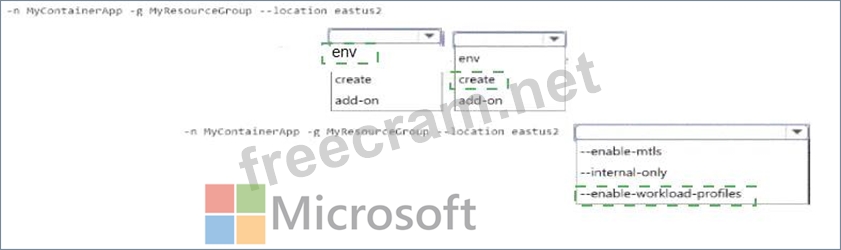
You are developing a microservices-based application that uses Azure Container Apps The application consists of several containerized services that handle tasks, such as processing orders, managing inventory, and generating reports.
You must secure the container apps. All apps must reside in the same virtual network, share the same Dapr configuration, and share the same logging location.
Apps must support the configuration of the amount of memory and compute resources available to containers.
You need to configure the Azure Container App
How should you complete the CLI command? To answer, select the appropriate options in the answer area.
NOTE: Each correct selection is worth one point.

You must secure the container apps. All apps must reside in the same virtual network, share the same Dapr configuration, and share the same logging location.
Apps must support the configuration of the amount of memory and compute resources available to containers.
You need to configure the Azure Container App
How should you complete the CLI command? To answer, select the appropriate options in the answer area.
NOTE: Each correct selection is worth one point.