Valid AI-200 Dumps shared by ExamDiscuss.com for Helping Passing AI-200 Exam! ExamDiscuss.com now offer the newest AI-200 exam dumps, the ExamDiscuss.com AI-200 exam questions have been updated and answers have been corrected get the newest ExamDiscuss.com AI-200 dumps with Test Engine here:
Access AI-200 Dumps Premium Version
(144 Q&As Dumps, 35%OFF Special Discount Code: freecram)
<< Prev Question Next Question >>
Question 54/70
You are creating an Azure Functions app project in your local development environment by using Azure Functions Core Tools.
You must create the project in either Python or C# without using a template.
You need to specify the command and its parameter required to create the Azure Functions app project.
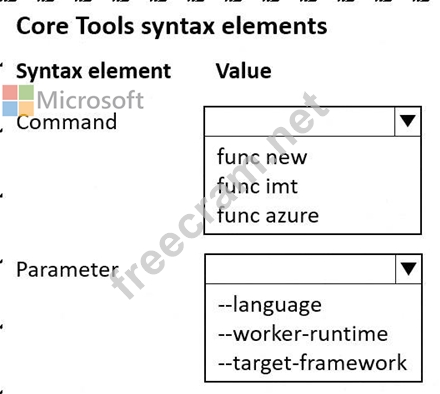
Which command and parameter should you specify? To answer, select the appropriate options in the answer area.
NOTE: Each correct selection is worth one point.
You must create the project in either Python or C# without using a template.
You need to specify the command and its parameter required to create the Azure Functions app project.
Which command and parameter should you specify? To answer, select the appropriate options in the answer area.
NOTE: Each correct selection is worth one point.
Correct Answer:

Explanation:
* Command: func init
* Parameter: --worker-runtime
Use func init to initialize a new Azure Functions project. Microsoft documents func init as the Azure Functions Core Tools command that creates the project structure in either the current directory or a specified project folder. The command is specifically intended for creating a new Functions application project, whereas func new creates an individual function from a template inside an already initialized project.
The --worker-runtime parameter specifies the language/runtime model for the Functions project. For example, Microsoft documents func init --worker-runtime python for Python projects and func init --worker- runtime dotnet-isolated for modern C#/.NET isolated-worker projects.
--language is not the primary parameter used to establish the Functions worker runtime in this scenario. It can be relevant to certain runtime combinations, such as Node.js, but the Core Tools project initialization examples for Python and C# rely on --worker-runtime. --target-framework is used to select a specific .NET target framework after the worker/runtime model is determined; it does not identify whether the project should be Python or C#.
Therefore, the correct combination is func init + --worker-runtime .
Study Guide references: Azure Functions Core Tools # func init; local Functions project creation; --worker- runtime; Python and .NET isolated worker projects.


- Question List (70q)
- Question 1: You are designing an Azure Function app that processes large...
- Question 2: You are provisioning and configuring a Service Bus processor...
- Question 3: A company uses Azure Monitor Application Insights to monitor...
- Question 4: You are evaluating a fine-tuned Azure OpenAI model against t...
- Question 5: You are designing an Azure Database for PostgreSQL table for...
- Question 6: You provisioned an Azure Cosmos DB for NoSQL account named a...
- Question 7: You are developing an Azure Functions app. All functions in ...
- Question 8: You have an existing AKS cluster and a container image store...
- Question 9: You plan to deploy an Azure Container Apps app named App1. A...
- Question 10: A company is implementing a publish-subscribe (Pub/Sub) mess...
- Question 11: You plan to deploy a container to an Azure App Service API a...
- Question 12: You are developing a .NET application that uses Azure Cosmos...
- Question 13: You need to add a custom voice that matches your company ' s...
- Question 14: You have an Azure web app that uses Azure Cosmos DB as a dat...
- Question 15: You are deploying a model in Azure AI Foundry and must ensur...
- Question 16: - You are preparing a container image for deployment to prod...
- Question 17: You have a newly provisioned Azure subscription. You are des...
- Question 18: You are implementing semantic retrieval in Redis. The soluti...
- Question 19: You are building a semantic search feature for a chatbot. Yo...
- Question 20: A semantic search application queries Azure Database for Pos...
- Question 21: You are developing a microservices-based application that us...
- Question 22: You are developing an Azure Function that calls external API...
- Question 23: You are developing a microservices-based application that us...
- Question 24: You are creating a hazard notification system that has a sin...
- Question 25: You are developing a .NET application that uses Azure Cosmos...
- Question 26: You must ensure an Azure OpenAI-powered application never ex...
- Question 27: You deploy an AI application across multiple Azure regions. ...
- Question 28: You are developing a Retrieval-Augmented Generation (RAG) so...
- Question 29: You maintain multiple versions of a container image in Azure...
- Question 30: You need to translate real-time spoken customer conversation...
- Question 31: You are training a Language Understanding model for a user s...
- Question 32: You are reviewing secret access patterns used by an AI appli...
- Question 33: You are developing a solution that will use a multi-partitio...
- Question 34: You need to deploy Azure Function resources and apps to meet...
- Question 35: You are implementing an Azure solution that uses Azure Cosmo...
- Question 36: You are developing a solution that uses several Azure Servic...
- Question 37: Your solution must answer questions about numeric data in la...
- Question 38: An AI application retrieves configuration values from App Co...
- Question 39: You deploy multiple instances of a change feed processor to ...
- Question 40: You need to configure a connection string for the partner-fa...
- Question 41: You need to configure vector embedding updates according to ...
- Question 42: You are developing a solution for a hospital to support the ...
- Question 43: An AI application uses a database. The database credential r...
- Question 44: You develop an ASP.NET Core app that uses Azure App Configur...
- Question 45: You have container source code stored in a Git repository. T...
- Question 46: You need to deploy a batch retraining workload. How should y...
- Question 47: You are implementing an application by using Azure Event Gri...
- Question 48: An ACA app processes messages from an Azure Storage queue. T...
- Question 49: You need to ensure that responses from your Azure OpenAI app...
- Question 50: You are developing an application that must extract structur...
- Question 51: You plan to create a Docker image that runs an ASP.NET Core ...
- Question 52: You deploy an API to Azure Container Apps. The solution must...
- Question 53: A Python API retrieves a document from Azure Database for Po...
- Question 54: You are creating an Azure Functions app project in your loca...
- Question 55: A large retail company operates online and physical stores. ...
- Question 56: You are designing Azure Functions for three different backen...
- Question 57: You deploy a private container image from Azure Container Re...
- Question 58: An Azure Service Bus queue processes AI enrichment jobs. Som...
- Question 59: You are designing a solution that will use two Azure Functio...
- Question 60: You need to configure the database resources for the Azure D...
- Question 61: You deploy a Linux container image to App Service. The conta...
- Question 62: A python web API uses OpenTelemetry for tracing. The call do...
- Question 63: You are implementing semantic retrieval for a chatbot. Embed...
- Question 64: You are developing an application that uses a Python API to ...
- Question 65: A recommendation system stores 1 million embeddings in Azure...
- Question 66: You need to configure image build automation based on the te...
- Question 67: You are implementing an application by using Azure Event Gri...
- Question 68: An AI platform uses App Configuration for feature flags and ...
- Question 69: An application performs similarity search across 5 million e...
- Question 70: You optimize an AI inference API that uses Redis caching. Yo...
