<< Prev Question Next Question >>
Question 6/40
A company uses an agent flow that occasionally requires human input before continuing execution.
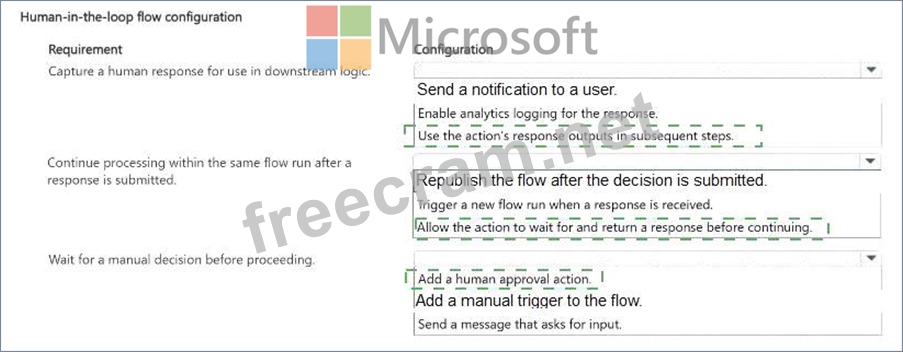
Some automated actions must pause until a human provides a decision or additional information. The flow must be configured to:
* Capture a human response for use in later steps.
* Continue processing within the same flow run after the response is submitted.
* Wait for a manual decision before proceeding.
You need to configure a human-in-the-loop agent flow.
Which setting should you configure for each requirement? To answer, select the appropriate options in the answer area.
NOTE: Each correct selection is worth one point.
Some automated actions must pause until a human provides a decision or additional information. The flow must be configured to:
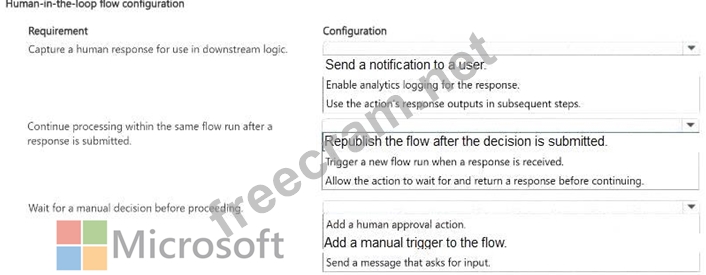
* Capture a human response for use in later steps.
* Continue processing within the same flow run after the response is submitted.
* Wait for a manual decision before proceeding.
You need to configure a human-in-the-loop agent flow.
Which setting should you configure for each requirement? To answer, select the appropriate options in the answer area.
NOTE: Each correct selection is worth one point.