Valid JN0-636 Dumps shared by EduDump.com for Helping Passing JN0-636 Exam! EduDump.com now offer the newest JN0-636 exam dumps, the EduDump.com JN0-636 exam questions have been updated and answers have been corrected get the newest EduDump.com JN0-636 dumps with Test Engine here:
Access JN0-636 Dumps Premium Version
(117 Q&As Dumps, 35%OFF Special Discount Code: freecram)
<< Prev Question Next Question >>
Question 4/55
Exhibit
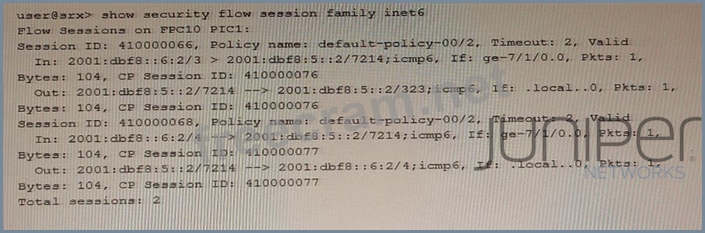
Which statement is true about the output shown in the exhibit?
Which statement is true about the output shown in the exhibit?
Correct Answer: C
The output shown in the exhibit is from the command "show security flow session family inet6". This command displays the IPv6 flow sessions on the SRX Series device. The output shows that there are two total sessions, both of which are valid. This means that the SRX Series device is configured with flow-based IPv6 forwarding options. Flow-based IPv6 forwarding options enable the device to process IPv6 packets using the security policies, NAT, and other security features. To configure flow-based IPv6 forwarding options, use the command set security forwarding-options family inet6 mode flow-based and reboot the device. Reference:
show security flow session family inet6
Configuring Flow-Based IPv6 Forwarding Options
SRX Getting Started - Configure IPv6
show security flow session family inet6
Configuring Flow-Based IPv6 Forwarding Options
SRX Getting Started - Configure IPv6


- Question List (55q)
- Question 1: You are asked to download and install the IPS signature data...
- Question 2: You are connecting two remote sites to your corporate headqu...
- Question 3: Regarding IPsec CoS-based VPNs, what is the number of IPsec ...
- Question 4: Exhibit (Exhibit) Which statement is true about the output s...
- Question 5: Exhibit (Exhibit) Referring to the exhibit, which two statem...
- Question 6: A company wants to paron their physical SRX series f...
- Question 7: Exhibit (Exhibit) Referring to the exhibit, which two statem...
- Question 8: Exhibit (Exhibit) Your company recently acquired a competito...
- Question 9: You have a webserver and a DNS server residing in the same i...
- Question 10: You have the NAT rule, shown in the exhibit, applied to allo...
- Question 11: You are configuring transparent mode on an SRX Series device...
- Question 12: You are not able to activate the SSH honeypot on the all-in-...
- Question 13: Your Source NAT implementation uses an address pool that con...
- Question 14: Your IPsec VPN configuration uses two CoS forwarding classes...
- Question 15: You are asked to detect domain generation algorithms Which t...
- Question 16: Exhibit (Exhibit) An administrator wants to configure an SRX...
- Question 17: Exhibit (Exhibit) Referring to the exhibit, which type of NA...
- Question 18: You are required to deploy a security policy on an SRX Serie...
- Question 19: Your company uses non-Juniper firewalls and you are asked to...
- Question 20: What are two valid modes for the Juniper ATP Appliance? (Cho...
- Question 21: Refer to the Exhibit. (Exhibit) Referring to the exhibit, wh...
- Question 22: In Juniper ATP Cloud, what are two different actions availab...
- Question 23: Exhibit (Exhibit) You have configured the SRX Series device ...
- Question 24: Exhibit (Exhibit) You are implementing filter-based forwardi...
- Question 25: Which two statements are correct regarding tenant systems on...
- Question 26: Which method does an SRX Series device in transparent mode u...
- Question 27: You configured a chassis cluster for high availability on an...
- Question 28: Exhibit (Exhibit) Referring to the exhibit, which three stat...
- Question 29: What is the purpose of the Switch Microservice of Policy Enf...
- Question 30: You want to configure a threat prevention policy. Which thre...
- Question 31: You are asked to look at a configuration that is designed to...
- Question 32: You want to enable inter-tenant communicaon with tenant ...
- Question 33: Exhibit (Exhibit) Which two statements are correct about the...
- Question 34: Exhibit. (Exhibit) Referring to the exhibit, which two state...
- Question 35: You are deploying a virtualization solution with the securit...
- Question 36: Which two security intelligence feed types are supported?...
- Question 37: The monitor traffic interface command is being used to captu...
- Question 38: You are asked to share threat intelligence from your environ...
- Question 39: Exhibit (Exhibit) Referring to the exhibit, which three prot...
- Question 40: Exhibit (Exhibit) You are not able to ping the default gatew...
- Question 41: Exhibit (Exhibit) Which two statements are correct about the...
- Question 42: According to the log shown in the exhibit, you notice the IP...
- Question 43: you configured a security policy permitting traffic from the...
- Question 44: Click the Exhibit button. (Exhibit) Which type of NAT is sho...
- Question 45: You are asked to configure a security policy on the SRX Seri...
- Question 46: your company wants to take your juniper ATP appliance into p...
- Question 47: You are asked to allocate security profile resources to the ...
- Question 48: Which two types of source NAT translations are supported in ...
- Question 49: You are required to secure a network against malware. You mu...
- Question 50: You are asked to deploy filter-based forwarding on your SRX ...
- Question 51: SRX Series device enrollment with Policy Enforcer fails To d...
- Question 52: Which two log format types are supported by the JATP applian...
- Question 53: which security feature bypasses routing or switching lookup?...
- Question 54: Exhibit (Exhibit) Referring to the exhibit, which two statem...
- Question 55: Exhibit (Exhibit) Referring to the exhibit, which two statem...
