Valid 400-101 Dumps shared by ExamDiscuss.com for Helping Passing 400-101 Exam! ExamDiscuss.com now offer the newest 400-101 exam dumps, the ExamDiscuss.com 400-101 exam questions have been updated and answers have been corrected get the newest ExamDiscuss.com 400-101 dumps with Test Engine here:
Access 400-101 Dumps Premium Version
(150 Q&As Dumps, 35%OFF Special Discount Code: freecram)
<< Prev Question Next Question >>
Question 430/464
Refer to the exhibit.
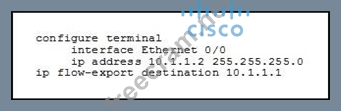
Which additional information must you specify in this configuration to capture NetFlow traffic?
Which additional information must you specify in this configuration to capture NetFlow traffic?
Correct Answer: A
Explanation/Reference:
Explanation:
Configuring NetFlow
Perform the following task to enable NetFlow on an interface.
SUMMARY STEPS
1. enable

2. configure terminal
3. interface type number
4. ip flow {ingress | egress}
5. exit
6. Repeat Steps 3 through 5 to enable NetFlow on other interfaces.
7. end
DETAILED STEPS
Command or Action
Purpose
Step 1
enable
Example:
Router> enable
Enables privileged EXEC mode.
Enter your password if prompted.
Step 2
configure terminal
Example:
Router# configure terminal
Enters global configuration mode.
Step 3
interface type number
Example:
Router(config)# interface ethernet 0/0
Specifies the interface that you want to enable NetFlow on and enters interface configuration mode.
Step 4
ip flow {ingress | egress}
Example:
Router(config-if)# ip flow ingress
Enables NetFlow on the interface.
ingress--Captures traffic that is being received by the interface
egress--Captures traffic that is being transmitted by the interface
Step 5
exit
Example:
Router(config-if)# exit
(Optional) Exits interface configuration mode and enters global configuration mode. Note You need to use this command only if you want to enable NetFlow on another interface.
Step 6
Repeat Steps 3 through 5 to enable NetFlow on other interfaces.
This step is optional.
Step 7
end
Example:
Router(config-if)# end
Exits the current configuration mode and returns to privileged EXEC mod ReferencE.
http://www.cisco.com/c/en/us/td/docs/ios/netflow/configuration/guide/12_2sr/nf_12_2sr_book/cfg_nflo w_data_expt.html
Explanation:
Configuring NetFlow
Perform the following task to enable NetFlow on an interface.
SUMMARY STEPS
1. enable
2. configure terminal
3. interface type number
4. ip flow {ingress | egress}
5. exit
6. Repeat Steps 3 through 5 to enable NetFlow on other interfaces.
7. end
DETAILED STEPS
Command or Action
Purpose
Step 1
enable
Example:
Router> enable
Enables privileged EXEC mode.
Enter your password if prompted.
Step 2
configure terminal
Example:
Router# configure terminal
Enters global configuration mode.
Step 3
interface type number
Example:
Router(config)# interface ethernet 0/0
Specifies the interface that you want to enable NetFlow on and enters interface configuration mode.
Step 4
ip flow {ingress | egress}
Example:
Router(config-if)# ip flow ingress
Enables NetFlow on the interface.
ingress--Captures traffic that is being received by the interface
egress--Captures traffic that is being transmitted by the interface
Step 5
exit
Example:
Router(config-if)# exit
(Optional) Exits interface configuration mode and enters global configuration mode. Note You need to use this command only if you want to enable NetFlow on another interface.
Step 6
Repeat Steps 3 through 5 to enable NetFlow on other interfaces.
This step is optional.
Step 7
end
Example:
Router(config-if)# end
Exits the current configuration mode and returns to privileged EXEC mod ReferencE.
http://www.cisco.com/c/en/us/td/docs/ios/netflow/configuration/guide/12_2sr/nf_12_2sr_book/cfg_nflo w_data_expt.html


- Question List (464q)
- Question 1: Which two statements about NPTv6 are true? (Choose two.)...
- Question 2: What is the most secure way to store ISAKMP/IPSec preshared ...
- Question 3: Which two statements about the command distance bgp 90 60 12...
- Question 4: Which two options are reasons for TCP starvation? (Choose tw...
- Question 5: Which three roles does a key server perform when used with G...
- Question 6: What does a nonzero forwarding address indicate in a type-5 ...
- Question 7: What is the hop limit for an MLD message?...
- Question 8: Refer to the exhibit. (Exhibit) What does "(received-only)" ...
- Question 9: If two OSPF type 3 prefixes have the same metric, and are wi...
- Question 10: Which field is specific to the OPSFv3 packet header, as oppo...
- Question 11: Refer to the exhibit. (Exhibit) R3 is failing to join the mu...
- Question 12: Refer to the exhibit. (Exhibit) Route exchange is failing on...
- Question 13: Which statement about shaped round robin queuing is true?...
- Question 14: Refer to the exhibit. (Exhibit) What is wrong with the confi...
- Question 15: Which two features are supported when Cisco HDLC is implemen...
- Question 16: Which three statements about EVCs are true? (Choose three.)...
- Question 17: Which BGP feature allows a router to maintain its current BG...
- Question 18: Refer to the exhibit. (Exhibit) If a port is configured as s...
- Question 19: Which two fields reside in the initial CHAP challenge packet...
- Question 20: Which two options are mandatory components of a multiprotoco...
- Question 21: Which two events occur when a packet is decapsulated in a GR...
- Question 22: A service provider is deploying L2VPN LAN services in its MP...
- Question 23: For which feature is the address family "rtfilter" used?...
- Question 24: Which option is the default maximum age of the MAC address t...
- Question 25: Refer to the exhibit. (Exhibit) How can Router X in AS70000 ...
- Question 26: Refer to the exhibit. (Exhibit) Which statement is true?...
- Question 27: Which statement describes the difference between a stub area...
- Question 28: Refer to the exhibit. (Exhibit) RIPv2 authentication is fail...
- Question 29: MPLS LDP IGP synchronization is configured on a link. The OS...
- Question 30: What can PfR passive monitoring mode measure for TCP flows?...
- Question 31: Which two hashing algorithms can be used when configuring SN...
- Question 32: Which protocol is the encapsulating protocol for mtrace pack...
- Question 33: Which three capabilities are provided by MLD snooping? (Choo...
- Question 34: Refer to the exhibit. (Exhibit) Which two statements about t...
- Question 35: Refer to the exhibit. (Exhibit) Why is the loopback 0 interf...
- Question 36: Refer to the exhibit. (Exhibit) What happens to packets when...
- Question 37: Which authentication method does OSPFv3 use to secure commun...
- Question 38: When you configure the ip pmtu command under an L2TPv3 pseud...
- Question 39: Refer to the exhibit. (Exhibit) Why is the prefix 1.1.1.1/32...
- Question 40: Which two statements describe characteristics of HDLC on Cis...
- Question 41: Refer to the exhibit. (Exhibit) Which two statements about t...
- Question 42: Which two tunneling techniques determine the IPv4 destinatio...
- Question 43: Which action does route poisoning take that serves as a loop...
- Question 44: For which three routing protocols can Cisco PfR provide dire...
- Question 45: Which option describes how a router responds if LSA throttli...
- Question 46: Which two pieces of information does RTCP use to inform endp...
- Question 47: Refer to the exhibit. (Exhibit) What is the polling frequenc...
- Question 48: Refer to the exhibit. (Exhibit) Which statement about the R1...
- Question 49: Refer to the exhibit. (Exhibit) While troubleshooting high C...
- Question 50: Refer to the exhibit. (Exhibit) If ISIS is configured utiliz...
- Question 51: Refer to the exhibit. (Exhibit) Which two statements are tru...
- Question 52: Refer to the exhibit. (Exhibit) You must complete the config...
- Question 53: Which two Cisco IOS XE commands can install a subpackage ont...
- Question 54: Refer to the exhibit. (Exhibit) Which statement is true abou...
- Question 55: What is a reason for 6PE to use two MPLS labels in the data ...
- Question 56: Which two routing protocols are not directly supported by Ci...
- Question 57: The session status for an IPsec tunnel with IPv6-in-IPv4 is ...
- Question 58: Which option is the Cisco recommended method to secure acces...
- Question 59: When deploying redundant route reflectors in BGP, which attr...
- Question 60: Which option describes how a VTPv3 device responds when it d...
- Question 61: Which statement about MSS is true?...
- Question 62: Which two statements are true about an EVPL? (Choose two.)...
- Question 63: Refer to the exhibit. (Exhibit) Which configuration is missi...
- Question 64: In which type of EIGRP configuration is EIGRP IPv6 VRF-Lite ...
- Question 65: Which two statements about private VLANs are true? (Choose t...
- Question 66: Which two values comprise the VPN ID for an MPLS VPN? (Choos...
- Question 67: Which regular expression will match prefixes from the AS 200...
- Question 68: Refer to the exhibit. R1 is configured as shown. R1 is able ...
- Question 69: Refer to the exhibit. (Exhibit) At which location will the b...
- Question 70: Which address is a MAC address that is mapped from an IPv6 a...
- Question 71: Which statement is true when using a VLAN ID from the extend...
- Question 72: Which two statements about the BGP community attribute are t...
- Question 73: Which statement is true about LLDP?...
- Question 74: Refer to the exhibit. (Exhibit) NHRP registration is failing...
- Question 75: Refer to the exhibit. (Exhibit) Why is the OSPF state in 2WA...
- Question 76: Refer to the exhibit. (Exhibit) What will be the extended co...
- Question 77: Which two statements are true about AAA? (Choose two.)...
- Question 78: Which two options are valid for the number of bytes in a BGP...
- Question 79: What are two reasons to define static peers in EIGRP? (Choos...
- Question 80: Which two statements about class maps are true? (Choose two....
- Question 81: Refer to the exhibit. (Exhibit) Which three statements about...
- Question 82: Refer to the exhibit. (Exhibit) Which two statements about t...
- Question 83: Refer to the exhibit. (Exhibit) If EIGRP is configured betwe...
- Question 84: Refer to the exhibit. (Exhibit) Which three statements about...
- Question 85: Which statement describes the function of the tracking objec...
- Question 86: Refer to the exhibit. (Exhibit) Which statement describes th...
- Question 87: Which problem can result when private AS numbers are include...
- Question 88: Which three options are sources from which a SPAN session ca...
- Question 89: Which three factors does Cisco PfR use to calculate the best...
- Question 90: Which two parameters does the Tunnel Mode Auto Selection fea...
- Question 91: Which option is an incorrect design consideration when deplo...
- Question 92: Refer to the exhibit. (Exhibit) How can the EIGRP hello and ...
- Question 93: Which statement about the BGP scope of the cost community is...
- Question 94: For which kind of MPLS deployment is the next-hop-self all k...
- Question 95: Refer to the exhibit. (Exhibit) What kind of load balancing ...
- Question 96: Which two statements about RSTP and MSTP BPDUs are true? (Ch...
- Question 97: Which two options describe two functions of a neighbor solic...
- Question 98: Refer to the exhibit. (Exhibit) Which statement about config...
- Question 99: Refer to the exhibit. (Exhibit) R2 is unable to access the 1...
- Question 100: Refer to the exhibit. (Exhibit) Which statement is true?...
- Question 101: Refer to the exhibit. (Exhibit) Which two options are possib...
- Question 102: Which three statements about RIP timers are true? (Choose th...
- Question 103: What is the main component of Unified MPLS?...
- Question 104: Refer to the exhibit. (Exhibit) Which three statements about...
- Question 105: Which technology can be affected when switches are used that...
- Question 106: Consider a network that mixes link bandwidths from 128 kb/s ...
- Question 107: Which three options are three of the default EIGRP administr...
- Question 108: Which timer expiration can lead to an EIGRP route becoming s...
- Question 109: Which three message types are used for prefix delegation in ...
- Question 110: Refer to the exhibit. (Exhibit) Which IP packets will be acc...
- Question 111: You are installing a new device to replace a device that fai...
- Question 112: Refer to the exhibit. (Exhibit) Which two statements about t...
- Question 113: What is the ip dhcp snooping information option command used...
- Question 114: Refer to the exhibit. (Exhibit) Which part of the joined gro...
- Question 115: How does EIGRP derive the metric for manual summary routes?...
- Question 116: Which option describes the effect of the OSPF default-inform...
- Question 117: Which configuration sets a minimum quality of service on a L...
- Question 118: Which TCP mechanism prevents the sender from sending data to...
- Question 119: Which statement describes the function of rekey messages?...
- Question 120: Refer to the exhibit. (Exhibit) Which feature can R1 use to ...
- Question 121: Refer to the exhibit. Which two statements are true? (Choose...
- Question 122: Which technology facilitates neighbor IP address resolution ...
- Question 123: What is a cause for unicast flooding?...
- Question 124: Which three statements about the designated router election ...
- Question 125: A company is multihomed to several Internet providers using ...
- Question 126: Refer to the exhibit. (Exhibit) For which reason could a BGP...
- Question 127: Which statement is true about MLD?...
- Question 128: Which two statements are true about an EPL? (Choose two.)...
- Question 129: Which two statements are true about RSTP? (Choose two.)...
- Question 130: Which two statements are true about OTV? (Choose two.)...
- Question 131: Refer to the exhibit. (Exhibit) Why is network 172.16.1.0/24...
- Question 132: Which three values can be used to tag external EIGRP routes?...
- Question 133: Refer to the exhibit. (Exhibit) Which statement about this C...
- Question 134: Which three steps are necessary to enable SSH? (Choose three...
- Question 135: Refer to the exhibit. (Exhibit) Which option is the result o...
- Question 136: Refer to the exhibit. (Exhibit) ASN 64523 has a multihomed B...
- Question 137: You are configuring Wireshark on a Cisco Catalyst 4500E Swit...
- Question 138: Refer to the exhibit. (Exhibit) You have just created a new ...
- Question 139: Which two statements about SoO checking in EIGRP OTP deploym...
- Question 140: Which three modes are valid for forming an EtherChannel betw...
- Question 141: Which three statements about Cisco HDLC are true? (Choose th...
- Question 142: Assume that the following MAC addresses are used for the bri...
- Question 143: By default, how does a GET VPN group member router handle tr...
- Question 144: Which two statements about Cisco Express Forwarding are true...
- Question 145: Refer to the exhibit. (Exhibit) What is a possible reason fo...
- Question 146: Which two statements about static NAT are true? (Choose two....
- Question 147: Which two features are used for inspection when IPv6 address...
- Question 148: A TCP/IP host is able to transmit small amounts of data (typ...
- Question 149: What are two advantages to using Asynchronous mode instead o...
- Question 150: Refer to the exhibit. (Exhibit) Routers R1, R2, and R3 are c...
- Question 151: Which two options are advantages of NetFlow version 9 over N...
- Question 152: Which three actions are required when configuring NAT-PT? (C...
- Question 153: Which statement about the function of poison reverse in EIGR...
- Question 154: Refer to the exhibit. (Exhibit) What will be the IP MTU of t...
- Question 155: Which two statements about IS-IS are true? (Choose two.)...
- Question 156: Which service is disabled by the no service tcp-small-server...
- Question 157: Which two options are required parts of an EEM policy? (Choo...
- Question 158: In GETVPN, which key is used to secure the control plane?...
- Question 159: Which mechanism does Cisco recommend for CE router interface...
- Question 160: Refer to the exhibit. (Exhibit) Which two statements are tru...
- Question 161: Which two options are ways in which an OSPFv3 router handles...
- Question 162: Refer to the exhibit. (Exhibit) Which two statements about t...
- Question 163: Refer to the exhibit. (Exhibit) Router 1 and Router 2 use HS...
- Question 164: Which three modes are valid PfR monitoring modes of operatio...
- Question 165: Which three statements about GET VPN are true? (Choose three...
- Question 166: Refer to the exhibit. (Exhibit) If the remaining configurati...
- Question 167: Which three features are considered part of the IPv6 first-h...
- Question 168: A GRE tunnel is down with the error message %TUN-5-RECURDOWN...
- Question 169: Which two options are two characteristics of the HSRPv6 prot...
- Question 170: Which three options are best practices for implementing a DM...
- Question 171: Refer to the exhibit. (Exhibit) Which AS paths are matched b...
- Question 172: Which OSPF feature supports LSA rate limiting in millisecond...
- Question 173: Refer to the exhibit. (Exhibit) Which two statements about t...
- Question 174: Refer to the exhibit. (Exhibit) Which two statements about t...
- Question 175: Which two statements about the C-bit and PW type are true? (...
- Question 176: Refer to the exhibit. (Exhibit) You have configured two rout...
- Question 177: Refer to the exhibit. (Exhibit) A spoke site that is connect...
- Question 178: Refer to the exhibit. (Exhibit) A PE router is configured wi...
- Question 179: Which two events occur when a packet is decapsulated in a GR...
- Question 180: In the DiffServ model, which class represents the lowest pri...
- Question 181: Which two features improve BGP convergence? (Choose two.)...
- Question 182: Refer to the exhibit. (Exhibit) Which two statements are tru...
- Question 183: Which two statements about the ipv6 ospf authentication comm...
- Question 184: Refer to the exhibit. (Exhibit) You discover that only 1.5 M...
- Question 185: Refer to the exhibit. (Exhibit) Routers R1 and R2 are config...
- Question 186: Which group of neighbors can be configured as a BGP peer gro...
- Question 187: Refer to the exhibit. (Exhibit) All of the routers on this n...
- Question 188: Which three statements about SPAN traffic monitoring are tru...
- Question 189: Refer to the exhibit. (Exhibit) If the downstream router has...
- Question 190: Which two statements about the function of a PIM designated ...
- Question 191: Which three statements are true about VSS? (Choose three.)...
- Question 192: Refer to the exhibit. (Exhibit) Which statement about the ro...
- Question 193: Which option is the most effective action to avoid packet lo...
- Question 194: Refer to the exhibit. (Exhibit) Which statement is true?...
- Question 195: Which two statements about the client-identifier in a DHCP p...
- Question 196: Refer to the exhibit. (Exhibit) Which statement is true?...
- Question 197: Which statement about a type 4 LSA in OSPF is true?...
- Question 198: Refer to the exhibit. (Exhibit) Which OSPFv3 routes will be ...
- Question 199: Which three features require Cisco Express Forwarding? (Choo...
- Question 200: Which three statements about the route preference of IS-IS a...
- Question 201: Which two statements about proxy ARP are true? (Choose two.)...
- Question 202: Which two statements about HSRP are true? (Choose two.)...
- Question 203: Which statement about VRRP is true?...
- Question 204: Where should the passive-interface command be used?...
- Question 205: In a network where a Layer 2 switch interconnects several ro...
- Question 206: Which two statements are true about IS-IS? (Choose two.)...
- Question 207: Which TCP feature allows a client to request a specific pack...
- Question 208: Refer to the exhibit. (Exhibit) This is the configuration of...
- Question 209: Refer to the exhibit. (Exhibit) Which statement describes wh...
- Question 210: Refer to the exhibit. All switches have default bridge prior...
- Question 211: Refer to the exhibit. (Exhibit) With these configurations fo...
- Question 212: Refer to the exhibit. (Exhibit) Which action must you take t...
- Question 213: According to RFC 4577, OSPF for BGP/MPLS IP VPNs, when must ...
- Question 214: Which statement is true about LLDP?...
- Question 215: Which three condition types can be monitored by crypto condi...
- Question 216: Which statement is true about trunking?...
- Question 217: Refer to the exhibit. (Exhibit) Which three statements about...
- Question 218: Refer to the exhibit. (Exhibit) Which technology can be used...
- Question 219: Which two statements are true about an EPL? (Choose two.)...
- Question 220: What is a key advantage of Cisco GET VPN over DMVPN?...
- Question 221: Which two statements about port ACLs are true? (Choose two.)...
- Question 222: Which three option are sub-subfields of the IPv4 Option Type...
- Question 223: Which type of OSPF packet is an OSPF link state update packe...
- Question 224: Which three statements about IS-IS are true? (Choose three.)...
- Question 225: Where is multicast traffic sent, when it is originated from ...
- Question 226: Which three statements are true about OSPFv3? (Choose three....
- Question 227: Refer to the exhibit. (Exhibit) Why is R2 unable to ping the...
- Question 228: Which congestion-avoidance or congestion-management techniqu...
- Question 229: Which three elements compose a network entity title? (Choose...
- Question 230: Which statement is true about VPLS?...
- Question 231: Refer to the exhibit. (Exhibit) Which two pieces of informat...
- Question 232: Which option describes the purpose of the PPP endpoint discr...
- Question 233: Which three statements about VTP version 3 are true? (Choose...
- Question 234: Which two statements about the default router settings for S...
- Question 235: Refer to the exhibit. (Exhibit) What is a reason for the RIB...
- Question 236: Refer to the exhibit. (Exhibit) Why is the neighbor relation...
- Question 237: Which IPv6 prefix is used for 6to4 tunnel addresses?...
- Question 238: In the DiffServ model, which class represents the highest pr...
- Question 239: Refer to the exhibit. (Exhibit) Why is the router out of mem...
- Question 240: Which two options are EIGRP route authentication encryption ...
- Question 241: In a nonbackbone OSPF area, all traffic that is destined to ...
- Question 242: Which three statements are functions that are performed by I...
- Question 243: Which two statements about MAC ACLs are true? (Choose two.)...
- Question 244: Refer to the exhibit. (Exhibit) Which action must you take t...
- Question 245: Which data plane protocol does EIGRP Over the Top use?...
- Question 246: Which two solutions can reduce UDP latency? (Choose two.)...
- Question 247: Which three statements describe the characteristics of a VPL...
- Question 248: For which two conditions is Cisco Express Forwarding recursi...
- Question 249: Packets from a router with policy-based routing configured a...
- Question 250: Which two OSPF LSA types are flooded within the originating ...
- Question 251: Refer to the exhibit. (Exhibit) ICMP Echo requests from host...
- Question 252: Refer to the exhibit. (Exhibit) Which technology does the us...
- Question 253: Refer to the exhibit. (Exhibit) Which two corrective actions...
- Question 254: When you migrate a network from PVST+ to rapid-PVST+, which ...
- Question 255: Which statement about the overload bit in IS-IS is true?...
- Question 256: Which two options are reasons to manipulate the delay metric...
- Question 257: Refer to the exhibit. (Exhibit) R3 prefers the path through ...
- Question 258: Which multicast protocol uses source trees and RPF?...
- Question 259: Which two statements about Inverse ARP are true? (Choose two...
- Question 260: Which neighbor-discovery message type is used to verify conn...
- Question 261: Refer to the exhibit. (Exhibit) Which statement is true abou...
- Question 262: Which two options are signaling protocols that are used in M...
- Question 263: Which command do you use to connect a dense-mode domain to a...
- Question 264: Refer to the exhibit. (Exhibit) Which device role could have...
- Question 265: Which statement about the feasible distance in EIGRP is true...
- Question 266: Which set of commands conditionally advertises 172.16.0.0/24...
- Question 267: Refer to the exhibit. (Exhibit) Which statement is true?...
- Question 268: You are implementing new addressing with EIGRP routing and m...
- Question 269: Refer to the exhibit. (Exhibit) AS #1 and AS #2 have multipl...
- Question 270: Which two statements about packet fragmentation on an IPv6 n...
- Question 271: Which two Cisco Express Forwarding tables are located in the...
- Question 272: Refer to the exhibit. (Exhibit) Which command is configured ...
- Question 273: Refer to the exhibit. (Exhibit) A Cisco Catalyst 6500 Series...
- Question 274: Which BGP aggregate address configuration advertises only th...
- Question 275: Which three TLVs does LLDP use to discover network devices? ...
- Question 276: When BGP route reflectors are used, which attribute ensures ...
- Question 277: How many bytes comprise the system ID within an IS-IS NET?...
- Question 278: Which two actions can you take to allow the greatest number ...
- Question 279: Which three statements about implementing a NAT application ...
- Question 280: In the DiffServ model, which class represents the lowest pri...
- Question 281: Refer to the exhibit. (Exhibit) If the traffic flowing from ...
- Question 282: Which statement about the feasibility condition in EIGRP is ...
- Question 283: Which two statements are true about a 6to4 tunnel connecting...
- Question 284: What is the destination multicast MAC address for BPDUs on t...
- Question 285: Which two statements about NetFlow are true? (Choose two.)...
- Question 286: Which statement about the NHRP network ID is true?...
- Question 287: Which two features does the show ipv6 snooping features comm...
- Question 288: Which statement about BGP and diverse path advertisement is ...
- Question 289: Which statement is true regarding UDLD and STP timers?...
- Question 290: Refer to the exhibit. (Exhibit) Which statement is true abou...
- Question 291: Which three components comprise the structure of a pseudowir...
- Question 292: What is the preferred method to improve neighbor loss detect...
- Question 293: What is the maximum number of secondary IP addresses that ca...
- Question 294: Which two methods change the IP MTU value for an interface? ...
- Question 295: Refer to the exhibit. (Exhibit) While configuring AAA with a...
- Question 296: Which statement describes the BGP add-path feature?...
- Question 297: Refer to the exhibit. (Exhibit) Which two statements about h...
- Question 298: Which two statements about the default SNMP configuration ar...
- Question 299: Refer to the exhibit. (Exhibit) R1, R2, and R3 have full net...
- Question 300: Which two statements about the protected ports feature and t...
- Question 301: Refer to the exhibit. (Exhibit) Why is the neighbor relation...
- Question 302: Refer to the exhibit. (Exhibit) Which statement is true abou...
- Question 303: Which flag in a configuration BPDU instructs all switches to...
- Question 304: Refer to the exhibit. (Exhibit) Which statement is true?...
- Question 305: Which technology is not necessary to set up a basic MPLS dom...
- Question 306: Refer to the exhibit. All switches have default bridge prior...
- Question 307: Which three statements are true about an EtherChannel? (Choo...
- Question 308: Like OSPFv2, OSPFv3 supports virtual links. Which two statem...
- Question 309: What is the cause of ignores and overruns on an interface, w...
- Question 310: Refer to the exhibit. (Exhibit) You are configuring the S1 s...
- Question 311: Which two statements are characteristics of Ethernet private...
- Question 312: Which two mechanisms can be used to eliminate Cisco Express ...
- Question 313: You are backing up a server with a 1 Gbps link and a latency...
- Question 314: Which type of EIGRP routes are summarized by the auto-summar...
- Question 315: Refer to the exhibit. (Exhibit) What is wrong with the confi...
- Question 316: NO: 14 Which two statements are true about unicast RPF? (Cho...
- Question 317: Which statement about the BGP originator ID is true?...
- Question 318: Refer to the exhibit. (Exhibit) R1 is performing mutual redi...
- Question 319: Refer to the exhibit. (Exhibit) Which option is the result o...
- Question 320: Which attribute is not part of the BGP extended community wh...
- Question 321: Which three types of traffic are allowed by IEEE 802.1X acce...
- Question 322: Refer to the exhibit. (Exhibit) What is the meaning of the a...
- Question 323: Refer to the exhibit. (Exhibit) Which option explains why th...
- Question 324: Which two options are interface requirements for turbo flood...
- Question 325: Refer to the exhibit. (Exhibit) Which two configuration chan...
- Question 326: Which three EIGRP packet types are valid? (Choose three.)...
- Question 327: Under Cisco IOS Software, which two features are supported i...
- Question 328: Refer to the exhibit. (Exhibit) What is the role of this mul...
- Question 329: Which two DHCP messages are always sent as broadcast? (Choos...
- Question 330: Refer to the exhibit. (Exhibit) Which two routes are include...
- Question 331: Which measure does ISIS use to avoid sending traffic with a ...
- Question 332: Refer to the exhibit. (Exhibit) Which LISP component do rout...
- Question 333: Refer to the exhibit. (Exhibit) Which two statements about t...
- Question 334: Refer to the exhibit. (Exhibit) Which statement about the R1...
- Question 335: Refer to the exhibit. (Exhibit) Router A and router B are ph...
- Question 336: Refer to the exhibit. (Exhibit) Which two statements about t...
- Question 337: Which two statements about the metric-style wide statement a...
- Question 338: Which two statements are true about IPv6 multicast? (Choose ...
- Question 339: Which BGP feature allows BGP routing tables to be refreshed ...
- Question 340: Which is the way to enable the control word in an L2 VPN dyn...
- Question 341: Refer to the exhibit. (Exhibit) Which statement is true?...
- Question 342: Which statement about Cisco Discovery Protocol is true?...
- Question 343: When EIGRP is used as the IPv4 PE-CE protocol, which two req...
- Question 344: Which VPN technology requires the use of an external key ser...
- Question 345: Refer to the exhibit. (Exhibit) The interface FastEthernet0/...
- Question 346: In which 802.1D port state are the root bridge, the root por...
- Question 347: Refer to the exhibit. (Exhibit) Which statement about this d...
- Question 348: Which two options are the two main phases of PPPoE? (Choose ...
- Question 349: Which three statements about bridge assurance are true? (Cho...
- Question 350: Refer to the exhibit. (Exhibit) How many EIGRP routes will a...
- Question 351: Refer to the exhibit. (Exhibit) Which route type is displaye...
- Question 352: Refer to the exhibit. (Exhibit) The device with this configu...
- Question 353: Refer to the exhibit. (Exhibit) All switches are Cisco switc...
- Question 354: Consider an OSPFv3 network with four parallel links between ...
- Question 355: Refer to the exhibit. (Exhibit) While troubleshooting high C...
- Question 356: What is the function of an EIGRP sequence TLV packet?...
- Question 357: Refer to the exhibit. All switches have default bridge prior...
- Question 358: Refer to the exhibit. (Exhibit) Assuming that the peer is co...
- Question 359: Refer to the exhibit. (Exhibit) Which statement about this I...
- Question 360: Which two services are used to transport Layer 2 frames acro...
- Question 361: Refer to the exhibit. (Exhibit) The spokes of the DMVPN with...
- Question 362: What are the three primary components of NetFlow? (Choose th...
- Question 363: Which two statements about logging are true? (Choose two.)...
- Question 364: Refer to the exhibit. (Exhibit) Which two possible network c...
- Question 365: Which two options are BGP attributes that are updated when r...
- Question 366: Which three protocols can use enhanced object tracking? (Cho...
- Question 367: Which BGP feature enables you to install a backup path in th...
- Question 368: Which two statements about the function of the stub feature ...
- Question 369: Two routers are trying to establish an OSPFv3 adjacency over...
- Question 370: Which statement about the OSPF Loop-Free Alternate feature i...
- Question 371: Which statement describes Cisco PfR link groups?...
- Question 372: You are configuring a DMVPN spoke to use IPsec over a physic...
- Question 373: What are the minimal configuration steps that are required t...
- Question 374: Refer to the exhibit. (Exhibit) Notice that debug ip bgp upd...
- Question 375: What is Nagle's algorithm used for?...
- Question 376: Which two Cisco IOS AAA features are available with the loca...
- Question 377: Refer to the exhibit. (Exhibit) Which additional configurati...
- Question 378: Which type of port would have root guard enabled on it?...
- Question 379: Refer to the exhibit. (Exhibit) When the link between RtrB a...
- Question 380: Which statement describes the native VLAN concept in an ISL ...
- Question 381: Which Carrier Ethernet service supports the multiplexing of ...
- Question 382: Which three statements are true about PPP CHAP authenticatio...
- Question 383: Which regular expression will match prefixes that originated...
- Question 384: Which statement is true about IGMP?...
- Question 385: Refer to the exhibit. (Exhibit) R1 is able to reach only som...
- Question 386: Which mechanism can be used on Layer 2 switches so that only...
- Question 387: How does having an EIGRP feasible successor speed up converg...
- Question 388: Refer to the exhibit. (Exhibit) R2 is mutually redistributin...
- Question 389: EIGRP allows configuration of multiple MD5 keys for packet a...
- Question 390: Refer to the exhibit. (Exhibit) Which VLANs are permitted to...
- Question 391: Refer to the exhibit. (Exhibit) What does the return code 3 ...
- Question 392: Refer to the exhibit. (Exhibit) Which statement is true?...
- Question 393: Which two configuration changes should be made on the OTP in...
- Question 394: Which two statements about 6VPE are true? (Choose two.)...
- Question 395: Which two options are benefits of EIGRP OTP? (Choose two.)...
- Question 396: Refer to the exhibit. (Exhibit) Which statement about the de...
- Question 397: In which two modes do IPv6-in-IPv4 tunnels operate? (Choose ...
- Question 398: Which statement about OTV is true?...
- Question 399: Which bit should be set in the link-state PDU of an IS-IS L1...
- Question 400: Which algorithm heavily influenced the algorithm used by pat...
- Question 401: On which three options can Cisco PfR base its traffic routin...
- Question 402: Which two packet types does an RTP session consist of? (Choo...
- Question 403: Refer to the exhibit. (Exhibit) Why is the router not access...
- Question 404: Which statement about the EIGRP RTO is true?...
- Question 405: Which term describes an EIGRP route that has feasible succes...
- Question 406: Which technology can create a filter for an embedded packet ...
- Question 407: Which two statements are true about VPLS? (Choose two.)...
- Question 408: Refer to the exhibit. (Exhibit) R1 and R2 have a working VRF...
- Question 409: Which statement is true when using a VLAN ID from the extend...
- Question 410: Which option describes the purpose of the leak-map keyword i...
- Question 411: Which three statements about IS-IS are true? (Choose three.)...
- Question 412: Which technology is an application of MSDP, and provides loa...
- Question 413: Which three statements about EIGRP and BFD are true? (Choose...
- Question 414: What is the range of addresses that is used for IPv4-mapped ...
- Question 415: Which IPv6 tunneling type establishes a permanent link betwe...
- Question 416: As a best practice, when a router is configured as an EIGRP ...
- Question 417: Refer to the exhibit. (Exhibit) What is a possible reason fo...
- Question 418: Refer to the exhibit. (Exhibit) Which statement is true?...
- Question 419: Which two functions are performed by the DR in OSPF? (Choose...
- Question 420: Which two technologies are supported by EIGRP? (Choose two.)...
- Question 421: Which statement is true about conditional advertisements?...
- Question 422: Which two statements about OSPF route types are true? (Choos...
- Question 423: What is the purpose of Route Target Constraint?...
- Question 424: How many hash buckets does Cisco Express Forwarding use for ...
- Question 425: Which statement is true comparing L2TPv3 to EoMPLS?...
- Question 426: What is a reason to use DHCPv6 on a network that uses SLAAC?...
- Question 427: What is the new designation for the MPLS EXP (experimental) ...
- Question 428: Refer to the exhibit. (Exhibit) If OSPF is implemented on th...
- Question 429: Which statement is true about Fast Link Pulses in Ethernet?...
- Question 430: Refer to the exhibit. (Exhibit) Which additional information...
- Question 431: Which command enables L2 QoS support in all VLANs (including...
- Question 432: Which two are features of DMVPN? (Choose two.)...
- Question 433: Which statement about the RPF interface in a BIDIR-PIM netwo...
- Question 434: Which statement about WAN Ethernet Services is true?...
- Question 435: Refer to the exhibit. (Exhibit) A tunnel is configured betwe...
- Question 436: Which technology can be used to prevent flooding of IPv6 mul...
- Question 437: On an MPLS L3VPN, which two tasks are performed by the PE ro...
- Question 438: Which statement about OSPF multiaccess segments is true?...
- Question 439: You are tasked with configuring a router on an OSPF domain t...
- Question 440: What is the goal of Unicast Reverse Path Forwarding?...
- Question 441: Which statement about passive interfaces is true?...
- Question 442: Refer to the exhibit. (Exhibit) Your network is suffering ex...
- Question 443: What is the destination MAC address of a BPDU frame?...
- Question 444: Which option describes a limitation of Embedded Packet Captu...
- Question 445: What is the purpose of EIGRP summary leaking?...
- Question 446: Refer to the exhibit. (Exhibit) Which statement is true?...
- Question 447: Refer to the exhibit. (Exhibit) If router R1 is functioning ...
- Question 448: Which two options are actions that EEM can perform after det...
- Question 449: In an STP domain, which two statements are true for a nonroo...
- Question 450: Refer to the exhibit. (Exhibit) You have configured two rout...
- Question 451: What is the function of the command ip pim autorp listener?...
- Question 452: Refer to the exhibit. (Exhibit) If the network switch is con...
- Question 453: Which IP SLA operation type is enhanced by the use of the IP...
- Question 454: Which two loop-prevention mechanisms are implemented in BGP?...
- Question 455: Refer to the exhibit. (Exhibit) Which action will solve the ...
- Question 456: With which ISs will an ISIS Level 1 IS exchange routing info...
- Question 457: Which three routing protocols utilize TLVs? (Choose three.)...
- Question 458: What is a disadvantage of using aggressive mode instead of m...
- Question 459: Which variable in an EEM applet is set when you use the sync...
- Question 460: Which three statements about implementing an application lay...
- Question 461: Which switching technology can be used to solve reliability ...
- Question 462: Refer to the exhibit. (Exhibit) Service provider SP 1 is run...
- Question 463: Refer to the exhibit. (Exhibit) Which statement about the de...
- Question 464: Which option is the default number of routes over which EIGR...
