- Home
- Cisco
- Implementing Cisco Service Provider Advanced Routing Solutions
- Cisco.300-510.v2026-01-11.q142
- Question 11
Valid 300-510 Dumps shared by EduDump.com for Helping Passing 300-510 Exam! EduDump.com now offer the newest 300-510 exam dumps, the EduDump.com 300-510 exam questions have been updated and answers have been corrected get the newest EduDump.com 300-510 dumps with Test Engine here:
Access 300-510 Dumps Premium Version
(304 Q&As Dumps, 35%OFF Special Discount Code: freecram)
<< Prev Question Next Question >>
Question 11/142
SIMULATION
Guidelines
This is a lab item in which tasks will be performed on virtual devices.
- Refer to the Tasks tab to view the tasks for this lab item.
- Refer to the Topology tab to access the device console(s) and perform the tasks.
- Console access is available for all required devices by clicking the device icon or using the tab(s) above the console window.
- All necessary preconfigurations have been applied.
- Do not change the enable password or hostname for any device.
- Save your configurations to NVRAM before moving to the next item.
- Click Next at the bottom of the screen to submit this lab and move to the next question.
- When Next is clicked, the lab closes and cannot be reopened.
Topology
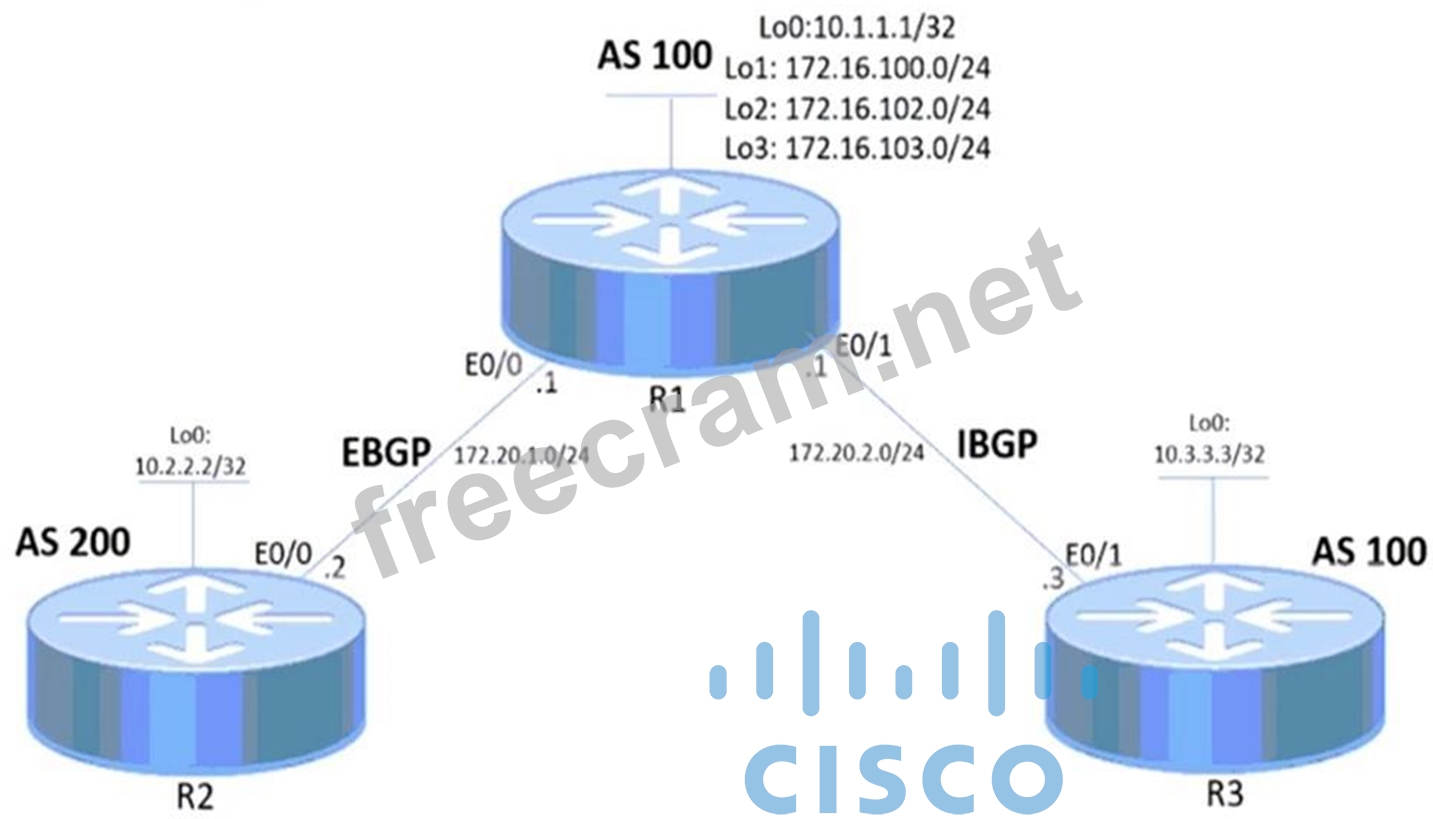
Tasks
Troubleshoot and configure BGP according to the topology to achieve these goals:
1. R1 and R3 establishes IBGP connectivity using Loopback addresses. The updates should come from Loopback0.
2. R3 should be able to ping loopback0 interface of R2. These changes must be accomplished through BGP.
3. R1 advertises only the summary route of 172.16.100.0/22 to R2 and R3.
Guidelines
This is a lab item in which tasks will be performed on virtual devices.
- Refer to the Tasks tab to view the tasks for this lab item.
- Refer to the Topology tab to access the device console(s) and perform the tasks.
- Console access is available for all required devices by clicking the device icon or using the tab(s) above the console window.
- All necessary preconfigurations have been applied.
- Do not change the enable password or hostname for any device.
- Save your configurations to NVRAM before moving to the next item.
- Click Next at the bottom of the screen to submit this lab and move to the next question.
- When Next is clicked, the lab closes and cannot be reopened.
Topology
Tasks
Troubleshoot and configure BGP according to the topology to achieve these goals:
1. R1 and R3 establishes IBGP connectivity using Loopback addresses. The updates should come from Loopback0.
2. R3 should be able to ping loopback0 interface of R2. These changes must be accomplished through BGP.
3. R1 advertises only the summary route of 172.16.100.0/22 to R2 and R3.
Correct Answer:
Step 1: R1 and R3 IBGP Connectivity Using Loopback0
To establish IBGP between R1 and R3 using their Loopback0 interfaces and ensure updates originate from Loopback0, configure the following:
On R1:
router bgp 100
neighbor 10.3.3.3 remote-as 100
neighbor 10.3.3.3 update-source Loopback0
On R3:
router bgp 100
neighbor 10.1.1.1 remote-as 100
neighbor 10.1.1.1 update-source Loopback0
neighbor update-source Loopback0 ensures that the BGP updates are sourced from Loopback0.
Verify the BGP peering: show ip bgp summary
Step 2: R3 Can Ping R2 Loopback0 (10.2.2.2/32)
To allow R3 to reach R2's Loopback0, configure R1 to redistribute the route from EBGP to IBGP.
Ensure next-hop resolution works correctly:
On R1:
router bgp 100
neighbor 10.3.3.3 next-hop-self
next-hop-self: This changes the next-hop IP to R1's IP when advertising routes to R3. This ensures R3 can resolve the next-hop for R2's loopback.
Step 3: R1 Advertises Only Summary Route (172.16.100.0/22)
To advertise only the summary route 172.16.100.0/22 to both R2 and R3:
On R1:
router bgp 100
network 172.16.100.0 mask 255.255.252.0
aggregate-address 172.16.100.0 255.255.252.0 summary-only
aggregate-address 172.16.100.0 255.255.252.0 summary-only advertises the summary route and suppresses more specific routes.
Verification Commands:
Verify IBGP Peering: show ip bgp summary
Verify BGP Advertisements: show ip bgp
Verify R3 Reachability to R2's Loopback: ping 10.2.2.2 source Loopback0 Verify the Summary Route Advertisement on R2 and R3: show ip bgp IBGP Peering: Use Loopback0 and configure update-source.
Next-Hop Resolution: next-hop-self ensures reachability for EBGP routes.
Summary Route: Use aggregate-address with summary-only to advertise a summary route.
To establish IBGP between R1 and R3 using their Loopback0 interfaces and ensure updates originate from Loopback0, configure the following:
On R1:
router bgp 100
neighbor 10.3.3.3 remote-as 100
neighbor 10.3.3.3 update-source Loopback0
On R3:
router bgp 100
neighbor 10.1.1.1 remote-as 100
neighbor 10.1.1.1 update-source Loopback0
neighbor update-source Loopback0 ensures that the BGP updates are sourced from Loopback0.
Verify the BGP peering: show ip bgp summary
Step 2: R3 Can Ping R2 Loopback0 (10.2.2.2/32)
To allow R3 to reach R2's Loopback0, configure R1 to redistribute the route from EBGP to IBGP.
Ensure next-hop resolution works correctly:
On R1:
router bgp 100
neighbor 10.3.3.3 next-hop-self
next-hop-self: This changes the next-hop IP to R1's IP when advertising routes to R3. This ensures R3 can resolve the next-hop for R2's loopback.
Step 3: R1 Advertises Only Summary Route (172.16.100.0/22)
To advertise only the summary route 172.16.100.0/22 to both R2 and R3:
On R1:
router bgp 100
network 172.16.100.0 mask 255.255.252.0
aggregate-address 172.16.100.0 255.255.252.0 summary-only
aggregate-address 172.16.100.0 255.255.252.0 summary-only advertises the summary route and suppresses more specific routes.
Verification Commands:
Verify IBGP Peering: show ip bgp summary
Verify BGP Advertisements: show ip bgp
Verify R3 Reachability to R2's Loopback: ping 10.2.2.2 source Loopback0 Verify the Summary Route Advertisement on R2 and R3: show ip bgp IBGP Peering: Use Loopback0 and configure update-source.
Next-Hop Resolution: next-hop-self ensures reachability for EBGP routes.
Summary Route: Use aggregate-address with summary-only to advertise a summary route.


- Question List (142q)
- Question 1: Which types of multicast distribution tree can PIM-SM use?...
- Question 2: What are two major differences between OSPF and IS-IS routin...
- Question 3: Refer to the exhibit. An engineer working for a private tele...
- Question 4: Refer to the exhibit. VPN users that are connected to PE rou...
- Question 5: Refer to the exhibit. An engineer is troubleshooting an OSPF...
- Question 6: SIMULATION Guidelines This is a lab item in which tasks will...
- Question 7: Which two routing protocols have extensions capable of runni...
- Question 8: What are two characteristics of BGP confederations? (Choose ...
- Question 9: Refer to the exhibit. An engineer is troubleshooting an issu...
- Question 10: Refer to the exhibit. There is a connectivity issue between ...
- Question 11: SIMULATION Guidelines This is a lab item in which tasks will...
- Question 12: Refer to the exhibit. An engineer at a large ISP is troubles...
- Question 13: Refer to the exhibit. A network engineer configured the redi...
- Question 14: Refer to the exhibit. An engineer has configured all routers...
- Question 15: Which task is performed when troubleshooting LDP?...
- Question 16: Which IPv6 prefix format defines the destination of a dynami...
- Question 17: How does SRv6 function on the control plane?...
- Question 18: Refer to the exhibit. A network operator is working to filte...
- Question 19: Refer to the exhibit. CE1 and CE2 use connectivity over the ...
- Question 20: Refer to the exhibit. A network engineer applied configurati...
- Question 21: Refer to the exhibit. Which duplicate configuration causes t...
- Question 22: Refer to the exhibit. Mid-sized company Z connected two bran...
- Question 23: An engineer is troubleshooting slow performance issues on a ...
- Question 24: You noticed a recent change to the BGP configuration on a PE...
- Question 25: What is a feature of SRGB label values?...
- Question 26: Refer to the exhibit. An engineer working on a client's netw...
- Question 27: Which lag command is used within route-map to redistribute r...
- Question 28: An ISP has an MPLS VPN-based network with 12 PE routers. How...
- Question 29: Refer to the exhibit. Which two commands must the engineer c...
- Question 30: Refer to the exhibit. A network consultant is updating the c...
- Question 31: Refer to the exhibit. EBGP peering is up between BGP AS 6510...
- Question 32: Refer to the exhibit. Users connected to an application on 1...
- Question 33: Refer to the exhibit. A customer reports that Host-1 is fail...
- Question 34: What is the purpose of the confederation identifier in a BGP...
- Question 35: What are two features of dual-stack? (Choose two.)...
- Question 36: Refer to the exhibit. Router R1 is configured to advertise o...
- Question 37: Refer to the exhibit. Traffic flow from router R1 to router ...
- Question 38: Refer to the exhibit. Which tree does multicast traffic foll...
- Question 39: Refer to the exhibit. An engineer is comparing these RPL and...
- Question 40: RPL has several fundamental capabilities that differ from th...
- Question 41: Refer to the exhibits. All links inside the network are conf...
- Question 42: After an engineer configures BGP in R1, it starts receiving ...
- Question 43: Refer to the exhibit. R3 is: - failing to accept multicast R...
- Question 44: Refer to the exhibit. The service provider environment has t...
- Question 45: An engineer with an employee ID: 4535:15:507 must implement ...
- Question 46: Which feature provides service independence in service provi...
- Question 47: SIMULATION Guidelines This is a lab item in which tasks will...
- Question 48: Refer to the exhibit. A network engineer at a large ISP with...
- Question 49: A network engineer is troubleshooting OSPF multiarea. Which ...
- Question 50: Refer to the exhibit. After maintenance to activate BGP neig...
- Question 51: Refer to the exhibit. A network engineer configured routers ...
- Question 52: Drag and Drop Question Drag and drop the attributes for the ...
- Question 53: A network engineer of an ISP using Cisco IOS XR routers want...
- Question 54: What is the purpose of ACL type prefix set entries in RPL pr...
- Question 55: What is the purpose of a BGP confederation?...
- Question 56: Drag and Drop Question Drag and drop the BGP attributes from...
- Question 57: Refer to the exhibit. The branch office in area 10 is connec...
- Question 58: Refer to the exhibit. There is a BGP traffic path issue betw...
- Question 59: Refer to the exhibit. P1 and PE3 Cisco IOS XR routers are di...
- Question 60: Refer to the exhibit. A network engineer commissioned Router...
- Question 61: Refer to the exhibit. A service provider has LDP and segment...
- Question 62: Refer to the exhibit. BGP is running on the network, and CE1...
- Question 63: Refer to the exhibit. The initial BGP configuration of the n...
- Question 64: Refer to the exhibit. The Cisco router has a single uplink t...
- Question 65: SIMULATION Guidelines This is a lab item in which tasks will...
- Question 66: Refer to the exhibit. After configuring IS-IS on routers R1 ...
- Question 67: Refer to the exhibit. While troubleshooting a networking iss...
- Question 68: What is enabled by default on Cisco IOS-XR routers and canno...
- Question 69: Drag and Drop Question Drag and drop the characteristics fro...
- Question 70: Refer to the exhibit. Company A established BGP sessions wit...
- Question 71: Refer to the exhibit. The extension header of the IPv6 heade...
- Question 72: Refer to the exhibit. Early in the growth cycle of a small e...
- Question 73: Refer to the exhibit. A network engineer has divided AS into...
- Question 74: Refer to the exhibit. An engineer is configuring service tra...
- Question 75: What is a key benefit of BGP dynamic update peer groups?...
- Question 76: A CRS router that runs Cisco IOS XR has dual routing process...
- Question 77: What are three requirements for a static IPv6-in-IPv4 tunnel...
- Question 78: Refer to the exhibit. MPLS traffic from 192.168.4.0/24 to 19...
- Question 79: SIMULATION Guidelines This is a lab item in which tasks will...
- Question 80: In a PIM-SM environment, which mechanism determines the traf...
- Question 81: SIMULATION Guidelines This is a lab item in which tasks will...
- Question 82: Refer to the exhibit. CE1 is the gateway router into the pro...
- Question 83: Refer to the exhibit. An engineer is troubleshooting an issu...
- Question 84: What is one of the configuration errors within an AS that ca...
- Question 85: Refer to the exhibit. The network is situated at different l...
- Question 86: Refer to the exhibit. An administrator is troubleshooting ne...
- Question 87: Refer to the exhibit. After these configurations were applie...
- Question 88: Refer to the exhibit. An engineer is troubleshooting a netwo...
- Question 89: Refer to the exhibit. Router 1 resides in a different data c...
- Question 90: Refer to the exhibit. Routers within the cluster are not rec...
- Question 91: Which expression, when used with the as-path-set command, ma...
- Question 92: A network consultant is troubleshooting IS-IS instances to i...
- Question 93: Refer to the exhibit. A network operator is troubleshooting ...
- Question 94: Drag and Drop Question Drag and drop the features about mult...
- Question 95: Refer to the exhibit. A service provider is running IS-IS in...
- Question 96: Refer to the exhibit. A network engineer implemented this se...
- Question 97: Refer to the exhibit. What is the relationship between Route...
- Question 98: Refer to the exhibit. A network engineer is configuring rout...
- Question 99: Which feature is used in multicast routing to prevent loops?...
- Question 100: Refer to the exhibit. An administrator is troubleshooting In...
- Question 101: How does the SRv6 IS-IS Flexible Algorithm function on the d...
- Question 102: Refer to the exhibit. Users at the branch office on R1 repor...
- Question 103: Refer to the exhibit. Routers RA and RB are IS-IS peers conf...
- Question 104: Refer to the exhibit. A network engineer just replaced five ...
- Question 105: Refer to the exhibit. Customer A is a small media company wi...
- Question 106: Refer to the exhibit. Unified MPLS is implemented on this ne...
- Question 107: Refer to the exhibit. ISP_A in AS 635 has four BGP neighbors...
- Question 108: Refer to the exhibit. A network operator wants to expand the...
- Question 109: What is one of the purposes of a default Multicast Distribut...
- Question 110: Refer to the exhibit. A network operator must stop 10.33.33....
- Question 111: Which multicast routing protocol is most optimal for support...
- Question 112: Which type of policy does an IPv6 ISATAP tunnel support?...
- Question 113: Refer to the exhibit. Routers R1, R2, R3, and R4 have been c...
- Question 114: Refer to the exhibit. A network engineer must enable segment...
- Question 115: Refer to the exhibit. After troubleshooting an OSPF adjacenc...
- Question 116: What is a key benefit of BGP dynamic update peer groups?...
- Question 117: Refer to the exhibit. A network engineer is investigating a ...
- Question 118: An engineer is working to implement segment routing protocol...
- Question 119: Refer to the exhibit. Which LSA type is indicated by this ro...
- Question 120: Refer to the exhibit. Routers R1 and R2 cannot form a neighb...
- Question 121: Refer to the exhibit. How are packets directed through the d...
- Question 122: Which output from the show isis interface command helps an e...
- Question 123: You have configured MSDP peering between two autonomous syst...
- Question 124: What can be used to determine a path from the head-end to a ...
- Question 125: Which two of the following are true regarding the BGP Prefix...
- Question 126: What is determined by running the same hash algorithm on all...
- Question 127: Refer to the exhibit. When implementing SRv6, which SID does...
- Question 128: Refer to the exhibit. After troubleshooting BGP traffic stee...
- Question 129: Refer to the exhibit. The service provider provides IPv6 con...
- Question 130: Refer to the exhibit. An engineer is troubleshooting IS-IS c...
- Question 131: Refer to the exhibit. OSPF is an interior routing protocol o...
- Question 132: Refer to the exhibit. A regional service provider provides c...
- Question 133: Refer to the exhibit. Router R1 is expected to receive route...
- Question 134: Refer to the exhibit. An engineer has successfully fixed BGP...
- Question 135: Refer to the exhibit. MPLS traffic from the packet core that...
- Question 136: A network engineer must configure a Cisco IOS XR router with...
- Question 137: Refer to the exhibit. Excessive routes are flooding from net...
- Question 138: While configuring Cisco NSF awareness, a network engineer en...
- Question 139: Refer to the exhibit. A network engineer installed a new rou...
- Question 140: Refer to the exhibit. Company_A hosts multiple online VoD pl...
- Question 141: Refer to the exhibit. A network operator is getting the rout...
- Question 142: Refer to the exhibit. CE1 and CE2 cannot communicate through...
