Valid 300-101 Dumps shared by ExamDiscuss.com for Helping Passing 300-101 Exam! ExamDiscuss.com now offer the newest 300-101 exam dumps, the ExamDiscuss.com 300-101 exam questions have been updated and answers have been corrected get the newest ExamDiscuss.com 300-101 dumps with Test Engine here:
Access 300-101 Dumps Premium Version
(225 Q&As Dumps, 35%OFF Special Discount Code: freecram)
<< Prev Question Next Question >>
Question 289/453
A diagram with 3 routers: HQ2 - HQ1 - BR1.
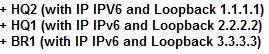
When you are running with EIGRP 100 on both routers, what command will you implement so that you will see the loopback IP of BR1 to be advertised at HQ2A diagram with 3 routers: HQ2 - HQ1 - BR1.
When you are running with EIGRP 100 on both routers, what command will you implement so that you will see the loopback IP of BR1 to be advertised at HQ2A diagram with 3 routers: HQ2 - HQ1 - BR1.
Correct Answer: B
Explanation/Reference:
Explanation:
B because BR1 is the router that has to advertise the loopback to his neighbors but if it is only receiving routes (no stub receive-only) It cannot advertise his loopback.
"eigrp stub recieve-only" will restrict the router from sharing any of its routes, meaning: connected, summary, redistributed or static routes to any other router in the EIGRP AS. Learned eigrp routes will never be shared as that would defeat the whole purpose of STUB.
There are other stub options that can be configured. The list looks like this:
- receive-only
- connected
- static
- summary
- redistribute
If you configure the receive-only option, you can't include any of the other options on the above list. If you just configure the router as a stub and don't specify any option, the default behavior is to share connected and summary routes. Some other caveats also arise when using these options. For instance, if you configure the static option, you still must allow EIGRP to share the static routes by issuing the redistribute static command in the config-router context, or the router won't share the routes. The same goes for the connected option. If a network statement does not include the connected routes you want to share, then you must issue the redistribute connected command. One last aspect which may seem counterintuitive is that if you use the redistribute option, you are permitting the router to share redistributed routes, but you still must actually redistribute the routes for them to be shared. If you choose the summary option, don't forget to either manually create summary routes or enable auto-summary.
Explanation:
B because BR1 is the router that has to advertise the loopback to his neighbors but if it is only receiving routes (no stub receive-only) It cannot advertise his loopback.
"eigrp stub recieve-only" will restrict the router from sharing any of its routes, meaning: connected, summary, redistributed or static routes to any other router in the EIGRP AS. Learned eigrp routes will never be shared as that would defeat the whole purpose of STUB.
There are other stub options that can be configured. The list looks like this:
- receive-only
- connected
- static
- summary
- redistribute
If you configure the receive-only option, you can't include any of the other options on the above list. If you just configure the router as a stub and don't specify any option, the default behavior is to share connected and summary routes. Some other caveats also arise when using these options. For instance, if you configure the static option, you still must allow EIGRP to share the static routes by issuing the redistribute static command in the config-router context, or the router won't share the routes. The same goes for the connected option. If a network statement does not include the connected routes you want to share, then you must issue the redistribute connected command. One last aspect which may seem counterintuitive is that if you use the redistribute option, you are permitting the router to share redistributed routes, but you still must actually redistribute the routes for them to be shared. If you choose the summary option, don't forget to either manually create summary routes or enable auto-summary.


- Question List (453q)
- Question 1: Refer to the exhibit. (Exhibit) A network engineer has confi...
- Question 2: Refer to the exhibit. Based upon the configuration, you need...
- Question 3: Refer to the exhibit. (Exhibit) On the basis of the partial ...
- Question 4: How can you mitigate fragmentation issues between endpoints ...
- Question 5: By default, which statement is correct regarding the redistr...
- Question 6: Refer to the exhibit. Which interoperability technique imple...
- Question 7: Which TCP port for BGP?
- Question 8: Which type of information is displayed when a network engine...
- Question 9: What are characteristics of PAP and CHAP? (Choose two.)...
- Question 10: What's the gateway in the global configuration? (Choose thre...
- 1 commentQuestion 11: What is the function of the snmp-server enable traps and snm...
- Question 12: Your company uses Voice over IP (VoIP). The system sends UDP...
- Question 13: A network engineer wants to notify a manager in the event th...
- Question 14: In which two areas does OSPF send a summary route by default...
- Question 15: Which protocols support DMVPN?
- Question 16: The Neighbor Discovery Protocol in ipv6 is replaced with whi...
- Question 17: Refer to Exhibit. R1 is unable to ping interface S0/0 of R2....
- Question 18: Which Cisco Express Forwarding components maintains Layer 2 ...
- Question 19: Refer to the exhibit. (Exhibit) The excerpt was taken from t...
- Question 20: Which two commands do you need to implement on a router to s...
- Question 21: Refer to the exhibit. (Exhibit) Routers R1 and R2 are IPv6 B...
- Question 22: Which two protocols can cause TCP starvation? (Choose two)...
- Question 23: Which IPv6 address correctly compresses the IPv6 unicast add...
- Question 24: (Exhibit) Refer to the exhibit. Which option prevents routin...
- Question 25: Which of the following SNMPv2 uses for authentication?...
- Question 26: Which two statements about the enable secret and enable pass...
- Question 27: A network engineer enables a trunk port and encounters the f...
- Question 28: Your Company trainee asks you, in the context of IPv6 and OS...
- Question 29: Which three benefits does the Cisco Easy Virtual Network pro...
- Question 30: Which two statements about Frame Relay Point-to-Point connec...
- Question 31: When policy-based routing (PBR) is being configured, which t...
- Question 32: What attribute is used to influce traffic form AS200 and AS3...
- Question 33: Which option is the first task that a device that is configu...
- Question 34: During which DMVPN phase is spoke-to-spoke communication ena...
- Question 35: Refer to the exhibit. After configuring GRE between two rout...
- Question 36: What does the number 16 in the following command represent? ...
- Question 37: Which type of NetFlow information is displayed when the show...
- Question 38: Which technology uses the many-to-one method of mapping IP a...
- Question 39: In a comparison of an IPv4 header with an IPv6 header, which...
- Question 40: Which three steps are most helpful in verifying proper route...
- Question 41: Refer to the exhibit. The network setup is running the RIP r...
- Question 42: Which two statements about AAA implementation in a Cisco rou...
- Question 43: In SNMP v3, which security level provides encryption of the ...
- Question 44: Refer to the following configuration command.: router(config...
- Question 45: Refer to the exhibit. Why is the 140.140.0.0 network not use...
- Question 46: Which type of BGP AS number is 64591?...
- Question 47: In which scenario can asymmetric routing occur?...
- Question 48: Which two debug commands can you use to view issues with CHA...
- Question 49: Which two OSPF network types can operate without a DR/BDR re...
- Question 50: Refer to the exhibit. EIGRP is configured on all routers in ...
- Question 51: Refer to the exhibit. (Exhibit) Which two statements are tru...
- Question 52: Your network consists of a large hub-and-spoke Frame Relay n...
- Question 53: Which CLI command can you enter to permit or deny IPv6 traff...
- Question 54: Which version or versions of NetFlow support MPLS?...
- Question 55: Which keyword of the aaa authentication ppp command supports...
- Question 56: A company has their headquarters located in a large city wit...
- Question 57: Which two types of threshold can you configure for tracking ...
- Question 58: How route tags can be set? (Choose two.)...
- Question 59: Which two routing protocols are supported by Easy Virtual Ne...
- Question 60: Refer to the exhibit. (Exhibit) Which statement is true?...
- Question 61: What is the purpose of configuring the router as a PPPoE cli...
- Question 62: Which two statements about IP access-lists are true? (Choose...
- Question 63: In IPv6, the interfaces running OSPF can be configured with ...
- Question 64: Which IPv6 address type is seen as the next-hop address in t...
- Question 65: Refer to the exhibit. You have correctly identified the insi...
- Question 66: Which routing protocol does DMVPN support? (Choose three.)...
- Question 67: Which statement about stateless and stateful IPv6 autoconfig...
- Question 68: Which three algorithms can you configure with the ip cef loa...
- Question 69: Where the output will be shown of the command debug conditio...
- Question 70: Which statement is a restriction for PPPoE configuration?...
- Question 71: Which traffic characteristic is the reason that UDP traffic ...
- Question 72: What is the output of the following command: show ip vrf...
- Question 73: What command would you use to set EIGRP routes to be priorit...
- Question 74: To enable BGP tunneling over an IPv4 backbone, the IPv4 addr...
- Question 75: Which statement describes the difference between a manually ...
- Question 76: If the total bandwidth is 64 kbps and the RTT is 3 seconds, ...
- Question 77: Which condition can cause unicast reverse path forwarding to...
- Question 78: Which command is used to check IP SLA when an interface is s...
- Question 79: Refer to the exhibit. (Exhibit) R1 and R2 belong to the RIP ...
- Question 80: Company has migrated to IPv6 in their network. Which three I...
- Question 81: What does the show ip route vrf CISCO command display?...
- Question 82: Refer to the exhibit. Which three NTP features can be deduce...
- Question 83: Which keyword of the aaa authentication ppp command applies ...
- Question 84: Which two statements about Frame Relay LMI autosense are tru...
- Question 85: What two situations could require the use of multiple routin...
- Question 86: A network engineer is asked to create an SNMP-enabled proact...
- Question 87: Which two options are causes of out-of-order packets? (Choos...
- Question 88: (Exhibit) Refer to the exhibit. A network engineer is workin...
- Question 89: An EUI-64-bit address is formed by adding a reserved 16-bit ...
- Question 90: Which command do you enter to display log messages with a ti...
- Question 91: A network engineer wants an NTP client to be able to update ...
- Question 92: Which two commands must you configure on a DMVPN hub to enab...
- Question 93: Technologies used in preparing Service Provider IPv6? (Choos...
- Question 94: What show command is used here? TCB Local Address Foreign Ad...
- Question 95: A network engineer configured an IOS router to send syslog m...
- Question 96: If routers in a single area are configured with the same pri...
- Question 97: What is the minimum privilege level to enter all commands in...
- Question 98: An engineer is using a network sniffer to troubleshoot DHCPv...
- Question 99: If you run the command auto-cost reference-bandwidth 10000 o...
- Question 100: Which three route filtering statements are true? (Choose thr...
- Question 101: (Exhibit) Which interoperability technique implemented on th...
- Question 102: (Exhibit) The configuration of R1 to R6 are posted below for...
- Question 103: The company network is in the process of migrating the IP ad...
- Question 104: (Exhibit) Based on the configuration information shown above...
- Question 105: Which cisco Express Forwarding component maintains Layer 2 a...
- Question 106: Refer to the exhibit. The command is executed while configur...
- Question 107: Which Cisco Express Forwarding table or tables hold forwardi...
- Question 108: Company plans on migrating their network from IPv4 to IPv6 i...
- Question 109: A network administrator notices that the BGP state drops and...
- Question 110: Which two statements about IP access lists are true? (Choose...
- Question 111: Which two address types are included in NAT? (Choose two.)...
- Question 112: A router was configured with the eigrp stub command. The rou...
- Question 113: What is supported RADIUS server? (Choose two)...
- Question 114: A network engineer is modifying RIPng timer configuration. W...
- Question 115: Which two statements indicate a valid association mode for N...
- Question 116: Which set of actions does a network engineer perform to set ...
- 1 commentQuestion 117: Which feature can mitigate fragmentation issues within netwo...
- Question 118: In which two ways can split horizon issues be overcome in a ...
- Question 119: Refer to the exhibit. (Exhibit) Why is the default route not...
- Question 120: What is the viable successor of NAT_PT?...
- Question 121: What number is a valid representation for the 200F:0000:AB00...
- Question 122: Router E is configured with the EIGRP variance 2 command. (E...
- Question 123: Which two statements about NTP stratum are true? (Choose two...
- Question 124: What are the default timers for RIPng?...
- Question 125: Which option is invalid when configuring Unicast Reverse Pat...
- Question 126: Refer to the exhibit. (Exhibit)...
- Question 127: (Exhibit) The configuration of R1 to R6 are posted below for...
- Question 128: Which option must be configured on a target device to use ti...
- Question 129: An IPv6 overlay tunnel is required to communicate with isola...
- Question 130: Into which two types of areas would an area border router (A...
- Question 131: Refer to the exhibit. The DHCP client is unable to receive a...
- Question 132: Which three protocols are supported with EVN?...
- Question 133: A network administrator is troubleshooting a DMVPN setup bet...
- Question 134: Which two features RADIUS combine? (Choose two)...
- Question 135: ALWAYS block the outbound web traffic on Saturdays and Sunda...
- Question 136: Which value does Frame Relay use to identify a connection be...
- Question 137: What is the optimal location from which to execute a debug c...
- Question 138: Refer to the exhibit. (Exhibit) The 6to4 overlay tunnel conf...
- Question 139: Which statement about conditional debugging is true?...
- Question 140: Refer to the following: Logging Console 7 Which option is on...
- Question 141: Which of the below mentioned conditions form a neighbor rela...
- Question 142: Which problem can be caused by latency on a UDP stream?...
- Question 143: A network engineer is considering enabling load balancing wi...
- Question 144: You need the IP address of the devices with which the router...
- Question 145: How to set up IP SLA to monitor jitter between the certain l...
- Question 146: A route map was configured and it was distributing OSPF exte...
- Question 147: What are two limitations when in use of NPTv6 for IPV6 vs IP...
- Question 148: Which location is traffic from IP SLAs?...
- Question 149: How to set up IP SLA to monitor Bandwidth between the certai...
- Question 150: Which statement is true?
- Question 151: During the IPv6 auto configuration, what does the device app...
- Question 152: Which two authentication protocols does PPP support? (Choose...
- Question 153: A Network engineer wants to configure logging to compile and...
- Question 154: What configurations does PPPoE allow? (Choose two.)...
- Question 155: Refer to the exhibit. (Exhibit) After configuring the routes...
- Question 156: Using new backup router in spite of faulty one in ospf domai...
- Question 157: Which of these can be used for IPv4 to IPv6 communication?...
- Question 158: Which two reductions are the correct reductions if the IPv6 ...
- Question 159: At which layer does Cisco Express Forwarding use adjacency t...
- Question 160: Which two options are requirements for EIGRP authentication?...
- Question 161: What is the IPv6 address FF02::2 used for? Select the best r...
- Question 162: Which two statements about NHRP in a DMVPN environment are t...
- Question 163: Case study. (Exhibit) Some notices from above configuration:...
- 1 commentQuestion 164: (Exhibit) Refer to the exhibit. All interfaces on each route...
- Question 165: Which interface type does a PPPoE client use to establish a ...
- Question 166: In which form does PAP Authentication send the user name and...
- Question 167: A network engineer is notified that several employees are ex...
- Question 168: (Exhibit) Refer to the exhibit showing complete command outp...
- Question 169: A network engineer is configuring a DHCP server to support a...
- Question 170: IP SLA network with a configuration snippet...
- Question 171: A network engineer enables OSPF on a Frame Relay WAN connect...
- Question 172: Refer to the exhibit. When summarizing these routes, which r...
- Question 173: Which statement about the NPTv6 protocol is true?...
- Question 174: Refer to the exhibit. (Exhibit) If this configuration is app...
- Question 175: Redistributing BGP into OSPF what statement is correct? rout...
- Question 176: Which command configures a PPPoE client and specifies dial-o...
- Question 177: In IPv6, SLAAC provides the ability to address a host based ...
- Question 178: Which command should be added to RTB under router bgp 100 to...
- Question 179: Which IP SLA operation requires Cisco endpoints?...
- Question 180: If you convert a WAN connection with OSPF from T1 to a Frame...
- Question 181: Which two commands must you configure in the calling router ...
- Question 182: How does an IOS router process a packet that should be switc...
- Question 183: NPTv6 restrictions? (Choose all that apply.)...
- Question 184: DHCPv6 can obtain configuration parameters from a server thr...
- Question 185: What is the international standard for transmitting data ove...
- Question 186: Which two among the following are used to indicate external ...
- Question 187: Which option is the minimum logging level that displays a lo...
- Question 188: Which statement is true about 6to4 tunneling?...
- Question 189: What is the administrative distance for EBGP?...
- Question 190: Which security feature can you enable to control access to t...
- Question 191: (Exhibit) All interfaces on each router are participating in...
- Question 192: Which three IP SLA performance metrics can you use to monito...
- Question 193: Which of the following NSAP addresses is a private, locally ...
- Question 194: (Exhibit) The configuration of R1 to R6 are posted below for...
- Question 195: An engineer is configuring a GRE tunnel interface in the def...
- Question 196: Which IPV6 address type does RIPng use for next-hop addresse...
- Question 197: (Exhibit) Which of the following is true?...
- Question 198: Congestion in the network. What is the effect on UDP?...
- Question 199: Refer to the exhibit. (Exhibit) A network engineer receives ...
- Question 200: (Exhibit) Refer to the exhibit. Router 1 cannot ping router ...
- Question 201: When use NPTv6 for IPV6 to IPV6 Address translation? (Choose...
- Question 202: Refer to the exhibit. (Exhibit) Which technology can be empl...
- Question 203: Refer to the exhibit. A network engineer executes the show i...
- Question 204: A network engineer wants to baseline the network to determin...
- Question 205: What are two rules for compacting IPv6 addresses? (Choose tw...
- Question 206: Which two statements about OSPF E1 routes are true? (Choose ...
- Question 207: What is IPv6 router solicitation?...
- Question 208: Which command must be globally enabled on a Cisco router to ...
- Question 209: What appears in the other router routing table? #loopback EI...
- Question 210: RIPng ____________.
- Question 211: (Exhibit) Refer to the exhibit. A network engineer has confi...
- Question 212: Study this exhibit below carefully. (Exhibit) What is the ef...
- Question 213: RIPv2 uses _____________.
- Question 214: Which two protocols are used to deploy a single Hub-DMVPN su...
- Question 215: To configure 6to4 tunneling on a dual-stack edge router. Whi...
- Question 216: Which command enables NAT-PT on an IPv6 interface?...
- Question 217: Which access list entry checks for an ACK within a packet TC...
- Question 218: A network engineer has configured a tracking object to monit...
- Question 219: Refer to the exhibit. (Exhibit) Which option represents the ...
- Question 220: What is show on logging console 7?...
- Question 221: Which of the following situations results in a routing loop?...
- Question 222: A network administrator is troubleshooting a redistribution ...
- Question 223: The OSPF which type of Router CAN BE aggregated? (Choose two...
- Question 224: Which three configuration parameters can a DHCPV6 pool conta...
- Question 225: Which two statements about NetFlow version 9 are true? (Choo...
- Question 226: (Exhibit) What is the correct configuration to enable router...
- Question 227: Which two technologies can encapsulate an IPv6 payload in an...
- Question 228: What are three IPv6 transition mechanisms? (Choose three)...
- Question 229: On which two types of interface is Frame Relay switching sup...
- Question 230: Which statement is true about the command ipv6 ospf 1 area 0...
- Question 231: Which next hop is going to be used for 172.17.1.0/24 ? (Exhi...
- Question 232: Which Easy Virtual Networking configuration component signif...
- Question 233: A network engineer is configuring the router for NetFlow dat...
- Question 234: By default, which type of IPv6 address is used to build the ...
- Question 235: After reviewing the EVN configuration, a network administrat...
- Question 236: Where are EIGRP successor routes stored?...
- Question 237: Which command prevents routers from sending routing updates ...
- Question 238: What command can you enter to configure an enable password t...
- Question 239: A network engineer receives reports about poor voice quality...
- Question 240: When a packet is denied by an IPv6 traffic filter, which add...
- Question 241: What does the command show ip vrf purple TOPOLOGY shows?...
- Question 242: A network engineer has set up VRF-Lite on two routers where ...
- Question 243: Other than a working EIGRP configuration, which option must ...
- Question 244: Refer to the exhibit. (Exhibit) How would you confirm on R1 ...
- Question 245: Which is an "invalid" option when redistributing from EIGRP ...
- Question 246: Which two OSPF router types can perform summarization in an ...
- Question 247: What are three reasons to control routing updates via route ...
- Question 248: A network engineer needs to verify IP SLA operations on an i...
- Question 249: A network administrator notices that the BGP state and logs ...
- Question 250: The Neighbor Discovery Protocol in IPv6 replaces which proto...
- Question 251: (Exhibit) Which of the following is true?...
- Question 252: OSPF chooses routes in which order, regardless of route's ad...
- Question 253: Which two statements about GRE tunnel interfaces are true? (...
- Question 254: A network engineer is trying to modify an existing active NA...
- Question 255: Which two statements are true of the OSPF link-state routing...
- Question 256: (Exhibit) How many times was SPF alrogithm executed on R4 fo...
- Question 257: Consider this scenario. TCP traffic is blocked on port 547 b...
- Question 258: Which three statements about IPv6 EIGRP are true? (Choose th...
- Question 259: What following parameters for the EIGRP authentication need ...
- Question 260: IP CEF load-sharing options (Choose three.)...
- Question 261: Which command instruct a PPPoE client to obtain its IP addre...
- Question 262: A network engineer wants to display the statistics of an act...
- Question 263: Which three statements are true when configuring redistribut...
- Question 264: Refer to the exhibit. Will redistributed RIP routes from OSP...
- Question 265: Which technology was originally developed for routers to han...
- Question 266: Which option describes why the EIGRP neighbors of this route...
- Question 267: Which two BGP neighbor states are valid? (Choose two.)...
- Question 268: What is used in EIGRP metric calculation?...
- Question 269: Which two protocols can be affected by MPP? (Choose two.)...
- Question 270: A network engineer executes the show ip sla statistics comma...
- Question 271: Which two statements are true about using IPv4 and IPv6 simu...
- Question 272: Which alerts will be seen on the console when running the co...
- Question 273: A network engineer is troubleshooting connectivity issues wi...
- 1 commentQuestion 274: To configure 6to4 on a dual-stack edge router. Which three o...
- Question 275: (Exhibit) A senior network engineer tries to propagate a sum...
- Question 276: Which outbound access list, applied to the WAN interface of ...
- 1 commentQuestion 277: An EUl-64 bit address is formed by adding a reserved 16-bit ...
- Question 278: Which two statements about uRPF are true?...
- Question 279: (Exhibit) Refer to the exhibit. A network engineer is troubl...
- Question 280: A policy needs to be implemented on Router B so that any tra...
- Question 281: After testing various dynamic IPv6 address assignment method...
- 1 commentQuestion 282: A network engineer is disabling split horizon on a point-to-...
- Question 283: Refer to the exhibit. What two statements are true? (Choose ...
- Question 284: You are configuring a Microsoft client to call a PPP server ...
- 1 commentQuestion 285: An EUI-64 bit address is formed by inserting which 16-bit va...
- Question 286: Which technology is required on an EVN trunk interface?...
- Question 287: Refer to the exhibit. Which option prevents routing updates ...
- Question 288: What is the benefit of deploying IPv6 in a campus network us...
- Question 289: A diagram with 3 routers: HQ2 - HQ1 - BR1. (Exhibit) When yo...
- Question 290: Which type of access list allows granular session filtering ...
- Question 291: Which two functionalities are specific to stateless NAT64? (...
- Question 292: Refer to the exhibit. (Exhibit) Which two statements are cor...
- Question 293: Which value does a Cisco router use as its default username ...
- Question 294: Which two configurations can a PPPoE client support? (Choose...
- Question 295: What is the effect of the following two commands? (Choose tw...
- Question 296: How does an EVN provide end-to-end virtualization and separa...
- Question 297: Refer to the exhibit. (Exhibit) Which option prevents routin...
- Question 298: Which authentication methods are EIGRP uses?...
- Question 299: What is the default maximum segment size for TCP traffic?...
- Question 300: Refer to the exhibit. (Exhibit) Which command allows hosts t...
- Question 301: Refer to the exhibit. (Exhibit) If R1 is configured for 6to4...
- Question 302: Which next hop is going to be used for 172.17.1.0/24 ? (Exhi...
- Question 303: (Exhibit) The configuration of R1 to R6 are posted below for...
- Question 304: Which SNMP verification command shows the encryption and aut...
- Question 305: Which value does a point-to-point GRE tunnel use to identify...
- Question 306: (Exhibit) Which of the following is true?...
- 1 commentQuestion 307: Which command do you enter to filter only routing updates th...
- Question 308: A network engineer applies the command ip tcp adjust-mss <...
- Question 309: A network engineer enables OSPF on a Frame Relay WAN connect...
- Question 310: Up/down interface... what is the log severity level?...
- Question 311: You get a call from a network administrator who tells you th...
- Question 312: Refer to the exhibit. (Exhibit) Which statement about the co...
- Question 313: Which two routers can do OSPF route summarization? (Choose t...
- Question 314: When implementing a 6to4 tunnel, which IPv6 address is the c...
- Question 315: Which two features does RADIUS combine? (Choose two.)...
- Question 316: (Exhibit) Refer to the exhibit. Which networking challenge i...
- Question 317: What does stateful NAT64 do that stateless NAT64 does not do...
- Question 318: (Exhibit) Refer to the exhibit. Router DHCP is configured to...
- Question 319: Refer to the exhibit. Which statement about the command outp...
- Question 320: Considering the IPv6 address independence requirement, which...
- Question 321: Which LSA type can exist only in an OSPF NSSA area?...
- Question 322: What are two BGP neigborship states? (Choose two.)...
- Question 323: Which two statements about 6to4 tunneling are accurate? (Cho...
- Question 324: Which two options are limitations of stateful NAT64? (Choose...
- Question 325: Which option is the minimum privilege level that allows the ...
- Question 326: How is network layer addressing accomplished in the OSI prot...
- Question 327: A network engineer executes the commands logging host 172.16...
- Question 328: Two aspects of an IP SLA operation can be tracked: state and...
- Question 329: Case study. (Exhibit) Some notices from above configuration:...
- Question 330: A network engineer wants to ensure an optimal end-to-end del...
- Question 331: What is the reasons of command: router(config)# snmp-server ...
- Question 332: Which Cisco VPN technology can use multipoint tunnel, result...
- Question 333: What type of IPv6 packet will indicate traffic from single h...
- Question 334: When ospf is forming an adjacency, in which state does the a...
- Question 335: What happens when an IPv6 enabled router running 6to4 must s...
- Question 336: The OSPF database of a router shows LSA types 1, 2, 3, and 7...
- Question 337: If you want to migrate an IS-IS network to another routing p...
- Question 338: Refer to exhibit. What is indicated by the show ip cef comma...
- 1 commentQuestion 339: What is the hop count that is advertised for an unreachable ...
- Question 340: Refer to the exhibit. (Exhibit) If this configuration is app...
- Question 341: Which the Valid range for BGP private ASNs?...
- Question 342: Which option is one way to mitigate asymmetric routing on an...
- Question 343: Refer to the exhibit. (Exhibit) For which reason is EIGRP fa...
- Question 344: A router receives a routing advertisement for the same prefi...
- Question 345: An engineer is asked to monitor the availability of the next...
- Question 346: What is the primary service that is provided when you implem...
- Question 347: Which value does GRE tunnel use to identify the end points o...
- Question 348: The following exhibit shows ipv6 route output. What would th...
- Question 349: Which two tasks does a DHCP relay agent perform? (Choose two...
- Question 350: An administrator types in the command router ospf 1 and rece...
- Question 351: Which PPP authentication method sends authentication informa...
- Question 352: Refer to the exhibit. (Exhibit) Which option prevents routin...
- Question 353: During a recent OSPF election among three routers, RTA was e...
- Question 354: Which type of handshake does CHAP authentication use to esta...
- Question 355: Which statement about dual stack is true?...
- Question 356: Which three statements about SNMP are true? (Choose three.)...
- Question 357: Router RTA is configured as follows: RTA (config)# router ri...
- Question 358: Refer to the exhibit. Based on the output from the show comm...
- Question 359: Refer to the exhibit. (Exhibit) Which statement about this n...
- Question 360: Choose the best IP SLA deployment cycle that reduce deployme...
- Question 361: Which DSL encapsulation method requires client software runn...
- Question 362: To configure SNMPv3 implementation, a network engineer is us...
- Question 363: A network engineer enables OSPF on a Frame Relay WAN connect...
- Question 364: Which NAT Command do you enter to disable dynamic ARP learni...
- Question 365: Under which circumstance will a branch ISR router contain in...
- Question 366: Which two attributes describe UDP within a TCP/IP network? (...
- Question 367: By default, which type of IPv6 address is used to build the ...
- Question 368: A route map uses an ACL, if the required matching is based o...
- Question 369: What is a valid ipv6 multicast address?...
- Question 370: Which three items can you track when you use two time stamps...
- Question 371: Case study. (Exhibit) Some notices from above configuration:...
- 1 commentQuestion 372: Which type of address does OSPFv3 use to form neighbor adjac...
- Question 373: What command allows permit or deny IPv6 traffic?...
- Question 374: (Exhibit) Which address would successfully summarize only th...
- Question 375: Refer to the exhibit. (Exhibit) Based on the output, which o...
- Question 376: What is the most security snmp version?...
- Question 377: (Exhibit) Refer to the exhibit. Which effect of this configu...
- Question 378: Which item does EIGRP IPv6 require before it can start runni...
- Question 379: Frame Relay LMI autosense. Which statements are true? (Choos...
- Question 380: Which two commands do you need to implement on the CALLING r...
- Question 381: Which ospf area prevent LSA type 4, LSA type 5? (Choose two....
- Question 382: Various employees in the same department report to the netwo...
- Question 383: A network administrator recently redistributed RIP routes in...
- Question 384: An EUl-64 bit address is formed by inserting which 16-bit va...
- Question 385: (Exhibit) The configuration of R1 to R6 are posted below for...
- 1 commentQuestion 386: What is true about EIGRP's redistributed static routes and s...
- Question 387: Which two statements about PAP and CHAP authentication are t...
- Question 388: Which three options are valid DHCPv6 functions? (Choose thre...
- Question 389: Which action can you take to mitigate unicast flooding in a ...
- Question 390: What from the following can cause an issue for uRPF?...
- Question 391: When an IPv6 enabled host boots, it sends a router solicitat...
- Question 392: Which type of IPv6 address is an identifier for a single int...
- Question 393: Refer to the following configuration command. router (config...
- Question 394: (Exhibit) Refer to the exhibit. After you apply this configu...
- Question 395: What is the purpose of the route-target command?...
- Question 396: Refer to the exhibit. Which command would verify if PBR reac...
- Question 397: What does a Cisco router use as default username for CHAP au...
- Question 398: You have a router has some interface configured with 10Gb in...
- Question 399: Which two options for authenticating a user who is attemptin...
- Question 400: Where must a network engineer configure the ip helper-addres...
- Question 401: Observe the exhibit. (Exhibit) If the command variance 3 wer...
- Question 402: An engineer executes the ip flow ingress command in interfac...
- Question 403: Which protocol is used in a DMVPN network to map physical IP...
- Question 404: Refer to the exhibit. Router 1 cannot ping router 2 via the ...
- Question 405: Which two options are components of a dual stack? (Choose tw...
- Question 406: What is the function of the snmp-server manager command?...
- 1 commentQuestion 407: Under which circumstance can TCP starvation occur?...
- Question 408: When a tunnel interface is configured in the default mode, w...
- Question 409: What is true about peer groups? (Choose two.)...
- Question 410: (Exhibit) Refer to exhibit. If the IGP in AS65000 is RIPv2, ...
- Question 411: Which IP SLA operation can be used to measure round-trip del...
- Question 412: A network engineer configures two connected routers to run O...
- Question 413: Engineer has to enable RIP on a link. Where he will issue th...
- 2 commentQuestion 414: Which DHCP options provides a TFTP server that Cisco phones ...
- Question 415: In a point-to-multipoint Frame Relay topology, which two met...
- Question 416: (Exhibit) Refer to exhibit. A network engineer is unable to ...
- Question 417: A network engineer is investigating the cause of a service d...
- Question 418: Which functionality is required within an IP router that is ...
- Question 419: Which value does a point-to-point GRE tunnel use to identity...
- Question 420: Which three statements about configuring OSPF in a IPv6 netw...
- Question 421: Which technology does Easy Virtual Network use?...
- Question 422: A network engineer executes the show ip cache flow command. ...
- Question 423: Refer to the exhibit. Which statement about the configuratio...
- Question 424: Which statement describes what this command accomplishes whe...
- 1 commentQuestion 425: Which two types of authentication does EIGRP offer? (Choose ...
- Question 426: Stateful NAT64 specifications? (Choose three.)...
- Question 427: A network engineer executes the command show ip eigrp vrf pu...
- Question 428: Which Cisco VPN technology uses AAA to implement group polic...
- Question 429: How should a router that is being used in a Frame Relay netw...
- Question 430: Which two statements about configuring Frame Relay point-to-...
- Question 431: Which two statements about NTP operation are true? (Choose t...
- Question 432: In which two ways can NetFlow data be viewed? (Choose two.)...
- 1 commentQuestion 433: Which BGP option is required when load sharing over multiple...
- Question 434: Which parameter in an SNMPv3 configuration offers authentica...
- 1 commentQuestion 435: What would you configure on SNMPv3 to allow authentication?...
- Question 436: Which two statements about route targets that are configured...
- Question 437: You have a router that has some interfaces configured with 1...
- 1 commentQuestion 438: What would you configure on SNMPv3 to allow authentication a...
- Question 439: Where can NetFlow export data for long term storage and anal...
- Question 440: What is the default value of TCP maximum segment size?...
- Question 441: Which type of message does a device configured with the eigr...
- Question 442: In which form does PAP authentication send the username and ...
- Question 443: Which statement about local policy routing is true?...
- Question 444: Which option can you use to monitor voice traffic when confi...
- Question 445: Which are new LSA types in OSPF for IPv6 (OSPFv3)? (Choose t...
- Question 446: Which command will display all the EIGRP feasible successor ...
- Question 447: Which routing protocol will continue to receive and process ...
- Question 448: Given ((diagram with R1 SLA config)) with configuration writ...
- Question 449: Which three NTP operating modes must the trusted-Key command...
- Question 450: A router is configured for redistribution to advertise EIGRP...
- Question 451: Refer to the exhibit. In the network diagram, Area 1 is defi...
- Question 452: (Exhibit) A network engineer is working on the network topol...
- Question 453: A network administrator creates a static route that points d...
