- Home
- Cisco
- Interconnecting Cisco Networking Devices Part 2 (ICND2 v3.0)
- Cisco.200-105.v2018-06-25.q97
- Question 78
Valid 200-105 Dumps shared by EduDump.com for Helping Passing 200-105 Exam! EduDump.com now offer the newest 200-105 exam dumps, the EduDump.com 200-105 exam questions have been updated and answers have been corrected get the newest EduDump.com 200-105 dumps with Test Engine here:
Access 200-105 Dumps Premium Version
(775 Q&As Dumps, 35%OFF Special Discount Code: freecram)
<< Prev Question Next Question >>
Question 78/97
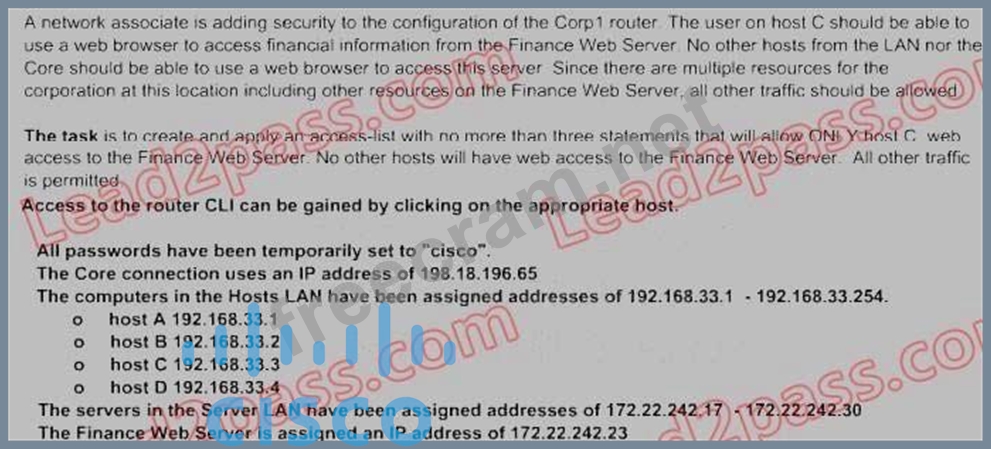
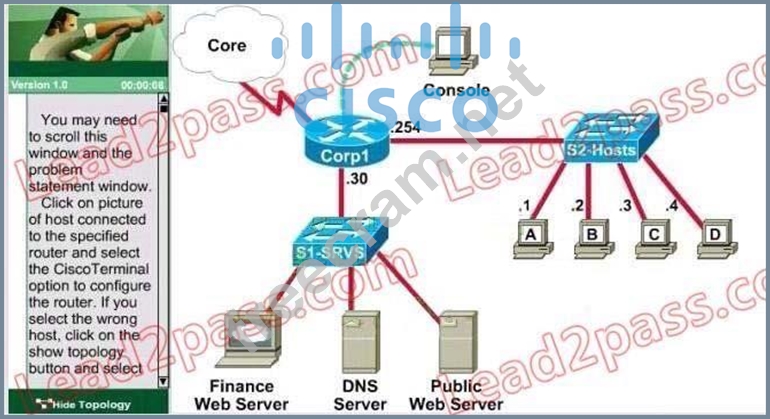
Lab - Access List Simulation
Correct Answer:
Corp1#configure terminal
Corp1(config)#interface s1/0
Corp1(config-if)#ip add 198.18.196.65 255.255.255.252
Corp1(config-if)#end
Corp1>enable
Corp1#show running-config
Corp1#configure terminal
Corp1(config)#access-list 100 permit tcp host 192.168.33.3 host 172.22.242.23 eq 80 Corp1(config)#access-list 100 deny tcp any host 172.22.242.23 eq 80 Corp1(config)#access-list 100 permit ip any any Corp1(config)#interface fa0/1 Corp1(config-if)#ip access-group 100 out
Corp1(config-if)#end
Corp1#copy running-config startup-config
Explanation :
Select the console on Corp1 router
Configuring ACL
Corp1>enable
Corp1#configure terminal
Comment: To permit only Host C (192. 168. 33. 3){source addr} to access finance server address (172.
22.242. 23){destination addr} on port number 80 (web)
Corp1(config)# access-list 100 permit tcp host 192.168.33.3 host 172.22.242.23 eq 80 Comment: To deny any source to access finance server address (172. 22. 242. 23) {destination addr} on port number 80 (web) Corp1(config)# access-list 100 deny tcp any host 172.22.242.23 eq 80 Comment: To permit ip protocol from any source to access any destination because of the implicit deny any any statement at the end of ACL.
Corp1(config)# access-list 100 permit ip any any
Applying the ACL on the Interface
Comment: Check show ip interface brief command to identify the interface type and number by checking the IP address configured.
Corp1(config)#interface fa 0/1
If the ip address configured already is incorrect as well as the subnet mask. this should be corrected in order ACL to work type this commands at interface mode :
no ip address 192. x. x. x 255. x. x. x (removes incorrect configured ip address and subnet mask) Configure Correct IP Address and subnet mask :
ip address 172. 22. 242. 30 255. 255. 255. 240 ( range of address specified going to server is given as
172.
22. 242. 17 172. 22. 242. 30 )
Comment: Place the ACL to check for packets going outside the interface towards the finance web server.
Corp1(config-if)#ip access-group 100 out
Corp1(config-if)#end
Important: To save your running config to startup before exit.
Corp1#copy running-config startup-config
Verifying the Configuration :
Step1: Show ip interface brief command identifies the interface on which to apply access list . Step2: Click on each host A,B,C & D . Host opens a web browser page , Select address box of the web browser and type the ip address of finance web server(172. 22. 242. 23) to test whether it permits /deny access to the finance web Server.
Corp1(config)#interface s1/0
Corp1(config-if)#ip add 198.18.196.65 255.255.255.252
Corp1(config-if)#end
Corp1>enable
Corp1#show running-config
Corp1#configure terminal
Corp1(config)#access-list 100 permit tcp host 192.168.33.3 host 172.22.242.23 eq 80 Corp1(config)#access-list 100 deny tcp any host 172.22.242.23 eq 80 Corp1(config)#access-list 100 permit ip any any Corp1(config)#interface fa0/1 Corp1(config-if)#ip access-group 100 out
Corp1(config-if)#end
Corp1#copy running-config startup-config
Explanation :
Select the console on Corp1 router
Configuring ACL
Corp1>enable
Corp1#configure terminal
Comment: To permit only Host C (192. 168. 33. 3){source addr} to access finance server address (172.
22.242. 23){destination addr} on port number 80 (web)
Corp1(config)# access-list 100 permit tcp host 192.168.33.3 host 172.22.242.23 eq 80 Comment: To deny any source to access finance server address (172. 22. 242. 23) {destination addr} on port number 80 (web) Corp1(config)# access-list 100 deny tcp any host 172.22.242.23 eq 80 Comment: To permit ip protocol from any source to access any destination because of the implicit deny any any statement at the end of ACL.
Corp1(config)# access-list 100 permit ip any any
Applying the ACL on the Interface
Comment: Check show ip interface brief command to identify the interface type and number by checking the IP address configured.
Corp1(config)#interface fa 0/1
If the ip address configured already is incorrect as well as the subnet mask. this should be corrected in order ACL to work type this commands at interface mode :
no ip address 192. x. x. x 255. x. x. x (removes incorrect configured ip address and subnet mask) Configure Correct IP Address and subnet mask :
ip address 172. 22. 242. 30 255. 255. 255. 240 ( range of address specified going to server is given as
172.
22. 242. 17 172. 22. 242. 30 )
Comment: Place the ACL to check for packets going outside the interface towards the finance web server.
Corp1(config-if)#ip access-group 100 out
Corp1(config-if)#end
Important: To save your running config to startup before exit.
Corp1#copy running-config startup-config
Verifying the Configuration :
Step1: Show ip interface brief command identifies the interface on which to apply access list . Step2: Click on each host A,B,C & D . Host opens a web browser page , Select address box of the web browser and type the ip address of finance web server(172. 22. 242. 23) to test whether it permits /deny access to the finance web Server.


- Question List (97q)
- Question 1: What does the frame-relay interface-dlci command configure?...
- Question 2: The following configuration is applied to a Layer 2 Switch: ...
- Question 3: What occurs on a Frame Relay network when the CIR is exceede...
- Question 4: Which command allows you to verify the encapsulation type (C...
- Question 5: Which two statements about using the CHAP authentication mec...
- Question 6: Hotspot Question (Exhibit) If required, what password should...
- Question 7: Which protocol is an open standard protocol framework that i...
- Question 8: The command show frame-relay map gives the following output:...
- Question 9: Refer to the exhibit. Why has this switch not been elected t...
- Question 10: Hotspot Question (Exhibit) To allow or prevent load balancin...
- Question 11: Which two statements describe the process identifier that is...
- Question 12: The output of the show frame-relay pvc command shows "PVC ST...
- Question 13: Which command enables IPv6 forwarding on a Cisco router?...
- Question 14: Which two statistics appear in show frame-relay map output? ...
- Question 15: Lab - OSPF (Exhibit)
- Question 16: Lab - CLI Configuration (Exhibit) Attention: In practical ex...
- Question 17: The internetwork infrastructure of company XYZ consists of a...
- Question 18: Which statement is true, as relates to classful or classless...
- Question 19: At which layer of the OSI model is RSTP used to prevent loop...
- Question 20: What is the advantage of using a multipoint interface instea...
- Question 21: Which Layer 2 protocol encapsulation type supports synchrono...
- Question 22: What are three reasons that an organization with multiple br...
- Question 23: What are two drawbacks of implementing a link-state routing ...
- Question 24: Lab - NAT A network associate is configuring a router for th...
- Question 25: What are three characteristics of the OSPF routing protocol?...
- Question 26: Refer to the exhibit. Given the output from the show ip eigr...
- Question 27: Which two options are valid WAN connectivity methods? (Choos...
- Question 28: Which parameter would you tune to affect the selection of a ...
- Question 29: Drag and Drop Question Drag the Frame Relay acronym on the l...
- Question 30: What does a router do if it has no EIGRP feasible successor ...
- Question 31: Which commands are required to properly configure a router t...
- Question 32: Refer to the exhibit. The network is converged. After link-s...
- Question 33: Which port state is introduced by Rapid-PVST?...
- Question 34: What is the purpose of Inverse ARP?...
- Question 35: Hotspot Question (Exhibit) OSPF is configured using default ...
- Question 36: A network administrator needs to configure a serial link bet...
- Question 37: Drag and Drop Question Drag the description on the left to t...
- Question 38: What is the default administrative distance of OSPF?...
- Question 39: Refer to the exhibit. Hosts in network 192.168.2.0 are unabl...
- Question 40: Hotspot Question (Exhibit) R1 is configured with the default...
- Question 41: Which parameter or parameters are used to calculate OSPF cos...
- Question 42: Refer to the exhibit. Which two statements are true about th...
- Question 43: What information does a router running a link-state protocol...
- Question 44: Refer to the exhibit. Each of these four switches has been c...
- Question 45: Refer to the exhibit. The Lakeside Company has the internetw...
- Question 46: Refer to the exhibit. Based on the exhibited routing table, ...
- Question 47: Refer to the exhibit. The network associate is configuring O...
- Question 48: Refer to the exhibit. Which two statements are true about in...
- Question 49: Which two are advantages of static routing when compared to ...
- Question 50: Hotspot Question (Exhibit) What would be the destination Lay...
- Question 51: What can be done to secure the virtual terminal interfaces o...
- Question 52: Refer to the exhibit. What three actions will the switch tak...
- Question 53: Which encapsulation type is a Frame Relay encapsulation type...
- Question 54: Which command is used to display the collection of OSPF link...
- Question 55: What can be done to Frame Relay to resolve split-horizon iss...
- Question 56: Which three of these statements regarding 802.1Q trunking ar...
- Question 57: What is the default maximum number of equal-cost paths that ...
- Question 58: Refer to the exhibit. The output that is shown is generated ...
- Question 59: Refer to the exhibit. Assume that all router interfaces are ...
- Question 60: Refer to the exhibit. A technician has configured the FastEt...
- Question 61: Which two states are the port states when RSTP has converged...
- Question 62: Refer to the exhibit. How will the router handle a packet de...
- Question 63: Which two of these statements regarding RSTP are correct? (C...
- Question 64: Which statements are true about EIGRP successor routes? (Cho...
- Question 65: Refer to the exhibit. What information about the interfaces ...
- Question 66: The internetwork infrastructure of company XYZ consists of a...
- Question 67: Refer to the exhibit. A network associate has configured OSP...
- Question 68: A router is running three routing processes: RIP, OSPF, and ...
- Question 69: Refer to the exhibit. RTA is configured with a basic configu...
- Question 70: Drag and Drop Question Drag each description on the left to ...
- Question 71: What command is used to verify the DLCI destination address ...
- Question 72: Refer to the exhibit. Which switch provides the spanning-tre...
- Question 73: Refer to the exhibit. Assuming that the entire network topol...
- Question 74: Refer to the exhibit. When running EIGRP, what is required f...
- Question 75: Which three statements about RSTP are true? (Choose three.)...
- Question 76: Refer to the exhibit. C-router is to be used as a "router-on...
- Question 77: Lab - VTP Configuration A new switch is being added to the R...
- Question 78: Lab - Access List Simulation (Exhibit)...
- Question 79: Refer to the exhibit. Which of these correctly describes the...
- Question 80: Hotspot Question (Exhibit) A static map to the S-AMER locati...
- Question 81: Refer to the exhibit. Given the output for this command, if ...
- Question 82: What is the result of issuing the frame-relay map ip 192.168...
- Question 83: What is one benefit of PVST+?
- Question 84: Hotspot Question (Exhibit) After the network has converged, ...
- Question 85: Which three statements are typical characteristics of VLAN a...
- Question 86: Hotspot Question (Exhibit) Which connection uses the default...
- Question 87: At which layer of the OSI model does PPP perform?...
- Question 88: Refer to the exhibit. At the end of an RSTP election process...
- Question 89: Refer to the exhibit. Assume that all of the router interfac...
- Question 90: Refer to the exhibit. Given the output shown from this Cisco...
- Question 91: What are two characteristics of Frame Relay point-to-point s...
- Question 92: Refer to the exhibit. What commands must be configured on th...
- Question 93: A technician pastes the configurations in the exhibit into t...
- Question 94: Which command is used to enable CHAP authentication, with PA...
- Question 95: Which PPP subprotocol negotiates authentication options?...
- Question 96: Which type of EIGRP route entry describes a feasible success...
- Question 97: Refer to the exhibit. Which WAN protocol is being used? (Exh...
