- Home
- UiPath
- UiPath Advanced RPA Developer v1.0 Exam (UiARD)
- UiPath.UiPath-ARDv1.v2023-07-03.q104
- Question 22
Valid UiPath-ARDv1 Dumps shared by EduDump.com for Helping Passing UiPath-ARDv1 Exam! EduDump.com now offer the newest UiPath-ARDv1 exam dumps, the EduDump.com UiPath-ARDv1 exam questions have been updated and answers have been corrected get the newest EduDump.com UiPath-ARDv1 dumps with Test Engine here:
Access UiPath-ARDv1 Dumps Premium Version
(340 Q&As Dumps, 35%OFF Special Discount Code: freecram)
<< Prev Question Next Question >>
Question 22/104
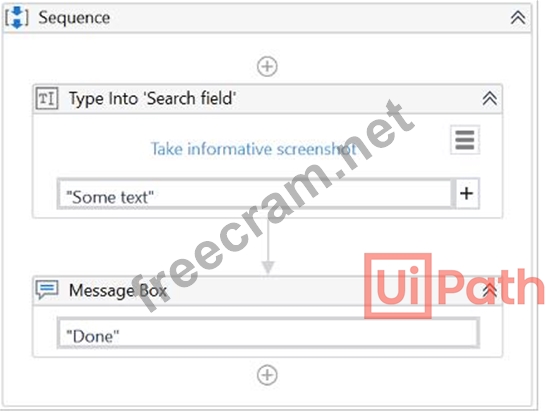
A developer configured the properties for a Type Into activity on an element inside a web page as shown in the following graphic. During runtime, the selector is invalid and does not match any element on the web page. What occurs during the execution of the sequence?

Correct Answer: B
1. Even if the activity is executed as the first one, the robot waits before its execution. By default, for 200 milliseconds, but in this case, the value in DelayBefore is set for 10 seconds.
2. If the corresponding selector cannot be found on the screen, the robot waits by default for 30 seconds for it to appear. If the corresponding selector cannot be found during those 30 seconds, an error is thrown. If ContinueOnError is set to True, then the error is ignored and the error message does not appear.
3. After executing the activity, the robot waits before executing the following activity. By default, for 300 milliseconds, but in this case, the value in DelayAfter is set for 1 minute. However, as the corresponding selector is not found, an error is thrown and the robot does not wait for DelayAfter, even if ContinueOnError is set to True.
UiPath Documentation
Exam Topic: Identify and describe the key Classic UI Activities' properties; for example, ContinueOnError, DelayBefore, DelayAfter, and Target.
2. If the corresponding selector cannot be found on the screen, the robot waits by default for 30 seconds for it to appear. If the corresponding selector cannot be found during those 30 seconds, an error is thrown. If ContinueOnError is set to True, then the error is ignored and the error message does not appear.
3. After executing the activity, the robot waits before executing the following activity. By default, for 300 milliseconds, but in this case, the value in DelayAfter is set for 1 minute. However, as the corresponding selector is not found, an error is thrown and the robot does not wait for DelayAfter, even if ContinueOnError is set to True.
UiPath Documentation
Exam Topic: Identify and describe the key Classic UI Activities' properties; for example, ContinueOnError, DelayBefore, DelayAfter, and Target.


- Question List (104q)
- Question 1: A developer automates a process which has an Excel file as i...
- Question 2: A developer uses a GIT repository for version control of his...
- Question 3: A developer creates a workflow that extracts the date of bir...
- Question 4: An RPA developer needs to perform a code review on a process...
- Question 5: Which of the following types of variables can be defined in ...
- Question 6: What do the Items in the Orchestrator queues consist of? Sel...
- Question 7: You want to automate a process on the https://acme-test.uipa...
- Question 8: A developer automates a project for Finance Team. As the fir...
- Question 9: What represents an example of a full selector?...
- Question 10: Where should credentials be stored? Select all the options t...
- Question 11: Which of the following Rules belongs to the Naming Rules cat...
- Question 12: After adding an Invoke Workflow File activity and selecting ...
- Question 13: In this exercise, you will create a UiPath automation that p...
- Question 14: A developer wants to pass a value of a variable to a workflo...
- Question 15: Is it possible to write to a text file without using the Wri...
- Question 16: A developer has set custom values for the DelayBetweenPagesM...
- Question 17: A developer creates a process using a State Machine. What se...
- Question 18: A developer wants to use a Basic recorder to capture several...
- Question 19: A developer is using UiExplorer to modify selectors. The "Hi...
- Question 20: Please select the incorrect statement about partial selector...
- Question 21: You want to identify a selector for a button in an applicati...
- Question 22: A developer configured the properties for a Type Into activi...
- Question 23: What is the use of <idx='*'> attribute when working wi...
- Question 24: What will be executed in the following Try Catch activity if...
- Question 25: What is Orchestrator used for? Options are :...
- Question 26: Which of the scraping methods can get you the hidden text in...
- Question 27: How should exceptions be handled? Select all the options tha...
- Question 28: A developer is creating a process using the Dispatcher and P...
- Question 29: How can you find all anchor elements in a web page? Options ...
- Question 30: During the debugging process, which panel will help monitor ...
- Question 31: What are the functions of the Outline panel? Options are :...
- Question 32: A developer has configured the Activity Project Settings for...
- Question 33: What UiPath tool ensures that your project meets high qualit...
- Question 34: Which of the following are required to have efficient execut...
- Question 35: While working with a queue in Orchestrator, you notice that ...
- Question 36: During the execution of a process, a button must be clicked ...
- Question 37: One of the steps in your process is to authenticate on a web...
- Question 38: In the UiPath Robotic Enterprise Framework template, what sh...
- Question 39: In UiPath Robotic Enterprise Framework, what are the transit...
- Question 40: Which action is performed when the Validate File button is p...
- Question 41: What is the robot able to do when the Full Text scraping met...
- Question 42: What tags are verified in Internet Explorer to assess if an ...
- Question 43: In the UiPath Robotic Enterprise Framework template, if a Sy...
- Question 44: In a UiPath Studio project, the property ValidateUnconnected...
- Question 45: What will be the value of isEven variable at the breakpoint,...
- Question 46: In the UiPath Robotic Enterprise Framework template, to enab...
- Question 47: Which statements are true regarding the Write Line and the L...
- Question 48: Which activity uses the "SimulateType" property by default a...
- Question 49: The String.Format("Input ={0} and Output = {0}", "1","2") ex...
- Question 50: How does the Anchor Base activity work? Options are :...
- Question 51: A developer is automating a project for the Finance team. As...
- Question 52: Scheduling a process is done from: Options are :...
- Question 53: A developer wants to add items to a list of strings using th...
- Question 54: While automating an installation wizard, a pop-up window may...
- Question 55: If a large item collection is processed using For Each, whic...
- Question 56: A developer automates a process which has an Excel file as i...
- Question 57: A developer has created a project to scrape structured data ...
- Question 58: A developer executes the following Parallel activity. What i...
- Question 59: Review the following exhibits: (Exhibit) Based on the exhibi...
- Question 60: What is the best way to select a row with a certain value fr...
- Question 61: What is the best practice to stop an ongoing job in Orchestr...
- Question 62: A developer wants to extract data from "Sheet1" of the "Test...
- Question 63: A process is created using UiPath REFramework. During the pr...
- Question 64: What will be the value of isEven variable at the breakpoint,...
- Question 65: A developer needs to reference the element in the first row ...
- Question 66: A developer is working with a legacy system using UiExplorer...
- Question 67: A developer has configured the Activity Project Settings for...
- Question 68: When should an Attended Robot be used? Select the option tha...
- Question 69: This is a reliable selector for a dynamic web page: webctrl ...
- Question 70: Please choose the correct statement about the usage of wildc...
- Question 71: In the UiPath Robotic Enterprise Framework template, what ha...
- Question 72: A developer needs to create a process that performs the foll...
- Question 73: *In the UiPath Robotic Enterprise Framework template, in the...
- Question 74: A developer uses Read Range and Write Range activities to co...
- Question 75: A developer wants to determine how much time it takes for an...
- Question 76: A developer uses Workflow Analyzer with the default rules to...
- Question 77: Where can we see the logs generated by running robots? Optio...
- Question 78: A developer is automating a production level process in the ...
- Question 79: Can you store a Selector in a variable? Options are :...
- Question 80: Where can you find the value written by the Write Line activ...
- Question 81: Please select the incorrect statement about Rethrow activity...
- Question 82: A developer created automation in UiPath to process CVs of j...
- Question 83: A developer uses a For Each Row in Data Table activity to it...
- Question 84: A developer needs to automate a process which involves captu...
- Question 85: A developer created a UiPath Process to find out, how many w...
- Question 86: When fine-tuning a dynamic selector, how many characters doe...
- Question 87: A developer wants to assign a value to a two-dimensional arr...
- Question 88: A developer defined two Int32 variables, FirstInt and Second...
- Question 89: At the end of the execution of Workflow1, which retrieves so...
- Question 90: What direction can the arguments of a workflow have? Options...
- Question 91: Where can the logging level of a robot be changed from? Opti...
- Question 92: How can you retrieve the value stored in a Queue Item variab...
- Question 93: A developer is running a process in UiPath Studio based on R...
- Question 94: In this exercise, you will create a UiPath automation that p...
- Question 95: A developer is using UiExplorer to modify selectors. The "Hi...
- Question 96: A developer uses REFramework to create complex process autom...
- Question 97: Which of the following statements related to Orchestrator ar...
- Question 98: You want to build a Dispatcher process to populate an Orches...
- Question 99: What can the UiPath Robotic Enterprise Framework template be...
- Question 100: When debugging a process, you run in Debug mode and are paus...
- Question 101: A developer creates a Dispatcher which extracts information ...
- Question 102: A developer has built a process consisting of three invoked ...
- Question 103: A developer uses Workflow Analyzer with the default rules to...
- Question 104: Which statement about the UiPath Robotic Enterprise Framewor...
