- Home
- UiPath
- UiPath (ADPv1) Automation Developer Professional
- UiPath.UiPath-ADPv1.v2026-09-09.q92
- Question 68
Valid UiPath-ADPv1 Dumps shared by ExamDiscuss.com for Helping Passing UiPath-ADPv1 Exam! ExamDiscuss.com now offer the newest UiPath-ADPv1 exam dumps, the ExamDiscuss.com UiPath-ADPv1 exam questions have been updated and answers have been corrected get the newest ExamDiscuss.com UiPath-ADPv1 dumps with Test Engine here:
Access UiPath-ADPv1 Dumps Premium Version
(209 Q&As Dumps, 35%OFF Special Discount Code: freecram)
<< Prev Question Next Question >>
Question 68/92
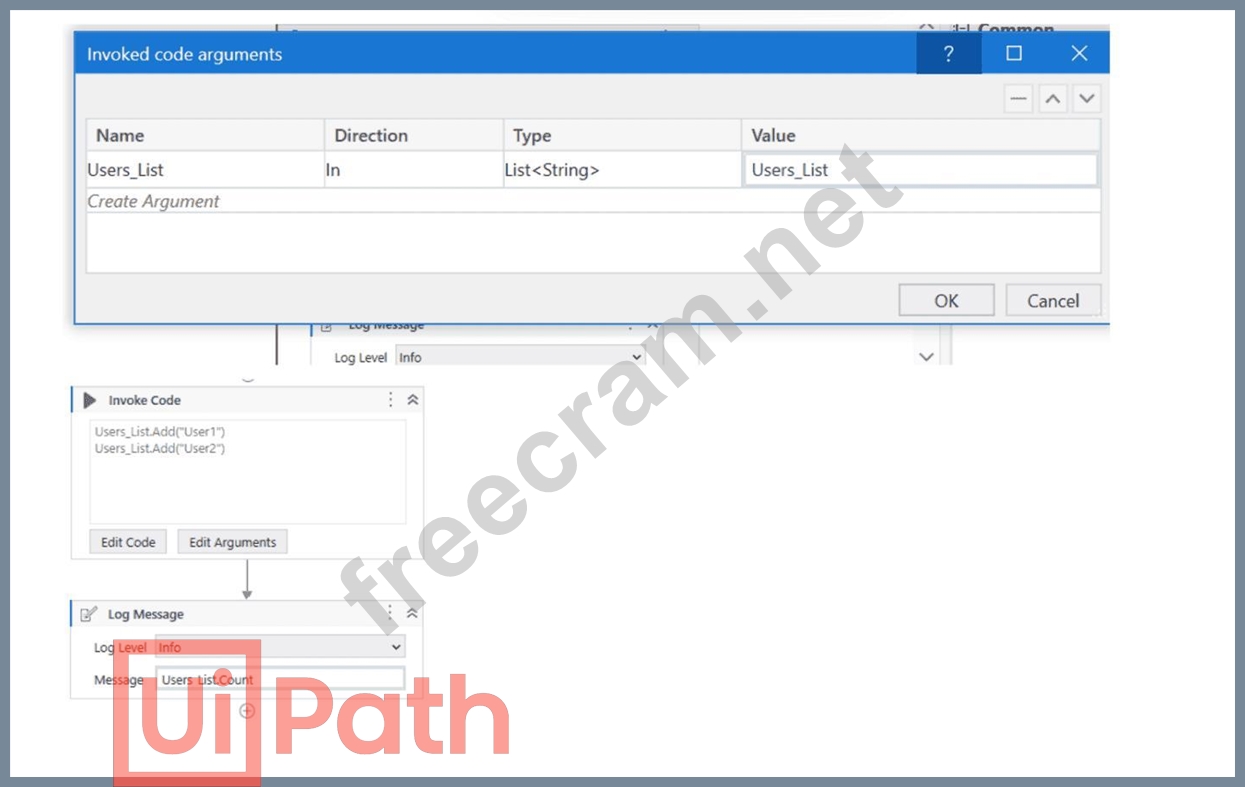
A developer has created a variable of type List of Strings named " Users_List " , and initialized it with an empty list: " Users_List = new List(Of String) " .
What is printed in the log message after the following Invoke Code is executed?
What is printed in the log message after the following Invoke Code is executed?
Correct Answer: B
The screenshot shows an " Invoke Code " activity in UiPath with the following VB.NET code:
Users_List.Add( " User1 " )
Users_List.Add( " User2 " )
According to the given information, the " Users_List " variable is a List of Strings that has been initialized with an empty list before the Invoke Code activity is run. The code within the Invoke Code activity is adding two strings: " User1 " and " User2 " to the " Users_List " .
The Log Message activity following the Invoke Code is attempting to log the count of items in " Users_List "
, which would be the number of elements contained in the list at that time.
Given the steps that have been described, after the Invoke Code activity has run, the " Users_List " will contain two elements ( " User1 " and " User2 " ). Therefore, the log message will print the count of items in the list, which is:
B). 2
So the correct answer is B, as the " Users_List " will have two elements and Users_List.Count will return the number 2.
The Invoke Code activity is used to execute VB.NET or C# code within a UiPath workflow1. The activity has the following properties:
* Code: The code that is to be executed. This field supports only strings and String variables1.
* Language: The language that the code is written in. The available options are VBNet and CSharp1.
* Arguments: The parameters that can be passed to and from the code1.
In this question, the developer has created a variable of type List of Strings named "Users_List", and initialized it with an empty list: "Users_List = new List(Of String)". Then, the developer has used the Invoke Code activity to execute the following code:
Users_List.Add("User1") Users_List.Add("User2")
This code adds two items ("User1" and "User2") to the "Users_List" variable. After the Invoke Code activity, the developer has used the Log Message activity to print the count of items in the "Users_List" variable, using the expression "Users_List.Count.ToString". This expression returns the number of items in the list as a string2. Therefore, the log message will print "2", as there are two items in the list
Users_List.Add( " User1 " )
Users_List.Add( " User2 " )
According to the given information, the " Users_List " variable is a List of Strings that has been initialized with an empty list before the Invoke Code activity is run. The code within the Invoke Code activity is adding two strings: " User1 " and " User2 " to the " Users_List " .
The Log Message activity following the Invoke Code is attempting to log the count of items in " Users_List "
, which would be the number of elements contained in the list at that time.
Given the steps that have been described, after the Invoke Code activity has run, the " Users_List " will contain two elements ( " User1 " and " User2 " ). Therefore, the log message will print the count of items in the list, which is:
B). 2
So the correct answer is B, as the " Users_List " will have two elements and Users_List.Count will return the number 2.
The Invoke Code activity is used to execute VB.NET or C# code within a UiPath workflow1. The activity has the following properties:
* Code: The code that is to be executed. This field supports only strings and String variables1.
* Language: The language that the code is written in. The available options are VBNet and CSharp1.
* Arguments: The parameters that can be passed to and from the code1.
In this question, the developer has created a variable of type List of Strings named "Users_List", and initialized it with an empty list: "Users_List = new List(Of String)". Then, the developer has used the Invoke Code activity to execute the following code:
Users_List.Add("User1") Users_List.Add("User2")
This code adds two items ("User1" and "User2") to the "Users_List" variable. After the Invoke Code activity, the developer has used the Log Message activity to print the count of items in the "Users_List" variable, using the expression "Users_List.Count.ToString". This expression returns the number of items in the list as a string2. Therefore, the log message will print "2", as there are two items in the list


- Question List (92q)
- Question 1: In a UiPath coded automation, what does the DelayAsync metho...
- Question 2: In order for a developer to utilize the default REFramework ...
- Question 3: The following table is stored in a variable called " dt " . ...
- Question 4: When building automation projects, which statement is true r...
- Question 5: Data from an Excel file is read into a data table named " dt...
- Question 6: What actions must be manually selected in the App/Web Record...
- Question 7: What are the three main components of UiPath Integration Ser...
- Question 8: What status needs to be selected in the Set Transaction Stat...
- Question 9: A developer configured the properties for a Click activity o...
- Question 10: What are the components that define a state within a State M...
- Question 11: A developer implemented a process using the Robotic Enterpri...
- Question 12: What does the Profile Execution tool in UiPath Studio do?...
- Question 13: The following table is stored in a variable called " dt " . ...
- Question 14: What are the five severity levels of Orchestrator alerts?...
- Question 15: In the Robotic Enterprise (RE) Framework, at which point sho...
- Question 16: Which of the following options is correct regarding the belo...
- Question 17: What is the purpose of the Interval filter in the Orchestrat...
- Question 18: Which are the actions that can be done in Test Explorer?...
- Question 19: In UlPath Orchestrator. when managing multiple Jobs in a que...
- Question 20: Given the following list of arguments: (Exhibit) and the fol...
- Question 21: A developer plans to build an automation process using the R...
- Question 22: What can be verified in the InltAIISettlngsTestCase test cas...
- Question 23: A developer creates a process that uses data from multiple s...
- Question 24: Which of the following statements accurately describes the p...
- Question 25: A developer is building an automation which types text into ...
- Question 26: Which one is a feature of UiPath Solutions Management?...
- Question 27: In the context of the REFramework, if the OrchestratorQueueN...
- Question 28: What are the four job types present in the Job Type field ac...
- Question 29: When configuring the Max # of retries for the queue in Orche...
- Question 30: When installing UiPath Studio, which of the following action...
- Question 31: While developing a test case using UiPath.Testing.Activities...
- Question 32: What is the use of job priorities in unattended automations ...
- Question 33: A company needs to execute background automation without wor...
- Question 34: What is the correct method to check how many resources are u...
- Question 35: What is the default OCR engine used in CV Screen Scope?...
- Question 36: What is a prerequisite for performing Remote Debugging using...
- Question 37: What is the purpose of the Invoke Code activity in UiPath?...
- Question 38: Suppose you have the following workflow that verifies if the...
- Question 39: What Information is provided in the Descriptor Coverage sub-...
- Question 40: In a UlPath State Machine, what Is the primary function or t...
- Question 41: Which of the following examples accurately demonstrates the ...
- Question 42: What advantages do pre-built connectors in UiPath Integratio...
- Question 43: An error occurs during the Initialization state within the #...
- Question 44: How can a process be converted from a toreground process to ...
- Question 45: When using Profile Execution to analyze performance, what sh...
- Question 46: Where in the REFramework template project is the " SetTransa...
- Question 47: Consider testing a workflow that computes the sum of two num...
- Question 48: A developer is building a process that types data into input...
- Question 49: Considering that the attached table is stored in a variable ...
- Question 50: Which command in the UiPath installation folder configures t...
- Question 51: A developer intends to enter text into an input field using ...
- Question 52: What are the possible statuses after running any REFramework...
- Question 53: A developer needs to create a repetitive process in the REFr...
- Question 54: You have to create a testcase for an attended RPA process. A...
- Question 55: A user is working on their computer while an automation is r...
- Question 56: When performing Remote Debugging using an Unattended Robot c...
- Question 57: What distinguishes the Settings sheet from the Assets sheet ...
- Question 58: What do the percentages from the Test Explorer panel represe...
- Question 59: Which of the following describes the correct hierarchy of th...
- Question 60: Which of the following statements correctly illustrates usin...
- Question 61: In the context of a UiPath State Machine, what is the primar...
- Question 62: A developer implemented a process using the REFramework and ...
- Question 63: What are the differences between the properties Input mode: ...
- Question 64: A developer designed a project in the REFramework. The " Con...
- Question 65: What is the correct execution order of the State activity se...
- Question 66: How do you subtract a specific TimeSpan from " Today " in VB...
- Question 67: Considering a process developed using REFramework, if the st...
- Question 68: A developer has created a variable of type List of Strings n...
- Question 69: " Process A " is scheduled to run at 2:00 PM using a time tr...
- Question 70: In a UiPath REFramework project, what is the primary purpose...
- Question 71: When a developer runs a process using the REFramework, with ...
- Question 72: In UlPath Studio, when a developer executes a workflow in De...
- Question 73: What are the possible statuses after running any REFramework...
- Question 74: What is a pre-requisite for running functional test cases in...
- Question 75: What is the main function of the UiPath Remote Runtime compo...
- Question 76: Which activity can be used to transition a Background Proces...
- Question 77: A developer aims to employ the REFramework for automating a ...
- Question 78: When automating the process of entering values into a web fo...
- Question 79: While working in an RPA testing project, you encountered the...
- Question 80: How are custom log fields used in the REFramework?...
- Question 81: Which of the following is an accurate example of using LINQ ...
- Question 82: What are the steps to publish a project from UiPath Studio? ...
- Question 83: What are the two types of events supported by Integration Se...
- Question 84: A developer wants to add items to a list of strings using th...
- Question 85: In which scenarios can the Add Attachment option in UiPath.W...
- Question 86: In the Global Exception Handler, which arguments are provide...
- Question 87: A developer is building an automation that must interact wit...
- Question 88: How can UlPath Orchestrator help address potential Issues be...
- Question 89: The provided exhibit displays the representation of the " De...
- Question 90: The Extract PDF Page Range activity is used to extract a spe...
- Question 91: What is the recommended approach for a user to log custom in...
- Question 92: Assume we have the Verify Expression with Operator activity ...
