Valid SPLK-1002 Dumps shared by EduDump.com for Helping Passing SPLK-1002 Exam! EduDump.com now offer the newest SPLK-1002 exam dumps, the EduDump.com SPLK-1002 exam questions have been updated and answers have been corrected get the newest EduDump.com SPLK-1002 dumps with Test Engine here:
Access SPLK-1002 Dumps Premium Version
(315 Q&As Dumps, 35%OFF Special Discount Code: freecram)
<< Prev Question Next Question >>
Question 68/98
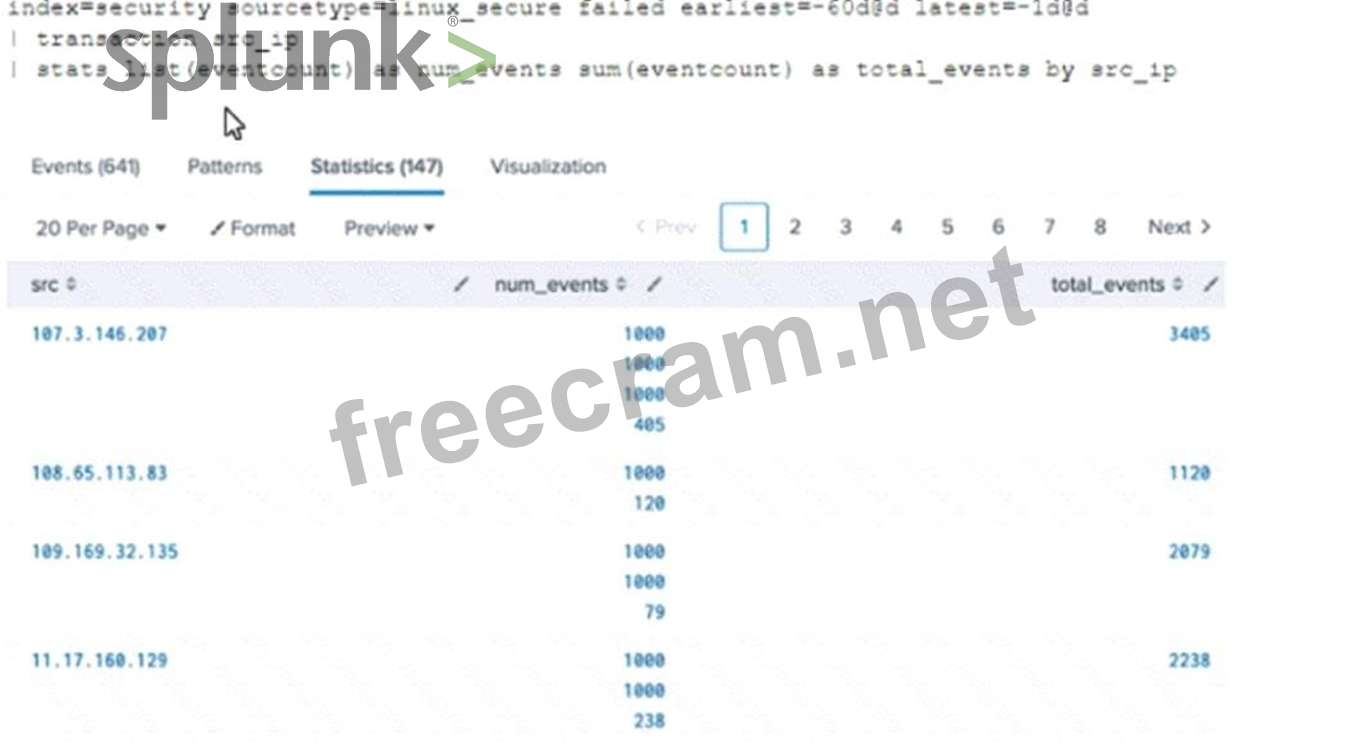
Why would the following search produce multiple transactions instead of one?
Correct Answer: B
Explanation
The correct answer is B. The transaction command has a limit of 1000 events per transaction.
The transaction command is used to group events that share some common values into a single record, called a transaction. A transaction can span multiple events and multiple sources, and can be useful for correlating events that are related but not contiguous1.
However, the transaction command has some limitations, one of which is that it can only group up to 1000 events per transaction. This means that if there are more than 1000 events that match the criteria for a transaction, they will be split into multiple transactions. This can result in incomplete or inaccurate transactions2.
To avoid this limitation, you can use the stats command instead of the transaction command. The stats command can also group events by common values, but it does not have a limit on the number of events per group. The stats command also performs faster and consumes less memory than the transaction command1.
In your search, you are using the stats list() function to group events by src_ip and dest_ip. This function returns a multivalue field that contains all the values of a given field for each group. However, this function does not create a single correlated event like the transaction command does. Instead, it creates a table of results with one row per group and one column per field3.
Therefore, your search will produce multiple transactions instead of one because you are using the transaction command with a limit of 1000 events per transaction, and you are using the stats list() function that does not create a single correlated event.
References:
stats command overview
transaction command overview
Splunk Transaction Command: What It Is and How to Use It
Splunk Core Certified Power User SPLK-1002 Practice Exam Part 1
The correct answer is B. The transaction command has a limit of 1000 events per transaction.
The transaction command is used to group events that share some common values into a single record, called a transaction. A transaction can span multiple events and multiple sources, and can be useful for correlating events that are related but not contiguous1.
However, the transaction command has some limitations, one of which is that it can only group up to 1000 events per transaction. This means that if there are more than 1000 events that match the criteria for a transaction, they will be split into multiple transactions. This can result in incomplete or inaccurate transactions2.
To avoid this limitation, you can use the stats command instead of the transaction command. The stats command can also group events by common values, but it does not have a limit on the number of events per group. The stats command also performs faster and consumes less memory than the transaction command1.
In your search, you are using the stats list() function to group events by src_ip and dest_ip. This function returns a multivalue field that contains all the values of a given field for each group. However, this function does not create a single correlated event like the transaction command does. Instead, it creates a table of results with one row per group and one column per field3.
Therefore, your search will produce multiple transactions instead of one because you are using the transaction command with a limit of 1000 events per transaction, and you are using the stats list() function that does not create a single correlated event.
References:
stats command overview
transaction command overview
Splunk Transaction Command: What It Is and How to Use It
Splunk Core Certified Power User SPLK-1002 Practice Exam Part 1


- Question List (98q)
- Question 1: Which of the following searches will return events containin...
- Question 2: A user wants to create a new field alias for a field that ap...
- Question 3: When using the Field Extractor (FX), which of the following ...
- Question 4: The timechart command buckets data in time intervals dependi...
- Question 5: When using the timechart command, how can a user group the e...
- Question 6: The fields sidebar does not show________. (Select all that a...
- Question 7: The Field Extractor (FX) is used to extract a custom field. ...
- Question 8: Which of the following data model are included In the Splunk...
- Question 9: Where are the results of eval commands stored?...
- Question 10: Calculated fields can be based on which of the following?...
- Question 11: Which search would limit an "alert" tag to the "host" field?...
- Question 12: What approach is recommended when using the Splunk Common In...
- Question 13: A user wants to convert numeric field values to strings and ...
- Question 14: When creating a Search workflow action, which field is requi...
- Question 15: Selected fields are displayed ______each event in the search...
- Question 16: Highlighted search terms indicate _________ search results i...
- Question 17: The macro weekly_sales (2) contains the search string: index...
- Question 18: which of the following commands are used when creating visua...
- Question 19: Which of the following statements about event types is true?...
- Question 20: Which of the following statements describe the search string...
- Question 21: Use the dedup command to _____....
- Question 22: The macro weekly sales (2) contains the search string: index...
- Question 23: What is the correct way to name a macro with two arguments?...
- Question 24: Which command is used to create choropleth maps?...
- Question 25: Which of the following statements describes this search? sou...
- Question 26: By default search results are not returned in ________ order...
- Question 27: This function of the stats command allows you to identify th...
- Question 28: What is the correct syntax to search for a tag associated wi...
- Question 29: What are the two parts of a root event dataset?...
- Question 30: What are search macros?
- Question 31: What are the expected results for a search that contains the...
- Question 32: __________ datasets can be added to root dataset to narrow d...
- Question 33: Which of the following statements describes field aliases?...
- Question 34: When using | timchart by host, which filed is representted i...
- Question 35: Which of the following is a feature of the Pivot tool?...
- Question 36: What other syntax will produce exactly the same results as |...
- Question 37: Which search retrieves events with the event type web_errors...
- Question 38: Which field extraction method should be selected for comma-s...
- Question 39: Which of the following is included with the Common Informati...
- Question 40: What functionality does the Splunk Common Information Model ...
- Question 41: What is a limitation of searches generated by workflow actio...
- Question 42: In this search, __________ will appear on the y-axis. SEARCH...
- Question 43: It is mandatory for the lookup file to have this for an auto...
- Question 44: Which of the following is NOT a stats function:...
- Question 45: This clause is used to group the output of a stats command b...
- Question 46: Which of the following statements about tags is true? (selec...
- Question 47: This is what Splunk uses to categorize the data that is bein...
- Question 48: Which of the following options will define the first event i...
- Question 49: What type of command is eval?
- Question 50: How many ways are there to access the Field Extractor Utilit...
- Question 51: which of the following are valid options with the chart comm...
- Question 52: For choropleth maps,splunk ships with the following KMZ file...
- Question 53: Which of the following is one of the pre-configured data mod...
- Question 54: Which of the following workflow actions can be executed from...
- Question 55: Which of the following about reports is/are true?...
- Question 56: A space is an implied _____ in a search string....
- Question 57: Consider the following search: Index=web sourcetype=access_c...
- Question 58: The gauge command:
- Question 59: Which of the following statements describes the use of the F...
- Question 60: Which method in the Field Extractor would extract the port n...
- Question 61: Information needed to create a GET workflow action includes ...
- Question 62: Which of the following file formats can be extracted using a...
- Question 63: Which of the following statements is true, especially in lar...
- Question 64: A data model consists of which three types of datasets?...
- Question 65: Which of the following statements about calculated fields in...
- Question 66: What is the relationship between data models and pivots?...
- Question 67: When would a user select delimited field extractions using t...
- Question 68: Why would the following search produce multiple transactions...
- Question 69: The transaction command allows you to __________ events acro...
- Question 70: Which of the following describes the I transaction command?...
- Question 71: Which of the following statements describes an event type?...
- Question 72: Which of the following statements are true for this search? ...
- Question 73: Which of the following can be used with the eval command tos...
- Question 74: Which of these is NOT a field that is automatically created ...
- Question 75: Which syntax will find events where the values for the 1 fie...
- Question 76: In what order arc the following knowledge objects/configurat...
- Question 77: What information must be included when using the datamodel c...
- Question 78: The time range specified for a historical search defines the...
- Question 79: What do events in a transaction have In common?...
- Question 80: Data model fields can be added using the Auto-Extracted meth...
- Question 81: The timechart command is an example of which of the followin...
- Question 82: Which of the following eval command functions is valid?...
- Question 83: Which are valid ways to create an event type? (select all th...
- Question 84: Which of the following commands support the same set of func...
- Question 85: In the following eval statement, what is the value of descri...
- Question 86: When is a GET workflow action needed?...
- Question 87: The eval command allows you to do which of the following? (C...
- Question 88: Which of the following searches would create a graph similar...
- Question 89: What happens when a user edits the regular expression (regex...
- Question 90: The stats command will create a _____________ by default....
- Question 91: A calculated field maybe based on which of the following?...
- Question 92: When should transaction be used?...
- Question 93: Using the export function, you can export search results as ...
- Question 94: Which of the following search modes automatically returns al...
- Question 95: Which statement is true?
- Question 96: Which knowledge Object does the Splunk Common Information Mo...
- Question 97: Which field will be used to populate the field if the produc...
- Question 98: Which type of workflow action sends field values to an exter...
