Valid EX200 Dumps shared by EduDump.com for Helping Passing EX200 Exam! EduDump.com now offer the newest EX200 exam dumps, the EduDump.com EX200 exam questions have been updated and answers have been corrected get the newest EduDump.com EX200 dumps with Test Engine here:
Access EX200 Dumps Premium Version
(69 Q&As Dumps, 35%OFF Special Discount Code: freecram)
<< Prev Question Next Question >>
Question 42/48
SIMULATION
Configure your Host Name, IP Address, Gateway and DNS.
Host name: dtop5.dn.ws.com
IP Address: 172.28.10.5/4
Gateway: 172.28.10.1
DNS: 172.28.10.1
Configure your Host Name, IP Address, Gateway and DNS.
Host name: dtop5.dn.ws.com
IP Address: 172.28.10.5/4
Gateway: 172.28.10.1
DNS: 172.28.10.1
Correct Answer:
See explanation below.
Explanation/Reference:
Explanation:
1. Configure Host Name
vim /etc/sysconfig/network NETWORKING=yes HOSTNAME=dtop5.dn.ws.com GATEWAY=172.28.10.1
2. Configure IP Address, Gateway and DNS
Configure the network by Network Manager:
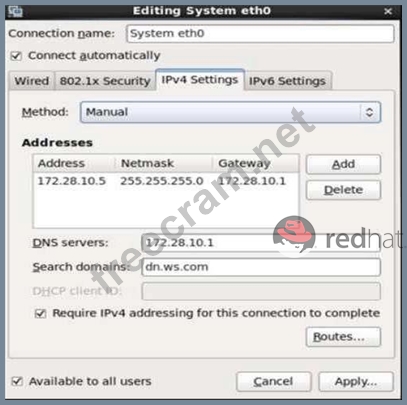
Note: Please remember to choose two options:
Connect automatically
Available to all users
Click "Apply", save and exit, and restart your network services:
# Service network restart
3. Validate these profiles:
a) Check gateway: # vim / etc / sysconfig / network
NETWORKING=yes
HOSTNAME=dtop5.dn.ws.com
GATEWAY=172.28.10.1
b) Check Host Name: # vim /etc/hosts

c) Check DNS: # vim /etc/resolv.conf
# Generated by NetworkManager
Search dn.ws.com
Nameserver 172.28.10.1
d) Check Gateway: # vim /etc/sysconfig/network-scripts/ifcfg-eth0
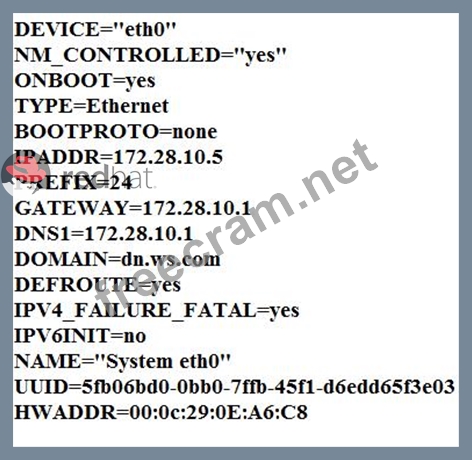
Explanation/Reference:
Explanation:
1. Configure Host Name
vim /etc/sysconfig/network NETWORKING=yes HOSTNAME=dtop5.dn.ws.com GATEWAY=172.28.10.1
2. Configure IP Address, Gateway and DNS
Configure the network by Network Manager:
Note: Please remember to choose two options:
Connect automatically
Available to all users
Click "Apply", save and exit, and restart your network services:
# Service network restart
3. Validate these profiles:
a) Check gateway: # vim / etc / sysconfig / network
NETWORKING=yes
HOSTNAME=dtop5.dn.ws.com
GATEWAY=172.28.10.1
b) Check Host Name: # vim /etc/hosts
c) Check DNS: # vim /etc/resolv.conf
# Generated by NetworkManager
Search dn.ws.com
Nameserver 172.28.10.1
d) Check Gateway: # vim /etc/sysconfig/network-scripts/ifcfg-eth0


- Question List (48q)
- Question 1: SIMULATION One Logical Volume is created named as myvol unde...
- Question 2: SIMULATION User mary must configure a task. Requirement: The...
- Question 3: SIMULATION Configure the NTP service in your system....
- Question 4: SIMULATION Create a swap space, set the size is 600 MB, and ...
- Question 5: SIMULATION There is a local logical volumes in your system, ...
- Question 6: SIMULATION Copy /etc/fstab document to /var/TMP directory. A...
- Question 7: SIMULATION There are two different networks 192.168.0.0/24 a...
- Question 8: SIMULATION Create a 2G swap partition which take effect auto...
- Question 9: SIMULATION SELinux must run in force mode....
- Question 10: SIMULATION Make on /archive directory that only the user own...
- Question 11: SIMULATION Open kmcrl value of 5 , and can verify in /proc/ ...
- Question 12: SIMULATION SELinux must be running in the Enforcing mode....
- Question 13: SIMULATION Make a swap partition having 100MB. Make Automati...
- Question 14: SIMULATION According the following requirements to create us...
- Question 15: SIMULATION According the following requirements to create a ...
- Question 16: SIMULATION Create a volume group, and set the size is 500M, ...
- Question 17: SIMULATION Install the Kernel Upgrade. Install suitable kern...
- Question 18: SIMULATION Search a String Find out all the columns that con...
- Question 19: SIMULATION There are two different networks, 192.168.0.0/24 ...
- Question 20: SIMULATION One Logical Volume named /dev/test0/testvolume1 i...
- Question 21: SIMULATION Create a backup Create a backup file named /root/...
- Question 22: SIMULATION The user authentication has been provided by ldap...
- Question 23: SIMULATION In the system, mounted the iso image /root/examin...
- Question 24: SIMULATION Who ever creates the files/directories on archive...
- Question 25: SIMULATION Configure your web services, download from http:/...
- Question 26: SIMULATION Resize the logical volume vo and its filesystem t...
- Question 27: SIMULATION According the following requirements, configure a...
- Question 28: SIMULATION Create the following users, groups, and group mem...
- Question 29: SIMULATION Binding to an external validation server. System ...
- Question 30: SIMULATION Configure iptables, there are two domains in the ...
- Question 31: SIMULATION Configure your NFS services. Share the directory ...
- Question 32: SIMULATION Please open the ip_forward, and take effect perma...
- Question 33: SIMULATION Download the document from ftp://instructor.examp...
- Question 34: SIMULATION A YUM repository has been provided at http://serv...
- Question 35: SIMULATION There is a local logical volumes in your system, ...
- Question 36: SIMULATION A YUM source has been provided in the http://inst...
- Question 37: SIMULATION Upgrade the kernel, start the new kernel by defau...
- Question 38: SIMULATION Create a logical volume Create a new logical volu...
- Question 39: SIMULATION Configure a user account. Create a user iar,uid ...
- Question 40: SIMULATION Notes: NFS: NFS instructor.example.com:/var/ftp/...
- Question 41: SIMULATION Configure autofs. Configure the autofs automatica...
- Question 42: SIMULATION Configure your Host Name, IP Address, Gateway and...
- Question 43: SIMULATION Update the kernel from ftp://instructor.example.c...
- Question 44: SIMULATION Search files. Find out files owned by jack, and c...
- Question 45: SIMULATION Add a swap partition. Adding an extra 500M swap p...
- Question 46: SIMULATION 1. Find all sizes of 10k file or directory under ...
- Question 47: SIMULATION Configure NTP. Configure NTP service, Synchronize...
- Question 48: SIMULATION Configure the FTP service in your system, allow r...
