- Home
- MuleSoft
- MuleSoft Certified Platform Architect - Level 1
- MuleSoft.MCPA-Level-1.v2022-06-28.q84
- Question 59
Valid MCPA-Level-1 Dumps shared by ExamDiscuss.com for Helping Passing MCPA-Level-1 Exam! ExamDiscuss.com now offer the newest MCPA-Level-1 exam dumps, the ExamDiscuss.com MCPA-Level-1 exam questions have been updated and answers have been corrected get the newest ExamDiscuss.com MCPA-Level-1 dumps with Test Engine here:
Access MCPA-Level-1 Dumps Premium Version
(154 Q&As Dumps, 35%OFF Special Discount Code: freecram)
<< Prev Question Next Question >>
Question 59/84
A company requires Mule applications deployed to CloudHub to be isolated between non-production and production environments. This is so Mule applications deployed to non-production environments can only access backend systems running in their customer-hosted non-production environment, and so Mule applications deployed to production environments can only access backend systems running in their customer-hosted production environment. How does MuleSoft recommend modifying Mule applications, configuring environments, or changing infrastructure to support this type of per-environment isolation between Mule applications and backend systems?
Correct Answer: D
Correct answer: Create separate Anypoint VPCs for non-production and production environments, then configure connections to the backend systems in the corresponding customer-hosted environments.
*****************************************
>> Creating different Business Groups does NOT make any difference w.r.t accessing the non-prod and prod customer-hosted environments. Still they will be accessing from both Business Groups unless process network restrictions are put in place.
>> We need to modify or couple the Mule Application Implementations with the environment. In fact, we should never implements application coupled with environments by binding them in the properties. Only basic things like endpoint URL etc should be bundled in properties but not environment level access restrictions.
>> IP addresses on CloudHub are dynamic until unless a special static addresses are assigned. So it is not possible to setup firewall rules in customer-hosted infrastrcture. More over, even if static IP addresses are assigned, there could be 100s of applications running on cloudhub and setting up rules for all of them would be a hectic task, non-maintainable and definitely got a good practice.
>> The best practice recommended by Mulesoft (In fact any cloud provider), is to have your Anypoint VPCs seperated for Prod and Non-Prod and perform the VPC peering or VPN tunneling for these Anypoint VPCs to respective Prod and Non-Prod customer-hosted environment networks.
Reference:
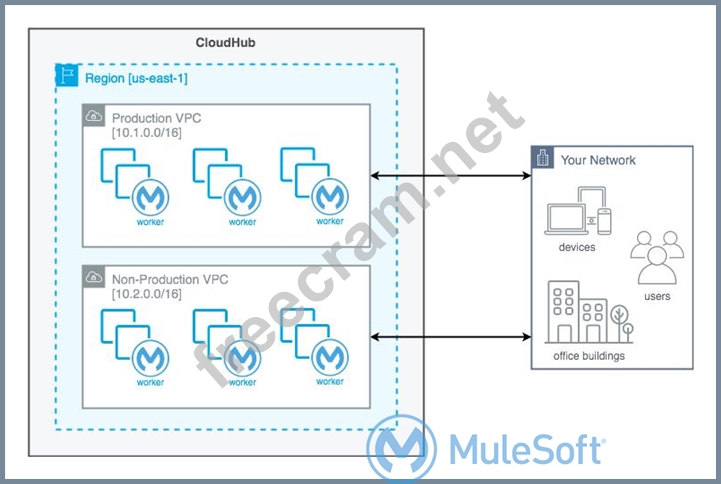
*****************************************
>> Creating different Business Groups does NOT make any difference w.r.t accessing the non-prod and prod customer-hosted environments. Still they will be accessing from both Business Groups unless process network restrictions are put in place.
>> We need to modify or couple the Mule Application Implementations with the environment. In fact, we should never implements application coupled with environments by binding them in the properties. Only basic things like endpoint URL etc should be bundled in properties but not environment level access restrictions.
>> IP addresses on CloudHub are dynamic until unless a special static addresses are assigned. So it is not possible to setup firewall rules in customer-hosted infrastrcture. More over, even if static IP addresses are assigned, there could be 100s of applications running on cloudhub and setting up rules for all of them would be a hectic task, non-maintainable and definitely got a good practice.
>> The best practice recommended by Mulesoft (In fact any cloud provider), is to have your Anypoint VPCs seperated for Prod and Non-Prod and perform the VPC peering or VPN tunneling for these Anypoint VPCs to respective Prod and Non-Prod customer-hosted environment networks.
Reference:


- Question List (84q)
- Question 1: Which of the following sequence is correct?...
- 1 commentQuestion 2: What Mule application can have API policies applied by Anypo...
- 1 commentQuestion 3: What is the most performant out-of-the-box solution in Anypo...
- 1 commentQuestion 4: What is a key requirement when using an external Identity Pr...
- Question 5: Which of the following best fits the definition of API-led c...
- Question 6: An API has been updated in Anypoint exchange by its API prod...
- 1 commentQuestion 7: When must an API implementation be deployed to an Anypoint V...
- Question 8: A system API is deployed to a primary environment as well as...
- Question 9: A code-centric API documentation environment should allow AP...
- Question 10: An organization is deploying their new implementation of the...
- 1 commentQuestion 11: An API implementation is updated. When must the RAML definit...
- Question 12: Due to a limitation in the backend system, a system API can ...
- Question 13: What Mule application deployment scenario requires using Any...
- Question 14: In which layer of API-led connectivity, does the business lo...
- Question 15: A company uses a hybrid Anypoint Platform deployment model t...
- Question 16: An API implementation is being designed that must invoke an ...
- Question 17: What best explains the use of auto-discovery in API implemen...
- Question 18: Select the correct Owner-Layer combinations from below optio...
- 1 commentQuestion 19: An organization uses various cloud-based SaaS systems and mu...
- Question 20: Refer to the exhibit. (Exhibit) What is a valid API in the s...
- Question 21: An organization is implementing a Quote of the Day API that ...
- Question 22: Refer to the exhibit. (Exhibit) A RAML definition has been p...
- Question 23: An API experiences a high rate of client requests (TPS) vwth...
- Question 24: An organization uses various cloud-based SaaS systems and mu...
- Question 25: What best describes the Fully Qualified Domain Names (FQDNs)...
- Question 26: What is true about the technology architecture of Anypoint V...
- Question 27: Refer to the exhibit. (Exhibit) what is true when using cust...
- Question 28: An organization is implementing a Quote of the Day API that ...
- 1 commentQuestion 29: The implementation of a Process API must change. What is a v...
- Question 30: A new upstream API Is being designed to offer an SLA of 500 ...
- 1 commentQuestion 31: What condition requires using a CloudHub Dedicated Load Bala...
- 1 commentQuestion 32: An API implementation is deployed on a single worker on Clou...
- Question 33: What CANNOT be effectively enforced using an API policy in A...
- Question 34: The responses to some HTTP requests can be cached depending ...
- 1 commentQuestion 35: What best describes the Fully Qualified Domain Names (FQDNs)...
- Question 36: An organization makes a strategic decision to move towards a...
- Question 37: An API experiences a high rate of client requests (TPS) vwth...
- 1 commentQuestion 38: When using CloudHub with the Shared Load Balancer, what is m...
- 1 commentQuestion 39: What do the API invocation metrics provided by Anypoint Plat...
- Question 40: A code-centric API documentation environment should allow AP...
- 1 commentQuestion 41: What is a typical result of using a fine-grained rather than...
- Question 42: A new upstream API Is being designed to offer an SLA of 500 ...
- 1 commentQuestion 43: When designing an upstream API and its implementation, the d...
- 1 commentQuestion 44: A new upstream API Is being designed to offer an SLA of 500 ...
- 1 commentQuestion 45: Refer to the exhibit. (Exhibit) what is true when using cust...
- 1 commentQuestion 46: What is most likely NOT a characteristic of an integration t...
- Question 47: What is true about API implementations when dealing with leg...
- Question 48: What is a best practice when building System APIs?...
- 1 commentQuestion 49: A code-centric API documentation environment should allow AP...
- 1 commentQuestion 50: What is true about API implementations when dealing with leg...
- 1 commentQuestion 51: Mule applications that implement a number of REST APIs are d...
- Question 52: An API implementation is deployed on a single worker on Clou...
- 1 commentQuestion 53: What API policy would be LEAST LIKELY used when designing an...
- Question 54: A Mule application exposes an HTTPS endpoint and is deployed...
- 1 commentQuestion 55: An API implementation is deployed on a single worker on Clou...
- Question 56: What is the most performant out-of-the-box solution in Anypo...
- Question 57: What is true about automating interactions with Anypoint Pla...
- Question 58: An API has been updated in Anypoint Exchange by its API prod...
- Question 59: A company requires Mule applications deployed to CloudHub to...
- Question 60: Refer to the exhibit. An organization needs to enable access...
- 1 commentQuestion 61: What correctly characterizes unit tests of Mule applications...
- 1 commentQuestion 62: Refer to the exhibit. (Exhibit) Three business processes nee...
- 1 commentQuestion 63: What best explains the use of auto-discovery in API implemen...
- Question 64: In an organization, the InfoSec team is investigating Anypoi...
- Question 65: Refer to the exhibit. (Exhibit) What is the best way to deco...
- 1 commentQuestion 66: In an organization, the InfoSec team is investigating Anypoi...
- 1 commentQuestion 67: The implementation of a Process API must change. What is a v...
- 1 commentQuestion 68: Refer to the exhibit. (Exhibit) What is a valid API in the s...
- 1 commentQuestion 69: An organization has implemented a Customer Address API to re...
- 1 commentQuestion 70: A System API is designed to retrieve data from a backend sys...
- 1 commentQuestion 71: What API policy would be LEAST LIKELY used when designing an...
- Question 72: A retail company is using an Order API to accept new orders....
- 1 commentQuestion 73: An organization uses various cloud-based SaaS systems and mu...
- 2 commentQuestion 74: When using CloudHub with the Shared Load Balancer, what is m...
- 1 commentQuestion 75: A System API is designed to retrieve data from a backend sys...
- 1 commentQuestion 76: An organization makes a strategic decision to move towards a...
- Question 77: What is most likely NOT a characteristic of an integration t...
- Question 78: The implementation of a Process API must change. What is a v...
- Question 79: What is true about where an API policy is defined in Anypoin...
- 2 commentQuestion 80: A System API is designed to retrieve data from a backend sys...
- 1 commentQuestion 81: Refer to the exhibit. (Exhibit) An organization uses one spe...
- 1 commentQuestion 82: What CANNOT be effectively enforced using an API policy in A...
- Question 83: Mule applications that implement a number of REST APIs are d...
- 1 commentQuestion 84: Refer to the exhibit. (Exhibit) A developer is building a cl...

[×]
Download PDF File
Enter your email address to download MuleSoft.MCPA-Level-1.v2022-06-28.q84.pdf