- Home
- Microsoft
- Microsoft Power Platform Functional Consultant
- Microsoft.PL-200.v2024-02-01.q111
- Question 80
Valid PL-200 Dumps shared by ExamDiscuss.com for Helping Passing PL-200 Exam! ExamDiscuss.com now offer the newest PL-200 exam dumps, the ExamDiscuss.com PL-200 exam questions have been updated and answers have been corrected get the newest ExamDiscuss.com PL-200 dumps with Test Engine here:
Access PL-200 Dumps Premium Version
(302 Q&As Dumps, 35%OFF Special Discount Code: freecram)
<< Prev Question Next Question >>
Question 80/111
You are designing the organization structure for a company that has 5,000 users.
You need to configure security roles for the company while minimizing administrative effort.
What should you do? To answer, select the appropriate options in the answer area.
NOTE: Each correct selection is worth one point.
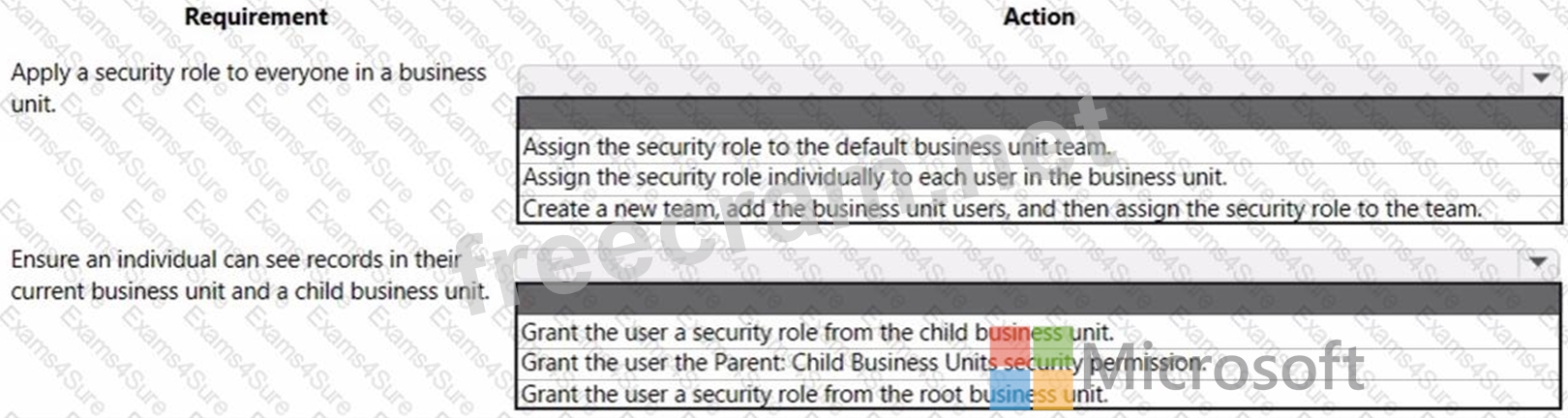
You need to configure security roles for the company while minimizing administrative effort.
What should you do? To answer, select the appropriate options in the answer area.
NOTE: Each correct selection is worth one point.
Correct Answer:
Explanation
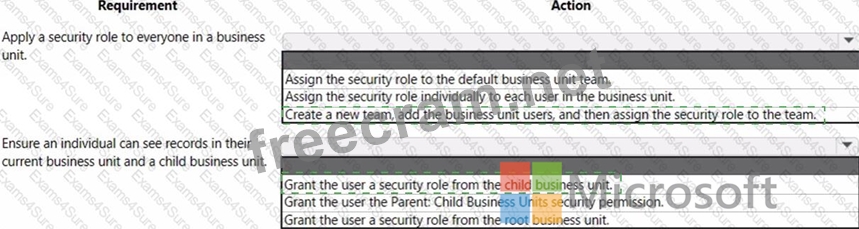
Box 1: Create a new team, and the business unit users, and the assign the security role to the team.
Change the business unit for a team
Important
By changing the business unit for a team, you can remove all security role assignments for the team. At least one security role must be assigned to the team in the new business unit.
Select an environment and go to Settings > Users + permissions > Teams.
Select the checkbox for a team name.
Screenshot selecting a team.
On the menu bar, select Change Business Unit.
In the Change Business Unit dialog box, select a business unit. Enable Move records to new business unit to move to a new business unit. Select OK.
Box 2: Grant the user a security role from the child business unit.
Reference: https://docs.microsoft.com/en-us/power-platform/admin/create-edit-business-units
https://docs.microsoft.com/en-us/power-platform/admin/security-roles-privileges


- Question List (111q)
- Question 1: You manage the Dynamics 365 environment for a company. You n...
- Question 2: A user has access to an existing Common Data Service databas...
- Question 3: You implement an editable grid for the Account entity. The b...
- Question 4: A company is developing several Power Virtual Agents chatbot...
- Question 5: You are designing an app for a bank. You must create entitie...
- Question 6: You are designing a Power Virtual Agents chatbot. The chatbo...
- Question 7: You are designing a Power Virtual Agents chatbot for a store...
- Question 8: Note: This question is part of a series of questions that pr...
- Question 9: On a Contact record, a user creates a Note record that conta...
- Question 10: You are a system administrator for a company with locations ...
- Question 11: You need to configure a Power Automate flow to send the emai...
- Question 12: Note: This question is part of a series of questions that pr...
- Question 13: You have a canvas app. The canvas app must store data in a v...
- Question 14: You configure an alert in Power Bl. You need to alert users ...
- Question 15: You are a Dynamics 365 administrator. You create a new app. ...
- Question 16: You are using power Automate to create a list of customers f...
- Question 17: You use a dataflow to import data into Microsoft Dataverse. ...
- Question 18: You are embedding a Power Apps visual in a Power BI dashboar...
- Question 19: On a Contact record, a user creates a Note record that conta...
- Question 20: A company plans to create an app by using Power Apps. The co...
- Question 21: Note: This question is part of a series of questions that pr...
- Question 22: You create a Power Apps app for Microsoft Teams using Micros...
- Question 23: You create a Power Apps app. The app must be able to display...
- Question 24: You are a Dynamics 365 Customer Service administrator. Users...
- Question 25: A company's sales staff wants a simplified way to manage the...
- Question 26: You create a canvas app for a sales team. The app has an emb...
- Question 27: A company is updating a Power Apps solution that contains tw...
- Question 28: A customer uses Power Apps to view and maintain their contac...
- Question 29: A company creates a canvas app. The app requires users to en...
- Question 30: You need to design the resort portal's email registration pr...
- Question 31: You use Power Virtual Agents to create a bot that will answe...
- Question 32: A company uses a canvas app to manage production resources i...
- Question 33: You have a form that displays a custom field from an entity....
- Question 34: A company uses a canvas app. Supervisors must approve transa...
- Question 35: A company collaborates by using Microsoft Teams. You must cr...
- Question 36: You create a Power Platform help Desk solution. You need to ...
- Question 37: You manage the Dynamics 365 Customer Service environment for...
- Question 38: You need to design the chat solution to answer the inquiry f...
- Question 39: Note: This question is part of a series of questions that pr...
- Question 40: You need to embed the check-in solution into the communicati...
- Question 41: You need to embed the FAQbot into the communication solution...
- Question 42: A company uses a model driven app. The company needs to auto...
- Question 43: On a Contact record, a user creates a Note record that conta...
- Question 44: You need to design and create the solution for gathering con...
- Question 45: Note: This question is part of a series of questions that pr...
- Question 46: You are a Dynamics 365 for Customer Service administrator. Y...
- Question 47: You need to capture the Date Completed value from the websit...
- Question 48: A company is implementing Power Apps and Power Automate. Sev...
- Question 49: You need to design the FAQ solution to handle unknown respon...
- Question 50: A customer has a support website that includes FAQ pages, kn...
- Question 51: You plan to automate several different processes by using Po...
- Question 52: A company is training an Al model using a custom table to de...
- Question 53: A company uses a model driven app. The company needs to auto...
- Question 54: A company plans to automate the following manual processes b...
- Question 55: A company plans to create a Power Virtual Agents chatbot. Th...
- Question 56: You create a JavaScript web resource named MyBusinessLogic. ...
- Question 57: You need to be able to move a Power Automate desktop flow us...
- Question 58: You need to build a Power Bl dashboard for sales managers to...
- Question 59: You ate a Dynamics 365 Customer Engagement administrator. Yo...
- Question 60: A company plans to create two Microsoft Power Platform appli...
- Question 61: You are a Dynamics 365 Sales administrator for a software co...
- Question 62: You create a new Power Virtual Agents chatbot for an organiz...
- Question 63: A company uses a Power Apps app with Microsoft Dataverse. Th...
- Question 64: A company is creating a canvas app and a model-driven app to...
- Question 65: You configure and test a user interface (Ul) flow. You plan ...
- Question 66: You plan on implementing complex business logic in Microsoft...
- Question 67: A company uses Common Data Service to store sales data. For ...
- Question 68: You need to resolve the issue reported by substitute employe...
- Question 69: You create a canvas app that uses data from a Microsoft SQL ...
- Question 70: A company has a Power Apps app. The app must meet the follow...
- Question 71: A company uses Microsoft Teams. You plan to create a Power A...
- Question 72: A company plans to implement AI Builder to add intelligence ...
- Question 73: A company has locations in the United States, Brazil, India....
- Question 74: A company uses Power Apps. Users must be able to view only t...
- Question 75: You create a Power Virtual Agents bot. You observe that the ...
- Question 76: You create and publish a Power Bl report that contains an em...
- Question 77: A company uses a model-driven app for customer support. The ...
- Question 78: You are a Dynamics 365 Sales administrator for a software co...
- Question 79: Your organization does not permit the use of custom code for...
- Question 80: You are designing the organization structure for a company t...
- Question 81: You are a Dynamics 365 Customer Services administrator. You ...
- Question 82: You create a Power Apps portal to provide training and docum...
- Question 83: You have a classic workflow. The workflow updates a custom c...
- Question 84: A company is configuring a Power Apps portal using Microsoft...
- Question 85: A company has a canvas app that includes the following scree...
- Question 86: You are a consultant. A client asks you to remove several so...
- Question 87: You add a business process flow to the Account table. The fl...
- Question 88: A bank uses Power BI visualizations to help determine whethe...
- 1 commentQuestion 89: You are setting up Power Apps security for a company. The co...
- Question 90: A company uses Common Data Service to manage account and con...
- Question 91: A company uses a model-driven Power Apps app in a new enviro...
- Question 92: You need to set up the new service request completion proces...
- Question 93: You have a model-driven app. You create five Microsoft Excel...
- Question 94: You need to assign 10 percent of the Qualification records t...
- Question 95: You are a Dynamics 365 Customer Service developer. A salespe...
- Question 96: You need to design the resort portal's email registration pr...
- Question 97: You are examining several processes to determine if you can ...
- Question 98: You create a report by using Power BI Desktop and a Power BI...
- Question 99: You plan to create classic workflows for process automation ...
- Question 100: You need to design the guest check-in solution. Which techno...
- Question 101: You create a Power Apps app for Microsoft Teams using Micros...
- Question 102: You are configuring Microsoft Dataverse security. You plan t...
- Question 103: You need to configure a Power Automate flow to send the emai...
- Question 104: You use Power BI Desktop to configure Power BI reports. You ...
- Question 105: You set up a new instance of Dynamics 365 for Customer Servi...
- Question 106: You create a Power Automate flow as part of a managed soluti...
- Question 107: You plan to create a Power Virtual Agents bot. The bot has t...
- Question 108: Note: This question is part of a series of questions that pr...
- Question 109: A company creates a canvas app. The app requires near real-t...
- Question 110: You create a Power Virtual Agents chatbot to reduce the numb...
- Question 111: A company uses three apps to complete several business proce...
