Valid PL-100 Dumps shared by ExamDiscuss.com for Helping Passing PL-100 Exam! ExamDiscuss.com now offer the newest PL-100 exam dumps, the ExamDiscuss.com PL-100 exam questions have been updated and answers have been corrected get the newest ExamDiscuss.com PL-100 dumps with Test Engine here:
Access PL-100 Dumps Premium Version
(279 Q&As Dumps, 35%OFF Special Discount Code: freecram)
<< Prev Question Next Question >>
Question 74/118
You create an app with multiple screens.
Test users report that the size and type of gallery displayed on each screen are different. You must improve the consistency for the app screens.
You need to create a reusable gallery that displays information based on the current record.
Which three actions should you perform in sequence? To answer, move the appropriate actions from the list of actions to the answer area and arrange them in the correct order.
NOTE: More than one order of answer choices is correct. You will receive credit for any of the correct orders you select.
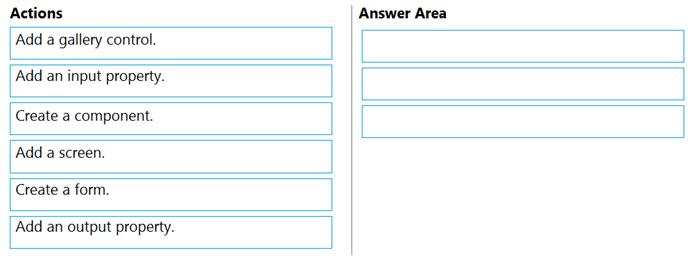
Test users report that the size and type of gallery displayed on each screen are different. You must improve the consistency for the app screens.
You need to create a reusable gallery that displays information based on the current record.
Which three actions should you perform in sequence? To answer, move the appropriate actions from the list of actions to the answer area and arrange them in the correct order.
NOTE: More than one order of answer choices is correct. You will receive credit for any of the correct orders you select.
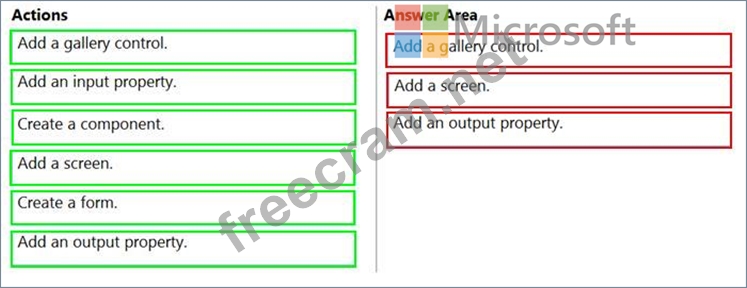
Correct Answer:
Explanation:
Step 1: Add a gallery control
Add a gallery to a blank screen
1. On the Insert tab, select Gallery, and then select Vertical.
2. On the Properties tab of the right-hand pane, open the Items list, and then select your Gallery Step 2: Add a screen Add a gallery in a screen
1. On the Home tab, select New screen > List screen.
A screen that contains a Gallery control and other controls, such as a search bar, appears.
Step 3: Add an input property
Input property is how a component receives data to be used in the component.
Incorrect Answers:
Output property is used to emit data or component state. For example, the Selected property on a Gallery control is an output property.
Reference:
https://docs.microsoft.com/en-us/powerapps/maker/canvas-apps/add-gallery
https://docs.microsoft.com/en-us/powerapps/maker/canvas-apps/create-component


- Question List (118q)
- Question 1: You create a canvas app for technicians at a computer store....
- Question 2: You need to roll back the mobile app to an earlier version. ...
- Question 3: DRAG DROP You plan to create apps for a company. You need to...
- Question 4: The company is adding a multi-stream interactive dashboard t...
- Question 5: You create a canvas app. You need to make the app available ...
- Question 6: A company creates a Power Apps app that allows service repre...
- Question 7: Rangers in national parks report wildlife they encounter dur...
- Question 8: A company creates a Power Apps app that allows service repre...
- Question 9: You create a canvas app within a Power Platform environment....
- Question 10: A company uses Power Automate. You manage two cloud flows na...
- Question 11: A company uses a model-driven app. You create a Power BI sal...
- Question 12: You have a solution that contains a Power Automate flow, an ...
- Question 13: You need to configure the app to meet the requirements. Whic...
- Question 14: You need to implement features for the solution. Which Power...
- Question 15: You are creating a canvas app. You need to display a limited...
- Question 16: A company uses a model-driven app. You create a Power BI sal...
- Question 17: You need to create a model-driven app without using code. Wh...
- Question 18: You need to resolve the issue for User1. What should you use...
- Question 19: You are creating a Power Automate flow. You have an array th...
- Question 20: You have a Power Apps solution that includes three model-dri...
- Question 21: You create a custom field on the Account entity. Members of ...
- Question 22: You are creating a canvas app for a company that delivers pa...
- Question 23: You create an automated flow by using Power Automate. The fl...
- Question 24: You need to implement logic in the app for lost sales. What ...
- Question 25: You need to meet the requirements for sales representative t...
- Question 26: A company must use a Power Apps app custom control that is e...
- Question 27: A company is building a Power Apps app to track key project ...
- Question 28: You create a new solution publisher and include a publisher ...
- Question 29: You need to create a model-driven app without using code. Wh...
- Question 30: A company is using Power Virtual Agents in Microsoft Teams t...
- Question 31: You are designing a canvas app that will be used by all user...
- Question 32: You need to implement features for the solution. Which Power...
- Question 33: A company is building multiple Power Apps apps to support a ...
- Question 34: You create a custom field on the Account entity. Members of ...
- Question 35: A company uses Power Apps. The company requites a canvas app...
- Question 36: You create an app with multiple screens. Test users report t...
- Question 37: You have an existing Power Apps environment. You need to cre...
- Question 38: You create a canvas app for a store. The logo must appear as...
- Question 39: You need to modify the app design to meet the accessibility ...
- Question 40: An administrator plans to create and deploy dashboards for u...
- Question 41: You need to modify the app design to meet the accessibility ...
- Question 42: The customer service team of a company uses a model-driven a...
- Question 43: You are creating an app for an organization's human resource...
- Question 44: A company uses Microsoft Power Platform. All users in the co...
- Question 45: You create an app with multiple screens. Test users report t...
- Question 46: Note: This question is part of a series of questions that pr...
- Question 47: The company is adding a multi-stream interactive dashboard t...
- Question 48: You create multiple apps as part of an unmanaged solution. Y...
- Question 49: Note: This question is part of a series of questions that pr...
- Question 50: An administrator plans to create and deploy dashboards for u...
- Question 51: You create an automated flow by using Power Automate. The fl...
- Question 52: An administrator plans to create and deploy dashboards for u...
- Question 53: Note: This question is part of a series of questions that pr...
- Question 54: You need to configure the system to meet the sales requireme...
- Question 55: Note: This question is part of a series of questions that pr...
- Question 56: You have an existing Power Apps environment. You need to cre...
- Question 57: You receive ideas from employees in a Microsoft Teams channe...
- Question 58: You need to ensure that the app can support the needs of Use...
- Question 59: You create a custom field on the Account entity. Members of ...
- Question 60: You create an automated flow by using Power Automate. The fl...
- Question 61: You have an existing Power Apps environment. You need to cre...
- Question 62: A company uses a model-driven app. You create a Power BI sal...
- Question 63: You plan to create apps for a company. You need to identify ...
- Question 64: You need to configure the app to meet the requirements. Whic...
- Question 65: You have a solution that contains a Power Automate flow, an ...
- Question 66: A company is building a Power Apps app to track key project ...
- Question 67: Note: This question is part of a series of questions that pr...
- Question 68: You need to create a flow for sending required emails to the...
- Question 69: You need to store a list of products and their colors. You h...
- Question 70: DRAG DROP You are an app builder for a medical office. The m...
- Question 71: A company must use a Power Apps app custom control that is e...
- Question 72: Note: This question is part of a series of questions that pr...
- Question 73: You create a canvas app. A user is not able to determine whi...
- Question 74: You create an app with multiple screens. Test users report t...
- Question 75: You are designing several new Microsoft Power Platform apps ...
- Question 76: You need to implement the change requested by the operations...
- Question 77: A company uses two SQL Server environments and two Common Da...
- 1 commentQuestion 78: A company stores sales orders in a Microsoft Excel workbook....
- Question 79: Note: This question is part of a series of questions that pr...
- Question 80: The company is adding a multi-stream interactive dashboard t...
- Question 81: A coworker creates a canvas app. The canvas app contains the...
- Question 82: A coworker creates a canvas app. The canvas app contains the...
- Question 83: The company is adding a multi-stream interactive dashboard t...
- Question 84: You use a Microsoft SharePoint list to record information ab...
- Question 85: A company has 500 products. Each product is referenced by a ...
- Question 86: You need to configure the app to meet the requirements. Whic...
- Question 87: You are designing a canvas app that will be used by all user...
- Question 88: You are configuring a new Common Data Service environment by...
- Question 89: You need to implement logic in the app for lost sales. What ...
- Question 90: You design a canvas app for users to search thousands of rec...
- Question 91: You create a canvas app within a Power Platform environment....
- Question 92: You need to create a flow for moving data from the Sales Log...
- Question 93: You are creating entities in a Common Data Service database ...
- Question 94: A company is onboarding new workers to the Microsoft Power P...
- Question 95: You are an app maker. You want to create apps and track cust...
- Question 96: You are developing a canvas app to monitor time. The app inc...
- Question 97: You have a Power Platform solution that uses Common Data Ser...
- Question 98: HOTSPOT You need to roll back the mobile app to an earlier v...
- Question 99: A company must use a Power Apps app custom control that is e...
- Question 100: You need to implement logic in the app for lost sales. What ...
- Question 101: A company is building multiple Power Apps apps to support a ...
- Question 102: You are designing several new Microsoft Power Platform apps ...
- Question 103: You are creating a canvas app. You need to store and retriev...
- Question 104: The company is adding a multi-stream interactive dashboard t...
- Question 105: You are an app maker for a college. You create an app for st...
- Question 106: DRAG DROP You plan to create apps for a company. You need to...
- Question 107: Note: This question is part of a series of questions that pr...
- Question 108: You are using Test Studio to test a Power Apps canvas app. Y...
- Question 109: Note: This question is part of a series of questions that pr...
- Question 110: You need to configure the system to meet the requirements. W...
- Question 111: Note: This question is part of a series of questions that pr...
- Question 112: You publish the first version of the app and solution on Nov...
- Question 113: You need to meet the requirement for the time tracking app. ...
- Question 114: You are an app builder for a medical office. The medical off...
- Question 115: You need to store a list of products and their colors. You h...
- Question 116: You are configuring security to enable users to analyze data...
- Question 117: You create the following apps for a company that provides fi...
- Question 118: You need to create a flow for sending required emails to the...
