Valid MD-102 Dumps shared by EduDump.com for Helping Passing MD-102 Exam! EduDump.com now offer the newest MD-102 exam dumps, the EduDump.com MD-102 exam questions have been updated and answers have been corrected get the newest EduDump.com MD-102 dumps with Test Engine here:
Access MD-102 Dumps Premium Version
(365 Q&As Dumps, 35%OFF Special Discount Code: freecram)
<< Prev Question Next Question >>
Question 136/163
You have a Microsoft 365 subscription.
All users have Microsoft 365 apps deployed.
You need to configure Microsoft 365 apps to meet the following requirements:
* Enable the automatic installation of WebView2 Runtime.
* Prevent users from submitting feedback.
Which two settings should you configure in the Microsoft 365 Apps admin center? To answer, select the appropriate settings in the answer area.
NOTE: Each correct selection is worth one point.
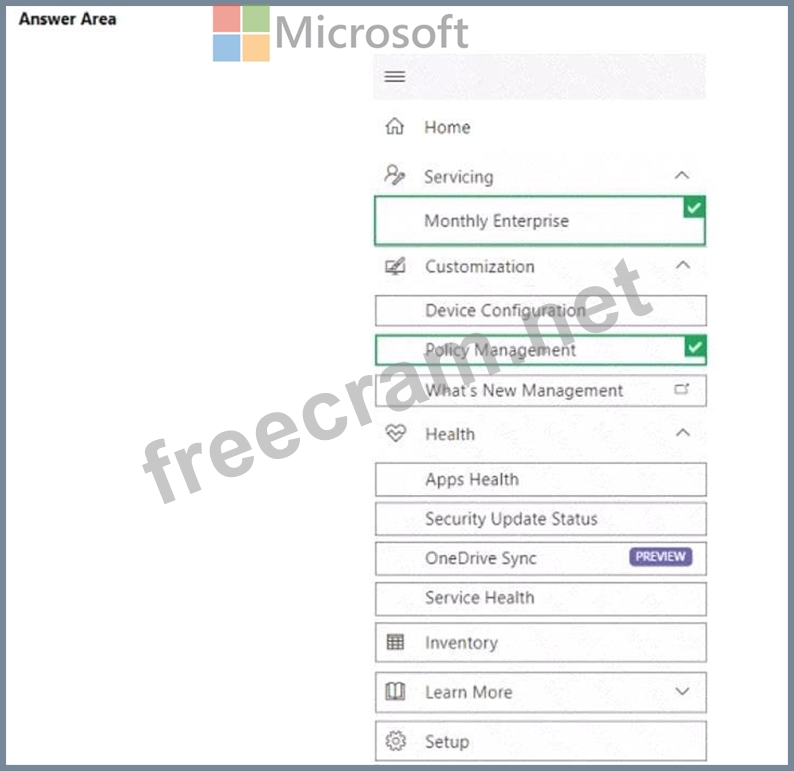
All users have Microsoft 365 apps deployed.
You need to configure Microsoft 365 apps to meet the following requirements:
* Enable the automatic installation of WebView2 Runtime.
* Prevent users from submitting feedback.
Which two settings should you configure in the Microsoft 365 Apps admin center? To answer, select the appropriate settings in the answer area.
NOTE: Each correct selection is worth one point.
Correct Answer:
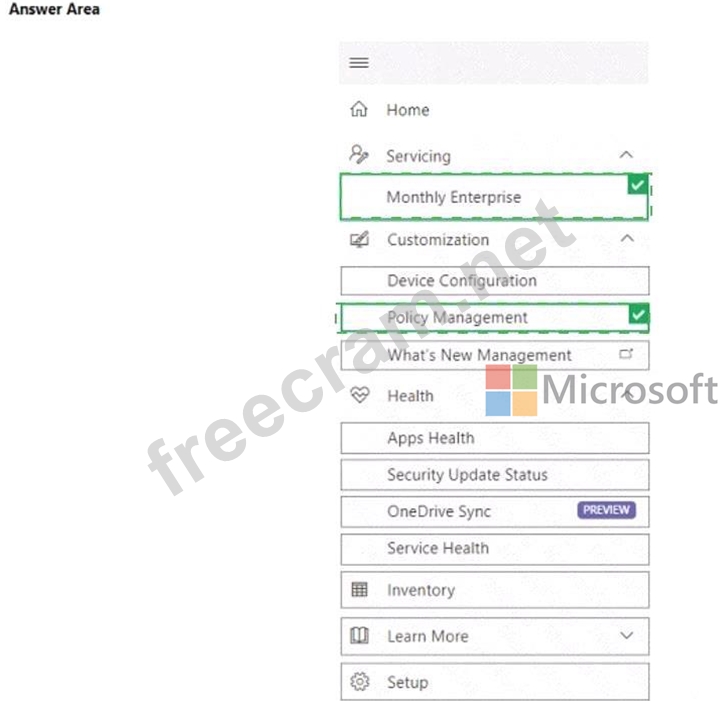
Explanation:
You can enable automatic installation in the same setting as where you prevent it from being installed automatically:
To prevent the automatic installation of WebView2 Runtime, sign in to the Microsoft 365 Apps admin center (https://config.office.com) with an admin account. Then, go to Customization > Device Configuration > Modern Apps Settings. Select Microsoft Edge WebView2 and then clear the Enable automatic installation of WebView2 Runtime check box.
https://learn.microsoft.com/en-us/deployoffice/webview2-install
Prevent users from submitting feedback:
https://learn.microsoft.com/en-us/microsoft-365/admin/manage/manage-feedback-ms-org?view=o365- worldwide


- Question List (163q)
- Question 1: You use the Microsoft Deployment Toolkit (MDT) to deploy Win...
- Question 2: You have a Microsoft 365 E5 subscription and use Microsoft I...
- Question 3: You have a Microsoft 365 E5 subscription. All Windows device...
- Question 4: You plan to deploy Windows 11 Pro to 200 new computers by us...
- Question 5: You have a Microsoft 365 tenant. You have devices enrolled i...
- Question 6: You have a Microsoft 365 subscription. You create a retentio...
- Question 7: You have a Microsoft 365 subscription that uses Microsoft In...
- Question 8: You have computers that run Windows 10 and are managed by us...
- Question 9: Your network contains an on-premises Active Directory Domain...
- Question 10: Which devices are registered by using the Windows Autopilot ...
- Question 11: You have a Microsoft 365 subscription that contains 500 Andr...
- Question 12: You have a Hyper-V host. The host contains virtual machines ...
- Question 13: Your company has an Azure AD tenant named contoso.com that c...
- Question 14: You are evaluating which devices are compliant. For each of ...
- Question 15: You have a Microsoft 365 subscription that includes Microsof...
- Question 16: You have the on-premises servers shown in the following tabl...
- Question 17: You have the devices shown in the following table. You need ...
- Question 18: Your network contains an on-premises Active Directory domain...
- Question 19: You have computer that run Windows 10 and connect to an Azur...
- Question 20: You have an Azure Active Directory (Azure AD) tenant named c...
- Question 21: You have a Microsoft 365 E5 subscription and use Microsoft I...
- Question 22: You have a Microsoft 365 subscription that contains a user n...
- Question 23: - You have a Microsoft 365 subscription that contains the de...
- Question 24: Your network contains an Active Directory domain. The domain...
- Question 25: You have a Microsoft 365 subscription that uses Microsoft In...
- Question 26: You have a Microsoft 365 subscription. You use Microsoft Int...
- Question 27: You have a Microsoft 365 E5 subscription and 100 computers t...
- Question 28: You have a Microsoft 365 subscription that uses Microsoft In...
- Question 29: You have a Microsoft 365 subscription that uses Microsoft In...
- Question 30: You have a Microsoft 365 E5 subscription that is linked to a...
- Question 31: You need to implement mobile device management (MDM) for per...
- Question 32: You need to meet the device management requirements for the ...
- Question 33: You have a Microsoft Intune subscription associated to an Az...
- Question 34: You have a Microsoft 365 subscription that contains the devi...
- Question 35: You have a Microsoft 365 E5 subscription. You create an app ...
- Question 36: You have a Microsoft Azure subscription that contains an Azu...
- Question 37: You need to meet the technical requirements for the new HR d...
- Question 38: You have an Azure AD tenant that contains the devices shown ...
- Question 39: You have a Microsoft 365 tenant that contains the objects sh...
- Question 40: You have a Microsoft 365 subscription that contains 1,000 iO...
- Question 41: You manage 1.000 devices by using Microsoft Intune. You revi...
- Question 42: For each of the following statements, select Yes if the stat...
- Question 43: - You have a Microsoft 365 subscription that contains device...
- Question 44: You have an Azure Active Directory Premium Plan 2 subscripti...
- Question 45: You have a Microsoft 365 E5 subscription that contains a use...
- Question 46: You have a Microsoft 365 E5 subscription. You create a new u...
- Question 47: You have a Microsoft 365 tenant that uses Microsoft Intune. ...
- Question 48: You have 100 computers that run Windows 10. You plan to depl...
- Question 49: You have a Microsoft 365 E5 subscription. The subscription c...
- Question 50: You have a Microsoft 365 subscription that uses Microsoft In...
- Question 51: You have an Azure AD tenant that contains the users shown in...
- Question 52: You have a Microsoft 365 subscription. You need to enable pa...
- Question 53: You have a Microsoft 365 E5 subscription and use Microsoft I...
- Question 54: Your network contains an Active Directory domain. You instal...
- Question 55: You have a Microsoft Entra tenant named contoso.com that con...
- Question 56: You have a Microsoft 365 subscription. You plan to use Windo...
- Question 57: You have a Microsoft 365 tenant and an internal certificatio...
- Question 58: You need to recommend a solution to meet the device manageme...
- Question 59: You have a Microsoft 365 subscription. You have 10 computers...
- Question 60: You have a Microsoft 365 subscription that uses Microsoft In...
- Question 61: You use Microsoft Intune and Intune Data Warehouse. You need...
- Question 62: You have a Microsoft 365 subscription that uses Microsoft In...
- Question 63: You have a Microsoft 365 subscription that contains 1.000 Wi...
- Question 64: You have a Microsoft 365 E5 subscription. You use Microsoft ...
- Question 65: You have an Azure AD tenant and 100 Windows 10 devices that ...
- Question 66: Your network contains an Active Directory domain. Active Dir...
- Question 67: You have a Microsoft 365 subscription that contains 500 comp...
- Question 68: For each of the following statements, select Yes if the stat...
- Question 69: Your company has a Microsoft 365 E5 tenant. All the devices ...
- Question 70: You have a Microsoft 365 ES subscription that uses Microsoft...
- Question 71: You have a Microsoft 365 ES subscription that includes Micro...
- Question 72: You have a Microsoft 365 E5 subscription that contains the d...
- Question 73: You need to capture the required information for the sales d...
- Question 74: You need to meet the requirements for the MKG department use...
- Question 75: You have a Microsoft Entra tenant named contoso.com that con...
- Question 76: You have the devices shown in the following table. (Exhibit)...
- Question 77: You have a Microsoft 365 E5 subscription. You need to downlo...
- Question 78: You have a Microsoft 365 E5 subscription and a computer that...
- Question 79: You have two computers that run Windows 10. The computers ar...
- Question 80: You have a Microsoft 365 E5 tenant that contains Windows dev...
- Question 81: You install a feature update on a computer that runs Windows...
- Question 82: You have a Microsoft 365 E5 subscription that contains a gro...
- Question 83: You have an Azure AD tenant named contoso.com that contains ...
- Question 84: You have a Microsoft 365 subscription that contains a user n...
- Question 85: You have a hybrid environment that contains a Microsoft Entr...
- Question 86: You have a Microsoft 365 subscription and use Microsoft Intu...
- Question 87: You have a Microsoft 365 subscription that includes Microsof...
- Question 88: You have a Windows 10 device named Computer1 enrolled in Mic...
- Question 89: Your company has computers that run Windows 10 and are Micro...
- Question 90: You have an Azure AD group named Group1. Group! contains two...
- Question 91: You have groups that use the Dynamic Device membership type ...
- Question 92: You have following types of devices enrolled in Microsoft In...
- Question 93: You have a Microsoft 365 subscription that contains 1,000 iO...
- Question 94: You are creating a device configuration profile in Microsoft...
- Question 95: You have a Microsoft 365 tenant that uses Microsoft Intune. ...
- Question 96: You have a Microsoft 365 Business Standard subscription and ...
- Question 97: You manage 1,000 computers that run Windows 10. All the comp...
- Question 98: You need to resolve the performance issues in the Los Angele...
- Question 99: Note: This section contains one or more sets of questions wi...
- Question 100: You have a workgroup computer named Client1 that runs Window...
- Question 101: Your company standardizes on Windows 10 Enterprise for all u...
- Question 102: You have a Microsoft 365 E5 subscription that contains the d...
- Question 103: Your network contains an Active Directory domain named conto...
- Question 104: You have an Azure AD tenant that contains the devices shown ...
- Question 105: You have a Microsoft 365 E5 subscription. You use Microsoft ...
- Question 106: You have a Microsoft 365 subscription and use Microsoft Intu...
- Question 107: You have a Microsoft 365 subscription. You plan to enroll de...
- Question 108: You have a Microsoft 365 subscription that contains 1,000 An...
- Question 109: You have a computer that runs Windows 10 and contains two lo...
- Question 110: You have a Microsoft Entra tenant named contoso.com. You man...
- Question 111: To which devices do Policy1 and Policy2 apply? To answer, se...
- Question 112: Which users can purchase and assign App1?...
- Question 113: You have a Microsoft 365 subscription that includes Microsof...
- Question 114: You have a Microsoft 365 subscription that contains a user n...
- Question 115: You have a Microsoft 365 tenant that contains the devices sh...
- Question 116: You have a Microsoft 365 subscription. Users have iOS device...
- Question 117: You have a Microsoft 365 subscription that contains a user n...
- Question 118: You have a Microsoft 365 subscription that uses Microsoft In...
- Question 119: You have a Microsoft 365 subscription that uses Microsoft In...
- Question 120: You have a Microsoft 365 subscription that includes Microsof...
- Question 121: Your network contains an Active Directory domain. The domain...
- Question 122: You have a Microsoft 365 subscription. All computers are enr...
- Question 123: You need to meet the technical requirements for the iOS devi...
- Question 124: What should you use to meet the technical requirements for A...
- Question 125: What is the maximum number of devices that User1 and User2 c...
- Question 126: You have a Microsoft Deployment Toolkit (MDT) deployment sha...
- Question 127: You have a Microsoft 365 subscription that contains Windows ...
- Question 128: You have a Microsoft 365 E5 subscription. You need to use De...
- Question 129: You have 100 Windows 10 devices enrolled in Microsoft Intune...
- Question 130: You have the Microsoft Deployment Toolkit (MDT) installed in...
- Question 131: You have a Microsoft 365 E5 subscription that contains two d...
- Question 132: You need to prepare for the deployment of the Phoenix office...
- Question 133: You create a Windows Autopilot deployment profile. You need ...
- Question 134: You have 200 computers that run Windows 10 and are joined to...
- Question 135: Your network contains an on-premises Active Directory Domain...
- Question 136: You have a Microsoft 365 subscription. All users have Micros...
- Question 137: Your company has a computer named Computer1 that runs Window...
- Question 138: Your company has an Azure AD tenant named contoso.com that c...
- Question 139: You have a Windows 10 device named Device! that is joined to...
- Question 140: Note: This section contains one or more sets of questions wi...
- Question 141: You have a Microsoft 365 E5 subscription that contains the u...
- Question 142: You have 200 computers that run Windows 10. The computers ar...
- Question 143: You have a Microsoft 365 subscription that contains the foll...
- Question 144: You have a Microsoft 365 E5 subscription that includes Micro...
- Question 145: You have a Microsoft 365 E5 subscription that uses Microsoft...
- Question 146: You have a Microsoft 365 subscription. You use Microsoft Int...
- Question 147: You have the Microsoft Deployment Toolkit (MDT) installed. Y...
- Question 148: Your on-premises network contains an Active Directory domain...
- Question 149: You have a Microsoft Deployment Toolkit (MDT) solution that ...
- Question 150: Your network contains an Active Directory domain. The domain...
- Question 151: You have a Microsoft 365 subscription. You have devices enro...
- Question 152: You have a Microsoft 365 subscription. All devices run Windo...
- Question 153: You have a Microsoft 365 E5 subscription that uses Microsoft...
- Question 154: You have devices enrolled in Microsoft Intune as shown in th...
- Question 155: You have a Microsoft 365 E5 subscription and 25 Apple iPads....
- Question 156: You have a Microsoft 365 subscription that contains the devi...
- Question 157: You have a Microsoft 365 E5 subscription. The subscription c...
- Question 158: You have an Azure AD tenant named contoso.com that contains ...
- Question 159: You have a Microsoft 365 subscription. You have 25 Microsoft...
- Question 160: You have a Microsoft Intune subscription that is configured ...
- Question 161: You have a Microsoft 365 subscription that uses Microsoft In...
- Question 162: You have a Microsoft 365 subscription that uses Microsoft In...
- Question 163: You have an on-premises Active Directory domain that syncs t...
