<< Prev Question Next Question >>
Question 39/46
A company owns and operates hotels, restaurants, and stores.
When the staff orders materials from the purchasing department, the requests are not directed to the correct approvers.
The staff requires a new field named Approver from which they can select the appropriate approver. The field must include the following options:
* Hotel manager
* Restaurant manager
* Store manager
* Purchasing manager
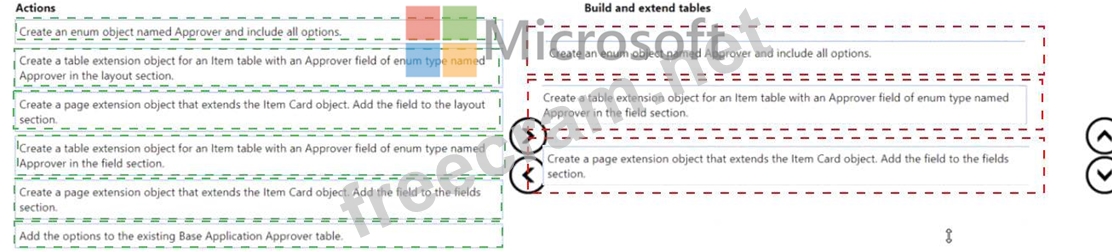
You need to create the Approver field in the Item table by using an AL extension.
Which three actions should you perform in sequence? To answer, move the appropriate actions from the list of actions to the answer area and arrange them in the correct order.
When the staff orders materials from the purchasing department, the requests are not directed to the correct approvers.
The staff requires a new field named Approver from which they can select the appropriate approver. The field must include the following options:
* Hotel manager
* Restaurant manager
* Store manager
* Purchasing manager
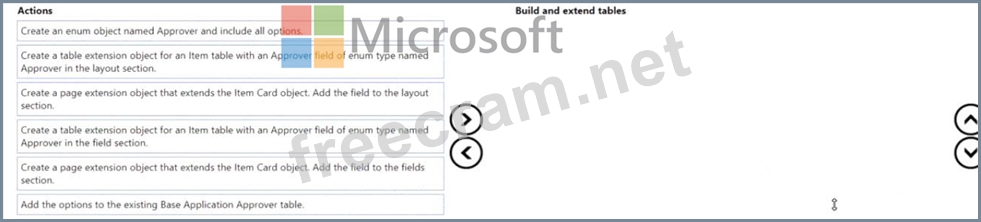
You need to create the Approver field in the Item table by using an AL extension.
Which three actions should you perform in sequence? To answer, move the appropriate actions from the list of actions to the answer area and arrange them in the correct order.