- Home
- Microsoft
- Microsoft Dynamics 365: Finance and Operations Apps Developer
- Microsoft.MB-500.v2026-10-10.q208
- Question 191
Valid MB-500 Dumps shared by ExamDiscuss.com for Helping Passing MB-500 Exam! ExamDiscuss.com now offer the newest MB-500 exam dumps, the ExamDiscuss.com MB-500 exam questions have been updated and answers have been corrected get the newest ExamDiscuss.com MB-500 dumps with Test Engine here:
Access MB-500 Dumps Premium Version
(431 Q&As Dumps, 35%OFF Special Discount Code: freecram)
<< Prev Question Next Question >>
Question 191/208
Drag and Drop Question
An organization uses Visual Studio to develop customizations for Dynamics 365 Supply chain Management.
You need to create an extension for the CustTable form and add the extension to the Visual Studio project.
Which three actions should you perform in sequence? To answer, move the appropriate actions from the list of actions to the answer area and arrange them in the correct order.
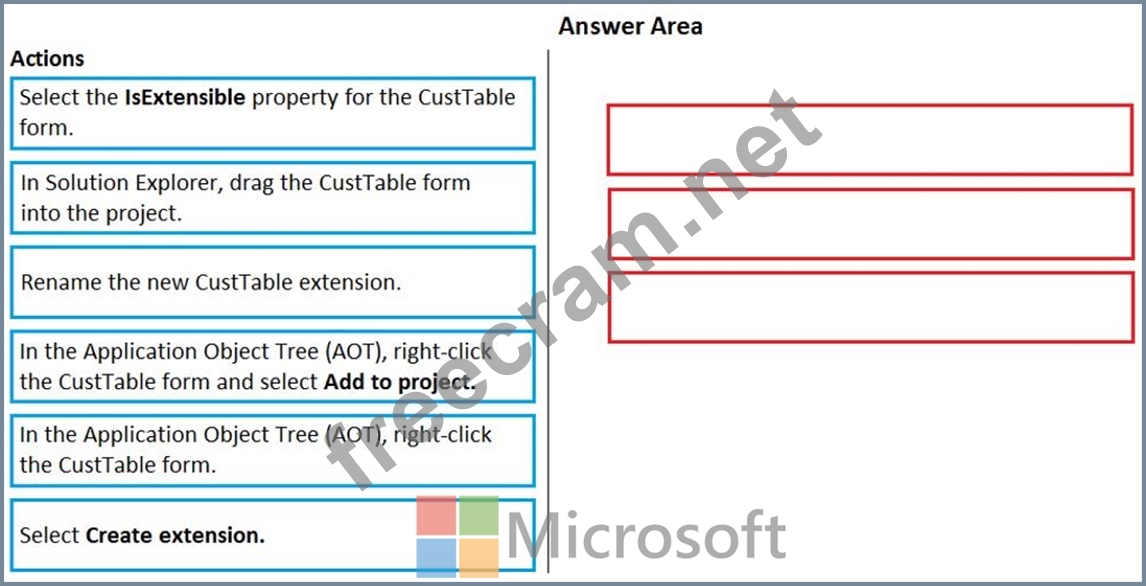
An organization uses Visual Studio to develop customizations for Dynamics 365 Supply chain Management.
You need to create an extension for the CustTable form and add the extension to the Visual Studio project.
Which three actions should you perform in sequence? To answer, move the appropriate actions from the list of actions to the answer area and arrange them in the correct order.
Correct Answer:
Explanation:
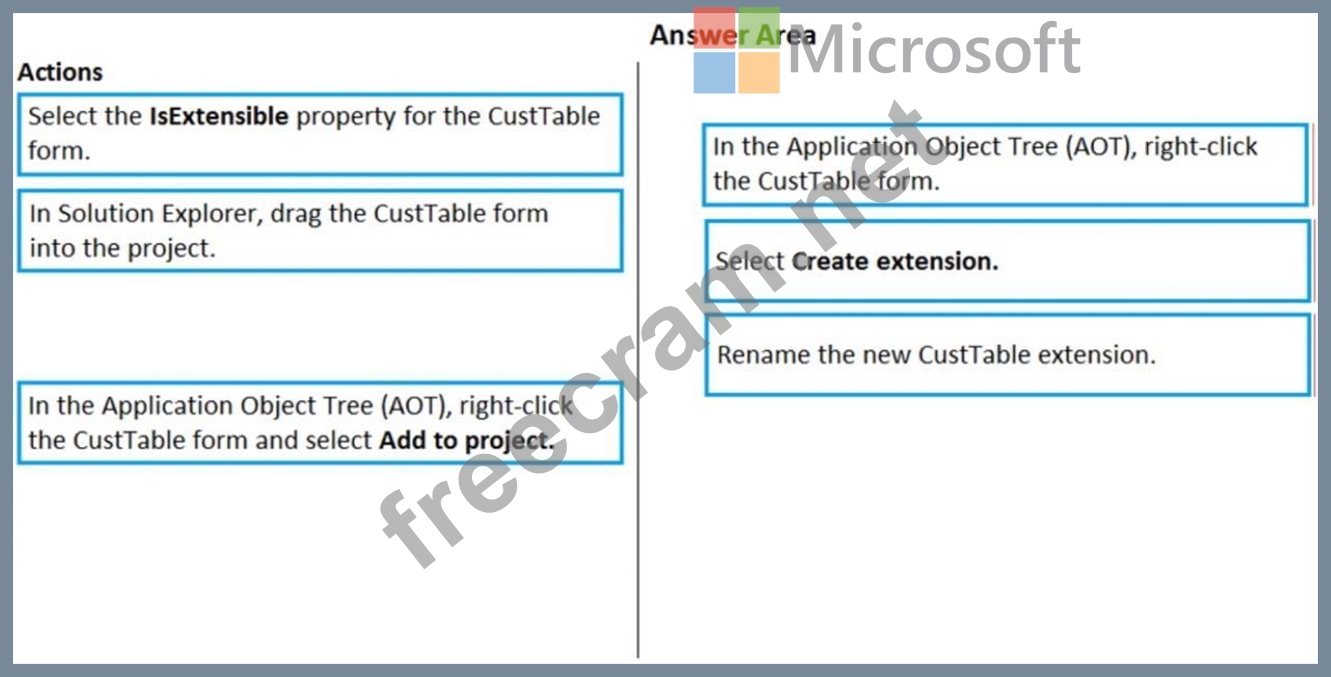
Step 1: In The Application Object Tree (AOT), right-click the CustTable form.
Step 2: Select Create extension.
Step 3: Rename the new CustTable extension
Note: To create an extension (in general terms), follow these steps:
1. In the Application Explorer window, expand the AOT node.
2. Expand the node for the element that you want to extend. For example, in Classic view, extend the Data Models node, and then extend the Tables node to view all available tables.
3. Right-click the element that you want to extend.
4. Select Create extension to add an extension to your current project. Select Create extension in new project if you want to add the extension to a new project. The element will be added to a project in the Solution Explorer window, and it will open in the element designer.
Reference:
https://docs.microsoft.com/en-us/dynamics365/business-central/dev-itpro/developer/devenv-extension-example


- Question List (208q)
- Question 1: Drag and Drop Question You are a Dynamics 365 Finance develo...
- Question 2: Drag and Drop Question A company uses Dynamics 365 Finance. ...
- Question 3: You are training a new Dynamics 365 Finance developer. You n...
- Question 4: A company uses Dynamics 365 Finance. The company requires mo...
- Question 5: A company is implementing Dynamics 365 finance and operation...
- Question 6: Note: This question is part of a series of questions that pr...
- Question 7: Hotspot Question You have a Dynamics 365 Finance environment...
- Question 8: Drag and Drop Question A company uses Dynamics 365 Finance. ...
- Question 9: Hotspot Question You are developing a Power BI report. The r...
- Question 10: Note: This question is part of a series of questions that pr...
- Question 11: Note: This question is part of a series of questions that pr...
- Question 12: You need to prepare to deploy a software deployable package ...
- Question 13: Hotspot Question You are using the Metadata search tool in V...
- Question 14: Hotspot Question You are a Dynamics 365 Finance developer. Y...
- Question 15: Case Study 3 - Munson's Pickles and Preserves Farm Backgroun...
- Question 16: Hotspot Question A user reports that a form takes a long tim...
- Question 17: Drag and Drop Question You are a Dynamics 365 Finance develo...
- Question 18: Drag and Drop Question A company uses Dynamics 365 Finance. ...
- Question 19: You develop apps for Dynamics 365 Supply Chain Management. Y...
- Question 20: Drag and Drop Question A company uses Dynamics 365 Finance a...
- Question 21: Drag and Drop Question A company uses Dynamics 365 Finance. ...
- Question 22: Drag and Drop Question You are importing data packages into ...
- Question 23: Drag and Drop Question You need to integrate Dynamics 365 Fi...
- Question 24: You are a Dynamics 365 Finance developer. You make changes t...
- Question 25: Case study 4 - ADatum Corporation Background ADatum Corporat...
- Question 26: A company has an extension that makes changes to a base form...
- Question 27: Case Study 1 - Wide World Importers Background Wide World Im...
- Question 28: You are Dynamics 365 Finance developer. You need to initiali...
- Question 29: You are training a new Dynamics 365 Finance developer. You n...
- Question 30: A company uses Dynamics 365 Finance. You must add fields to ...
- Question 31: A company uses Dynamics 365 Finance. The company has a custo...
- Question 32: Drag and Drop Question You are a Dynamics 365 Finance develo...
- Question 33: Drag and Drop Question A company uses Dynamics 365 Finance. ...
- Question 34: Case study 4 - ADatum Corporation Background ADatum Corporat...
- Question 35: Case Study 2 - First Up Consultants Background Overview Firs...
- Question 36: An error message displays when a user tries to save an outgo...
- Question 37: Case study 4 - ADatum Corporation Background ADatum Corporat...
- Question 38: Drag and Drop Question You are importing data packages into ...
- Question 39: Note: This question is part of a series of questions that pr...
- Question 40: Drag and Drop Question You are creating a new class and addi...
- Question 41: Hotspot Question A company requires a change to one of the b...
- Question 42: Contoso, Ltd. uses Dynamics 365 Finance. You receive reports...
- Question 43: Case Study 1 - Wide World Importers Background Wide World Im...
- Question 44: Hotspot Question A company uses Dynamics 365 finance and ope...
- Question 45: Note: This question is part of a series of questions that pr...
- Question 46: Drag and Drop Question A company has a Dynamics 365 Finance ...
- Question 47: A company is implementing Dynamics 365 Finance. A series of ...
- Question 48: You are a Dynamics 365 Finance developer. You have the follo...
- Question 49: Drag and Drop Question A company uses Dynamics 365 Supply Ch...
- Question 50: Drag and Drop Question A company implements Dynamics 365 Fin...
- Question 51: Drag and Drop Question Developers at a company discover a bu...
- Question 52: You are a Dynamics 365 Finance developer. You create a class...
- Question 53: Hotspot Question A company uses Dynamics 365 Supply Chain Ma...
- Question 54: You are a Dynamics 365 Finance developer. Users report that ...
- Question 55: Note: This question is part of a series of questions that pr...
- Question 56: You add a new field in an extension to the SalesTable table ...
- Question 57: Case Study 3 - Munson's Pickles and Preserves Farm Backgroun...
- Question 58: Hotspot Question You develop a customization for Dynamics 36...
- Question 59: You have a table in which multiple properties must be change...
- Question 60: Hotspot Question You are a Dynamics 365 Finance developer. A...
- Question 61: Case study 4 - ADatum Corporation Background ADatum Corporat...
- Question 62: Drag and Drop Question You are a Dynamics 365 Finance develo...
- Question 63: Drag and Drop Question You are developing new features for a...
- Question 64: A company requires Dynamics 365 finance and operations apps ...
- Question 65: Drag and Drop Question A company uses Dynamics 365 Supply Ch...
- Question 66: A company is using Dynamics 365 finance and operations apps....
- Question 67: You are a Dynamics 365 Finance developer. You create an inte...
- Question 68: Case Study 3 - Munson's Pickles and Preserves Farm Backgroun...
- Question 69: You have a table in which multiple properties must be change...
- Question 70: A company is developing a new solution in Dynamics 365 Suppl...
- Question 71: Hotspot Question You are building analytical components for ...
- Question 72: You are Dynamics 365 Finance developer. You need to initiali...
- Question 73: A company uses Dynamics 365 Finance. You have two tables as ...
- Question 74: Note: This question is part of a series of questions that pr...
- Question 75: Drag and Drop Question A company uses Dynamics 365 Finance. ...
- Question 76: You are a Dynamics 365 Finance developer. You have a form th...
- Question 77: Drag and Drop Question A company uses Dynamics 365 Finance. ...
- Question 78: A company has a Dynamics 365 finance and operations app. A u...
- Question 79: Case Study 3 - Munson's Pickles and Preserves Farm Backgroun...
- Question 80: Hotspot Question You have an SSRS report developed in a syst...
- Question 81: Note: This question is part of a series of questions that pr...
- Question 82: A company uses Dynamics 365 Finance. The company uses a sand...
- Question 83: A company uses Dynamics 365 Finance. You must create a proce...
- Question 84: Note: This question is part of a series of questions that pr...
- Question 85: Drag and Drop Question A company is implementing Dynamics 36...
- Question 86: A company uses Dynamics 365 Supply Chain Management. You are...
- Question 87: A company is implementing Dynamics 365 finance and operation...
- Question 88: Hotspot Question A company uses Dynamics 365 Finance. The co...
- Question 89: A company requires a Power Apps app that will enable users t...
- Question 90: You are creating a new form in Visual Studio. You need to ap...
- Question 91: A company uses Dynamics 365 Finance. System users require a ...
- Question 92: Users report that a company's Dynamics 365 Finance website i...
- Question 93: Drag and Drop Question A company has a cloud-based installat...
- Question 94: A company wants to integrate Dynamics 365 Finance with an ex...
- Question 95: A company uses Dynamics 365 Finance. You create an analytica...
- Question 96: Drag and Drop Question You are working on a project in Dynam...
- Question 97: You are a Dynamics 365 Finance developer. You make changes t...
- Question 98: Hotspot Question You are a Dynamics 365 Finance developer. Y...
- Question 99: You need to prepare to deploy a software deployable package ...
- Question 100: You need to prepare to deploy a software deployable package ...
- Question 101: Drag and Drop Question A company uses Dynamics 365 Supply Ch...
- Question 102: Note: This question is part of a series of questions that pr...
- Question 103: Drag and Drop Question You are implementing Dynamics 365 Fin...
- Question 104: Hotspot Question You are a Dynamics 365 Finance developer. Y...
- Question 105: A company uses Dynamics 365 Supply Chain Management. The com...
- Question 106: You are a Dynamics 365 Finance developer. You have a table n...
- Question 107: Drag and Drop Question You are working on a project that use...
- Question 108: Case Study 1 - Wide World Importers Background Wide World Im...
- Question 109: You are a Dynamics 365 Finance and Operations developer. You...
- Question 110: Note: This question is part of a series of questions that pr...
- Question 111: Case Study 2 - First Up Consultants Background Overview Firs...
- Question 112: Drag and Drop Question A company uses Dynamics 365 Finance. ...
- Question 113: Drag and Drop Question A company uses Dynamics 365 Supply Ch...
- Question 114: You are a Dynamics 365 Finance developer. You have a solutio...
- Question 115: Case Study 3 - Munson's Pickles and Preserves Farm Backgroun...
- Question 116: Drag and Drop Question A company uses Dynamics 365 Finance. ...
- Question 117: Note: This question is part of a series of questions that pr...
- Question 118: Drag and Drop Question A company has a table named CustTrans...
- Question 119: Note: This question is part of a series of questions that pr...
- Question 120: Hotspot Question You are a Dynamics 365 Finance developer. A...
- Question 121: You are a Dynamics 365 Finance developer. You have the follo...
- Question 122: Case Study 3 - Munson's Pickles and Preserves Farm Backgroun...
- Question 123: Case study 4 - ADatum Corporation Background ADatum Corporat...
- Question 124: Drag and Drop Question You are a Dynamics 365 Finance develo...
- Question 125: Drag and Drop Question A company uses Dynamics 365 Finance. ...
- Question 126: You create a bring your own database (BYOD) entity that incl...
- Question 127: Drag and Drop Question A company uses Dynamics 365 Finance. ...
- Question 128: Hotspot Question A company has a cloud-based Dynamics 365 Fi...
- Question 129: Contoso, Ltd. uses Dynamics 365 Finance. You receive reports...
- Question 130: You are training a new Dynamics 365 Finance developer. You n...
- Question 131: Drag and Drop Question You are configuring your developer en...
- Question 132: Accompany is implementing Dynamics 365 Supply Chain Manageme...
- Question 133: Note: This question is part of a series of questions that pr...
- Question 134: Note: This question is part of a series of questions that pr...
- Question 135: You have a cloud-based Dynamics 365 Finance production envir...
- Question 136: Drag and Drop Question A company uses Dynamics 365 finance a...
- Question 137: A company implements Dynamics 365 Finance and Dynamics 365 S...
- Question 138: Drag and Drop Question A company is upgrading from Dynamics ...
- Question 139: You are a Dynamics 365 Finance developer. You need to ensure...
- Question 140: You are a Dynamics 365 Finance developer. You are testing a ...
- Question 141: A company uses a SQL Server Reporting Services (SSRS) report...
- Question 142: Drag and Drop Question A company uses Dynamics 365 Supply Ch...
- Question 143: You are developing a workflow for Dynamics 365 Supply Chain ...
- Question 144: Drag and Drop Question A company uses Dynamics 365 Supply Ch...
- Question 145: Drag and Drop Question You are a Dynamics 365 Finance develo...
- Question 146: Drag and Drop Question A company has a Dynamics 365 finance ...
- Question 147: Case study 4 - ADatum Corporation Background ADatum Corporat...
- Question 148: Drag and Drop Question An error occurs when an employee crea...
- Question 149: You are an architect implementing a Dynamics 365 Finance env...
- Question 150: Drag and Drop Question A company is migrating from a legacy ...
- Question 151: A company uses Dynamics 365 Supply Chain Management. You cre...
- Question 152: Note: This question is part of a series of questions that pr...
- Question 153: Drag and Drop Question You are a Dynamics 365 Finance develo...
- Question 154: Hotspot Question You are a Dynamics 365 finance developer. Y...
- Question 155: You are developing a customization for Dynamics 365 Unified ...
- Question 156: Case Study 1 - Wide World Importers Background Wide World Im...
- Question 157: A company uses Dynamics 365 finance and operations apps. The...
- Question 158: Hotspot Question You have the following code: (Exhibit) For ...
- Question 159: You are a Dynamics 365 Finance developer. You have a table n...
- Question 160: Drag and Drop Question A company has a Dynamics 365 finance ...
- Question 161: Hotspot Question A company uses Dynamics 365 Supply Chain Ma...
- Question 162: Hotspot Question You are designing a new layout for the Vend...
- Question 163: Drag and Drop Question A company implements Dynamics 365 Sup...
- Question 164: Drag and Drop Question A company uses Dynamics 365 Commerce ...
- Question 165: You create a new interface class in Dynamics 365 Finance. Th...
- Question 166: Hotspot Question You are a Dynamics 365 Finance developer. Y...
- Question 167: You are a Dynamics 365 Finance developer. You need to create...
- Question 168: Contoso, Ltd. uses Dynamics 365 Finance. You receive reports...
- Question 169: Drag and Drop Question A company uses Dynamics 365 Finance. ...
- Question 170: You are training a new Dynamics 365 Finance developer. You n...
- Question 171: You are a Dynamics 365 Finance developer. You need to create...
- Question 172: Case Study 1 - Wide World Importers Background Wide World Im...
- Question 173: Case Study 1 - Wide World Importers Background Wide World Im...
- Question 174: You are a Dynamics 365 Finance and Operations developer. You...
- Question 175: Case study 4 - ADatum Corporation Background ADatum Corporat...
- Question 176: Note: This question is part of a series of questions that pr...
- Question 177: Hotspot Question You have the following code: (Exhibit) For ...
- Question 178: A company requires Dynamics 365 finance and operations apps ...
- Question 179: Note: This question is part of a series of questions that pr...
- Question 180: A company uses Dynamics 365 Supply Chain Management. Users a...
- Question 181: Drag and Drop Question A banking company is creating custom ...
- Question 182: You are Dynamics 365 Finance developer. You need to initiali...
- Question 183: You are a Dynamics 365 Finance developer. You have the follo...
- Question 184: Hotspot Question You have a Dynamics 365 Finance development...
- Question 185: You are a Dynamics 365 Finance developer. You have the follo...
- Question 186: Note: This question is part of a series of questions that pr...
- Question 187: Note: This question is part of a series of questions that pr...
- Question 188: A company is implementing Dynamics 365 finance and operation...
- Question 189: Note: This question is part of a series of questions that pr...
- Question 190: Case Study 1 - Wide World Importers Background Wide World Im...
- Question 191: Drag and Drop Question An organization uses Visual Studio to...
- Question 192: Case Study 3 - Munson's Pickles and Preserves Farm Backgroun...
- Question 193: A company uses Dynamics 365 Finance. The company deploys a c...
- Question 194: Hotspot Question You have a Dynamics 365 Finance environment...
- Question 195: Note: This question is part of a series of questions that pr...
- Question 196: You use Dynamics 365 Finance. You loop through a list of ven...
- Question 197: Hotspot Question A company is implementing Dynamics 365 Supp...
- Question 198: Drag and Drop Question A company uses Dynamics 365 Finance a...
- Question 199: A company uses Dynamics 365 Finance. The company requires a ...
- Question 200: Case study 4 - ADatum Corporation Background ADatum Corporat...
- Question 201: Drag and Drop Question A company implements Dynamics 365 Fin...
- Question 202: Note: This question is part of a series of questions that pr...
- Question 203: A company uses Dynamics 365 Finance. There are performance i...
- Question 204: A company uses Dynamics 365 Finance. You are performing a co...
- Question 205: Drag and Drop Question A company uses Dynamics 365 Finance. ...
- Question 206: You have a table in which multiple properties must be change...
- Question 207: Case Study 1 - Wide World Importers Background Wide World Im...
- Question 208: Hotspot Question A company is implementing Dynamics 365 Fina...
