- Home
- Microsoft
- Microsoft Dynamics 365 Supply Chain Management Functional Consultant
- Microsoft.MB-330.v2025-09-25.q172
- Question 51
Valid MB-330 Dumps shared by ExamDiscuss.com for Helping Passing MB-330 Exam! ExamDiscuss.com now offer the newest MB-330 exam dumps, the ExamDiscuss.com MB-330 exam questions have been updated and answers have been corrected get the newest ExamDiscuss.com MB-330 dumps with Test Engine here:
Access MB-330 Dumps Premium Version
(495 Q&As Dumps, 35%OFF Special Discount Code: freecram)
<< Prev Question Next Question >>
Question 51/172
You need to configure the conversions for the items.
Which measurement type should you use? To answer, drag the appropriate unit of measure types to the correct requirements. Each unit of measure type may be used once, more than once, or not at all. You may need to drag the split bar between panes or scroll to view content.
NOTE: Each correct selection is worth one point.
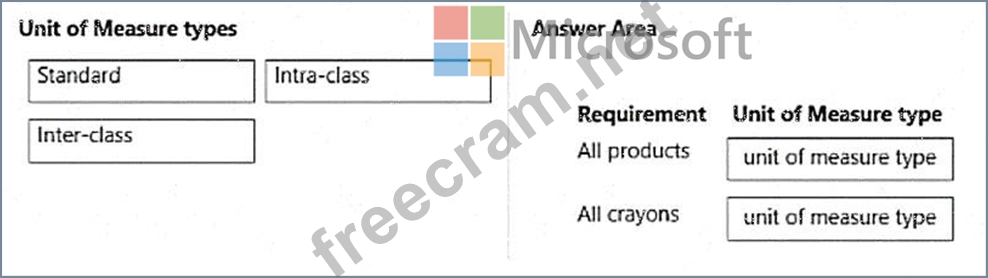
Which measurement type should you use? To answer, drag the appropriate unit of measure types to the correct requirements. Each unit of measure type may be used once, more than once, or not at all. You may need to drag the split bar between panes or scroll to view content.
NOTE: Each correct selection is worth one point.
Correct Answer:
Explanation:
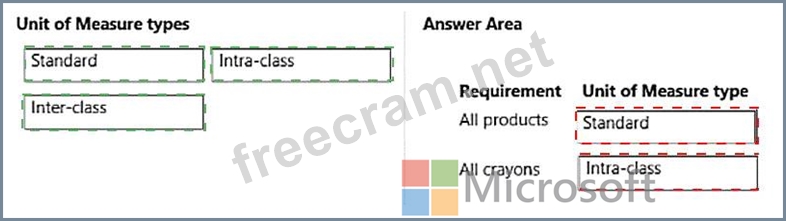
Box 1: Standard
Standard conversions - Set up standard conversion rules for all products.
Box 2: Intra-class
Crayons are stored as separate item numbers depending on whether they are in a box or a case. This creates issues when counting inventory to determine the total number of crayons in stock.
Intra-class conversions - Set up product-specific conversion rules for units in the same unit class. For example, you can set up a conversion rule for a product that converts a box to the number of pieces in a box.
Pieces and boxes are both assigned to the Quantity unit class.
Incorrect:
Inter-class conversions - Set up product-specific conversion rules for units across unit classes. For example, you can set up a conversion rule for a product that converts kilograms to liters. Kilograms are assigned to the Mass unit class and liters are assigned to the Liquid volume unit class.
Reference: https://learn.microsoft.com/en-us/dynamics365/supply-chain/pim/tasks/manage-unit-measure
https://learn.microsoft.com/en-us/dynamicsax-2012/appuser-itpro/set-up-units-and-unit-conversions-retail- essentials


- Question List (172q)
- Question 1: Trey Research is now live on Dynamics 365 Supply Chain Manag...
- Question 2: Note: This question is part of a series of questions that pr...
- Question 3: You are a functional consultant for a company named Contoso ...
- Question 4: A company is implementing sales order functionality in Dynam...
- Question 5: New order items arrive from vendors and come into a company'...
- Question 6: A company uses Dynamics 365 Supply Chain Management. The wor...
- Question 7: You need to configure the inventory reports. Which configura...
- Question 8: A company is using advanced warehouse functionality in Dynam...
- Question 9: You are setting up safety margins. Which unit of measure is ...
- Question 10: An energy sustainability company uses Dynamics 365 Supply Ch...
- Question 11: A distribution company that Dynamics 365 Supply Chain Manage...
- Question 12: You are a functional consultant for a company named Contoso ...
- Question 13: A company uses Dynamics 365 Supply Chain Management. The com...
- Question 14: A vendor is offering a rebate programe on bottles of wine th...
- Question 15: A company plans to make changes to change management process...
- Question 16: You need to recommend a process for planned orders that will...
- Question 17: A company needs to calculate the cost for a group of bill of...
- Question 18: A retail distributor is implementing Dynamics 365 Supply Cha...
- Question 19: Note: This question is part of a series of questions that pr...
- Question 20: You are a functional consultant for a company named Contoso ...
- Question 21: :119 HOTSPOT A company sells licensed products. You must pay...
- Question 22: You need to set up financial components for the new items. W...
- Question 23: You need to configure cheese smart numbering to meet the req...
- Question 24: A warehouse picks and ships product. The warehouse completes...
- Question 25: You are a functional consultant for a company named Contoso ...
- Question 26: A company is implementing the Warehouse management module in...
- Question 27: A company uses the Dynamics 365 for Finance and Operations W...
- Question 28: A company uses Dynamics 365 Supply Chain Management. The com...
- Question 29: You need to define the number of quarantine zones. How many ...
- Question 30: A manufacturing company produces finished goods that contain...
- Question 31: A company uses trade agreements for their customers. Prices ...
- Question 32: A company is implementing purchase requisition features in D...
- Question 33: You need to resolve the mango preserve issue and minimize th...
- Question 34: You must configure the acrylic paint requirements. What shou...
- Question 35: A manufacturing company uses Dynamics 365 Supply Chain Manag...
- Question 36: Note: This question is part of a series of questions that pr...
- Question 37: A company produces finished goods that consist of some raw m...
- Question 38: A company uses the built-in master planning engine but plans...
- Question 39: You need to make changes based on the internal audit finding...
- Question 40: A company uses Dynamics 365 Supply Chain Management. Invento...
- Question 41: You are the materials manager at a distribution company. You...
- Question 42: Negotiations with the vendor are complete. You need to set u...
- Question 43: A company receives a large quantity of inventory into the wa...
- Question 44: A company that uses standard cost agrees to a purchase price...
- Question 45: Note: This question is part of a series of questions that pr...
- Question 46: A company hires four sales representatives for a region name...
- Question 47: You need to order the high-end tires. What should you set up...
- Question 48: A company has items in inventory with two costing methods: F...
- Question 49: You need to resolve Operator's label issue. Which solutions ...
- Question 50: A company manufactures and sells surround-sound audio system...
- Question 51: You need to configure the conversions for the items. Which m...
- Question 52: You need to configure the system to identify the complaints ...
- Question 53: You need to configure automatic warehouse inventory replenis...
- Question 54: You need to configure the smartboards. What should you creat...
- Question 55: A company is implementing Dynamics 365 Supply Chain Manageme...
- Question 56: During a company's busy season, the sales team experiences m...
- Question 57: A company implements Dynamics 365 Supply Chain Management. Y...
- Question 58: A company uses Planning Optimization. The company uses the p...
- Question 59: A distribution company wants to set up barcodes in their Dyn...
- Question 60: Note: This question is part of a series of questions that pr...
- Question 61: You need to test the existing brakes in inventory. What are ...
- Question 62: You need to configure the products for the requirements. Whi...
- Question 63: A company must set up replenishment of inventory using vendo...
- Question 64: A company uses outside carrier services for inbound and outb...
- Question 65: A buying agent is evaluating vendors for sourcing an item. P...
- Question 66: A manufacturing company uses standard costs for raw material...
- Question 67: You need to configure the system to support regional sales r...
- Question 68: Employee1 must set up the new BOM. Which three actions shoul...
- Question 69: A company allows negative inventory because they ship outbou...
- Question 70: A company is implementing Dynamics 365 Supply Chain Manageme...
- Question 71: You need to implement business processes to address concerns...
- Question 72: A company uses Dynamics 365 Supply Chain Management. A large...
- Question 73: You need to configure the system for the customer tier B pri...
- Question 74: A company uses Planning Optimization. The company sets up wo...
- Question 75: A company plans to run their profit and loss statements by u...
- Question 76: You need to configure inventory levels for the retail stores...
- Question 77: A company plans to implement Dynamics 365 for Finance and Op...
- Question 78: An employee at a company needs to lay out the various compon...
- Question 79: A company with two legal entities uses Dynamics 365 Supply C...
- Question 80: A company decides to implement Planning Optimization. Compan...
- Question 81: Note: This question is part of a series of questions that pr...
- Question 82: A caulking manufacturer is implementing Dynamics 365 Supply ...
- Question 83: A company plans to create purchase agreements in the system ...
- Question 84: You need to determine Operator1s next steps. Which next two ...
- Question 85: Note: This question is part of a series of questions that pr...
- Question 86: A manufacturing company has implemented Dynamics 365 Supply ...
- Question 87: A company uses Dynamics 365 Supply Chain Management for inve...
- Question 88: A manufacturing company is implementing Dynamics 365 Supply ...
- Question 89: A warehouse picks and ships product. The warehouse completes...
- Question 90: A company is implementing Dynamics 365 Supply Chain Manageme...
- Question 91: A company uses several freight carriers. Freight is calculat...
- Question 92: A company uses Dynamics 365 Supply Chain Management to manag...
- Question 93: A company uses Dynamics 365 Supply Chain Management. The com...
- Question 94: A company plans to use the Planning Optimization add-in. How...
- Question 95: You manage a Dynamics 365 for Finance and Operations system ...
- Question 96: A company needs to stock inventory in their warehouse. Inbou...
- Question 97: A company uses Dynamics 365 Supply Chain Management and the ...
- Question 98: A company uses Dynamics 365 for Finance and Operations. You ...
- Question 99: A company uses Dynamics 365 Supply Cham Management to manage...
- Question 100: A company implementing Dynamics 365 Supply Chain Management ...
- Question 101: A distribution company implementing Dynamics 365 Supply Chai...
- Question 102: A manufacturing company is setting up a new warehouse. The w...
- Question 103: You need to configure the system to support the pottery prod...
- Question 104: A vendor is offering a rebate program on bottles of wine tha...
- Question 105: A company plans to stock new items and value those items by ...
- Question 106: A company uses Dynamics 365 Supply Chain Management to manag...
- Question 107: An airport uses Dynamics 365 for Finance and Operations. You...
- Question 108: A customer service agent creates a sales order for a custom ...
- Question 109: A company manufactures wood furniture. Cabinets can be purch...
- Question 110: A company uses Dynamics 365 Supply Chain Management. The com...
- Question 111: A company is implementing Dynamics 365 Supply Chain Manageme...
- Question 112: You need to create new location directives. Which values sho...
- Question 113: You need to configure the system to support the pottery line...
- Question 114: You use Dynamics 365 Supply Chain Management to manage inven...
- Question 115: A company uses Dynamics 365 Supply Chain Management for purc...
- Question 116: You need to set up and year for the desks. What should you c...
- Question 117: A company opens a new warehouse facility. You need to receiv...
- Question 118: A company is implementing sales order functionality in Dynam...
- Question 119: Note: This question is part of a series of questions that pr...
- Question 120: A company plans to use warehouse management and dock appoint...
- Question 121: A company manufactures and sells custom bicycles. Customers ...
- Question 122: You need to configure a product attribute to indicate whethe...
- Question 123: A company uses Planning Optimization. A customer calls a ser...
- Question 124: A warehouse uses mobile devices for locating products. Produ...
- Question 125: You need to configure the extreme sports discounts. Which co...
- Question 126: A client uses Dynamics 365 Supply Chain Management. You need...
- Question 127: An engineering department designs a bill of materials (BOM) ...
- Question 128: You are the inventory manager at a large distribution compan...
- Question 129: You need to identify the cause for the inventory issue repor...
- Question 130: A company uses Dynamics 365 Supply Chain Management. A custo...
- Question 131: A company runs out of inventory in warehouse 22 but has over...
- Question 132: You need to configure the replenishment of the bicycle parts...
- Question 133: A company plans to create a product that contains multiple b...
- Question 134: A company creates several item costing versions. All new and...
- Question 135: A company uses procurement in Dynamics 365 Supply Chain Mana...
- Question 136: A company implements Dynamics 365 Supply Chain Management. T...
- Question 137: A company is using Dynamics 365 Supply Chain Management for ...
- Question 138: A company uses planning optimization in Dynamics 365 Supply ...
- Question 139: Note: This question is part of a series of questions that pr...
- Question 140: A company plans to use the warehouse mobile app for cluster ...
- Question 141: You are a functional consultant for a company named Contoso ...
- Question 142: You are running Planning Optimization. A and B items need to...
- Question 143: A company is implementing Dynamics 365 Supply Chain Manageme...
- Question 144: A company uses Dynamics 365 for Finance and Operations and i...
- Question 145: A company is implementing Dynamics 365 Supply Chain Manageme...
- Question 146: A company that has two legal entities is implementing Dynami...
- Question 147: Note: This question is part of a series of questions that pr...
- Question 148: You are a functional consultant for a company named Contoso ...
- Question 149: You are the planner for a distribution company. You observe ...
- Question 150: You need to implement location directives in Dynamics 365 fo...
- Question 151: You need to reduce the fulfillment team's workload. Which fo...
- Question 152: You need to configure the system to meet the item testing re...
- Question 153: A client uses master planning in Dynamics 365 Supply Chain M...
- Question 154: A company uses Dynamics 365 Supply Chain Management. The com...
- Question 155: An inventory control clerk manages adjustments in inventory....
- Question 156: All items that a company purchases from a specific vendor ar...
- Question 157: You need to complete the shipments....
- Question 158: Employee 1 needs to set up the new items for the product lin...
- Question 159: A company uses Dynamics 365 Supply Chain Management. The com...
- Question 160: You are the quality supervisor for a company. You receive 10...
- Question 161: A company that uses Dynamics 365 Supply Chain Management rec...
- Question 162: You need to determine the costing versions for the requireme...
- Question 163: A company requires that a percentage of the building overhea...
- Question 164: A single master plan is run with no filters applied. Buyer1 ...
- Question 165: You need to determine the number of pickle bottles in each c...
- Question 166: A company uses Dynamics 365 Supply Chain Management Three as...
- Question 167: A bottle manufacturing company uses Dynamics 365 Supply Chai...
- Question 168: A distribution company is implementing Dynamics 365 Supply C...
- Question 169: You are a functional consultant for a company named Contoso ...
- Question 170: A company uses Dynamics 365 Supply Chain Management. The com...
- Question 171: A company uses Dynamics 365 Supply Chain Management for wave...
- Question 172: You are the inventory manager for a distribution center. You...
