- Home
- Microsoft
- Administering Relational Databases on Microsoft Azure
- Microsoft.DP-300.v2026-09-14.q168
- Question 48
Valid DP-300 Dumps shared by ExamDiscuss.com for Helping Passing DP-300 Exam! ExamDiscuss.com now offer the newest DP-300 exam dumps, the ExamDiscuss.com DP-300 exam questions have been updated and answers have been corrected get the newest ExamDiscuss.com DP-300 dumps with Test Engine here:
Access DP-300 Dumps Premium Version
(434 Q&As Dumps, 35%OFF Special Discount Code: freecram)
<< Prev Question Next Question >>
Question 48/168
You have an on-premises Microsoft SQL Server 2016 server named Server1 that contains a database named DB1.
You need to perform an online migration of DB1 to an Azure SQL Database managed instance by using Azure Database Migration Service.
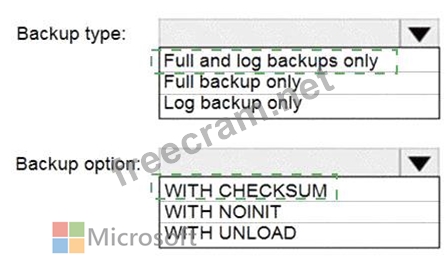
How should you configure the backup of DB1? To answer, select the appropriate options in the answer area.
NOTE: Each correct selection is worth one point.

You need to perform an online migration of DB1 to an Azure SQL Database managed instance by using Azure Database Migration Service.
How should you configure the backup of DB1? To answer, select the appropriate options in the answer area.
NOTE: Each correct selection is worth one point.
Correct Answer:
Explanation:

Box 1: Full and log backups only
Make sure to take every backup on a separate backup media (backup files). Azure Database Migration Service doesn ' t support backups that are appended to a single backup file. Take full backup and log backups to separate backup files.
Box 2: WITH CHECKSUM
Azure Database Migration Service uses the backup and restore method to migrate your on-premises databases to SQL Managed Instance. Azure Database Migration Service only supports backups created using checksum.
Reference:
https://docs.microsoft.com/en-us/azure/dms/known-issues-azure-sql-db-managed-instance-online Basic Concept: This question tests choosing the correct Azure migration approach by matching the source platform, target service, downtime tolerance, and administrative effort.
Why the selected answer is Correct: The selected values fit this scenario because they apply the required Azure SQL configuration at the correct scope and sequence: You need to perform an online migration of DB1 to an Azure SQL Database managed instance by using Azure Database Migration Service.
Why the alternate choices are Wrong: The alternate selections would either use a migration tier that does not match the downtime requirement, choose a network resource that does not support the migration path, or add an unnecessary deployment component.


- Question List (168q)
- Question 1: You have an Azure subscription that contains an Azure SQL da...
- Question 2: You plan to develop a dataset named Purchases by using Azure...
- Question 3: You have two instances of SQL Server on Azure virtual Machin...
- Question 4: You have an Azure SQL database named DB1. You need to encryp...
- Question 5: You have an Azure subscription. The subscription contains an...
- Question 6: You have an Azure subscription that contains an Azure SQL ma...
- Question 7: You have an Azure SQL database named DB1. DB1 has a table na...
- Question 8: You are provisioning an Azure SQL database in the Azure port...
- Question 9: You have an on-premises Microsoft SQL Server 2022 instance t...
- Question 10: You have SQL Server on an Azure virtual machine that contain...
- Question 11: You have an on-premises multi-tier application named App1 th...
- Question 12: You have an Azure SQL managed instance named SQLMI1 that hos...
- Question 13: You have an Azure virtual machine named VM1 on a virtual net...
- Question 14: You have an Azure subscription that contains an Azure SQL da...
- Question 15: Task 6 You need to ensure that any enhancements made to the ...
- Question 16: You have an Azure subscription that contains a resource grou...
- Question 17: You have an Azure subscription. You need to deploy two virtu...
- Question 18: You have SQL Server 2019 or an Azure virtual machine that ru...
- Question 19: You have an Azure SQL database named DBI that contains a non...
- Question 20: You have an Azure SQL database named SOL1. You need to imple...
- Question 21: You are designing a star schema for a dataset that contains ...
- Question 22: Note: This question is part of a series of questions that pr...
- Question 23: Task 11 You have a legacy application written for Microsoft ...
- Question 24: You need to implement authentication for ResearchDB1. The so...
- Question 25: You need to recommend a solution to ensure that the performa...
- Question 26: You plan to migrate on-premises Microsoft SQL Server databas...
- Question 27: You need to provide an implementation plan to configure data...
- Question 28: You have an Azure subscription that contains an Azure SQL da...
- Question 29: You have an Azure virtual machine named VM1 that runs Window...
- Question 30: Vou have an Azure SQL database named DB1. You have 10 Azure ...
- Question 31: You configure backup for an Azure SQL database as shown in t...
- Question 32: You plan to deploy three instances of SQL Server on Azure Vi...
- Question 33: You have a Microsoft SQL Server database named DB1 that cont...
- Question 34: You plan to perform batch processing in Azure Databricks onc...
- Question 35: You have an on-premises Microsoft SQL Server instance named ...
- Question 36: You have an Azure subscription that contains a user named us...
- Question 37: You need to apply 20 built-in Azure Policy definitions to al...
- Question 38: You have an Azure subscription that contains a logical SQL s...
- Question 39: You configure version control for an Azure Data Factory inst...
- Question 40: You need to recommend a disaster recovery solution for an on...
- Question 41: You have an Azure subscription that contains the resources s...
- Question 42: You have a Microsoft SQL Server 2022 database named DB1 that...
- Question 43: You have an Azure subscription that uses a domain named cont...
- Question 44: You need to recommend a backup solution to restore DB3. The ...
- Question 45: You have an Azure subscription. You need to create a new dat...
- Question 46: You have an on-premises Microsoft SQL server that uses the F...
- Question 47: You have an Azure Data Lake Storage Gen2 container. Data is ...
- Question 48: You have an on-premises Microsoft SQL Server 2016 server nam...
- Question 49: You deploy an instance of SQL Server on Azure Virtual Machin...
- Question 50: You have an Azure virtual machine named VM1 on a virtual net...
- Question 51: You have an Azure subscription. You need to deploy an Azure ...
- Question 52: You need to implement the surrogate key for the retail store...
- Question 53: You have an Azure subscription. You need to provision a logi...
- Question 54: You need to design an analytical storage solution for the tr...
- Question 55: Task 2 You need to configure differential backups for the db...
- Question 56: You have an Azure SQL database named db1 that contains an Az...
- Question 57: You have an Always On availability group deployed to Azure v...
- Question 58: You have an Azure SQL database. You identify a long running ...
- Question 59: You have an instance of SQL Server on Azure Virtual Machines...
- Question 60: You have an Azure SQL managed instance named sqldbmi1 that c...
- Question 61: You have 20 Azure SQL databases provisioned by using the vCo...
- Question 62: You have an on-premises server named Server1 that has Micros...
- Question 63: Note: This question is part of a series of questions that pr...
- Question 64: Note: This question is part of a series of questions that pr...
- Question 65: You are performing exploratory analysis of bus fare data in ...
- Question 66: Based on the PaaS prototype, which Azure SQL Database comput...
- Question 67: Note: This question is part of a series of questions that pr...
- Question 68: You are building a database backup solution for a SQL Server...
- Question 69: You have an Azure subscription that contains an Azure SQL ma...
- Question 70: You have an Azure subscription that contains an Always On av...
- Question 71: You need to configure user authentication for the SERVER1 da...
- Question 72: You have an Azure SQL managed instance. You need to restore ...
- Question 73: You have an Azure Data Factory that contains 10 pipelines. Y...
- Question 74: You need to implement a solution to notify the administrator...
- Question 75: You have an Azure SQL database named DB1 in the General Purp...
- Question 76: You are designing a security model for an Azure Synapse Anal...
- Question 77: You have an Azure subscription. Vou need to deploy two insta...
- Question 78: Task 6 You need to ensure that you can connect to db1 by usi...
- Question 79: You have an Azure subscription that contains the resources s...
- Question 80: You have an Azure subscription that contains an instance of ...
- Question 81: You have two Azure SQL databases named SQLDB1 and SQLDB2 in ...
- Question 82: You have an Azure SQL database named that contains a table n...
- Question 83: You have two on-premises Microsoft SQL Server instances name...
- Question 84: You have an Azure SQL database named DB 1 in the General Pur...
- Question 85: You have an Azure subscription that contains the resources s...
- Question 86: You need to deploy an Azure SQL Database elastic pool by usi...
- Question 87: You have a new Azure subscription. You create an Azure SQL D...
- Question 88: You have an instance of SQL Server on Azure Virtual Machines...
- Question 89: You have SQL Server 2019 on an Azure virtual machine that ru...
- Question 90: You have an Azure subscription. You need to deploy a logical...
- Question 91: Task 4 You need to encrypt the LastName column of the SalesL...
- Question 92: You have SQL Server on an Azure virtual machine that contain...
- Question 93: You have an instance of SQL Server on Azure Virtual Machines...
- Question 94: You have five on-premises servers that have Microsoft SQL Se...
- Question 95: You have an Azure subscription that contains a server named ...
- Question 96: You have a data warehouse in Azure Synapse Analytics. You ne...
- Question 97: You have 40 Azure SQL databases, each for a different custom...
- Question 98: You have an Azure Synapse Analytics workspace named WS1 that...
- Question 99: You need to identify the cause of the performance issues on ...
- Question 100: You have an Azure subscription that contains the following r...
- Question 101: Note: This question is part of a series of questions that pr...
- Question 102: You plan to deploy two instances of SQL Server on Azure virt...
- Question 103: You have an Azure subscription. You need to deploy an Azure ...
- Question 104: You have an Azure SQL database named DB1 that has default co...
- Question 105: You have a burstable Azure virtual machine named VMI that ho...
- Question 106: You plan to deploy an Always On failover cluster instance (F...
- Question 107: You have SQL Server on an Azure virtual machine that contain...
- Question 108: You have an Azure SQL managed instance that hosts multiple d...
- Question 109: You have two resource groups named RG1 and RG2. RG1 contains...
- Question 110: Note: This question is part of a series of questions that pr...
- Question 111: You have an Azure data solution that contains an enterprise ...
- Question 112: You have an Azure SQL Database failover group named AzFG1. Y...
- Question 113: You are working on two projects named Project1 and Project2 ...
- Question 114: You have a new Azure SQL database. The database contains a c...
- Question 115: You have an Azure SQL managed instance named SQLMI1 that has...
- Question 116: You have an Azure subscription that contains an instance of ...
- Question 117: You have an Azure Stream Analytics job. You need to ensure t...
- Question 118: (Exhibit) You have an Azure subscription that contains an Az...
- Question 119: A data engineer creates a table to store employee informatio...
- Question 120: Note: This question is part of a series of questions that pr...
- Question 121: You plan to create a table in an Azure Synapse Analytics ded...
- Question 122: You have an Azure Synapse Analytics dedicated SQL pool named...
- Question 123: You have an Azure SQL database named DB1. The automatic tuni...
- Question 124: You have 25 Azure SQL databases. You need to implement a cen...
- Question 125: You have an Azure subscription that contains a SQL Server on...
- Question 126: You have an Azure subscription that contains two instances o...
- Question 127: You have an Azure subscription. You create a logical SQL ser...
- Question 128: You have a Microsoft SQL Server 2019 database named DB1 that...
- Question 129: You have an Azure subscription that contains the resources s...
- Question 130: You have a single availability set that contains two SQL Ser...
- Question 131: You have an Azure subscription that contains an Azure SQL da...
- Question 132: Note: This question is part of a series of questions that pr...
- Question 133: You have a Microsoft SQL Server 2017 server. You need to mig...
- Question 134: You have an Azure data factory that has two pipelines named ...
- Question 135: Task 10 You need to protect all the databases on sql37006S95...
- Question 136: You have an Azure subscription that is linked to an Azure AD...
- Question 137: You have an Azure subscription that contains an Azure SQL da...
- Question 138: You create an Azure SQL managed instance and a job that perf...
- Question 139: Task 1 In an Azure SQL database named db1, you need to enabl...
- Question 140: You have an instance of SQL Server on Azure Virtual Machines...
- Question 141: Task 8 You need to increase the maximum storage size of the ...
- Question 142: A company plans to use Apache Spark analytics to analyze int...
- Question 143: You have an Azure SQL Database managed instance. The instanc...
- Question 144: You have a new Azure SQL database named DB1 on an Azure SQL ...
- Question 145: You have an Azure SQL database named DB1. You need to displa...
- Question 146: You have an Azure SQL database named DB1 that contains a pri...
- Question 147: You need to recommend a solution to ensure that the customer...
- Question 148: You are designing a dimension table in an Azure Synapse Anal...
- Question 149: You have a SQL Server on Azure Virtual Machines instance nam...
- Question 150: You plan to deploy two instances of SQL Server on Azure virt...
- Question 151: You have an Azure AD tenant and a logical Microsoft SQL serv...
- Question 152: You have a SQL Server on Azure Virtual Machines instance tha...
- Question 153: You have an Azure SQL database that contains a table named E...
- Question 154: Note: This question is part of a series of questions that pr...
- Question 155: You are creating a new notebook in Azure Databricks that wil...
- Question 156: You have an Azure SQL database named db1 on a server named s...
- Question 157: You plan to deploy Instance1 by using the following script. ...
- Question 158: You have an Azure SQL Database server named sqlsrv1 that hos...
- Question 159: You are monitoring an Azure Stream Analytics job. You discov...
- Question 160: You need to recommend a process to automate the management o...
- Question 161: You create five Azure SQL Database instances on the same log...
- Question 162: You configure backups for an Azure SQL database as shown in ...
- Question 163: You have an Azure subscription that contains two Azure SQL m...
- Question 164: Task 5 You need to generate an email alert for db1 if the av...
- Question 165: You have an Azure subscription that contains an Azure SQL da...
- Question 166: You have an Azure subscription. You plan to deploy an instan...
- Question 167: You have an on-premises Microsoft SQL Server 2016 instance t...
- Question 168: You receive numerous alerts from Azure Monitor for an Azure ...
