Valid DP-203 Dumps shared by EduDump.com for Helping Passing DP-203 Exam! EduDump.com now offer the newest DP-203 exam dumps, the EduDump.com DP-203 exam questions have been updated and answers have been corrected get the newest EduDump.com DP-203 dumps with Test Engine here:
Access DP-203 Dumps Premium Version
(365 Q&As Dumps, 35%OFF Special Discount Code: freecram)
<< Prev Question Next Question >>
Question 123/146
You have a self-hosted integration runtime in Azure Data Factory.
The current status of the integration runtime has the following configurations:
Status: Running
Type: Self-Hosted
Version: 4.4.7292.1
Running / Registered Node(s): 1/1
High Availability Enabled: False
Linked Count: 0
Queue Length: 0
Average Queue Duration. 0.00s
The integration runtime has the following node details:
Name: X-M
Status: Running
Version: 4.4.7292.1
Available Memory: 7697MB
CPU Utilization: 6%
Network (In/Out): 1.21KBps/0.83KBps
Concurrent Jobs (Running/Limit): 2/14
Role: Dispatcher/Worker
Credential Status: In Sync
Use the drop-down menus to select the answer choice that completes each statement based on the information presented.
NOTE: Each correct selection is worth one point.

The current status of the integration runtime has the following configurations:
Status: Running
Type: Self-Hosted
Version: 4.4.7292.1
Running / Registered Node(s): 1/1
High Availability Enabled: False
Linked Count: 0
Queue Length: 0
Average Queue Duration. 0.00s
The integration runtime has the following node details:
Name: X-M
Status: Running
Version: 4.4.7292.1
Available Memory: 7697MB
CPU Utilization: 6%
Network (In/Out): 1.21KBps/0.83KBps
Concurrent Jobs (Running/Limit): 2/14
Role: Dispatcher/Worker
Credential Status: In Sync
Use the drop-down menus to select the answer choice that completes each statement based on the information presented.
NOTE: Each correct selection is worth one point.
Correct Answer:
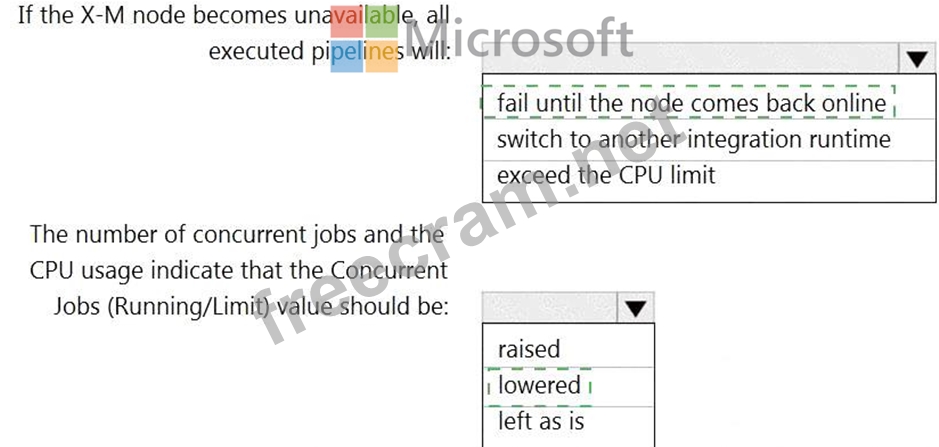
Explanation:

Box 1: fail until the node comes back online
We see: High Availability Enabled: False
Note: Higher availability of the self-hosted integration runtime so that it's no longer the single point of failure in your big data solution or cloud data integration with Data Factory.
Box 2: lowered
We see:
Concurrent Jobs (Running/Limit): 2/14
CPU Utilization: 6%
Note: When the processor and available RAM aren't well utilized, but the execution of concurrent jobs reaches a node's limits, scale up by increasing the number of concurrent jobs that a node can run Reference:
https://docs.microsoft.com/en-us/azure/data-factory/create-self-hosted-integration-runtime


- Question List (146q)
- Question 1: You are designing an Azure Synapse Analytics dedicated SQL p...
- Question 2: You have an Azure Data Lake Storage Gen2 account that contai...
- Question 3: You have an Azure Synapse Analytics dedicated SQL pool that ...
- Question 4: You are designing an Azure Databricks cluster that runs user...
- Question 5: You have a Microsoft Purview account. The Lineage view of a ...
- Question 6: You are designing an Azure Synapse Analytics dedicated SQL p...
- Question 7: You have an Azure Synapse Analytics dedicated SQL pool named...
- Question 8: You have an Azure subscription that contains an Azure Synaps...
- Question 9: You have an Azure subscription that contains an Azure Synaps...
- Question 10: You have an enterprise data warehouse in Azure Synapse Analy...
- Question 11: You need to ensure that the Twitter feed data can be analyze...
- Question 12: You have an Azure Synapse Analytics dedicated SQL pool named...
- Question 13: You are designing an Azure Databricks table. The table will ...
- Question 14: You have an Azure subscription that contains an Azure Blob S...
- Question 15: You have an Azure Synapse Analytics dedicated SQL pool. You ...
- Question 16: You have a Microsoft Entra tenant. The tenant contains an Az...
- Question 17: You are designing an inventory updates table in an Azure Syn...
- Question 18: Note: This question is part of a series of questions that pr...
- Question 19: You need to implement an Azure Synapse Analytics database ob...
- Question 20: You have an Azure data factory. You execute a pipeline that ...
- Question 21: You have an Azure subscription that contains an Azure Synaps...
- Question 22: You have an Azure Data Factory pipeline named pipeline1 that...
- Question 23: Note: This question is part of a series of questions that pr...
- Question 24: Note: This question is part of a series of questions that pr...
- Question 25: You have an Azure subscription that contains a Microsoft Pur...
- Question 26: You have an Azure Data Lake Storage Gen2 account that contai...
- Question 27: You are developing a solution that will stream to Azure Stre...
- Question 28: You are designing a data mart for the human resources (MR) d...
- Question 29: You have an enterprise-wide Azure Data Lake Storage Gen2 acc...
- Question 30: You have an Azure subscription that contains the resources s...
- Question 31: You have an Azure data factory that is configured to use a G...
- Question 32: You have an Azure Data lake Storage account that contains a ...
- Question 33: You are designing a slowly changing dimension (SCD) for supp...
- Question 34: You have an Azure Synapse Analytics dedicated SQL pod. You n...
- Question 35: You have a SQL pool in Azure Synapse. You plan to load data ...
- Question 36: You have an Azure Synapse Analytics dedicated SQL pool named...
- Question 37: You need to create a partitioned table in an Azure Synapse A...
- Question 38: You have an Azure Data Factory instance named ADF1 and two A...
- Question 39: You have an Azure subscription that contains an Azure Databr...
- Question 40: Note: This question is part of a series of questions that pr...
- Question 41: You have an Azure Storage account that generates 200,000 new...
- Question 42: You have an Azure Data Lake Storage Gen2 account named accou...
- Question 43: You need to design an analytical storage solution for the tr...
- Question 44: You have an Azure subscription. The subscription contains an...
- Question 45: Note: This question is part of a series of questions that pr...
- Question 46: You are designing 2 solution that will use tables in Delta L...
- Question 47: You are designing a streaming data solution that will ingest...
- Question 48: You have an Azure Synapse Analytics dedicated SQL pool mat c...
- Question 49: You have an Azure Synapse Analytics pipeline named Pipeline1...
- Question 50: You have an Azure Stream Analytics job named Job1. The metri...
- Question 51: You are designing an Azure Synapse Analytics workspace. You ...
- Question 52: You need to design a data retention solution for the Twitter...
- Question 53: You have an Azure Synapse Analytics dedicated SQL pool named...
- Question 54: You are designing a partition strategy for a fact table in a...
- Question 55: You have the following Azure Stream Analytics query. (Exhibi...
- Question 56: You have an Azure Data Lake Storage Gen2 account named adls2...
- Question 57: You are implementing an Azure Stream Analytics solution to p...
- Question 58: You need to design a data storage structure for the product ...
- Question 59: You have a SQL pool in Azure Synapse that contains a table n...
- Question 60: You have an Azure subscription that contains an Azure Synaps...
- Question 61: You have an Azure subscription that contains an Azure data f...
- Question 62: You are designing a dimension table in an Azure Synapse Anal...
- Question 63: You are developing a solution using a Lambda architecture on...
- Question 64: You plan to monitor an Azure data factory by using the Monit...
- Question 65: You have an Azure Data Factory pipeline that has the activit...
- Question 66: You have an Azure Data Factory instance that contains two pi...
- Question 67: You have an Azure subscription that contains the resources s...
- Question 68: You are designing an Azure Stream Analytics job to process i...
- Question 69: You configure monitoring for a Microsoft Azure SQL Data Ware...
- Question 70: You are designing a solution that will copy Parquet files st...
- Question 71: You have an Azure subscription that contains an Azure Stream...
- Question 72: You plan to use an Apache Spark pool in Azure Synapse Analyt...
- Question 73: You have an Azure Synapse Analytics serverless SQL pool, an ...
- Question 74: Note: This question is part of a series of questions that pr...
- Question 75: You have an Azure Synapse Analystics dedicated SQL pool that...
- Question 76: You are monitoring an Azure Stream Analytics job. You discov...
- Question 77: You plan to create an Azure Data Lake Storage Gen2 account Y...
- Question 78: You have an Azure Blob storage account that contains a folde...
- Question 79: You have two fact tables named Flight and Weather. Queries t...
- Question 80: You use Azure Stream Analytics to receive data from Azure Ev...
- Question 81: You are designing a highly available Azure Data Lake Storage...
- Question 82: You have an Azure subscription that contains an Azure data f...
- Question 83: You are building an Azure Stream Analytics job to identify h...
- Question 84: You create an Azure Databricks cluster and specify an additi...
- Question 85: You have an Azure Synapse Analytics workspace named WS1. You...
- Question 86: You need to implement a Type 3 slowly changing dimension (SC...
- Question 87: You have an Azure Synapse Analytics dedicated SQL pool named...
- Question 88: A company plans to use Platform-as-a-Service (PaaS) to creat...
- Question 89: You have an Azure subscription that is linked to a hybrid Az...
- Question 90: You manage an enterprise data warehouse in Azure Synapse Ana...
- Question 91: You have an Azure Synapse Analytics dedicated SQL pool that ...
- Question 92: You have an Azure subscription that contains the resources s...
- Question 93: You have files and folders in Azure Data Lake Storage Gen2 f...
- Question 94: You plan to ingest streaming social media data by using Azur...
- Question 95: You have two Azure Blob Storage accounts named account1 and ...
- Question 96: You are designing a financial transactions table in an Azure...
- Question 97: You are building a database in an Azure Synapse Analytics se...
- Question 98: You have an Azure subscription that contains an Azure Synaps...
- Question 99: You use Azure Stream Analytics to receive Twitter data from ...
- Question 100: You have an Azure Synapse Analytics dedicated SQL pool. You ...
- Question 101: You are monitoring an Azure Stream Analytics job by using me...
- Question 102: You are building an Azure Analytics query that will receive ...
- Question 103: You have an Azure subscription that contains the resources s...
- Question 104: You need to design a data retention solution for the Twitter...
- Question 105: You have an Azure subscription that contains an Azure Synaps...
- Question 106: Note: This question is part of a series of questions that pr...
- Question 107: You are processing streaming data from vehicles that pass th...
- Question 108: Note: This question is part of a series of questions that pr...
- Question 109: You have an Azure subscription that contains an Azure Synaps...
- Question 110: You have an Azure data factory named ADM that contains a pip...
- Question 111: You have an Azure Synapse Analytics dedicated SQL pool named...
- Question 112: You need to implement the surrogate key for the retail store...
- Question 113: You are creating an Apache Spark job in Azure Databricks tha...
- Question 114: You are creating an Azure Data Factory data flow that will i...
- Question 115: You have an Azure data factory. You need to examine the pipe...
- Question 116: You are deploying a lake database by using an Azure Synapse ...
- Question 117: You have the Azure Synapse Analytics pipeline shown in the f...
- Question 118: You need to create an Azure Data Factory pipeline to process...
- Question 119: You have an Azure Synapse Analytics serverless SQL pool name...
- Question 120: You are monitoring an Azure Stream Analytics job. The Backlo...
- Question 121: What should you do to improve high availability of the real-...
- Question 122: You are designing a real-time dashboard solution that will v...
- Question 123: You have a self-hosted integration runtime in Azure Data Fac...
- Question 124: You have an Azure Stream Analytics job that is a Stream Anal...
- Question 125: You are responsible for providing access to an Azure Data La...
- Question 126: You have a data warehouse in Azure Synapse Analytics. You ne...
- Question 127: You plan to create a table in an Azure Synapse Analytics ded...
- Question 128: You have several Azure Data Factory pipelines that contain a...
- Question 129: You implement an enterprise data warehouse in Azure Synapse ...
- Question 130: You have an enterprise data warehouse in Azure Synapse Analy...
- Question 131: You haw an Azure data factory named ADF1. You currently publ...
- Question 132: You have an Azure Synapse Analytics workspace that contains ...
- Question 133: You have an Azure subscription. You plan to build a data war...
- Question 134: You have an Azure Synapse serverless SQL pool. You need to r...
- Question 135: You have a table named SalesFact in an enterprise data wareh...
- Question 136: You have an Azure subscription that contains an Azure Synaps...
- Question 137: The following code segment is used to create an Azure Databr...
- Question 138: You have an Azure subscription that contains an Azure Synaps...
- Question 139: You are developing an application that uses Azure Data Lake ...
- Question 140: In Azure Data Factory, you have a schedule trigger that is s...
- Question 141: You are designing an Azure Synapse solution that will provid...
- Question 142: You have an Azure Synapse Analytics dedicated SQL pool named...
- Question 143: You have two Azure SQL databases named DB1 and DB2. DB1 cont...
- Question 144: You are building a data flow in Azure Data Factory that upse...
- Question 145: You are designing a sales transactions table in an Azure Syn...
- Question 146: You are creating dimensions for a data warehouse in an Azure...
