- Home
- Microsoft
- Analyzing Data with Microsoft Power BI
- Microsoft.DA-100.v2022-06-08.q105
- Question 103
Valid DA-100 Dumps shared by ExamDiscuss.com for Helping Passing DA-100 Exam! ExamDiscuss.com now offer the newest DA-100 exam dumps, the ExamDiscuss.com DA-100 exam questions have been updated and answers have been corrected get the newest ExamDiscuss.com DA-100 dumps with Test Engine here:
Access DA-100 Dumps Premium Version
(150 Q&As Dumps, 35%OFF Special Discount Code: freecram)
<< Prev Question Next Question >>
Question 103/105
You have a Microsoft Power BI data model that contains three tables named Sales, Product, and Date.
The Sales table has an existing measure named [Total Sales] that sums the total sales from the Sales table.
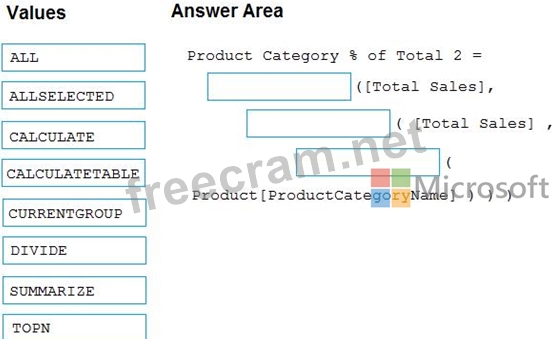
You need to write a calculation that returns the percentage of total sales that a selected ProductCategoryName value represents. The calculation must respect any slicers on ProductCategoryName and must show the percentage of visible total sales. For example, if there are four ProductCategoryName values, and a user filters one out, a table showing ProductCategoryName and the calculation must sum up to 100 percent.
How should you complete the calculation? To answer, drag the appropriate values to the correct targets. Each value may be used once, more than once, or not at all. You may need to drag the split bar between panes or scroll to view content.
NOTE: Each correct selection is worth one point.
The Sales table has an existing measure named [Total Sales] that sums the total sales from the Sales table.
You need to write a calculation that returns the percentage of total sales that a selected ProductCategoryName value represents. The calculation must respect any slicers on ProductCategoryName and must show the percentage of visible total sales. For example, if there are four ProductCategoryName values, and a user filters one out, a table showing ProductCategoryName and the calculation must sum up to 100 percent.
How should you complete the calculation? To answer, drag the appropriate values to the correct targets. Each value may be used once, more than once, or not at all. You may need to drag the split bar between panes or scroll to view content.
NOTE: Each correct selection is worth one point.
Correct Answer:
Explanation:
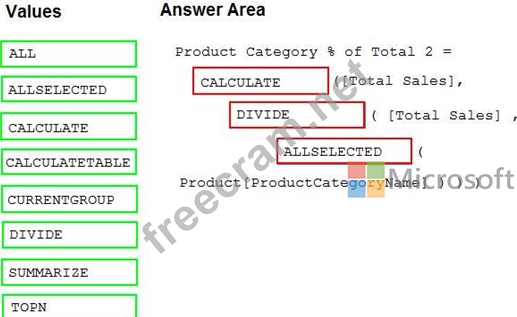
Box 1: CALCULATE
CALCULATE rvaluates an expression in a modified filter context.
Box 2: DIVIDE
As a data modeler, when you write a DAX expression to divide a numerator by a denominator, you can choose to use the DIVIDE function or the divide operator (/ - forward slash).
When using the DIVIDE function, you must pass in numerator and denominator expressions.
Box 3: ALLSELECTED
ALLSELECTED removes context filters from columns and rows in the current query, while retaining all other context filters or explicit filters.
The ALLSELECTED function gets the context that represents all rows and columns in the query, while keeping explicit filters and contexts other than row and column filters. This function can be used to obtain visual totals in queries.
Example:
measure 'Reseller Sales'[Reseller Visual Total]=calculate(sum('Reseller Sales'[Sales Amount]), ALLSELECTED()) Reference:
https://docs.microsoft.com/en-us/dax/allselected-function-dax


- Question List (105q)
- 1 commentQuestion 1: You have an Azure SQL database that contains sales transacti...
- Question 2: Note: This question is part of a series of questions that pr...
- Question 3: You need to design the data model to meet the report require...
- Question 4: You have a line chart that shows the number of employees in ...
- 2 commentQuestion 5: You view a query named Transactions as shown in the followin...
- 1 commentQuestion 6: Case Study 1 - Litware, Inc. Overview Litware, Inc. is an on...
- Question 7: You create the following step by using Power Query Editor. =...
- Question 8: You have a Microsoft Power Bl report. The size of PBIX file ...
- Question 9: What is the minimum number of Power BI datasets needed to su...
- Question 10: You have the following three versions of an Azure SQL databa...
- 1 commentQuestion 11: Hotspot Question You are creating an analytics report that w...
- Question 12: You publish a report to a workspace named Customer Services....
- 1 commentQuestion 13: You are preparing a financial report in Power BI. You connec...
- Question 14: You plan to create the chart shown in the following exhibit....
- 2 commentQuestion 15: You need to create a visualization to meet the reporting req...
- Question 16: Hotspot Question You have two Azure SQL databases that conta...
- 1 commentQuestion 17: You have a Microsoft SharePoint Online site that contains se...
- Question 18: You need to create a visualization that compares revenue and...
- Question 19: You need to provide a solution to provide the sales managers...
- 2 commentQuestion 20: You have a folder of monthly transaction extracts. You plan ...
- 2 commentQuestion 21: You are creating a quick measure as shown in the following e...
- 2 commentQuestion 22: You need to calculate the last day of the month in the balan...
- Question 23: Hotspot Question Your company has affiliates who help the co...
- Question 24: You have a table that contains sales data and approximately ...
- Question 25: You need to create a relationship between the Weekly_Returns...
- Question 26: You have a report that contains four pages. Each page contai...
- 1 commentQuestion 27: You have a report page that contains the visuals shown in th...
- Question 28: Note: This question is part of a series of questions that us...
- Question 29: Drag and Drop Question You receive revenue data that must be...
- 1 commentQuestion 30: You need to create a visualization to meet the reporting req...
- Question 31: Case Study 1 - Litware, Inc. Overview Litware, Inc. is an on...
- Question 32: You create a report by using Microsoft Power BI Desktop. The...
- 1 commentQuestion 33: You import a large dataset to Power Query Editor. You need t...
- Question 34: Your company has training videos that are published to Micro...
- Question 35: You are creating a Microsoft Power Bl model that has two tab...
- Question 36: Your company has training videos that are published to Micro...
- 1 commentQuestion 37: You have a folder of monthly transaction extracts. You plan ...
- Question 38: You are creating a quick measure as shown in the following e...
- Question 39: You have a large dataset that contains more than 1 million r...
- Question 40: You are creating a Microsoft Power BI data model that has th...
- Question 41: You have a folder of monthly transaction extracts. You plan ...
- Question 42: You have a Microsoft Power Bl workspace. You need to grant t...
- Question 43: You are creating a column chart visualization. You configure...
- Question 44: You import two Microsoft Excel tables named Customer and Add...
- Question 45: You are configuring a Microsoft Power Bl data model to enabl...
- Question 46: You view a query named Transactions as shown in the followin...
- 1 commentQuestion 47: You are developing a sales report that will have multiple pa...
- Question 48: You have a table that contains sales data and approximately ...
- Question 49: Note: This question is part of a series of questions that pr...
- Question 50: You are creating a Microsoft Power BI data model that has th...
- Question 51: Note: This question is part of a series of questions that pr...
- Question 52: You have a prospective customer list that contains 1,500 row...
- Question 53: You have two tables named Customers and Invoice in a Power B...
- Question 54: You have a dashboard that contains tiles pinned from a singl...
- Question 55: You need to create a visualization to meet the reporting req...
- Question 56: You have a report that contains a bar chart and a column cha...
- Question 57: You have two Azure SQL databases that contain the same table...
- Question 58: (Exhibit) You need to create relationships to meet the repor...
- Question 59: Case Study 1 - Litware, Inc. Overview Litware, Inc. is an on...
- Question 60: Note: This question is part of a series of questions that pr...
- Question 61: You need to recommend a strategy to consistently define the ...
- Question 62: You need to recommend a strategy to consistently define the ...
- Question 63: Case Study 2 - Contoso Ltd Overview Existing Environment Con...
- Question 64: Once the profit and loss dataset is created, which four acti...
- Question 65: You have the tables shown in the following table. (Exhibit) ...
- Question 66: You need to create a DAX measure in the data model that only...
- Question 67: You have a Microsoft Power BI data model that contains three...
- Question 68: You have a large dataset that contains more than 1 million r...
- Question 69: You have a query that returns the data shown in the followin...
- Question 70: You create the following step by using Power Query Editor. =...
- Question 71: You have a report that contains four pages. Each page contai...
- Question 72: You have a data model that contains many complex DAX express...
- Question 73: You are creating a Microsoft Power Bl imported data model to...
- Question 74: You are creating a Microsoft Power Bl imported data model to...
- Question 75: You have a Power B1 report. The report contains visualizatio...
- Question 76: You have a Microsoft Power BI data model that contains three...
- Question 77: You have sales data in a star schema that contains four tabl...
- Question 78: You have the visual shown in the exhibit. (Click the Exhibit...
- Question 79: You have the visual shown in the Original exhibit. (Click th...
- Question 80: You need to create a relationship in the dataset for RLS. Wh...
- Question 81: You build a report to analyze customer transactions from a d...
- Question 82: Note: This question is part of a series of questions that pr...
- Question 83: You have a large dataset that contains more than 1 million r...
- Question 84: You need to create relationships to meet the reporting requi...
- Question 85: You build a report about warehouse inventory dat a. The data...
- Question 86: Your company has affiliates who help the company acquire cus...
- Question 87: You have four sales regions. Each region has multiple sales ...
- Question 88: You need to create a visualization to meet the reporting req...
- Question 89: You have a query that returns the data shown in the followin...
- Question 90: You are configuring a Microsoft Power Bl data model to enabl...
- Question 91: You need to create a visualization that compares revenue and...
- Question 92: You are creating a Microsoft Power Bl imported data model to...
- Question 93: Note: This question is part of a series of questions that pr...
- Question 94: You attempt to publish a Microsoft Excel file to Power BI, a...
- Question 95: You create a report by using Microsoft Power BI Desktop. The...
- Question 96: You publish a Microsoft Power BI dataset to powerbi.com. The...
- Question 97: You need to create a visualization that compares revenue and...
- Question 98: Case Study 1 - Litware, Inc. Overview Litware, Inc. is an on...
- Question 99: You need to create a calculated column to display the month ...
- Question 100: You need to calculate the last day of the month in the balan...
- Question 101: You have an API that returns more than 100 columns. The foll...
- Question 102: You have a Microsoft Power BI data model that contains three...
- Question 103: You have a Microsoft Power BI data model that contains three...
- Question 104: Once the profit and loss dataset is created, which four acti...
- Question 105: You have a CSV file that contains user complaints. The file ...
