- Home
- Microsoft
- Administering Windows Server Hybrid Core Infrastructure
- Microsoft.AZ-800.v2026-07-28.q128
- Question 34
Valid AZ-800 Dumps shared by EduDump.com for Helping Passing AZ-800 Exam! EduDump.com now offer the newest AZ-800 exam dumps, the EduDump.com AZ-800 exam questions have been updated and answers have been corrected get the newest EduDump.com AZ-800 dumps with Test Engine here:
Access AZ-800 Dumps Premium Version
(342 Q&As Dumps, 35%OFF Special Discount Code: freecram)
<< Prev Question Next Question >>
Question 34/128
You have an on-premises server named Server1 that runs Windows Server and has internet connectivity.
You have an Azure subscription.
You need to monitor Server1 by using Azure Monitor.
Which resources should you create in the subscription, and what should you install on Server1? To answer, select the appropriate options in the answer area.
NOTE: Each correct selection is worth one point.
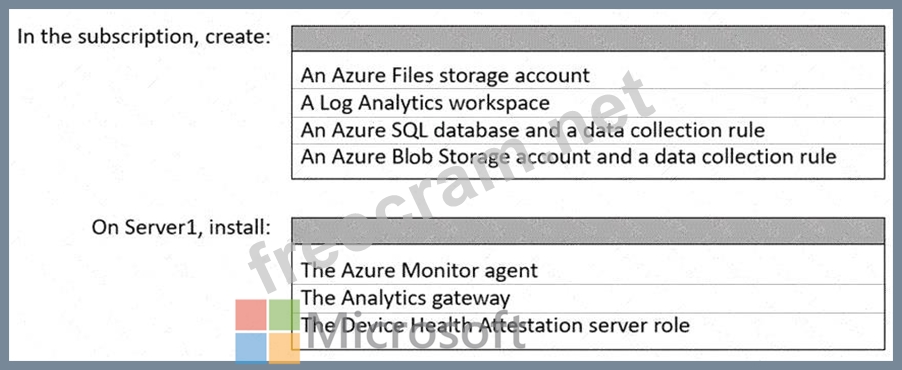
You have an Azure subscription.
You need to monitor Server1 by using Azure Monitor.
Which resources should you create in the subscription, and what should you install on Server1? To answer, select the appropriate options in the answer area.
NOTE: Each correct selection is worth one point.
Correct Answer:

Explanation:

The Administering Windows Server Hybrid Core Infrastructure learning path explains that onboarding Windows Server machines to Azure Monitor hinges on a Log Analytics workspace as the data store for logs and metrics, and an agent on the machine to collect and send data. The guide states that "Azure Monitor collects telemetry from Windows Server machines into a Log Analytics workspace," and that for current deployments you should "install the Azure Monitor agent (AMA) on each computer and associate it with a workspace." It further notes that "the AMA replaces the legacy Log Analytics agent" and "uses data collection rules (DCRs) to define which data to collect and to which Log Analytics workspace to send it." Storage accounts, SQL databases, or analytics gateways are not required to onboard a standalone Windows Server to Azure Monitor. Likewise, Device Health Attestation is unrelated to Azure Monitor onboarding.
In short, to monitor an on-premises Windows Server from Azure you create a Log Analytics workspace in the subscription and install the Azure Monitor agent on the server. (In practice, you then configure a DCR to route data from the AMA to the workspace, but no additional Azure resources like SQL or Blob/Azure Files are needed for basic monitoring.)


- Question List (128q)
- Question 1: Your network contains a Microsoft Entra Domain Services doma...
- Question 2: You have a server named Host1 that runs Windows Server 2022 ...
- Question 3: Note: This question is part of a series of questions that pr...
- Question 4: Your network contains an on-premises Active Directory Domain...
- Question 5: Your network contains an Active Directory Domains Services (...
- Question 6: Task 9 You need to ensure that all the computers in the doma...
- Question 7: You have an on-premises server named Server1 that runs Windo...
- Question 8: You have an Azure subscription that contains the following r...
- Question 9: You have an onpremises DNS server named Server1 that runs Wi...
- Question 10: You have an Active Directory Domain Services (AD DS) domain....
- Question 11: Task 5 You have an application that is copied to a folder na...
- Question 12: Your network contains an Active Directory Domain Services (A...
- Question 13: You have an on-premises network that is connected to an Azur...
- Question 14: Your network contains the domains shown in the following exh...
- Question 15: You have a server named Server1 that runs Windows Server and...
- Question 16: Your network contains a Active Directory Domain Service (AD ...
- Question 17: Note: This question is part of a series of questions that pr...
- Question 18: Your on-premises network contains an Active Directory Domain...
- Question 19: You have an on-premises se rver that runs Windows Server and...
- Question 20: You have a server named Server1 that runs Windows Server and...
- Question 21: You have a Windows Server container host named Server1. You ...
- Question 22: You have a server named Server1 that runs Windows Server 201...
- Question 23: Your on-premises network contains an Active Directory Domain...
- Question 24: You have an Active Directory Domain Services (AD DS) domain....
- Question 25: You have an Azure subscription that contains the storage acc...
- Question 26: You have a Windows Server container host named Server! that ...
- Question 27: Note: This question is part of a series of questions that pr...
- Question 28: You deploy a single-domain Active Directory Domain Services ...
- Question 29: Your company has offices in Boston and Montre al. The office...
- Question 30: You have a server that runs Windows Server and has the DHCP ...
- Question 31: What sho uld you implement for the deployment of DC3?...
- Question 32: Your network contains an Active Directory Domain Services (A...
- Question 33: You have an on-premises Active Directory Domain Servic es (A...
- Question 34: You have an on-premises server named Server1 that runs Windo...
- Question 35: You have an Azure virtual machine named Server1 that runs a ...
- Question 36: You need to configure Azure File Sync to meet the file shari...
- Question 37: You have an on-premises server named Server1 tha t runs Wind...
- Question 38: Task 4 You need to run a container that uses the mcrmicrosof...
- Question 39: Your network contains an Active Directory Domain Services (A...
- Question 40: You have an Azure subscription. The subscription contains a ...
- Question 41: Task 2 You plan to promote a domain controller named DC3 in ...
- Question 42: Your network contains the segments shown in the following ta...
- Question 43: Your network contains a single-domain Active Directory Domai...
- Question 44: You have an Active Directory domain that contains a file s e...
- Question 45: You need to implement the planned changes for the Azure DNS ...
- Question 46: You have on-premises Windows devices. You have an A zure sub...
- Question 47: Your network contains two Active Directory Domain Services (...
- Question 48: You have two on-premises servers named Server1 and Servet2 t...
- Question 49: Your network contains an Active Directory Domain Services (A...
- Question 50: You have a Windows Server container host named Server1 and a...
- Question 51: Task 7 You need to monitor the security configuration of DC1...
- Question 52: You have on-premises file servers that run Windows Server as...
- Question 53: Your network contains an Active Directory Domain Services (A...
- Question 54: You have an Azure subscripti on. The subscription contains a...
- Question 55: You have an Active Directory Domain Services (AD DS) domain ...
- Question 56: Your network contains an Active Directory Domain Services (A...
- Question 57: You have a server named Server1 that runs Windows Server and...
- Question 58: Your network contains an Active Directory Domain Services (A...
- Question 59: You have an on-premises datacenter named DC1. You have an Az...
- Question 60: Your network contains an Active Directory Domain Services (A...
- Question 61: You need to implement the planned changes for Microsoft Entr...
- Question 62: You deploy a new Active Directory Domain Services (AD DS) fo...
- Question 63: Your network contains an Active Directory Domain Services {A...
- Question 64: You have an on-premises server that runs Windows Server and ...
- Question 65: You need to sync files from an on-premises server named Serv...
- Question 66: Task 1 You need to prevent domain users from saving executab...
- Question 67: Task 11 You need to ensure that all DHCP clients that get an...
- Question 68: You have a Windows Server 2022 container host named Host1 an...
- Question 69: Your network contains two Active Directory Domain Services (...
- Question 70: Your network contains an on -premises Active Directory Domai...
- Question 71: You create a new Azure subscription. You plan to deploy Azur...
- Question 72: You have a server named Server1 that runs Windows Server and...
- Question 73: Your network contains a single domain Active Directory Domai...
- Question 74: Your network contains an Active Directory Domain Services (A...
- Question 75: Your on-premises network contains an Active Directory domain...
- Question 76: Your network contains an Active Directory Domain Services (A...
- Question 77: You have a disaggregated cluster deployment. The deployment ...
- Question 78: Your network contains two VLANs for client computers and one...
- Question 79: Your network contains an Active Directory Domain Services (A...
- Question 80: You create an Azure virtual machine named Server1 that runs ...
- Question 81: You have an on premises Active Directory Domain Services (AD...
- Question 82: Your network contains an Active Directory Domain Services (A...
- Question 83: You have an on-premises server named Server 1 that runs Wind...
- Question 84: You have an on premises Active Directory Domain Services (AD...
- Question 85: Task 8 You need to deploy a new primary DNS zone named fabri...
- Question 86: Task 3 You need to run a container that uses the mcr.microso...
- Question 87: You have a server named Server1 that runs Windows Server. Yo...
- Question 88: You have an Azure subscription that contains a virtual machi...
- Question 89: Yo ur network contains an Active Directory Domain Services (...
- Question 90: You have a file server named Server1 that runs Windows Serve...
- Question 91: Your network contains an Azure AD Domain Services domain nam...
- Question 92: You have an Active Directory Domain Services (AD DS) domain ...
- Question 93: You plan to deploy an Azure virtual machine that will run Wi...
- Question 94: You have a server named Served that runs Windows Server and ...
- Question 95: Task 12 You need to create a Group Policy Object (GPO) named...
- Question 96: Your network contains an Active Directory Domain Services (A...
- Question 97: Your network contains an Active Directory Domain Services (A...
- Question 98: You need to implement an availability solution for DHCP that...
- Question 99: Task 4 You need to ensure that the minimum password length f...
- Question 100: You have a Windows Server container host named Server1. You ...
- Question 101: You have an Azure subscription. The subscription contains a ...
- Question 102: You have an on-premises server named Server 1 that runs Wind...
- Question 103: You need to ensure that access to storage1 for the Marketing...
- Question 104: Your network contains an Active Directory Domain Services (A...
- Question 105: You have an Azure subscription that contains the storage acc...
- Question 106: Which groups can you add to Group3 and Group5? To answer, se...
- Question 107: Your network contains an Active Directory Domain Services (A...
- Question 108: You need to meet the technical requirements for VM3 On which...
- Question 109: Task 5 You need to ensure that a DHCP scope named scope! on ...
- Question 110: You have a Windows server named Server1. You add two 4-TB ha...
- Question 111: Your network contains an Active Directory Domain Services (A...
- Question 112: You need to configure remote administration to meet the secu...
- Question 113: Task 6 You need to use Azure File Sync 10 replicate the cont...
- Question 114: You are planning the implementation Azure Arc to support the...
- Question 115: You have the servers shown in the following tab (Exhibit) Se...
- Question 116: Your network contains an Active Directory forest. The forest...
- Question 117: You have an Azure Active Directory Domain Services (Azure AD...
- Question 118: You need to meet the technical requirements for VM1. Which c...
- Question 119: Task 7 SRV1 contains a virtual machine named VM1. You need a...
- Question 120: You pla n w deploy an Azure virtual machine that win run Win...
- Question 121: You need to implement a name resolution solution that meets ...
- Question 122: You create a new Azure subscription. You plan to deploy Azur...
- Question 123: You have an Azure subscrip tion. The subscription contains a...
- Question 124: You have an Azure subscription that contains the virtual mac...
- Question 125: Task 4 You need to register SRV1 to sync Azure file shares T...
- Question 126: You need to meet the technical requirements for Server1. Whi...
- Question 127: Your network contains an Active Directory Domain Services (A...
- Question 128: Your network contains an Active Directory Domain Services (A...
