- Home
- Microsoft
- Designing and Implementing Microsoft Azure Networking Solutions
- Microsoft.AZ-700.v2023-10-06.q75
- Question 10
Valid AZ-700 Dumps shared by ExamDiscuss.com for Helping Passing AZ-700 Exam! ExamDiscuss.com now offer the newest AZ-700 exam dumps, the ExamDiscuss.com AZ-700 exam questions have been updated and answers have been corrected get the newest ExamDiscuss.com AZ-700 dumps with Test Engine here:
Access AZ-700 Dumps Premium Version
(313 Q&As Dumps, 35%OFF Special Discount Code: freecram)
<< Prev Question Next Question >>
Question 10/75
You have an Azure subscription that contains a single virtual network and a virtual network gateway.
You need to ensure that administrators can use Point-to-Site (P2S) VPN connections to access resources in the virtual network. The connections must be authenticated by Azure Active Directory (Azure AD).
What should you configure? To answer, select the appropriate options in the answer area.
NOTE: Each correct selection is worth one point.
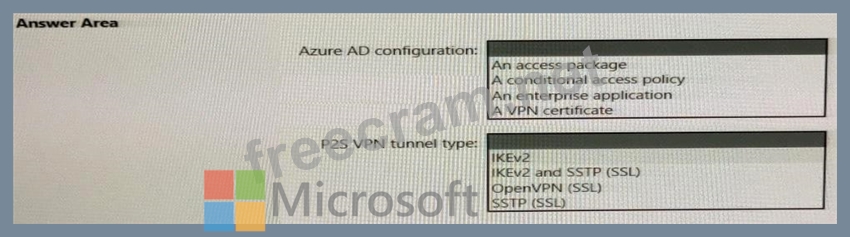
You need to ensure that administrators can use Point-to-Site (P2S) VPN connections to access resources in the virtual network. The connections must be authenticated by Azure Active Directory (Azure AD).
What should you configure? To answer, select the appropriate options in the answer area.
NOTE: Each correct selection is worth one point.
Correct Answer:


- Question List (75q)
- 1 commentQuestion 1: You have an Azure subscription that contains the route table...
- 1 commentQuestion 2: You have an Azure subscription that contains the resources s...
- Question 3: You have an Azure subscription that contains the resources s...
- 1 commentQuestion 4: You have an application named App1 that listens for incoming...
- 1 commentQuestion 5: You have an Azure Front Door instance that has a single fron...
- Question 6: You have the Azure environment shown In the Azure Environmen...
- Question 7: You have an Azure subscription that contains the virtual net...
- 1 commentQuestion 8: You have two Azure App Service instances that host the web a...
- 1 commentQuestion 9: You have an Azure virtual network named Vnet1 that contains ...
- 1 commentQuestion 10: You have an Azure subscription that contains a single virtua...
- Question 11: You have an Azure application gateway named AppGw1. You need...
- Question 12: You create NSG10 and NSG11 to meet the network security requ...
- Question 13: You have an Azure subscription that contains the virtual net...
- 2 commentQuestion 14: You have the Azure environment shown in the exhibit. (Exhibi...
- Question 15: You have an Azure Web Application Firewall (WAF) policy in p...
- Question 16: You have an Azure subscription. You have the on-premises sit...
- Question 17: You have an Azure subscription that contains a virtual netwo...
- Question 18: Your company has 10 instances of a web service. Each instanc...
- 1 commentQuestion 19: Your company has an on-premises network and three Azure subs...
- Question 20: You have an Azure virtual network named Vnet1 that connects ...
- Question 21: You have an Azure application gateway for a web app named Ap...
- 1 commentQuestion 22: Your company has an office in New York. The company has an A...
- Question 23: You have 10 Azure App Service instances. Each instance hosts...
- Question 24: You plan to configure BGP for a Site-to-Site VPN connection ...
- Question 25: You plan to publish a website that will use an FQDN of www.c...
- Question 26: You configure a route table named RT1 that has the routes sh...
- Question 27: For each of the following statements, select Yes if the stat...
- Question 28: You have an Azure virtual network that contains the subnets ...
- Question 29: You are planning an Azure Front Door deployment that will co...
- Question 30: You have two Azure virtual networks named Hub1 and Spoke1. H...
- Question 31: You have an Azure subscription that is linked to an Azure Ac...
- 1 commentQuestion 32: You have an Azure subscription that contains the virtual net...
- Question 33: You have the Azure environment shown in the following exhibi...
- Question 34: Note: This question is part of a series of questions that pr...
- Question 35: You have an Azure environment shown in the following exhibit...
- 1 commentQuestion 36: Your on-premises network contains an Active Directory Domain...
- 1 commentQuestion 37: You have an Azure virtual network that contains two subnets ...
- Question 38: What should you implement to meet the virtual network requir...
- 1 commentQuestion 39: You have on-premises datacenters in New York and Seattle. Yo...
- Question 40: You have two Azure virtual networks named Vnet1 and Vnet2. Y...
- Question 41: You have an Azure Front Door instance named FrontDoor1. You ...
- Question 42: You have the Azure resources shown in the following table. (...
- 1 commentQuestion 43: You have an Azure subscription that contain a viral network ...
- Question 44: You have the hybrid network shown in the Network Diagram exh...
- 1 commentQuestion 45: You are implementing the Virtual network requirements for Vn...
- Question 46: You have an Azure subscription that contains the resources s...
- Question 47: You have an Azure subscription that contains the virtual mac...
- Question 48: You have a network security group named NSG1. You need to en...
- 1 commentQuestion 49: You need to configure the default route in Vnet2 and Vnet3. ...
- 1 commentQuestion 50: You have an Azure subscription that contains a virtual netwo...
- 1 commentQuestion 51: You have an Azure application gateway named AGW1 that has a ...
- Question 52: You need to meet the network security requirements for the N...
- 1 commentQuestion 53: You have an Azure subscription that contains the resources s...
- Question 54: Note: This question is part of a series of questions that pr...
- 1 commentQuestion 55: You need to use Traffic Analytics to monitor the usage of ap...
- Question 56: You have an Azure application gateway named AppGW1 that bala...
- Question 57: You have an Azure firewall shown in the following exhibit. (...
- Question 58: Which virtual machines can VM1 and VM4 ping successfully? To...
- Question 59: Note: This question is part of a series of questions that pr...
- Question 60: You have the Azure load balancer shown in the Load Balancer ...
- Question 61: Your company has an Azure virtual network named Vnet1 that u...
- Question 62: You have an Azure subscription that contains the public IPv4...
- Question 63: You are planning the IP addressing for the subnets in Azure ...
- 1 commentQuestion 64: You have the network topology shown in the Topology exhibit....
- Question 65: You have an Azure application gateway named AppGW1 that prov...
- 1 commentQuestion 66: You need to configure GW1 to meet the network security requi...
- 1 commentQuestion 67: You have an on-premises datacenter. You have an Azure subscr...
- Question 68: You fail to establish a Site-to-Site VPN connection between ...
- Question 69: You have an Azure subscription that contains the public IP a...
- Question 70: You need to implement a P2S VPN for the users in the branch ...
- Question 71: Note: This question is part of a series of questions that pr...
- Question 72: You have an Azure virtual network that contains a subnet nam...
- Question 73: You have five virtual machines that run Windows Server. Each...
- Question 74: For each of the following statements, select Yes if the stat...
- Question 75: You have 10 on-premises networks that are connected by using...

Recent Comments (The most recent comments are at the top.)
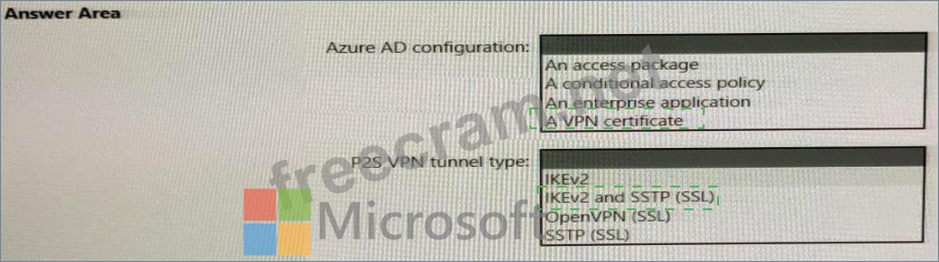
Box 1: An enterprise application
Enable Azure AD authentication on the VPN gateway:
1. Locate the Directory ID of the directory that you want to use for authentication. It's listed in the properties section of the Active Directory page.
2. Under your Azure AD, in Enterprise applications, you see Azure VPN listed.
Copy the Directory ID.
3. Sign in to the Azure portal as a user that is assigned the Global administrator role.
4. Next, give admin consent. Copy and paste the URL that pertains to your deployment location in the address bar of your browser.
5. Select the Global Admin account if prompted.
6. Select Accept when prompted.
7. Under your Azure AD, in Enterprise applications, you see Azure VPN listed.
Box 2: Open VPN (SSL)
When you connect to your VNet using Point-to-Site, you have a choice of which protocol to use. The protocol you use determines the authentication options that are available to you. If you want to use Azure Active Directory authentication, you can do so when using the OpenVPN protocol.
Reference:
https://docs.microsoft.com/en-us/azure/vpn-gateway/openvpn-azure-ad-tenant...