- Home
- Microsoft
- Designing Microsoft Azure Infrastructure Solutions
- Microsoft.AZ-305.v2025-12-18.q194
- Question 76
Valid AZ-305 Dumps shared by EduDump.com for Helping Passing AZ-305 Exam! EduDump.com now offer the newest AZ-305 exam dumps, the EduDump.com AZ-305 exam questions have been updated and answers have been corrected get the newest EduDump.com AZ-305 dumps with Test Engine here:
Access AZ-305 Dumps Premium Version
(372 Q&As Dumps, 35%OFF Special Discount Code: freecram)
<< Prev Question Next Question >>
Question 76/194
Hotspot Question
You have a production line that is monitored by using IoT devices.
You are building a project that will process data streams from the IoT devices.
You need to recommend a pipeline solution that will perform the following activities:
- Ingest the data streams from the IoT devices.
- Analyze the data and identify manufacturing defects among items on
the production line.
- When a manufacturing defect is identified, flag the item for removal
from the production line.
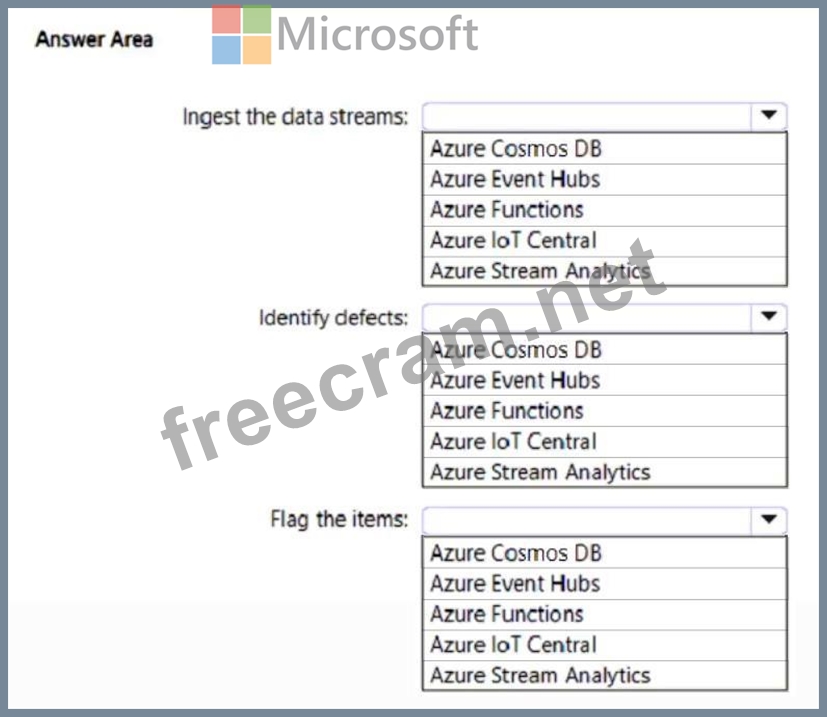
What should you include in the recommendation for each activity? To answer, select the appropriate options in the answer area.
NOTE: Each correct selection is worth one point.
You have a production line that is monitored by using IoT devices.
You are building a project that will process data streams from the IoT devices.
You need to recommend a pipeline solution that will perform the following activities:
- Ingest the data streams from the IoT devices.
- Analyze the data and identify manufacturing defects among items on
the production line.
- When a manufacturing defect is identified, flag the item for removal
from the production line.
What should you include in the recommendation for each activity? To answer, select the appropriate options in the answer area.
NOTE: Each correct selection is worth one point.
Correct Answer:

Explanation:
Box 1: Azure Event Hub
In a real-world scenario, you could have hundreds of these sensors generating events as a stream. Ideally, a gateway device would run code to push these events to Azure Event Hubs or Azure IoT Hubs. Your Stream Analytics job would ingest these events from Event Hubs or IoT Hubs and run real-time analytics queries against the streams.
Box 2: Azure Stream Analytics
Analyze the data and identify manufacturing defects among items on the production line.
Box 3: Azure IoT Central
When a manufacturing defect is identified, flag the item for removal from the production line.
IoT Central is an IoT application platform as a service (aPaaS) that reduces the burden and cost of developing, managing, and maintaining IoT solutions.
The web UI lets you quickly connect devices, monitor device conditions, create rules, and manage devices and their data throughout their life cycle. Furthermore, it enables you to act on device insights by extending IoT intelligence into line-of-business applications. After you've used IoT Central to evaluate your IoT scenario, you can then build your enterprise-ready Azure IoT solution.
Reference:
https://learn.microsoft.com/en-us/azure/stream-analytics/stream-analytics-get-started-with-azure- stream-analytics-to-process-data-from-iot-devices
https://learn.microsoft.com/en-us/azure/iot-central/core/overview-iot-central


- Question List (194q)
- 1 commentQuestion 1: A company wants to migrate workloads from on-premises to the...
- Question 2: Hotspot Question You need to recommend a solution to integra...
- Question 3: Your company has the divisions shown in the following table....
- Question 4: You have an Azure subscription. You plan to deploy an app na...
- Question 5: Drag and Drop Question A company has an existing web applica...
- Question 6: You have an Azure subscription that contains an Azure SQL da...
- Question 7: Hotspot Question You have a Microsoft Entra tenant that uses...
- Question 8: You have an on-premises network and an Azure subscription. T...
- Question 9: Drag and Drop Question You need to design an architecture to...
- Question 10: Your company has an app named App1 that uses data from the o...
- Question 11: You plan to archive 10 TB of on-premises data files to Azure...
- Question 12: You have an Azure virtual machine named VM1 that runs Window...
- Question 13: You have an Azure subscription. You plan to deploy an app th...
- Question 14: Hotspot Question You have 10 on-premises servers that run Wi...
- Question 15: You are designing an app that will include two components. T...
- Question 16: Hotspot Question You have an Azure subscription that contain...
- Question 17: You have an Azure subscription. The subscription has a blob ...
- Question 18: Drag and Drop Question Your company identifies the following...
- Question 19: Drag and Drop Question Your on-premises network contains a V...
- Question 20: You have an Azure Active Directory (Azure AD) tenant that sy...
- Question 21: You have the Azure resources shown in the following table. (...
- Question 22: A company uses Azure SQL Managed Instance for the applicatio...
- Question 23: Case Study 2 - Fabrikam, Inc Overview Fabrikam, Inc. is an e...
- Question 24: Your company has the divisions shown in the following table....
- Question 25: Your company has an Azure subscription that contains multipl...
- Question 26: Hotspot Question You are planning an Azure Storage solution ...
- Question 27: Hotspot Question You have an Azure subscription. You are des...
- Question 28: Hotspot Question You have an Azure subscription named Sub1 t...
- Question 29: Hotspot Question You plan to create an Azure Storage account...
- Question 30: Hotspot Question You have an on-premises Microsoft SQL Serve...
- Question 31: A company named Contoso, Ltd. has an Azure Active Directory ...
- Question 32: Hotspot Question You plan to develop two apps that will be h...
- Question 33: You are designing a microservices architecture that will sup...
- Question 34: You are designing a point of sale (POS) solution that will b...
- Question 35: Hotspot Question You have the Azure management groups shown ...
- Question 36: You have an Azure subscription. You plan to deploy a virtual...
- Question 37: Case Study 2 - Fabrikam, Inc Overview Fabrikam, Inc. is an e...
- Question 38: You have an Azure subscription that contains a custom applic...
- Question 39: You plan to store data in Azure Blob storage for many years....
- Question 40: Hotspot Question You have an Azure Active Directory (Azure A...
- Question 41: Drag and Drop Question You have an on-premises named App1. C...
- Question 42: You plan to deploy an Azure SQL database that will store Per...
- Question 43: Hotspot Question You have an Azure subscription that contain...
- Question 44: Hotspot Question You plan to deploy the backup policy shown ...
- Question 45: You plan to develop, deploy, and maintain 100 React-based we...
- Question 46: Note: This section contains one or more sets of questions wi...
- Question 47: Hotspot Question You have two Azure AD tenants named contoso...
- Question 48: Hotspot Question You have a Microsoft Entra tenant named con...
- Question 49: You are planning an Azure IoT Hub solution that will include...
- Question 50: Hotspot Question You have an Azure subscription. The subscri...
- Question 51: You plan to deploy an Azure Databricks Data Science & En...
- Question 52: You have to deploy an Azure SQL database named db1 for your ...
- Question 53: Hotspot Question You have an Azure subscription that contain...
- Question 54: You are developing a sales application that will contain sev...
- Question 55: Hotspot Question You plan to use Azure SQL as a database pla...
- Question 56: Note: This question is part of a series of questions that pr...
- Question 57: Note: This question is part of a series of questions that pr...
- Question 58: Hotspot Question You have an Azure subscription that contain...
- Question 59: You need to recommend a storage solution for the records of ...
- Question 60: Hotspot Question You have an on-premises web server farm tha...
- Question 61: Hotspot Question You have two on-premises Microsoft SQL Serv...
- Question 62: Hotspot Question You are designing an application that will ...
- Question 63: Hotspot Question You have an Azure subscription. The subscri...
- Question 64: You have an app named App1 that uses two on-premises Microso...
- Question 65: You have SQL Server on an Azure virtual machine. The databas...
- Question 66: You plan to automate the deployment of resources to Azure su...
- Question 67: You are developing an app that will read activity logs for a...
- Question 68: You have an on-premises line-of-business (LOB) application t...
- Question 69: Case Study 3 - Contoso Existing Environment: Technical Envir...
- Question 70: Hotspot Question You are designing a data pipeline that will...
- Question 71: You are developing an app that will use Azure Functions to p...
- Question 72: Hotspot Question You have 100 Azure Storage accounts. Access...
- Question 73: You have an Azure subscription that contains an Azure Cosmos...
- Question 74: You have 100 devices that write performance data to Azure Bl...
- Question 75: You are designing a solution that will include containerized...
- Question 76: Hotspot Question You have a production line that is monitore...
- Question 77: You have an Azure subscription. You plan to deploy a monitor...
- Question 78: You have an Azure subscription. You need to recommend a solu...
- Question 79: Drag and Drop Question You are designing a virtual machine t...
- Question 80: Hotspot Question You have an Azure subscription. The subscri...
- Question 81: You have an Azure subscription that contains an Azure key va...
- Question 82: Note: This question is part of a series of questions that pr...
- Question 83: Drag and Drop Question Your company has an existing web app ...
- Question 84: Hotspot Question You are designing an Azure we app. You plan...
- Question 85: Hotspot Question You have an Azure subscription. You plan to...
- Question 86: Hotspot Question Your company has two on-premises sites in N...
- Question 87: Hotspot Question You have an Azure subscription that contain...
- Question 88: You have an app named App1 that uses an on-premises Microsof...
- Question 89: You are developing a sales application that will contain sev...
- Question 90: Hotspot Question A company plans to implement an HTTP-based ...
- Question 91: Hotspot Question You have an Azure subscription. You plan to...
- Question 92: You have multiple on-premises locations. The locations host ...
- Question 93: Drag and Drop Question You are designing a virtual machine t...
- Question 94: Hotspot Question You need to design an Azure policy that wil...
- Question 95: Hotspot Question You manage a database environment for a Mic...
- Question 96: Hotspot Question You have a mobile app that is deployed to 1...
- Question 97: Drag and Drop Question You are planning an Azure solution th...
- Question 98: You need to recommend a data storage solution that meets the...
- Question 99: Case Study 1 - Litware Existing Environment Azure Environmen...
- Question 100: You have an Azure Active Directory (Azure AD) tenant that sy...
- Question 101: You need to recommend a solution to deploy containers that r...
- Question 102: Your company, named Contoso, Ltd, implements several Azure l...
- Question 103: You are designing an Azure resource deployment that will use...
- Question 104: Hotspot Question Your company, named Contoso, Ltd., has an A...
- Question 105: Hotspot Question You have the resources shown in the followi...
- Question 106: CompanyA, which operates in East US only, is modernizing its...
- Question 107: A company needs to host a set of applications on Azure virtu...
- Question 108: Case Study 1 - Litware Existing Environment Azure Environmen...
- Question 109: Hotspot Question You have an on-premises network. You have a...
- Question 110: Case Study 2 - Fabrikam, Inc Overview Fabrikam, Inc. is an e...
- Question 111: You have an Azure subscription that contains resources in th...
- Question 112: Hotspot Question You have an app that generates 50,000 event...
- Question 113: You need to design a highly available Azure SQL database tha...
- Question 114: Note: This question is part of a series of questions that pr...
- Question 115: You have an Azure subscription that contains the resources s...
- Question 116: Hotspot Question You have an Azure subscription. The subscri...
- Question 117: A company is planning on deploying a set of applications ont...
- Question 118: Drag and Drop Question You plan to import data from your on-...
- Question 119: You have 100 Microsoft SQL Server integration Services (SSIS...
- Question 120: Hotspot Question You plan to deploy an Azure web app named A...
- Question 121: Note: This question is part of a series of questions that pr...
- Question 122: Hotspot Question Your on-premises network contains an Active...
- Question 123: You have an app named App1 that uses an Azure Blob Storage c...
- Question 124: You are designing an app that will use Azure Cosmos DB to co...
- Question 125: Hotspot Question You have an Azure subscription that contain...
- Question 126: Your company has an Azure Web App that runs via the Premium ...
- Question 127: Hotspot Question You deploy several Azure SQL Database insta...
- Question 128: You are developing a sales application that will contain sev...
- Question 129: Hotspot Question You have an Azure subscription. You create ...
- Question 130: You have an Azure subscription. The subscription has a blob ...
- Question 131: A company needs a datastore created in Azure for an applicat...
- Question 132: A company wants to migrate its relation data to Azure Cosmos...
- Question 133: Hotspot Question You have an on-premises app named App1 that...
- Question 134: Hotspot Question You have an Azure subscription. You need to...
- Question 135: Hotspot Question You have an Azure subscription. You plan to...
- Question 136: Hotspot Question You have an Azure subscription named Subscr...
- Question 137: Hotspot Question You have the following projects: - Project1...
- Question 138: Case Study 1 - Litware Existing Environment Azure Environmen...
- Question 139: Hotspot Question You have five .NET Core applications that r...
- Question 140: You have multiple Azure subscriptions. You need to ensure th...
- Question 141: You have an on-premises network to which you deploy a virtua...
- Question 142: The developers at your company are building a containerized ...
- Question 143: Hotspot Question You have an Azure subscription. You plan to...
- Question 144: Hotspot Question You plan to develop a new app that will sto...
- Question 145: You have an Azure subscription that contains an Azure App Se...
- Question 146: Hotspot Question Your on-premises network contains an Active...
- Question 147: You are designing an order processing system in Azure that w...
- Question 148: What two parameters would you recommend set up to ensure tha...
- Question 149: Hotspot Question You have an Azure subscription. The subscri...
- Question 150: You have an on-premises application named App1 that uses an ...
- Question 151: Case Study 1 - Litware Existing Environment Azure Environmen...
- Question 152: Drag and Drop Question You have an Azure subscription. You a...
- Question 153: Hotspot Question You are designing a storage solution that w...
- Question 154: You need to design a highly available Azure SQL database tha...
- Question 155: Hotspot Question You plan to develop a new app that will sto...
- Question 156: Hotspot Question You need to recommend an Azure Storage Acco...
- Question 157: Drag and Drop Question You have an on-premises datacenter na...
- Question 158: Hotspot Question You are designing an Azure App Service web ...
- Question 159: A company has the following on-premise data stores: - A Micr...
- Question 160: Drag and Drop Question You have an Azure AD tenant that cont...
- Question 161: You plan to deploy an app that will use an Azure Storage acc...
- Question 162: A company has an Azure subscription that contains two Azure ...
- Question 163: Case Study 2 - Fabrikam, Inc Overview Fabrikam, Inc. is an e...
- Question 164: You are developing a web application that provides streaming...
- Question 165: Case Study 3 - Contoso Existing Environment: Technical Envir...
- Question 166: Your company has IT, security, and finance departments. You ...
- Question 167: You have 12 Azure subscriptions and three projects. Each pro...
- Question 168: Note: This question is part of a series of questions that pr...
- Question 169: Your company has setup an Azure subscription and an Azure AD...
- Question 170: You have an on-premises network and an Azure subscription. T...
- Question 171: You have data files in Azure Blob Storage. You plan to trans...
- Question 172: Your company wants to deploy a new Azure web application. Th...
- Question 173: Your company has 300 virtual machines hosted in a VMware env...
- Question 174: You have an Azure subscription that contains 10 web apps. Th...
- Question 175: Your company has the divisions shown in the following table....
- Question 176: Case Study 3 - Contoso Existing Environment: Technical Envir...
- Question 177: You have an Azure subscription. You need to deploy an Azure ...
- Question 178: Hotspot Question Your on-premises datacenter contains a serv...
- Question 179: You have a .NET web service named Service1 that has the foll...
- Question 180: You have an Azure subscription. You are designing a data sol...
- Question 181: Note: This question is part of a series of questions that pr...
- Question 182: Your company has the divisions shown in the following table....
- Question 183: Hotspot Question You plan to migrate on-premises Microsoft S...
- Question 184: A company stores web access logs for an application in Azure...
- Question 185: Hotspot Question You need to implement the Azure RBAC role a...
- Question 186: You plan to deploy an application named App1 that will run i...
- Question 187: You have an Azure subscription. The subscription contains a ...
- Question 188: Case Study 3 - Contoso Existing Environment: Technical Envir...
- Question 189: You are designing an Azure Cosmos DB solution that will host...
- Question 190: Case Study 3 - Contoso Existing Environment: Technical Envir...
- Question 191: You have the resources shown in the following table. (Exhibi...
- Question 192: Note: This question is part of a series of questions that pr...
- Question 193: A team is planning on deploying Azure resources by using Res...
- Question 194: Drag and Drop Question Your on-premises network contains a s...
