- Home
- Microsoft
- Designing Microsoft Azure Infrastructure Solutions
- Microsoft.AZ-305.v2024-12-09.q122
- Question 39
Valid AZ-305 Dumps shared by EduDump.com for Helping Passing AZ-305 Exam! EduDump.com now offer the newest AZ-305 exam dumps, the EduDump.com AZ-305 exam questions have been updated and answers have been corrected get the newest EduDump.com AZ-305 dumps with Test Engine here:
Access AZ-305 Dumps Premium Version
(374 Q&As Dumps, 35%OFF Special Discount Code: freecram)
<< Prev Question Next Question >>
Question 39/122
You are planning an Azure Storage solution for sensitive data. The data will be accessed daily. The data set is less than 10 GB.
You need to recommend a storage solution that meets the following requirements:
* All the data written to storage must be retained for five years.
* Once the data is written, the data can only be read. Modifications and deletion must be prevented.
* After five years, the data can be deleted, but never modified.
* Data access charges must be minimized
What should you recommend? To answer, select the appropriate options in the answer area.
NOTE: Each correct selection is worth one point.
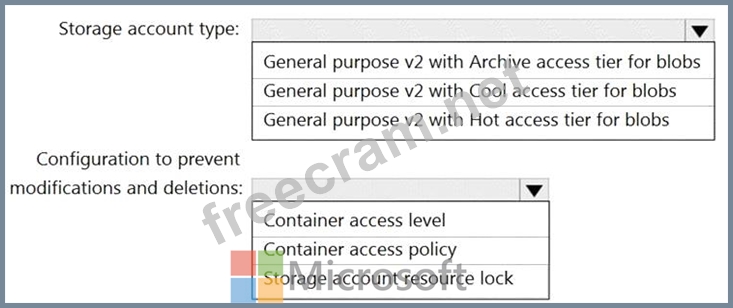
You need to recommend a storage solution that meets the following requirements:
* All the data written to storage must be retained for five years.
* Once the data is written, the data can only be read. Modifications and deletion must be prevented.
* After five years, the data can be deleted, but never modified.
* Data access charges must be minimized
What should you recommend? To answer, select the appropriate options in the answer area.
NOTE: Each correct selection is worth one point.
Correct Answer:
Explanation:
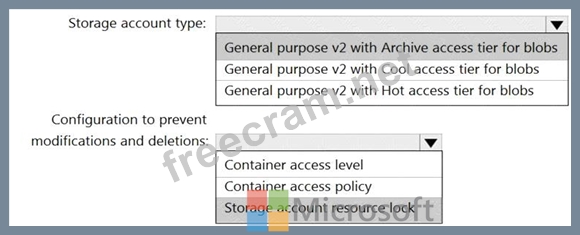
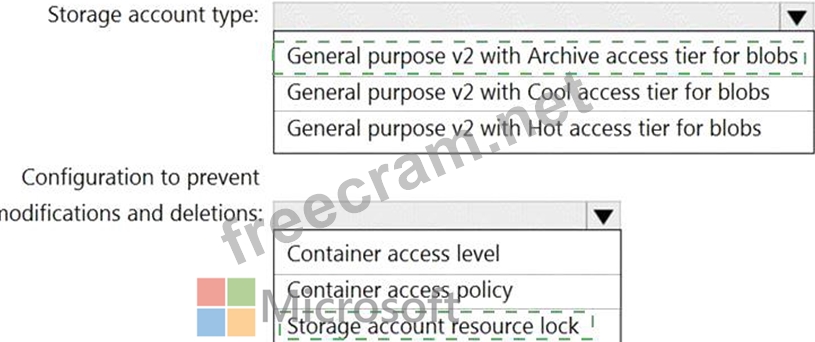
Box 1: General purpose v2 with Archive acce3ss tier for blobs
Archive - Optimized for storing data that is rarely accessed and stored for at least 180 days with flexible latency requirements, on the order of hours.
Cool - Optimized for storing data that is infrequently accessed and stored for at least 30 days.
Hot - Optimized for storing data that is accessed frequently.
Box 2: Storage account resource lock
As an administrator, you can lock a subscription, resource group, or resource to prevent other users in your organization from accidentally deleting or modifying critical resources. The lock overrides any permissions the user might have.
Note: You can set the lock level to CanNotDelete or ReadOnly. In the portal, the locks are called Delete and Read-only respectively.
* CanNotDelete means authorized users can still read and modify a resource, but they can't delete the resource.
* ReadOnly means authorized users can read a resource, but they can't delete or update the resource.
Applying this lock is similar to restricting all authorized users to the permissions granted by the Reader role.
Reference:
https://docs.microsoft.com/en-us/azure/storage/blobs/storage-blob-storage-tiers


- Question List (122q)
- Question 1: You have an app named App1 that uses two on-premises Microso...
- Question 2: You are developing a multi-tier app named App1 that will be ...
- 1 commentQuestion 3: What should you implement to meet the identity requirements?...
- Question 4: You have an on-premises database that you plan to migrate to...
- Question 5: You have a mobile app that is deployed to 100,000 users. Eac...
- 1 commentQuestion 6: You have an Azure subscription that contains a virtual netwo...
- Question 7: You have an Azure subscription that contains a Basic Azure v...
- 1 commentQuestion 8: You have an Azure subscription. You are designing a solution...
- Question 9: You plan to deploy an Azure SQL database that will store Per...
- Question 10: A company plans to implement an HTTP-based API to support a ...
- Question 11: You are designing a solution that calculates 3D geometry fro...
- 1 commentQuestion 12: You have an Azure Functions microservice app named Appl that...
- Question 13: You have a multi-tier app named Appl and an Azure SQL databa...
- Question 14: You have the Free edition of a hybrid Azure Active Directory...
- 1 commentQuestion 15: To meet the authentication requirements of Fabrikam, what sh...
- Question 16: Your company identifies the following business continuity an...
- Question 17: You need to design an Azure policy that will implement the f...
- Question 18: Note: This question is part of a series of questions that pr...
- Question 19: You have an Azure subscription that is linked to an Azure Ac...
- Question 20: What should you include in the identity management strategy ...
- Question 21: A company has an existing web application that runs on virtu...
- Question 22: You have an Azure subscription that contains an Azure Blob s...
- Question 23: Note: This question is part of a series of questions that pr...
- 1 commentQuestion 24: You need to recommend a strategy for migrating the database ...
- 1 commentQuestion 25: You have an Azure subscription that contains an Azure SQL da...
- Question 26: Your company has the infrastructure shown in the following t...
- Question 27: You plan to deploy the backup policy shown in the following ...
- 1 commentQuestion 28: Your company has offices in the United States, Europe, Asia,...
- Question 29: Your on-premises network contains a file server named Server...
- Question 30: You have an Azure subscription that contains 10 web apps. Th...
- Question 31: You plan to deploy an application named App1 that will run o...
- Question 32: You have an on-premises network that uses on IP address spac...
- Question 33: Your organization has developed and deployed several Azure A...
- 1 commentQuestion 34: You plan to develop a new app that will store business criti...
- Question 35: You are designing an app that will include two components. T...
- Question 36: Your company develops Azure applications. You need to recomm...
- Question 37: You need to design a storage solution for an app that will s...
- Question 38: You have an Azure subscription that contains 1,000 resources...
- 1 commentQuestion 39: You are planning an Azure Storage solution for sensitive dat...
- Question 40: You are designing an Azure web app. You plan to deploy the w...
- Question 41: You have 100 servers that run Windows Server 2012 R2 and hos...
- Question 42: You have 100 devices that write performance data to Azure Bl...
- Question 43: You have an on-premises line-of-business (LOB) application t...
- 1 commentQuestion 44: You need to deploy an instance of SQL Server on Azure Virtua...
- 1 commentQuestion 45: You have an Azure Active Directory (Azure AD) tenant. You pl...
- Question 46: You have an Azure Data Lake Storage account that contains 1,...
- Question 47: You ate designing an Azure governance solution. All Azure re...
- 1 commentQuestion 48: You plan to use an Azure Storage account to store data asset...
- Question 49: Your company deploys several Linux and Windows virtual machi...
- Question 50: You have an Azure App Service app named App1. You need to re...
- Question 51: You have an Azure subscription that contains a custom applic...
- 1 commentQuestion 52: You need to recommend an App Service architecture that meets...
- Question 53: You plan to migrate App1 to Azure. You need to recommend a n...
- 1 commentQuestion 54: You plan to migrate App1 to Azure. You need to recommend a h...
- 1 commentQuestion 55: You have an on-premises network to which you deploy a virtua...
- Question 56: How should the migrated databases DB1 and DB2 be implemented...
- Question 57: You have an app named App1 that uses two on-premises Microso...
- Question 58: You design a solution for the web tier of WebApp1 as shown i...
- Question 59: You have an Azure subscription. The subscription has a blob ...
- 1 commentQuestion 60: You have 100 Azure Storage accounts. Access to the accounts ...
- Question 61: You plan to deploy 10 applications to Azure. The application...
- Question 62: You need to recommend a solution to meet the database retent...
- Question 63: Your company currently has an application that is hosted on ...
- 1 commentQuestion 64: You are designing a data analytics solution that will use Az...
- Question 65: You have an Azure subscription. Your on-premises network con...
- Question 66: Your company deploys several virtual machines on-premises an...
- Question 67: You need to design a solution that will execute custom C# co...
- 1 commentQuestion 68: You have an Azure subscription. You create a storage account...
- Question 69: You need to configure an Azure policy to ensure that the Azu...
- 1 commentQuestion 70: The developers at your company are building a containerized ...
- Question 71: Note: This question is part of a series of questions that pr...
- Question 72: You have an on-premises network and an Azure subscription. T...
- Question 73: Your company develops a web service that is deployed to an A...
- Question 74: You have five .NET Core applications that run on 10 Azure vi...
- Question 75: You configure OAuth2 authorization in API Management as show...
- Question 76: Your company deploys an Azure App Service Web App. During te...
- Question 77: You have an Azure subscription that contains the resources s...
- Question 78: You have an on-premises file server that stores 2 TB of data...
- 1 commentQuestion 79: You plan to migrate App1 to Azure. The solution must meet th...
- Question 80: You have an on-premises file server that stores 2 TB of data...
- Question 81: You need to recommend a solution that meets the data require...
- Question 82: You plan to deploy an Azure web app named Appl that will use...
- 2 commentQuestion 83: You have an Azure subscription. You need to deploy an Azure ...
- Question 84: You plan to deploy an Azure App Service web app named App1 t...
- Question 85: You have data files in Azure Blob Storage. You plan to trans...
- Question 86: You need to recommend a solution that meets the application ...
- Question 87: You have a .NET web service named Service! that performs the...
- Question 88: You are designing an Azure solution. The network traffic for...
- Question 89: You plan to migrate App1 to Azure. The solution must meet th...
- Question 90: You are designing a large Azure environment that will contai...
- Question 91: You plan to create an Azure Storage account that will host f...
- Question 92: You need to recommend a notification solution for the IT Sup...
- Question 93: You plan to store data in Azure Blob storage for many years....
- Question 94: You have an Azure subscription that contains a storage accou...
- Question 95: You are designing a solution that will include containerized...
- 3 commentQuestion 96: You have an Azure subscription. You need to deploy a solutio...
- Question 97: You have the Azure resources shown in the following table. (...
- Question 98: Your company has 50 business units across the globe. The bus...
- Question 99: You have an Azure subscription. The subscription contains Az...
- Question 100: You have an Azure AD tenant. You plan to deploy Azure Cosmos...
- Question 101: You have an app named App1 that uses an on-premises Microsof...
- Question 102: You ate designing a SQL database solution. The solution will...
- Question 103: You need to recommend an Azure Storage Account configuration...
- Question 104: You have an Azure subscription that contains a storage accou...
- Question 105: You plan to deploy multiple instances of an Azure web app ac...
- Question 106: You have .NeT web service named service1 that has the follow...
- Question 107: Your company, named Contoso, Ltd, implements several Azure l...
- Question 108: You have 100 Microsoft SQL Server integration Services (SSIS...
- Question 109: You have a resource group named RG1 that contains the object...
- 2 commentQuestion 110: Your on-premises datacenter contains a server named Server1 ...
- Question 111: You are designing an app that will use Azure Cosmos DB to co...
- Question 112: Your company has two on-premises sites in New York and Los A...
- Question 113: You have an Azure web app named App1 and an Azure key vault ...
- Question 114: You need to ensure that users managing the production enviro...
- Question 115: You ate designing a SQL database solution. The solution will...
- Question 116: You have an Azure subscription that contains multiple storag...
- 2 commentQuestion 117: You are evaluating the components of the migration to Azure ...
- Question 118: You plan to deploy an Azure App Service web app that will ha...
- Question 119: You have several Azure App Service web apps that use Azure K...
- Question 120: You are designing a message application that will run on an ...
- 1 commentQuestion 121: You have an Azure AD tenant that contains a management group...
- Question 122: You have an application named App1. App1 generates log files...

Recent Comments (The most recent comments are at the top.)
Answer is GPv2 HOT to have frequent access :
https://docs.microsoft.com/en-us/azure/storage/blobs/access-tiers-overview
Answer is container access (immutable) policy at least at the container scope.
https://docs.microsoft.com/en-us/azure/storage/blobs/immutable-storage-overview