- Home
- Microsoft
- Developing Solutions for Microsoft Azure
- Microsoft.AZ-204.v2026-10-28.q297
- Question 190
Valid AZ-204 Dumps shared by ExamDiscuss.com for Helping Passing AZ-204 Exam! ExamDiscuss.com now offer the newest AZ-204 exam dumps, the ExamDiscuss.com AZ-204 exam questions have been updated and answers have been corrected get the newest ExamDiscuss.com AZ-204 dumps with Test Engine here:
Access AZ-204 Dumps Premium Version
(655 Q&As Dumps, 35%OFF Special Discount Code: freecram)
<< Prev Question Next Question >>
Question 190/297
Hotspot Question
You are preparing to deploy a Python website to an Azure Web App using a container. The solution will use multiple containers in the same container group. The Dockerfile that builds the container is as follows:
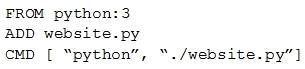
You build a container by using the following command. The Azure Container Registry instance named images is a private registry.

The user name and password for the registry is admin.
The Web App must always run the same version of the website regardless of future builds.
You need to create an Azure Web App to run the website.
How should you complete the commands? To answer, select the appropriate options in the answer area.
NOTE: Each correct selection is worth one point.
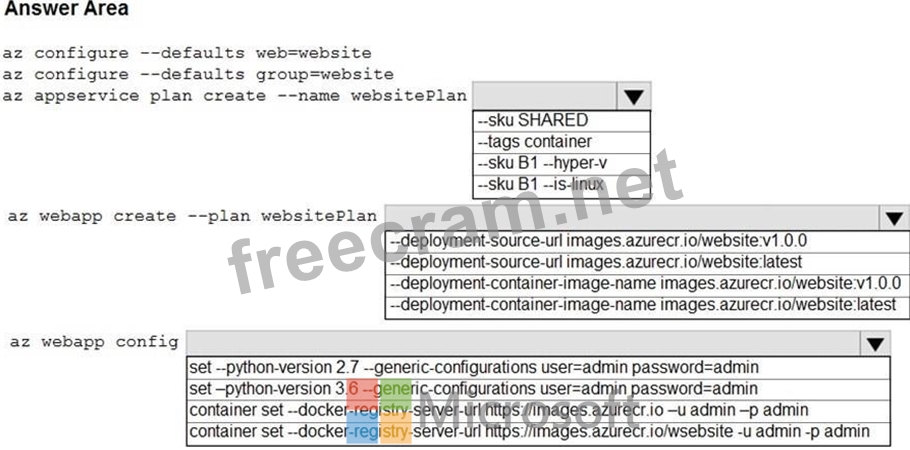
You are preparing to deploy a Python website to an Azure Web App using a container. The solution will use multiple containers in the same container group. The Dockerfile that builds the container is as follows:
You build a container by using the following command. The Azure Container Registry instance named images is a private registry.
The user name and password for the registry is admin.
The Web App must always run the same version of the website regardless of future builds.
You need to create an Azure Web App to run the website.
How should you complete the commands? To answer, select the appropriate options in the answer area.
NOTE: Each correct selection is worth one point.
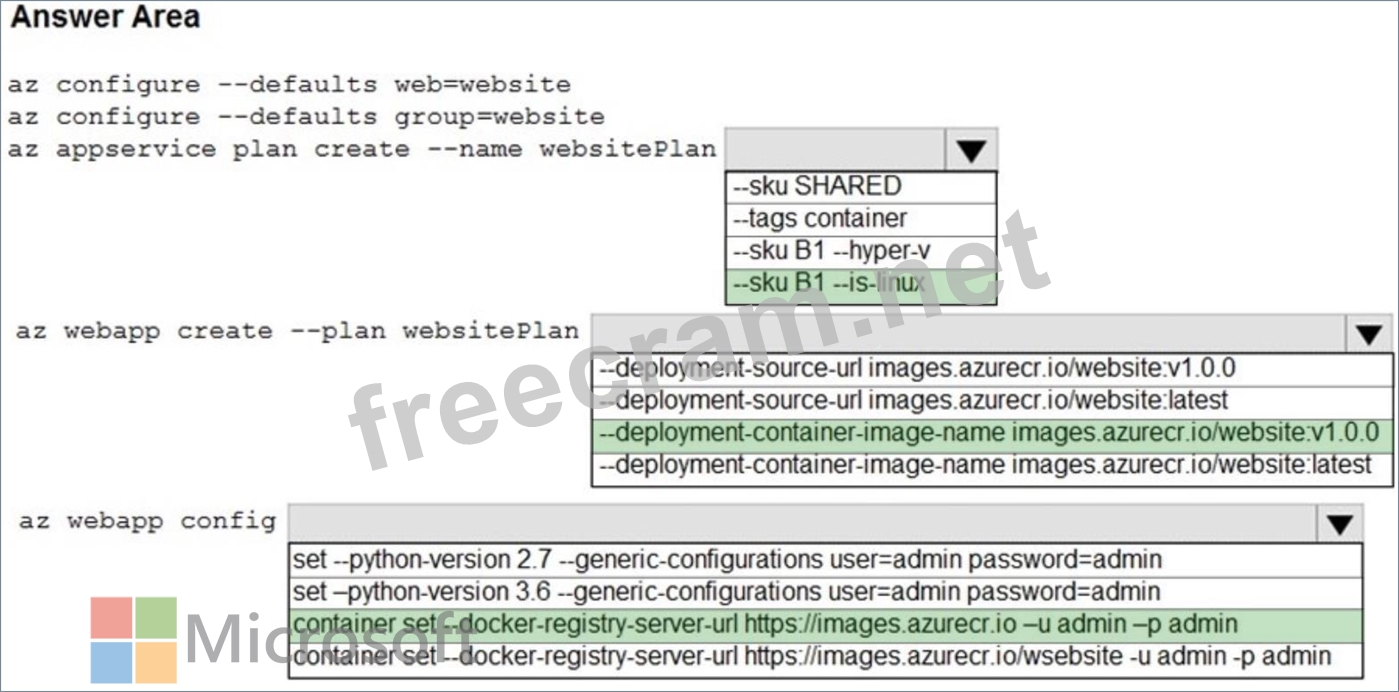
Correct Answer:
Explanation:
Multi-container groups currently support only Linux containers. For Windows containers, Azure Container Instances only supports deployment of a single container instance. While we are working to bring all features to Windows containers, you can find current platform differences in the service.
Box 1: sku B1 --is-linux
Box 2: --deployment-container-image-name images.azurecr.io/website:v1.0.0 Box 3: container set --docker-registry-server-url https://images.azurecr.io -u admin -p admin Reference:
https://docs.microsoft.com/en-us/azure/container-instances/container-instances-container-groups


- Question List (297q)
- Question 1: You have 100 Azure virtual machines (VMs) with the system-as...
- Question 2: You have an on-premises, public-facing website named www.con...
- Question 3: Case Study 3 - City Power & Light Background City Power ...
- Question 4: Hotspot Question You develop software solutions for a web se...
- Question 5: You are developing an application that is going to making us...
- Question 6: Case Study 3 - City Power & Light Background City Power ...
- Question 7: You are creating an Azure key vault using PowerShell. Object...
- Question 8: Your company has an Azure subscription. You need to deploy a...
- Question 9: You develop a web application that sells access to last-minu...
- Question 10: Note: The question is included in a number of questions that...
- Question 11: You have a Linux container-based console application that up...
- Question 12: Hotspot Question You are developing an Azure Durable Functio...
- Question 13: You develop an app that allows users to upload photos and vi...
- Question 14: You are developing a microservices-based application that us...
- Question 15: You develop a solution that uses Azure Virtual Machines (VMs...
- Question 16: Note: The question is included in a number of questions that...
- Question 17: A team has created an Index in the Azure Search service. You...
- Question 18: You are developing a Microsoft Entra ID integrated app that ...
- Question 19: Hotspot Question You are building a website that is used to ...
- Question 20: Your company purchases an Azure subscription and plans to mi...
- Question 21: You are developing a solution that will use Azure messaging ...
- Question 22: Case Study 6 - Contoso, Ltd Background Overview You are a de...
- Question 23: A team 'XNP' is developing container-based applications that...
- Question 24: Case Study 1 - Litware Inc Background You are a developer fo...
- Question 25: Case Study 5 - Wide World Importers Background Wide World Im...
- Question 26: You develop and deploy a web app to Azure App Service. The A...
- Question 27: Hotspot Question You are developing an Azure Web App. You co...
- Question 28: A development team is developing an application. The applica...
- Question 29: Case Study 10 - Fourth Coffee Background Fourth Coffee is a ...
- Question 30: Your company has several containers based on the following o...
- Question 31: Drag and Drop Question You are developing an Azure solution ...
- Question 32: Case Study 5 - Wide World Importers Background Wide World Im...
- Question 33: Case Study 10 - Fourth Coffee Background Fourth Coffee is a ...
- Question 34: You are developing an online game that includes a feature th...
- Question 35: Drag and Drop Question You develop an IoT solution by using ...
- Question 36: You have to develop an ASP.Net Core application. The applica...
- Question 37: You ate developing a web application that uses the Microsoft...
- Question 38: Hotspot Question You are developing an Azure Function app. T...
- Question 39: Note: This question is part of a series of questions that pr...
- Question 40: Case Study 3 - City Power & Light Background City Power ...
- Question 41: Note: This question is part of a series of questions that pr...
- Question 42: Drag and Drop Question You are developing a microservices so...
- Question 43: Hotspot Question You plan to implement an Azure Functions ap...
- Question 44: Case Study 7 - Proseware, Inc Background You are a developer...
- Question 45: How many triggers must a function have?...
- Question 46: Case Study 7 - Proseware, Inc Background You are a developer...
- Question 47: Note: The question is included in a number of questions that...
- Question 48: You are designing a web application to manage user satisfact...
- Question 49: Case Study 10 - Fourth Coffee Background Fourth Coffee is a ...
- Question 50: Case Study 4 - Best for You Organics Background Best for You...
- Question 51: Your company has an Azure Kubernetes Service (AKS) cluster t...
- Question 52: You are developing an Azure App Service REST API. The API mu...
- Question 53: You are developing an Azure Function App that generates end ...
- Question 54: You are developing an application to transfer data between o...
- Question 55: Drag and Drop Question You have an application that uses Azu...
- Question 56: Note: This question is part of a series of questions that pr...
- Question 57: Hotspot Question You are developing an Azure Function App. Y...
- Question 58: Case Study 7 - Proseware, Inc Background You are a developer...
- Question 59: Hotspot Question You have an Azure Function app named App1 w...
- Question 60: Note: The question is included in a number of questions that...
- Question 61: You are developing a web application that uses Azure Cache f...
- Question 62: Hotspot Question You have developed a Web App for your compa...
- Question 63: Hotspot Question You plan to implement an Azure function nam...
- Question 64: You manage an Azure App Service Web App named App1 and an as...
- Question 65: Hotspot Question You are developing an application that runs...
- Question 66: You manage an Azure Storage account named storage1. You plan...
- Question 67: Case Study 5 - Wide World Importers Background Wide World Im...
- Question 68: Case Study 9 - Munson's Pickles and Preserves Farm Backgroun...
- Question 69: Hotspot Question You are configuring a development environme...
- Question 70: Case Study 3 - City Power & Light Background City Power ...
- Question 71: Hotspot Question Your company is migrating applications to A...
- Question 72: Note: This question is part of a series of questions that pr...
- Question 73: Case Study 9 - Munson's Pickles and Preserves Farm Backgroun...
- Question 74: Drag and Drop Question You are developing an application. Yo...
- Question 75: You develop and deploy an Azure Logic app that calls an Azur...
- Question 76: You develop Azure solutions. A .NET application needs to rec...
- Question 77: Drag and Drop Question An organization plans to deploy Azure...
- Question 78: Drag and Drop Question You are developing an Azure solution....
- Question 79: Hotspot Question You are using Azure Front Door Service. You...
- Question 80: Note: This question is part of a series of questions that pr...
- Question 81: Note: This question is part of a series of questions that pr...
- Question 82: You are developing an Azure App Service web app. The web app...
- Question 83: You are developing a web application that runs as an Azure W...
- Question 84: Case Study 7 - Proseware, Inc Background You are a developer...
- Question 85: Your company is designing an application named App1 that wil...
- Question 86: Drag and Drop Question You are preparing to deploy an applic...
- Question 87: You develop and deploy a Java RESTful API to Azure App Servi...
- Question 88: Case Study 6 - Contoso, Ltd Background Overview You are a de...
- Question 89: Note: This question is part of a series of questions that pr...
- Question 90: Hotspot Question You are building a traffic monitoring syste...
- Question 91: You have implemented code that uses elastic transactions spa...
- Question 92: Hotspot Question You have an Azure Batch project that proces...
- Question 93: Case Study 9 - Munson's Pickles and Preserves Farm Backgroun...
- Question 94: Case Study 3 - City Power & Light Background City Power ...
- Question 95: You develop an ASP.NET Core app that uses Azure App Configur...
- Question 96: You are a developer at your company. You need to edit the wo...
- Question 97: You are developing an Azure Batch solution to perform CPU in...
- Question 98: Drag and Drop Question You are developing a microservices-ba...
- Question 99: Hotspot Question You have an Azure Active Directory (Azure A...
- Question 100: Case Study 8 - VanArsdel, Ltd Background VanArsdel, Ltd. is ...
- Question 101: Case Study 10 - Fourth Coffee Background Fourth Coffee is a ...
- Question 102: You are building a website that uses Azure Blob storage for ...
- Question 103: You are developing several Azure API Management (APIM) hoste...
- Question 104: Case Study 8 - VanArsdel, Ltd Background VanArsdel, Ltd. is ...
- Question 105: Note: This question is part of a series of questions that pr...
- Question 106: This question requires that you evaluate the underlined text...
- Question 107: Drag and Drop Question You develop a bot by using Language U...
- Question 108: Hotspot Question A company develops a series of mobile games...
- Question 109: Case Study 6 - Contoso, Ltd Background Overview You are a de...
- Question 110: Drag and Drop Question You are developing a new page for a w...
- Question 111: Hotspot Question You develop a containerized application. Yo...
- Question 112: Hotspot Question You are developing an application that use ...
- Question 113: Drag and Drop Question You develop a web app that uses tier ...
- Question 114: Hotspot Question You are developing a .NET application that ...
- Question 115: Hotspot Question You are developing a microservices-based ap...
- Question 116: Note: The question is included in a number of questions that...
- Question 117: Case Study 3 - City Power & Light Background City Power ...
- Question 118: Hotspot Question You are developing a web application that m...
- Question 119: Note: This question is part of a series of questions that pr...
- Question 120: Note: This question is part of a series of questions that pr...
- Question 121: A company is developing a solution that allows smart refrige...
- Question 122: Drag and Drop Question You have an application that provides...
- Question 123: Case Study 8 - VanArsdel, Ltd Background VanArsdel, Ltd. is ...
- Question 124: Hotspot Question A construction company creates three-dimens...
- Question 125: Drag and Drop Question You develop and deploy a web app to A...
- Question 126: You are developing a .NET Core MVC application that allows c...
- Question 127: Note: This question is part of a series of questions that pr...
- Question 128: A development team 'XRP' is developing an application. The a...
- Question 129: Hotspot Question You have an on-premises, internal-only webs...
- Question 130: A development team is developing an application. The applica...
- Question 131: Drag and Drop Question You have an Azure Virtual Machine (VM...
- Question 132: Case Study 6 - Contoso, Ltd Background Overview You are a de...
- Question 133: You are a developing a SaaS application that stores data as ...
- Question 134: Hotspot Question You are developing a web application that u...
- Question 135: Hotspot Question A software as a service (SaaS) company prov...
- Question 136: Hotspot Question You are developing a workflow solution usin...
- Question 137: Hotspot Question You develop an image upload service that is...
- Question 138: Drag and Drop Question You are developing an ASP.NET Core we...
- Question 139: Case Study 5 - Wide World Importers Background Wide World Im...
- Question 140: Note: This question is part of a series of questions that pr...
- Question 141: Case Study 7 - Proseware, Inc Background You are a developer...
- Question 142: A company is implementing a publish-subscribe (Pub/Sub) mess...
- Question 143: You are creating a hazard notification system that has a sin...
- Question 144: You develop and deploy an Azure App Service web app. The app...
- Question 145: Case Study 7 - Proseware, Inc Background You are a developer...
- Question 146: You create an Azure Cosmos DB for NoSQL database. You plan t...
- Question 147: You need to design network connectivity for a subnet in an A...
- Question 148: Hotspot Question You are developing a service where customer...
- Question 149: You are developing a software solution for an autonomous tra...
- Question 150: Hotspot Question You are developing an Azure Function App by...
- Question 151: Note: This question is part of a series of questions that pr...
- Question 152: What is Durable Functions?
- Question 153: You are developing an Azure Function that calls external API...
- Question 154: Drag and Drop Question You are developing an Azure solution....
- Question 155: Drag and Drop Question You develop a web application. You ne...
- Question 156: You are preparing to deploy a website to an Azure Web App fr...
- Question 157: Hotspot Question You are creating a bot for a company by usi...
- Question 158: Drag and Drop Question You develop software solutions for a ...
- Question 159: Hotspot Question You plan to develop an Azure Functions app ...
- Question 160: Hotspot Question You are reviewing the following code for an...
- Question 161: A development team is developing an application. The applica...
- Question 162: Case Study 6 - Contoso, Ltd Background Overview You are a de...
- Question 163: Case Study 2 - Coho Winery LabelMaker app Coho Winery produc...
- Question 164: Case Study 2 - Coho Winery LabelMaker app Coho Winery produc...
- Question 165: You are developing a speech-enabled home automation control ...
- Question 166: You are developing a .Net web application that stores data i...
- Question 167: Drag and Drop Question You manage an Azure Cosmos DB for a N...
- Question 168: Hotspot Question You have a web service that is used to pay ...
- Question 169: Drag and Drop Question You develop a gateway solution for a ...
- Question 170: A development team is developing an application that works w...
- Question 171: Drag and Drop Question You are developing a web service that...
- Question 172: Case Study 2 - Coho Winery LabelMaker app Coho Winery produc...
- Question 173: You are developing several microservices to run on Azure Con...
- Question 174: Drag and Drop Question You are maintaining an existing appli...
- Question 175: Drag and Drop Question You are developing several microservi...
- Question 176: You develop and deploy an Azure App Service web app to a pro...
- Question 177: Hotspot Question You are developing a static website hosted ...
- Question 178: Note: This question is part of a series of questions that pr...
- Question 179: You develop a REST API. You implement a user delegation SAS ...
- Question 180: You are building a web application that uses the Microsoft i...
- Question 181: Case Study 5 - Wide World Importers Background Wide World Im...
- Question 182: Suppose you're sending a message with Azure Service Bus and ...
- Question 183: Note: This question is part of a series of questions that pr...
- Question 184: Case Study 8 - VanArsdel, Ltd Background VanArsdel, Ltd. is ...
- Question 185: Hotspot Question You have a web service that is used to pay ...
- Question 186: You are developing an Azure Function app for scalability and...
- Question 187: You are developing a web app that is protected by Azure Web ...
- Question 188: Hotspot Question You are debugging an application that is ru...
- Question 189: A development team is developing an application that works w...
- Question 190: Hotspot Question You are preparing to deploy a Python websit...
- Question 191: Drag and Drop Question You develop and deploy several APIs t...
- Question 192: Drag and Drop Question You are developing a software solutio...
- Question 193: Case Study 6 - Contoso, Ltd Background Overview You are a de...
- Question 194: Case Study 2 - Coho Winery LabelMaker app Coho Winery produc...
- Question 195: Hotspot Question You develop a news and blog content app for...
- Question 196: Hotspot Question You are developing a containerized microser...
- Question 197: Note: This question is part of a series of questions that pr...
- Question 198: Case Study 6 - Contoso, Ltd Background Overview You are a de...
- Question 199: You develop an ASP. Net Care application by integrating the ...
- Question 200: Case Study 2 - Coho Winery LabelMaker app Coho Winery produc...
- Question 201: You are developing an Azure Function App that processes imag...
- Question 202: You plan to deploy an Azure Container app. You need to confi...
- Question 203: You are developing several microservices to deploy to a Azur...
- Question 204: Hotspot Question A company is developing a software as a ser...
- Question 205: An organization deploys Azure Cosmos DB. You need to ensure ...
- Question 206: Case Study 8 - VanArsdel, Ltd Background VanArsdel, Ltd. is ...
- Question 207: Drag and Drop Question You are creating a collaborative imag...
- Question 208: Hotspot Question You are developing an application that moni...
- Question 209: Drag and Drop Question You are developing an application to ...
- Question 210: Hotspot Question You have an Azure Storage queue named queue...
- Question 211: Note: This question is part of a series of questions that pr...
- Question 212: You develop an Azure App Service web app and deploy to a pro...
- Question 213: A development team is creating a new REST API. The API will ...
- Question 214: A CRON expression is a string that consists of six fields th...
- Question 215: Hotspot Question You have an Azure Cosmos DB for NoSQL API a...
- Question 216: You have an Azure subscription named Sub1 that contains a re...
- Question 217: Case Study 9 - Munson's Pickles and Preserves Farm Backgroun...
- Question 218: Case Study 7 - Proseware, Inc Background You are a developer...
- Question 219: Drag and Drop Question You are developing an application to ...
- Question 220: A company sells products worldwide and provides customer ser...
- Question 221: Drag and Drop Question You are implementing an order process...
- Question 222: Note: This question is part of a series of questions that pr...
- Question 223: Hotspot Question You have an Azure API Management instance n...
- Question 224: Note: This question is part of a series of questions that pr...
- Question 225: Case Study 3 - City Power & Light Background City Power ...
- Question 226: Note: This question is part of a series of questions that pr...
- Question 227: Note: This question is part of a series of questions that pr...
- Question 228: You are developing several Azure API Management (APIM) hoste...
- Question 229: Case Study 7 - Proseware, Inc Background You are a developer...
- Question 230: Hotspot Question You have an Azure App Service web app named...
- Question 231: Hotspot Question You are building a software-as-a-service (S...
- Question 232: You are updating an application that stores data on Azure an...
- Question 233: Case Study 1 - Litware Inc Background You are a developer fo...
- Question 234: You have a workspace-based Azure Application Insights resour...
- Question 235: You are developing an ASP.NET Core Web API web service. The ...
- Question 236: Case Study 1 - Litware Inc Background You are a developer fo...
- Question 237: Hotspot Question You have a Dockerfile that builds a contain...
- Question 238: Your company has an Azure subscription. You need to deploy a...
- Question 239: A development team 'NPR' is developing an application. The a...
- Question 240: Hotspot Question You develop several Azure Functions app fun...
- Question 241: Note: This question is part of a series of questions that pr...
- Question 242: Drag and Drop Question You are developing a REST web service...
- Question 243: Hotspot Question You are developing an Azure-hosted e-commer...
- Question 244: Hotspot Question You are configuring a new development envir...
- Question 245: Hotspot Question You have the following data lifecycle manag...
- Question 246: A development team is developing an application. The applica...
- Question 247: You develop Azure Web Apps for a commercial diving company. ...
- Question 248: You manage a data processing application that receives reque...
- Question 249: For an application Nea as developer needs to Create a Docker...
- Question 250: Case Study 1 - Litware Inc Background You are a developer fo...
- Question 251: Hotspot Question You develop and deploy an Azure App Service...
- Question 252: You develop a web application that provides access to legal ...
- Question 253: Note: This question is part of a series of questions that pr...
- Question 254: Hotspot Question You provisioned an Azure Cosmos DB for NoSQ...
- Question 255: Which of the following is an advantage of using bindings in ...
- Question 256: Drag and Drop Question You have an Azure Cosmos DB for NoSQL...
- Question 257: Drag and Drop Question You develop and deploy an Azure App S...
- Question 258: Hotspot Question You plan to deploy a new application to a L...
- Question 259: Case Study 1 - Litware Inc Background You are a developer fo...
- Question 260: Case Study 10 - Fourth Coffee Background Fourth Coffee is a ...
- Question 261: Which of the following best describes the role of the Orches...
- Question 262: Note: This question is part of a series of questions that pr...
- Question 263: Drag and Drop Question You are developing a software solutio...
- Question 264: Case Study 6 - Contoso, Ltd Background Overview You are a de...
- Question 265: You develop and add several functions to an Azure Function a...
- Question 266: Drag and Drop Question You are developing an Azure Function ...
- Question 267: Case Study 3 - City Power & Light Background City Power ...
- Question 268: You manage an Azure Key Vault named kv1 of Standard SKU. You...
- Question 269: Hotspot Question You are developing an ASP.NET Core web appl...
- Question 270: Drag and Drop Question You have an Azure App Service Web App...
- Question 271: Drag and Drop Question You are developing a multi-tenant ASP...
- Question 272: Drag and Drop Question You are preparing to deploy an Azure ...
- Question 273: Case Study 9 - Munson's Pickles and Preserves Farm Backgroun...
- Question 274: Drag and Drop Question You create an Azure subscription. You...
- Question 275: You are developing an e-Commerce Web App. You want to use Az...
- Question 276: A company is developing a solution that allows smart refrige...
- Question 277: Hotspot Question You have an Azure Application Insights reso...
- Question 278: A company is building a traffic monitoring system. The syste...
- Question 279: Drag and Drop Question Fourth Coffee has an ASP.NET Core web...
- Question 280: You manage an Azure subscription that contains 100 Azure App...
- Question 281: You are developing an application to store business-critical...
- Question 282: A company maintains multiple web and mobile applications. Ea...
- Question 283: Drag and Drop Question You have an Azure subscription. You m...
- Question 284: You are developing an inventory tracking solution. The solut...
- Question 285: You are designing a small app that will receive web requests...
- Question 286: Your company's Azure subscription includes an Azure Log Anal...
- Question 287: Hotspot Question You are implementing a software as a servic...
- Question 288: Drag and Drop Question You are developing a serverless Java ...
- Question 289: Case Study 8 - VanArsdel, Ltd Background VanArsdel, Ltd. is ...
- Question 290: Note: This question is part of a series of questions that pr...
- Question 291: Hotspot Question You have an Azure Web app that uses Cosmos ...
- Question 292: Note: This question is part of a series of questions that pr...
- Question 293: Hotspot Question You are developing a ticket reservation sys...
- Question 294: You develop an ASP. Net Care application by integrating the ...
- Question 295: Case Study 3 - City Power & Light Background City Power ...
- Question 296: Case Study 1 - Litware Inc Background You are a developer fo...
- Question 297: You develop and deploy a web app to Azure App Service. The A...
