- Home
- Microsoft
- Planning and Administering Microsoft Azure for SAP Workloads
- Microsoft.AZ-120.v2022-05-27.q125
- Question 97
Valid AZ-120 Dumps shared by ExamDiscuss.com for Helping Passing AZ-120 Exam! ExamDiscuss.com now offer the newest AZ-120 exam dumps, the ExamDiscuss.com AZ-120 exam questions have been updated and answers have been corrected get the newest ExamDiscuss.com AZ-120 dumps with Test Engine here:
Access AZ-120 Dumps Premium Version
(309 Q&As Dumps, 35%OFF Special Discount Code: freecram)
<< Prev Question Next Question >>
Question 97/125
Your on-premises network contains SAP and non-SAP applications.
You have JAVA-based SAP systems that use SPNEGO for single-sign on (SSO) authentication.
Your external portal uses multi-factor authentication (MFA) to authenticate users.
You plan to extend the on-premises authentication features to Azure and to migrate the SAP applications to Azure.
For each of the following statements, select Yes if the statement is true. Otherwise, select No.
NOTE: Each correct selection is worth one point.
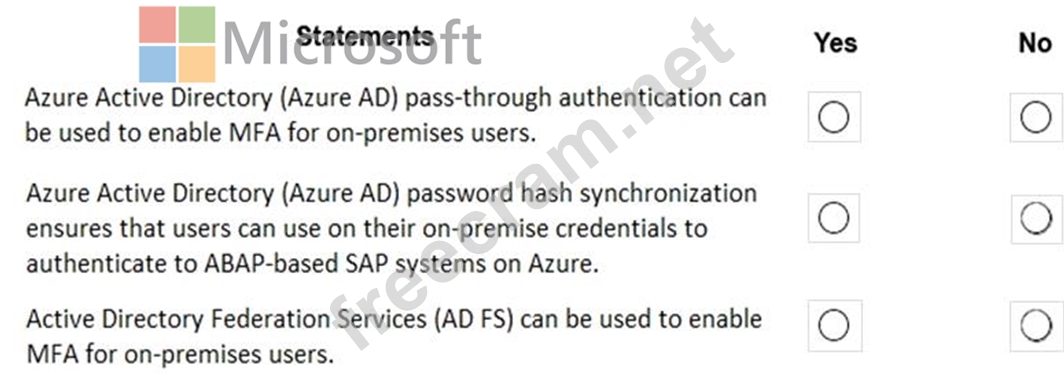
You have JAVA-based SAP systems that use SPNEGO for single-sign on (SSO) authentication.
Your external portal uses multi-factor authentication (MFA) to authenticate users.
You plan to extend the on-premises authentication features to Azure and to migrate the SAP applications to Azure.
For each of the following statements, select Yes if the statement is true. Otherwise, select No.
NOTE: Each correct selection is worth one point.
Correct Answer:
Explanation:
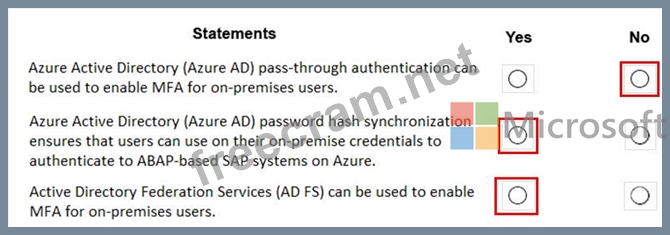
Box 1: No
Need AD FS for MF
Note: Azure Active Directory (Azure AD) Pass-through Authentication allows your users to sign in to both on-premises and cloud-based applications using the same passwords. This feature is an alternative to Azure AD Password Hash Synchronization (see Box 2).
Box 2: Yes
Password hash synchronization is one of the sign-in methods used to accomplish hybrid identity. Azure AD Connect synchronizes a hash, of the hash, of a users password from an on-premises Active Directory instance to a cloud-based Azure AD instance.
Password hash synchronization is an extension to the directory synchronization feature implemented by Azure AD Connect sync. You can use this feature to sign in to Azure AD services like Office 365. You sign in to the service by using the same password you use to sign in to your on-premises Active Directory instance.
Box 3: Yes
If your organization is federated with Azure AD, you can use Azure Multi-Factor Authentication to secure AD FS resources, both on-premises and in the cloud. Azure MFA enables you to eliminate passwords and provide a more secure way to authenticate.
References:
https://docs.microsoft.com/en-us/azure/active-directory/hybrid/whatis-phs
https://docs.microsoft.com/en-us/windows-server/identity/ad-fs/operations/configure-ad-fs-and-azure-mfa


- Question List (125q)
- Question 1: You deploy on SAP environment on Azure. You need to monitor ...
- Question 2: for each of the following statements, select Yes if the stat...
- Question 3: Your company has an SAP environment that contains the follow...
- Question 4: You deploy an SAP landscape on Azure. You plan to use an Azu...
- Question 5: You deploy an SAP environment on Azure. You need to configur...
- Question 6: You have an SAP environment on Azure. You use Azure Recovery...
- Question 7: You have an SAP environment on Azure. our on-promises networ...
- Question 8: For each of the following statements, select Yes if the stat...
- Question 9: You are planning the Azure network infrastructure for an SAP...
- Question 10: Note: This question is part of a series of questions that pr...
- Question 11: For each of the following statements, select Yes if the stat...
- Question 12: You plan to deploy multiple SAP HANA virtual machines to Azu...
- Question 13: You need to ensure that you can receive technical support to...
- Question 14: You have an SAP environment on Azure. You use Azure Recovery...
- Question 15: You deploy an SAP environment on Azure by following the SAP ...
- Question 16: You deploy an SAP environment on Azure. You need to configur...
- Question 17: What should you use to perform load testing as part of the m...
- Question 18: You have an on-premises SAP environment hosted on VMware VSp...
- Question 19: Before putting the SAP environment on Azure into production,...
- Question 20: This question requires that you evaluate the underlined text...
- Question 21: This question requires that you evaluate the underlined text...
- Question 22: You plan to deploy an SAP production landscape that uses SAP...
- Question 23: You have an Azure subscription. The subscription contains a ...
- Question 24: You have an on-premises SAP environment that uses AIX server...
- Question 25: You need to recommend a solution to reduce the cost of the S...
- Question 26: You plan to migrate an on-premises SAP development system to...
- Question 27: You have an on-premises SAP landscape that contains a 20-TB ...
- Question 28: You need to connect SAP HANA on Azure (Large Instances) to a...
- Question 29: For each of the following statements, select Yes if the stat...
- Question 30: You need to provide the Azure administrator with the values ...
- Question 31: You have an SAP development landscape on Azure. For each of ...
- Question 32: A customer has an on-premises SAP environment. The customer ...
- Question 33: Note: This question is part of a series of questions that pr...
- Question 34: You have an Azure virtual machine that runs SUSE Linux Enter...
- Question 35: You are integrating SAP HANA and Azure Active Directory (Azu...
- Question 36: You have an on-premises SAP environment that runs on SUSE Li...
- Question 37: You migrate SAP ERP Central Component (SAP ECC) production a...
- Question 38: You have a Recovery Services vault backup policy for SAP HAN...
- Question 39: You are validating an SAP HANA on Azure (Large Instances) de...
- Question 40: You are validating an SAP HANA on Azure (Large Instances) de...
- Question 41: Before putting the SAP environment on Azure into production,...
- Question 42: You plan to deploy an SAP landscape that will have virtual m...
- Question 43: You are evaluating the migration plan. Licensing for which S...
- Question 44: You are evaluating which migration method Litware can implem...
- Question 45: You are evaluating which migration method Litware can implem...
- Question 46: You have a large and complex SAP environment on Azure. You a...
- Question 47: Note: This question is part of a series of questions that pr...
- Question 48: You are planning replication of the SAP HANA database for th...
- Question 49: You have a large and complex SAP environment on Azure. You a...
- Question 50: You have an on-premises SAP environment. Backups are perform...
- Question 51: You have an on-premises SAP environment. Backups are perform...
- Question 52: You have an SAP landscape on Azure that contains the virtual...
- Question 53: Your on-premises network contains SAP and non-SAP applicatio...
- Question 54: Before putting the SAP environment on Azure into production,...
- Question 55: You have an on-premises SAP environment hosted on VMware VSp...
- Question 56: You have an SAP production landscape that uses SAP HANA data...
- Question 57: You have an SAP production landscape on-premises and an SAP ...
- Question 58: You are evaluating the migration plan. Licensing for which S...
- Question 59: You plan to migrate an SAP ERP Central Component (SAP ECC) p...
- Question 60: You have an Azure alert rule and action group as shown in th...
- Question 61: You deploy an SAP environment on Azure. You need to grant an...
- Question 62: You deploy an SAP environment on Azure. You need to configur...
- Question 63: For each of the following statements, select Yes if the stat...
- Question 64: For each of the following statements, select Yes if the stat...
- Question 65: For each of the following statements, select Yes if the stam...
- Question 66: For each of the following statements, select Yes if the stat...
- Question 67: You plan to migrate an SAP environment to Azure. You need to...
- Question 68: You have an Azure subscription. You plan to deploy a SAP Net...
- Question 69: You have a n SAP environment on Azure. Your on-premises netw...
- Question 70: For each of the following statements, select Yes if the stat...
- Question 71: For each of the following statements, select Yes if the stat...
- Question 72: You have an SAP environment that contains the following comp...
- Question 73: You are evaluating the proposed backup policy. For each of t...
- Question 74: Note: This question is part of a series of questions that pr...
- Question 75: For each of the following statements, select Yes if the stat...
- Question 76: You have an Azure subscription. Your company has an SAP envi...
- Question 77: You have an Azure subscription. Your company has an SAP envi...
- Question 78: You plan to deploy an SAP landscape that will have virtual m...
- Question 79: You have an SAP environment that is managed by using VMware ...
- Question 80: Note: This question is part of a series of questions that pr...
- Question 81: You plan to deploy multiple SAP HANA virtual machines to Azu...
- Question 82: You plan to deploy a highly available ASCS instance to SUSE ...
- Question 83: Note: This question is part of a series of questions that pr...
- Question 84: You have an SAP environment that contains the following comp...
- Question 85: HOTSPOT You are evaluating the proposed backup policy. For e...
- Question 86: You have an SAP environment on Azure. You use Azure Site Rec...
- Question 87: You have an on-premises SAP environment that runs on SUSE Li...
- Question 88: Your company has an SAP environment that contains the follow...
- Question 89: For each of the following statements, select Yes if the stat...
- Question 90: You are planning the deployment of a three-tier SAP landscap...
- Question 91: You need direct connectivity from an on-premises network to ...
- Question 92: You have an on-premises deployment of SAP Business Suite on ...
- Question 93: You have an on-premises SAP environment that runs on SUSE Li...
- Question 94: You have an on-premises deployment of SAP HANA. You plan to ...
- Question 95: for each of the following statements, select Yes if the stat...
- Question 96: You are validating an SAP HANA on Azure (Large Instances) de...
- Question 97: Your on-premises network contains SAP and non-SAP applicatio...
- Question 98: A customer enterprise SAP environment plans to migrate to Az...
- Question 99: Note: This question is part of a series of questions that pr...
- Question 100: HOTSPOT For each of the following statements, select Yes if ...
- Question 101: You are planning the Azure network infrastructure for an SAP...
- Question 102: You plan to migrate an SAP environment to Azure. You need to...
- Question 103: You have a on-premises SAP environment that runs on SUSE Lin...
- Question 104: For each of the following statements, select Yes if the stam...
- Question 105: for each of the following statements, select Yes if the stat...
- Question 106: For each of the following statements, select Yes if the stat...
- Question 107: Once the migrate completes, to which size should you set the...
- Question 108: You plan to migrate an on-premises SAP development system to...
- Question 109: For each of the following statements, select Yes if the stat...
- Question 110: You deploy an SAP environment on Azure. You need to grant an...
- Question 111: You have an on-premises SAP environment that runs on SUSE Li...
- Question 112: You are deploying SAP Fiori lo an SAP environment on Azure. ...
- Question 113: DRAG DROP Your on-premises network contains an Active Direct...
- Question 114: You are planning the Azure network infrastructure for an SAP...
- Question 115: For each of the following statements, select Yes if the stat...
- Question 116: You have an Azure Availability Set that is configured as sho...
- Question 117: You plan to deploy a high availability SAP environment that ...
- Question 118: You plan to deploy a highly available ASCS instance to SUSE ...
- Question 119: You have the following Azure Resource Manager template. (Exh...
- Question 120: You are planning replication of the SAP HANA database for th...
- Question 121: You have an SAP landscape on Azure that contains the virtual...
- Question 122: You deploy an SAP production landscape on Azure virtual mach...
- Question 123: You plan to deploy multiple SAP HANA virtual machines to Azu...
- Question 124: You plan to deploy a high availability SAP environment that ...
- Question 125: You plan to migrate an on-premises SAP development system to...
