Valid AZ-104 Dumps shared by ExamDiscuss.com for Helping Passing AZ-104 Exam! ExamDiscuss.com now offer the newest AZ-104 exam dumps, the ExamDiscuss.com AZ-104 exam questions have been updated and answers have been corrected get the newest ExamDiscuss.com AZ-104 dumps with Test Engine here:
Access AZ-104 Dumps Premium Version
(481 Q&As Dumps, 35%OFF Special Discount Code: freecram)
<< Prev Question Next Question >>
Question 72/401
Drag and Drop Question
You need to implement multiple Azure subscriptions for production and development environments. The solution must meet the following requirements:
- Control costs by limiting the number of high-cost resources that can
be provisioned in the subscriptions.
- Group all the resources by application for cost reporting.
- Control costs by monitoring resource usage.
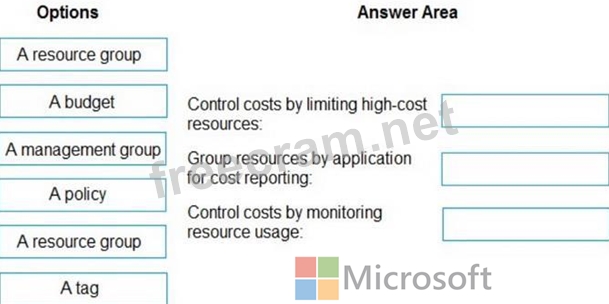
What should you configure for each requirement? To answer, drag the appropriate options to the correct requirements. Each option may be used once, more than once, or not at all. You may need to drag the split bar between panes or scroll to view content.
NOTE: Each correct selection is worth one point.
You need to implement multiple Azure subscriptions for production and development environments. The solution must meet the following requirements:
- Control costs by limiting the number of high-cost resources that can
be provisioned in the subscriptions.
- Group all the resources by application for cost reporting.
- Control costs by monitoring resource usage.
What should you configure for each requirement? To answer, drag the appropriate options to the correct requirements. Each option may be used once, more than once, or not at all. You may need to drag the split bar between panes or scroll to view content.
NOTE: Each correct selection is worth one point.
Correct Answer:
Explanation:
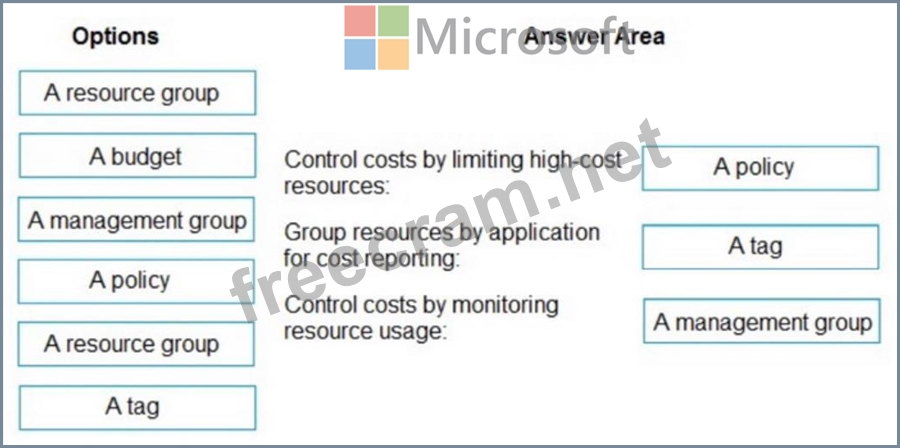
Box 1: A policy
Control costs by limiting the number of high-cost resources that can be provisioned in the subscriptions.
Use Azure Policy to set policies such as restricting the creation of high-cost resources in some subscriptions.
Box 2: A tag
Group all the resources by application for cost reporting.
To group multi-subscription Azure costs by application, the best approach is to consistently apply Azure Tags (e.g., ApplicationName, Environment) to all resources, then use Azure Cost Management's Cost Analysis feature at the Management Group or Billing Account scope to filter and group by these tags, revealing application-specific costs across subscriptions in a unified view. Alternatively, use Cost Allocation Rules for dynamic grouping or third-party tools for advanced analysis.
Box 3: A management group
Control costs by monitoring resource usage.
A management group in Azure is crucial for controlling costs across multiple subscriptions by providing a scope to apply governance, monitor usage centrally via Cost Management, and enforce policies, allowing for aggregated views and better optimization than managing each subscription individually. You can see costs rollup from nested subscriptions, track spending trends, and identify resource waste at the management group level for better financial control.
Reference:
https://techcommunity.microsoft.com/discussions/azure/a-complete-guide-to-azure-cost-management/4386446
https://learn.microsoft.com/en-us/answers/questions/1663822/cost-analysis-and-optimization-across-multiple-sub


- Question List (401q)
- Question 1: Hotspot Question You have an Azure Storage account named sto...
- Question 2: Hotspot Question You have an Azure subscription named Subscr...
- Question 3: Note: This question is part of a series of questions that pr...
- Question 4: You plan to deploy three Azure virtual machines named VM1, V...
- Question 5: Hotspot Question You have an Azure subscription that is link...
- Question 6: Hotspot Question You have an Azure subscription that contain...
- Question 7: You have two Azure virtual networks named VNet1 and VNet2. V...
- Question 8: Note: This question is part of a series of questions that pr...
- Question 9: Your company has virtual machines (VMs) hosted in Microsoft ...
- Question 10: Hotspot Question You have an Azure subscription that contain...
- Question 11: Your company has a Microsoft Azure subscription. The company...
- Question 12: Note: This question is part of a series of questions that pr...
- Question 13: You have an Azure subscription that contains vital network n...
- Question 14: You have a general purpose v1 storage account named storagea...
- Question 15: Drag and Drop Question You onboard 10 Azure virtual machines...
- Question 16: Note: This question is part of a series of questions that pr...
- Question 17: Drag and Drop Question Your network is configured as shown i...
- Question 18: Your company wants to deploy a blogging solution on Azure. B...
- Question 19: Hotspot Question You have an Azure subscription that contain...
- Question 20: Hotspot Question You have an Azure subscription that contain...
- Question 21: Hotspot Question You have an Azure subscription named Subscr...
- Question 22: You have the Azure virtual networks shown in the following t...
- Question 23: Case Study 6 - ADatum Corporation Overview ADatum Corporatio...
- Question 24: You have two Azure subscriptions named Sub1 and Sub2 that co...
- Question 25: Hotspot Question You have an Azure subscription that contain...
- Question 26: From the MFA Server blade, you open the Block/unblock users ...
- Question 27: You have an Azure subscription named Subscription1 that cont...
- Question 28: You have a Microsoft Entra tenant named contoso.com. You col...
- Question 29: You have an Azure subscription that contains a virtual machi...
- Question 30: You have an Azure subscription that contains the storage acc...
- Question 31: Hotspot Question You have an Azure Storage account named sto...
- Question 32: You have an Azure subscription that contains a virtual machi...
- Question 33: Case Study 6 - ADatum Corporation Overview ADatum Corporatio...
- Question 34: Hotspot Question You have a virtual network named VNET1 that...
- Question 35: Note: This question is part of a series of questions that pr...
- Question 36: You have an Azure subscription. All users are enabled for mu...
- Question 37: You have an Azure Active Directory (Azure AD) tenant named c...
- Question 38: Your on-premises network contains a VPN gateway. You have an...
- Question 39: SIMULATION Overview The following section of the exam is a l...
- Question 40: You have an Azure subscription. You enable multi-factor auth...
- Question 41: Note: This question is part of a series of questions that pr...
- Question 42: Hotspot Question You have an Azure subscription that contain...
- Question 43: Hotspot Question You have an Azure Load Balancer named LB1. ...
- Question 44: Drag and Drop Question You are developing an Azure web app n...
- Question 45: Hotspot Question You have an Azure Active Directory (Azure A...
- Question 46: Note: This question is part of a series of questions that pr...
- Question 47: Case Study 2 - Contoso, Ltd Overview Contoso, Ltd. is a manu...
- Question 48: You have an Azure App Service plan that hosts an Azure App S...
- Question 49: Drag and Drop Question You have an Azure subscription that c...
- Question 50: Hotspot Question You have an Azure virtual machine named VM1...
- Question 51: Note: This question is part of a series of questions that pr...
- Question 52: You have an Azure subscription that contains the resources s...
- Question 53: Hotspot Question You have an Azure subscription that contain...
- Question 54: You are the global administrator for an Azure Active Directo...
- Question 55: Hotspot Question You have an Azure subscription that contain...
- Question 56: You have an Azure subscription that contains the resources s...
- Question 57: Drag and Drop Question You have an Azure Active Directory (A...
- Question 58: Hotspot Question You purchase a new Azure subscription named...
- Question 59: Hotspot Question You have the Azure resources shown on the f...
- Question 60: You have two Azure Active Directory (Azure AD) tenants named...
- Question 61: You are planning to deploy an Ubuntu Server virtual machine ...
- Question 62: You have an Azure subscription that contains two users named...
- Question 63: You have a virtual network named VNet1 as shown in the exhib...
- Question 64: You create the following resources in an subscription: - An ...
- Question 65: Hotspot Question You have an Azure subscription named Subscr...
- Question 66: Hotspot Question You have an Azure subscription that contain...
- Question 67: You have the Azure virtual networks shown in the following t...
- Question 68: You have an Azure subscription that contains the following r...
- Question 69: Hotspot Question You have an Azure subscription that contain...
- Question 70: You have an Azure web app named webapp1. You have a virtual ...
- Question 71: Hotspot Question You have an Azure subscription and a Micros...
- Question 72: Drag and Drop Question You need to implement multiple Azure ...
- Question 73: Your company has an Azure subscription named Subscription1. ...
- Question 74: You have an Azure subscription named Subscription1. You have...
- Question 75: Drag and Drop Question You have an Azure subscription that c...
- Question 76: You have an Azure subscription that contains a resource grou...
- Question 77: Hotspot Question You have an Azure subscription that contain...
- Question 78: Hotspot Question You have an Azure subscription that contain...
- Question 79: A company has an Azure account and current has an Azure prem...
- Question 80: Hotspot Question You have an Azure subscription. The subscri...
- Question 81: Case Study 3 - Contoso, Ltd Overview Contoso, Ltd. is a cons...
- Question 82: Hotspot Question You have an Azure subscription that contain...
- Question 83: Hotspot Question You have an Azure Storage account named sto...
- Question 84: Case Study 3 - Contoso, Ltd Overview Contoso, Ltd. is a cons...
- Question 85: Hotspot Question You have an Azure subscription named Subscr...
- Question 86: You have an Azure subscription named Subscription1 that cont...
- Question 87: You have an Azure subscription that contains a virtual netwo...
- Question 88: Note: This question is part of a series of questions that pr...
- Question 89: Hotspot Question You need to create a bar chart that shows t...
- Question 90: You have an Azure subscription that contains the resources i...
- Question 91: Hotspot Question You have an Azure subscription that contain...
- Question 92: Hotspot Question You have an Azure AD tenant. You need to mo...
- Question 93: Note: This question is part of a series of questions that pr...
- Question 94: You are troubleshooting a performance issue for an Azure App...
- Question 95: Drag and Drop Question You have an on-premises network that ...
- Question 96: Note: This question is part of a series of questions that pr...
- Question 97: Hotspot Question You have an Azure subscription named Subscr...
- Question 98: Hotspot Question You have an Azure subscription. You need to...
- Question 99: You have an Azure subscription that contains the resources s...
- Question 100: You have an Azure subscription. You create an Azure containe...
- Question 101: You are configuring Azure Active Directory (Azure AD) authen...
- Question 102: Your company has an Azure Active Directory (Azure AD) tenant...
- Question 103: You have an Azure subscription that contains a Standard SKU ...
- Question 104: You have a virtual network named VNet1 as shown in the exhib...
- Question 105: Hotspot Question You have the App Service plan shown in the ...
- Question 106: You have three offices and an Azure subscription that contai...
- Question 107: You have an Azure subscription. You plan to create the resou...
- Question 108: Hotspot Question You have an Azure subscription named Sub1 t...
- Question 109: Note: The question is included in a number of questions that...
- Question 110: You have an Azure subscription that contains the resources s...
- Question 111: Note: This question is part of a series of questions that pr...
- Question 112: You have an Azure Active Directory (Azure AD) tenant. You pl...
- Question 113: Hotspot Question You create a virtual machine scale set name...
- Question 114: Drag and Drop Question You have an Azure subscription that c...
- Question 115: You have an Azure Storage account named storage1. For storag...
- Question 116: You have a Microsoft Entra tenant that contains the identiti...
- Question 117: Note: This question is part of a series of questions that pr...
- Question 118: Hotspot Question You have a sync group named Sync1 that has ...
- Question 119: Hotspot Question You have an Azure subscription that contain...
- Question 120: Your company has an Azure subscription that includes a Recov...
- Question 121: Case Study 1 - Humongous Insurance Overview Humongous Insura...
- Question 122: Note: This question is part of a series of questions that pr...
- Question 123: Note: This question is part of a series of questions that pr...
- Question 124: Hotspot Question You have an Azure subscription named Subscr...
- Question 125: You have an Azure policy as shown in the following exhibit. ...
- Question 126: You have an Azure subscription. You plan to deploy an Azure ...
- Question 127: Note: This question is part of a series of questions that pr...
- Question 128: Case Study 4 - ADatum Overview ADatum Corporation is a finan...
- Question 129: Hotspot Question You have Azure subscription that includes f...
- Question 130: You plan to move a distributed on-premises app named App1 to...
- Question 131: Your company goes ahead and registers a domain name of domai...
- Question 132: Your company has three offices. The offices are located in M...
- Question 133: Hotspot Question You have an Azure subscription that contain...
- Question 134: Hotspot Question You have an Azure subscription that contain...
- Question 135: Your company's local environment consists of a single Active...
- Question 136: You plan to use the Azure Import/Export service to copy file...
- Question 137: You have an Azure subscription named Subscription1. You depl...
- Question 138: Hotspot Question You have an Azure subscription named Subscr...
- Question 139: Hotspot Question You have an Azure subscription that contain...
- Question 140: Hotspot Question You have an Azure subscription named Sub1 t...
- Question 141: Your company has an Azure subscription and has setup the fol...
- Question 142: Hotspot Question You have an Azure subscription. You plan to...
- Question 143: Hotspot Question You have an Azure subscription that contain...
- Question 144: Drag and Drop Question You have an Azure subscription that c...
- Question 145: You create an Azure Storage account. You plan to add 10 blob...
- Question 146: You have an on-premises server that contains a folder named ...
- Question 147: Hotspot Question You have an Azure subscription that contain...
- Question 148: Hotspot Question You have a pay-as-you-go Azure subscription...
- Question 149: Hotspot Question You have an Azure subscription that contain...
- Question 150: Drag and Drop Question You have an Azure subscription that i...
- Question 151: You have an Azure subscription that contains the resources s...
- Question 152: You have an Azure subscription that contains a virtual netwo...
- Question 153: You have two Azure virtual machines named VM1 and VM2. You h...
- Question 154: You have an Azure subscription that contains the storage acc...
- Question 155: You have a Recovery Services vault named RSV1. RSV1 has a ba...
- Question 156: You have an Azure subscription. You create the following Azu...
- Question 157: You have an Azure web app named App1. App1 has the deploymen...
- Question 158: Hotspot Question You have the Azure virtual machines shown i...
- Question 159: You plan to create the Azure web apps shown in the following...
- Question 160: You have an Azure subscription that contains the devices sho...
- Question 161: You have an Azure subscription that contains a storage accou...
- Question 162: You have an Azure subscription that contains a resource grou...
- Question 163: A team needs to deploy a scaleset to Azure. You have to crea...
- Question 164: You have an Azure subscription that contains the resources s...
- Question 165: You have an Azure subscription that contains a storage accou...
- Question 166: Hotspot Question You have an Azure Migrate project that has ...
- Question 167: Hotspot Question You have the Azure management groups shown ...
- Question 168: Your company has serval departments. Each department has a n...
- Question 169: You have an Azure subscription that contains the resources s...
- Question 170: Note: This question is part of a series of questions that pr...
- Question 171: Hotspot Question You have Azure Storage accounts as shown in...
- Question 172: You have an Azure virtual machine named VM1 that runs Window...
- Question 173: Hotspot Question You have an Azure subscription that contain...
- Question 174: You plan to create an Azure virtual machine named VM1 that w...
- Question 175: Your company has an Azure Active Directory (Azure AD) subscr...
- Question 176: You have an Azure subscription named Subscription1 that has ...
- Question 177: You have an Azure web app named webapp1. Users report that t...
- Question 178: You have an Azure subscription. You plan to deploy the Azure...
- Question 179: Drag and Drop Question You have an Azure subscription named ...
- Question 180: You have an Azure subscription that contains the virtual net...
- Question 181: You have an Azure subscription that contains a virtual machi...
- Question 182: You plan to create the Azure web apps shown in the following...
- Question 183: You have an Azure subscription. You have an on-premises virt...
- Question 184: Note: This question is part of a series of questions that pr...
- Question 185: Case Study 3 - Contoso, Ltd Overview Contoso, Ltd. is a cons...
- Question 186: You have an Azure subscription that contains the resources i...
- Question 187: You have an on-premises datacenter and an Azure subscription...
- Question 188: Hotspot Question You have an Azure subscription that contain...
- Question 189: You plan to deploy several Azure virtual machines that will ...
- Question 190: You have several Windows Server and Ubuntu Linux virtual mac...
- Question 191: You have an Azure subscription named Sub1 that contains a re...
- Question 192: Hotspot Question You have an Azure subscription. You deploy ...
- Question 193: You have an Azure Active Directory (Azure AD) tenant named a...
- Question 194: You have an Azure container registry in the Standard tier. Y...
- Question 195: You have an Azure subscription that contains 10 virtual mach...
- Question 196: Case Study 1 - Humongous Insurance Overview Humongous Insura...
- Question 197: Note: This question is part of a series of questions that pr...
- Question 198: Case Study 5 - Contoso, Ltd Overview General Overview Contos...
- Question 199: You have an Azure subscription. The subscription contains 10...
- Question 200: Hotspot Question Your company has offices in New York and Lo...
- Question 201: You plan to move a distributed on-premises app named App1 to...
- Question 202: You have five Windows Server 2008 R2 physical servers. The s...
- Question 203: Note: This question is part of a series of questions that pr...
- Question 204: You manage an on-premises infrastructure based on VMware vSp...
- Question 205: Drag and Drop Question You have downloaded an Azure Resource...
- Question 206: You have an Azure subscription named Subscription1. You have...
- Question 207: A company has an Azure account and current has an Azure prem...
- Question 208: Note: This question is part of a series of questions that pr...
- Question 209: Hotspot Question You have an Azure subscription named Subscr...
- Question 210: You have an Azure subscription that contains 100 virtual mac...
- Question 211: You have two subscriptions named Subscription1 and Subscript...
- Question 212: You have an Azure subscription that contains a storage accou...
- Question 213: You have a Microsoft Entra tenant. You plan to create a grou...
- Question 214: Note: This question is part of a series of questions that pr...
- Question 215: You have an Azure subscription. You need to receive an email...
- Question 216: Note: This question is part of a series of questions that pr...
- Question 217: Hotspot Question You need to configure a new Azure App Servi...
- Question 218: You have an Azure subscription that contains three virtual m...
- Question 219: You sign up for Azure Active Directory (Azure AD) Premium. Y...
- Question 220: Hotspot Question You have an Azure subscription that contain...
- Question 221: Hotspot Question You have an Azure Storage account named sto...
- Question 222: You have an Azure Active Directory (Azure AD) tenant. All ad...
- Question 223: You have an Azure subscription. You need to implement a cust...
- Question 224: You have an Azure subscription. You create a routing table n...
- Question 225: Hotspot Question You have an Azure subscription that contain...
- Question 226: You have an Azure subscription that contains three virtual n...
- Question 227: Note: This question is part of a series of questions that pr...
- Question 228: You have an Azure subscription that contains an Azure Active...
- Question 229: You have an Azure subscription that contains a resource grou...
- Question 230: You have an Azure subscription that contains an Azure SQL da...
- Question 231: Hotspot Question You have an Azure subscription. The subscri...
- Question 232: You have an Azure subscription named Subscription1 and an on...
- Question 233: Note: This question is part of a series of questions that pr...
- Question 234: You are the global administrator for an Azure Directory (Azu...
- Question 235: Note: This question is part of a series of questions that pr...
- Question 236: You have an Azure subscription that contains the resources i...
- Question 237: Your company has an Azure subscription. You need to deploy a...
- Question 238: Case Study 4 - ADatum Overview ADatum Corporation is a finan...
- Question 239: Your team is creating a CDN profile and endpoint for an appl...
- Question 240: You have an Azure Active Directory (Azure AD) tenant named c...
- Question 241: Case Study 2 - Contoso, Ltd Overview Contoso, Ltd. is a manu...
- Question 242: Drag and Drop Question You have an Azure subscription that c...
- Question 243: You have an existing Azure subscription that contains 10 vir...
- Question 244: Note: This question is part of a series of questions that pr...
- Question 245: Hotspot Question You have an Azure subscription that contain...
- Question 246: Hotspot Question You have an Azure subscription that contain...
- Question 247: You have an Azure App Service plan named AdatumASP1 that use...
- Question 248: You have an Azure virtual machine named VM1. The network int...
- Question 249: You have two Azure virtual machines named VM1 and VM2 that r...
- Question 250: Hotspot Question You have an Azure subscription. You plan to...
- Question 251: Note: The question is included in a number of questions that...
- Question 252: Note: This question is part of a series of questions that pr...
- Question 253: Hotspot Question You have an Azure subscription named Subscr...
- Question 254: Hotspot Question You have an Azure subscription that contain...
- Question 255: Note: This question is part of a series of questions that pr...
- Question 256: You have an Azure subscription that contains 100 virtual mac...
- Question 257: You have an Azure Storage account named storage1 that contai...
- Question 258: You have an Azure subscription that uses the public IP addre...
- Question 259: Case Study 4 - ADatum Overview ADatum Corporation is a finan...
- Question 260: Hotspot Question You have an Azure subscription that contain...
- Question 261: Drag and Drop Question Your company has an Azure subscriptio...
- Question 262: Your company has three virtual machines (VMs) that are inclu...
- Question 263: You have an Azure subscription that contains an Azure Storag...
- Question 264: You administer a solution in Azure that is currently having ...
- Question 265: You have an Azure subscription named Subscription1 that cont...
- Question 266: Hotspot Question You have a Microsoft Entra tenant that cont...
- Question 267: You have an Azure subscription that contains a web app named...
- Question 268: You have an Azure subscription that contains the storage acc...
- Question 269: Note: This question is part of a series of questions that pr...
- Question 270: You have an on-premises network. You have an Azure subscript...
- Question 271: Hotspot Question You have an Azure subscription that contain...
- Question 272: Hotspot Question You have an Azure subscription that contain...
- Question 273: Hotspot Question You have an Azure subscription that contain...
- Question 274: Hotspot Question You have a hybrid deployment of Azure Activ...
- Question 275: SIMULATION Overview The following section of the exam is a l...
- Question 276: You recently created a new Azure subscription that contains ...
- Question 277: The development team asks you to provision an Azure storage ...
- Question 278: Hotspot Question You have a virtual network named VNet1 that...
- Question 279: You have an Azure subscription that contains a storage accou...
- Question 280: You have an Azure subscription that contains 10 virtual mach...
- Question 281: Hotspot Question You have an Azure subscription named Subscr...
- Question 282: Case Study 1 - Humongous Insurance Overview Humongous Insura...
- Question 283: You deploy an Azure Kubernetes Service (AKS) cluster named C...
- Question 284: Hotspot Question You have an Azure subscription that contain...
- Question 285: You have an Azure subscription that contains a storage accou...
- Question 286: Hotspot Question You have an Azure subscription. You plan to...
- Question 287: Hotspot Question You have an Azure subscription named Subscr...
- Question 288: You have an Azure subscription. You need to create an Azure ...
- Question 289: You are the global administrator for an Azure Active Directo...
- Question 290: Note: This question is part of a series of questions that pr...
- Question 291: Hotspot Question You have an Azure subscription. You plan to...
- Question 292: Hotspot Question You have an Azure Storage account named sto...
- Question 293: You have an Azure subscription that contains a container gro...
- Question 294: You plan to automate the deployment of a virtual machine sca...
- Question 295: Note: This question is part of a series of questions that pr...
- Question 296: A company has just setup an Azure account and subscription. ...
- Question 297: You plan to deploy several Azure virtual machines that will ...
- Question 298: Hotspot Question You have an Azure subscription named Subscr...
- Question 299: You have web apps in the West US, Central US and East US Azu...
- Question 300: Hotspot Question You have an Azure Storage account named sto...
- Question 301: Hotspot Question You have an Azure subscription named Subscr...
- Question 302: You deploy Azure virtual machines to three Azure regions. Ea...
- Question 303: Case Study 3 - Contoso, Ltd Overview Contoso, Ltd. is a cons...
- Question 304: Hotspot Question You have an Azure subscription that uses Az...
- Question 305: You have an Azure Storage account named storage1. You plan t...
- Question 306: You have an Azure subscription that contains an Azure contai...
- Question 307: Hotspot Question You have an Azure subscription named Sub1 t...
- Question 308: You create an Azure Storage account named contosostorage. Yo...
- Question 309: Hotspot Question You have an Azure web app named App1 that h...
- Question 310: You have an Azure subscription that contains a resource grou...
- Question 311: Hotspot Question You have an Azure App Service plan named AS...
- Question 312: Drag and Drop Question You have an Azure Linux virtual machi...
- Question 313: Case Study 5 - Contoso, Ltd Overview General Overview Contos...
- Question 314: Hotspot Question You have a Microsoft Entra tenant that cont...
- Question 315: Your on-premises network contains a VPN gateway. You have an...
- Question 316: Hotspot Question You have an Azure virtual machine named VM1...
- Question 317: You have an Azure subscription that contains a storage accou...
- Question 318: You have a Microsoft 365 subscription and a hybrid deploymen...
- Question 319: You have an Azure subscription. You plan to create a storage...
- Question 320: Note: This question is part of a series of questions that pr...
- Question 321: Your company has an Active Directory forest named domain.com...
- Question 322: Note: The question is included in a number of questions that...
- Question 323: Note: The question is included in a number of questions that...
- Question 324: Hotspot Question You have the role assignment file shown in ...
- Question 325: Case Study 3 - Contoso, Ltd Overview Contoso, Ltd. is a cons...
- Question 326: You have an Azure subscription that contains the resources s...
- Question 327: Hotspot Question You plan to deploy an Azure container insta...
- Question 328: Hotspot Question You have an Azure subscription that contain...
- Question 329: Hotspot Question You have an Azure subscription that contain...
- Question 330: Your company has an Azure Active Directory (Azure AD) tenant...
- Question 331: Hotspot Question You have an Azure File sync group that has ...
- Question 332: Your company's Azure subscription includes Azure virtual mac...
- Question 333: You have an Azure subscription that has Traffic Analytics co...
- Question 334: You have two Azure subscriptions named Sub1 and Sub2. Sub1 c...
- Question 335: You have the Azure virtual machines shown in the following t...
- Question 336: Note: This question is part of a series of questions that pr...
- Question 337: Hotspot Question You have an Azure subscription named Subscr...
- Question 338: Hotspot Question Your network contains an on-premises Active...
- Question 339: An IT administrator has a setup a Web app in Azure called do...
- Question 340: Note: This question is part of a series of questions that pr...
- Question 341: You have the Azure virtual network named VNet1 that contains...
- Question 342: Hotspot Question You have an Azure container registry named ...
- Question 343: You set the multi-factor authentication status for a user na...
- Question 344: SIMULATION Overview The following section of the exam is a l...
- Question 345: Case Study 2 - Contoso, Ltd Overview Contoso, Ltd. is a manu...
- Question 346: You have an Azure subscription that contains a storage accou...
- Question 347: Hotspot Question You have an Azure subscription that contain...
- Question 348: You have an Azure subscription that contains a user named Us...
- Question 349: Hotspot Question You have an Azure subscription that contain...
- Question 350: Hotspot Question You have an Azure subscription that contain...
- Question 351: You have a subnet named Subnet1 that contains Azure virtual ...
- Question 352: Note: This question is part of a series of questions that pr...
- Question 353: Note: This question is part of a series of questions that pr...
- Question 354: Hotspot Question You have an Azure subscription. You plan to...
- Question 355: Drag and Drop Question You have an Azure subscription that c...
- Question 356: A company currently has an Azure subscription. They have dep...
- Question 357: Note: The question is included in a number of questions that...
- Question 358: You have an Azure subscription. You plan to create an Azure ...
- Question 359: Case Study 6 - ADatum Corporation Overview ADatum Corporatio...
- Question 360: You have an Azure AD tenant named contoso.com. You have an A...
- Question 361: You need to configure an Azure web app named contoso.azurewe...
- Question 362: You have 100 Azure subscriptions. All the subscriptions are ...
- Question 363: Note: This question is part of a series of questions that pr...
- Question 364: You have an Azure subscription that contains a virtual netwo...
- Question 365: Hotspot Question You have an Azure subscription. You need to...
- Question 366: Hotspot Question You have an Azure AD tenant. You need to cr...
- Question 367: SIMULATION Overview The following section of the exam is a l...
- Question 368: Note: This question is part of a series of questions that pr...
- Question 369: Hotspot Question You have an Azure subscription that contain...
- Question 370: Drag and Drop Question You have an Azure subscription. The s...
- Question 371: Case Study 5 - Contoso, Ltd Overview General Overview Contos...
- Question 372: You have an Azure subscription that contains a virtual netwo...
- Question 373: Hotspot Question You have an Azure subscription named Subscr...
- Question 374: Note: This question is part of a series of questions that pr...
- Question 375: You have an Azure subscription named Subscription1 that cont...
- Question 376: Hotspot Question You have an Azure Storage account named sto...
- Question 377: SIMULATION Overview The following section of the exam is a l...
- Question 378: Note: This question is part of a series of questions that pr...
- Question 379: Note: The question is included in a number of questions that...
- Question 380: Hotspot Question You have an Azure subscription that contain...
- Question 381: Hotspot Question You have the web apps shown in the followin...
- Question 382: Hotspot Question You have an Azure subscription that contain...
- Question 383: Your company has an account and subscription in Azure. They ...
- Question 384: You have an Azure subscription named Subscription1 that cont...
- Question 385: You have Azure subscription that includes data in following ...
- Question 386: You have an Azure subscription that contains a virtual machi...
- Question 387: You plan to create an Azure Storage account named storage1 t...
- Question 388: Hotspot Question You are creating an Azure load balancer. Yo...
- Question 389: Hotspot Question You have a hybrid deployment of Azure Activ...
- Question 390: You need to deploy an Azure virtual machine scale set that c...
- Question 391: You have an Azure subscription that contains eight virtual m...
- Question 392: Drag and Drop Question You have an Azure subscription that c...
- Question 393: You have an Azure subscription that contains a resource grou...
- Question 394: You have a virtual network named VNet2 that has the configur...
- Question 395: You have an Azure Active Directory (Azure AD) tenant. You ha...
- Question 396: Hotspot Question You have an on-premises network. You have a...
- Question 397: You have an Azure virtual machine (VM) that has a single dat...
- Question 398: You have a resource group named RG1. RG1 contains an Azure S...
- Question 399: You have an Azure subscription named Subscription1 that cont...
- Question 400: Drag and Drop Question You have an Azure subscription that c...
- Question 401: Hotspot Question You have an Azure subscription that contain...
