Valid AZ-104 Dumps shared by ExamDiscuss.com for Helping Passing AZ-104 Exam! ExamDiscuss.com now offer the newest AZ-104 exam dumps, the ExamDiscuss.com AZ-104 exam questions have been updated and answers have been corrected get the newest ExamDiscuss.com AZ-104 dumps with Test Engine here:
Access AZ-104 Dumps Premium Version
(428 Q&As Dumps, 35%OFF Special Discount Code: freecram)
<< Prev Question Next Question >>
Question 149/159
You have an Azure subscription that contains an Azure file share.
You have an on-premises server named Server1 that runs Windows Server 2016.
You plan to set up Azure File Sync between Server1 and the Azure file share.
You need to prepare the subscription for the planned Azure File Sync.
Which two actions should you perform in the Azure subscription? To answer, drag the appropriate actions to the correct targets. Each action may be used once, more than once, or not at all. You may need to drag the split bar between panes or scroll to view content.

You have an on-premises server named Server1 that runs Windows Server 2016.
You plan to set up Azure File Sync between Server1 and the Azure file share.
You need to prepare the subscription for the planned Azure File Sync.
Which two actions should you perform in the Azure subscription? To answer, drag the appropriate actions to the correct targets. Each action may be used once, more than once, or not at all. You may need to drag the split bar between panes or scroll to view content.
Correct Answer:
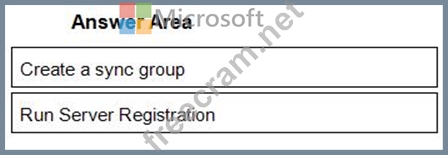
1 - Create a sync group
2 - Run Server Registration
Reference:
https://docs.microsoft.com/en-us/azure/storage/files/storage-sync-files-deployment-guide?tabs=azure-portal


- Question List (159q)
- Question 1: Note: This question is part of a series of questions that pr...
- Question 2: You have a service deployed to a Kubernetes cluster. Another...
- Question 3: You have an Azure subscription that contains a virtual netwo...
- Question 4: You are the global administrator for an Azure Active Directo...
- Question 5: You have an Azure virtual machine named VM1. Azure collects ...
- Question 6: You need to define a custom domain name for Azure AD to supp...
- Question 7: You have an Azure subscription. You plan to use an Azure Res...
- Question 8: Note: This question is part of a series of questions that pr...
- Question 9: From Azure Active Directory (AD) Privileged Identify Managem...
- Question 10: You have the Azure resources shown on the following exhibit....
- Question 11: You have an Azure App Service plan that hosts an Azure App S...
- 1 commentQuestion 12: You need to ensure that you can grant Group4 Azure RBAC read...
- Question 13: Note: The question is included in a number of questions that...
- Question 14: You have the Azure virtual machines shown in the following t...
- 1 commentQuestion 15: You have an Azure Active Directory (Azure AD) tenant named c...
- Question 16: You plan to deploy several Azure virtual machines that will ...
- Question 17: You need to define a custom domain name for Azure AD to supp...
- Question 18: Note: This question is part of a series of questions that pr...
- Question 19: You create the following resources in an subscription: * An ...
- Question 20: You need to prepare the environment to meet the authenticati...
- Question 21: You have an Azure subscription mat contains a virtual machin...
- 1 commentQuestion 22: You have an Azure subscription named Subscription1 that cont...
- Question 23: You have an Azure subscription that contains an Azure Availa...
- Question 24: You have the Azure virtual machines shown in the following t...
- 1 commentQuestion 25: Your company registers a domain name of contoso.com. You cre...
- Question 26: You have an Azure subscription named Subscription1. Subscrip...
- 1 commentQuestion 27: You have an Azure Active Directory (Azure AD) tenant named c...
- 1 commentQuestion 28: Note: This question is part of a series of questions that pr...
- Question 29: You have an on premises data center and an Azure subscriptio...
- 1 commentQuestion 30: You have an Azure App Service plan named ASP1. CPU usage for...
- Question 31: Your company has a main office in London that contains 100 c...
- Question 32: You have an Azure subscription named Subscription1. You have...
- Question 33: You have an existing Azure subscription that contains 10 vir...
- Question 34: You have an Azure subscription that contains the resources s...
- Question 35: You have an Azure tenant that contains two subscriptions nam...
- Question 36: Note: This question is part of a series of questions that pr...
- Question 37: You have an Azure subscription named Subscription1. Subscrip...
- Question 38: You have an Azure Kubernetes Service (AKS) cluster named AKS...
- Question 39: You need to implement Role1. Which command should you run be...
- Question 40: You have an Azure subscription that contains the virtual mac...
- Question 41: You have an Azure web app named WebApp1. You need to provide...
- Question 42: You have an Azure subscription named AZPT1 that contains the...
- Question 43: You have an Azure subscription that contains a storage accou...
- Question 44: You have an Azure virtual machine named VM1 and a Recovery S...
- Question 45: You are planning to deploy an Ubuntu Server virtual machine ...
- Question 46: You have an Azure Resource Manager template named Template1 ...
- 1 commentQuestion 47: You have a virtual network named VNET1 that contains the sub...
- Question 48: You have an Azure web app named Appt. You need to monitor th...
- 1 commentQuestion 49: You have two Azure Active Directory (Azure AD) tenants named...
- Question 50: You have an Azure subscription. You have an on-premises virt...
- Question 51: You need to create an Azure Storage account that meets the f...
- Question 52: You are troubleshooting a performance issue for an Azure App...
- Question 53: You have Azure virtual machines that run Windows Server 2019...
- Question 54: You have a computer named Computer! that has a point-to site...
- Question 55: You have an Azure subscription that contains the resources s...
- Question 56: You have an Azure subscription named Subscription' that cont...
- Question 57: You have an Azure subscription named Subscription1 that cont...
- Question 58: You have an Azure subscription that contains the resources s...
- Question 59: You plan to move a distributed on-premises app named App1 to...
- Question 60: You need to resolve the Active Directory issue. What should ...
- Question 61: You have an Azure subscription that contains an Azure Storag...
- Question 62: You have an availability set named AS1 that contains three v...
- Question 63: You have an Azure Active Directory (Azure AD) tenant named a...
- Question 64: You have an Azure subscription that contains the following u...
- Question 65: Note: The question is included in a number of questions that...
- Question 66: You need to ensure that VM1 can communicate with VM4. The so...
- Question 67: You have an Azure subscription, You have an on-premises virt...
- Question 68: Note: This question is part of a series of questions that pr...
- Question 69: You need to create storage5. The solution must support the p...
- Question 70: You are evaluating the name resolution for the virtual machi...
- Question 71: Note: This question is part of a series of questions that pr...
- Question 72: You plan to move services from your on-premises network to A...
- Question 73: You have an Azure Active Directory tenant named Contoso.com ...
- 1 commentQuestion 74: You have two Azure Active Directory (Azure AD) tenants named...
- 1 commentQuestion 75: You have an Azure subscription that contains an Azure Storag...
- Question 76: You have an Azure virtual machine named VM1 that connects to...
- 1 commentQuestion 77: You have an Azure Active Directory (Azure AD) tenant named c...
- Question 78: You plan to create the Azure web apps shown in the following...
- Question 79: You have an Azure virtual machine that runs Windows Server 2...
- Question 80: You need to meet the connection requirements for the New Yor...
- Question 81: You download an Azure Resource Manager template based on an ...
- Question 82: Your company has offices in New York and Los Angeles. You ha...
- 1 commentQuestion 83: You have an Azure App Services web app named App1. You plan ...
- 1 commentQuestion 84: You have an Azure subscription that contains the resources s...
- Question 85: You have an Azure subscription. You create the Azure Storage...
- Question 86: Note: This question is part of a series of questions that pr...
- Question 87: You have a pay-as-you-go Azure subscription that contains th...
- Question 88: You have an Azure subscription that contains the resources s...
- Question 89: You have an Azure subscription that contains a storage accou...
- Question 90: You have an Azure subscription named Subscription1. Subscrip...
- Question 91: You have an Azure subscription. You activate Enterprise Mobi...
- Question 92: You need to identify which storage account to use for the fl...
- Question 93: You are developing an Azure web app named WebApp1. WebApp1 u...
- Question 94: You have an Azure subscription that contains a web app named...
- Question 95: You have an Azure web app named WebApp1 that runs in an Azur...
- Question 96: You have an Azure Subscription named Subcription1.has Subcri...
- Question 97: You have an Azure subscription named Sub1. You plan to deplo...
- 1 commentQuestion 98: You have the App Service plan shown in the following exhibit...
- Question 99: You need to meet the technical requirement for VM4. What sho...
- Question 100: You have an Azure Active Directory (Azure AD) tenant that ha...
- Question 101: You have a virtual network named VNet1 that has the configur...
- Question 102: You need to identify the storage requirements for Contoso. F...
- 1 commentQuestion 103: You have an Azure subscription named Subscription1 that cont...
- Question 104: You have an Azure subscription. You need to deploy a virtual...
- 1 commentQuestion 105: You have a Basic App Service plan named ASP1 that hosts an A...
- Question 106: You have an Azure subscription that contains the resources i...
- Question 107: You have a general purpose v1 storage account named storagea...
- Question 108: You have an Azure subscription that contains the resources s...
- Question 109: You have an Azure subscription that contains three virtual n...
- Question 110: You have an Azure subscription named Subscription1 that cont...
- Question 111: You have an Azure subscription that contains the resources s...
- Question 112: You have an Azure subscription that contains the Azure virtu...
- Question 113: Note: This question is part of a series of questions that pr...
- Question 114: You have an Azure virtual machine named VM1 that runs Window...
- Question 115: Note: This question is part of a series of questions that pr...
- Question 116: You have two Azure virtual machines named VM1 and VM2. You h...
- Question 117: You have an Azure subscription named Subscription1 that has ...
- Question 118: Note: This question is part of a series of questions that pr...
- Question 119: You have an Azure Active Directory (Azure AD) tenant named c...
- Question 120: You are deploying a containerized web application in Azure. ...
- Question 121: You have an Azure virtual network named VNet1 that connects ...
- Question 122: You have an Azure subscription. You deploy a virtual machine...
- Question 123: You have an Azure Active Directory (Azure AD) tenant named C...
- Question 124: You have an Azure subscription that contains several virtual...
- Question 125: Note: This question is part of a series of questions that pr...
- Question 126: Note: This question is part of a series of questions that pr...
- Question 127: Note: This question is part of a series of questions that pr...
- Question 128: Note: This question is part of a series of questions that pr...
- Question 129: A web developer creates a web application that you plan to d...
- Question 130: Note: This question is part of a series of questions that pr...
- Question 131: Note: This question is part of a series of questions that pr...
- Question 132: You have an Azure subscription that contains the following s...
- Question 133: You have an Azure virtual machine named VM1. You use Azure B...
- Question 134: You have an Azure subscription named Subscription1. Subscrip...
- Question 135: You plan to deploy 20 Azure virtual machines by using an Azu...
- Question 136: You have an Azure subscription. You are deploying an Azure K...
- Question 137: Note: This question is part of a series of questions that pr...
- Question 138: You have an Azure virtual machine named VM1. The network int...
- Question 139: You have an Azure subscription that contains two om-premises...
- Question 140: Note: This question is part of a series of questions that pr...
- 1 commentQuestion 141: You have an Azure Active Directory (Azure AD) tenant that sy...
- Question 142: You have an Azure subscription that contains three virtual n...
- Question 143: You have an Azure subscription named Subscription1 that cont...
- Question 144: You have an Azure subscription. You enable multi-factor auth...
- 1 commentQuestion 145: You need to configure the alerts for VM1 and VM2 to meet the...
- Question 146: You onboard 10 Azure virtual machines to Azure Automation St...
- Question 147: You need to deploy two Azure web apps named WebApp1 and WebA...
- Question 148: Note: This question is part of a series of questions that pr...
- 1 commentQuestion 149: You have an Azure subscription that contains an Azure file s...
- Question 150: You have an Azure subscription that contains a virtual netwo...
- Question 151: You have an Azure subscription that contains the hierarchy s...
- Question 152: You have an Azure Active Directory (Azure AD) tenant named c...
- Question 153: Note: This question is part of a series of questions that pr...
- Question 154: Your on-premises network contains an SMB share named Share1....
- 1 commentQuestion 155: You have Azure subscription that includes following Azure fi...
- Question 156: You have three offices and an Azure subscription that contai...
- Question 157: Note: This question is part of a series of questions that pr...
- Question 158: You have an Azure Active Directory (Azure AD) tenant named T...
- Question 159: You have an Azure subscription named Subscription1. Subscrip...

Recent Comments (The most recent comments are at the top.)
Step 1: Create a Storage Sync Service
The deployment of Azure File Sync starts with placing a Storage Sync Service resource into a resource group of your selected subscription.
Step 2: Install the Azure File Sync agent
The Azure File Sync agent is a downloadable package that enables Windows Server to be synced with an Azure file share.
When the Azure File Sync agent installation is finished, the Server Registration UI automatically opens. You must have a Storage Sync Service before registering.
(Step 3: Run Server Registration
Registering your Windows Server with a Storage Sync Service establishes a trust relationship between your server (or cluster) and the Storage Sync Service. A server can only be registered to one Storage Sync Service and can sync with other servers and Azure file shares associated with the same Storage Sync
Service. )
Reference:
https://docs.microsoft.com/en-us/azure/storage/files/storage-sync-files-deployment-guide?tabs=azure-portal