Valid AZ-104 Dumps shared by ExamDiscuss.com for Helping Passing AZ-104 Exam! ExamDiscuss.com now offer the newest AZ-104 exam dumps, the ExamDiscuss.com AZ-104 exam questions have been updated and answers have been corrected get the newest ExamDiscuss.com AZ-104 dumps with Test Engine here:
Access AZ-104 Dumps Premium Version
(428 Q&As Dumps, 35%OFF Special Discount Code: freecram)
<< Prev Question Next Question >>
Question 77/144
You create an Azure web app named WebApp1. WebApp1 has the autoscale settings shown in the following exhibit.
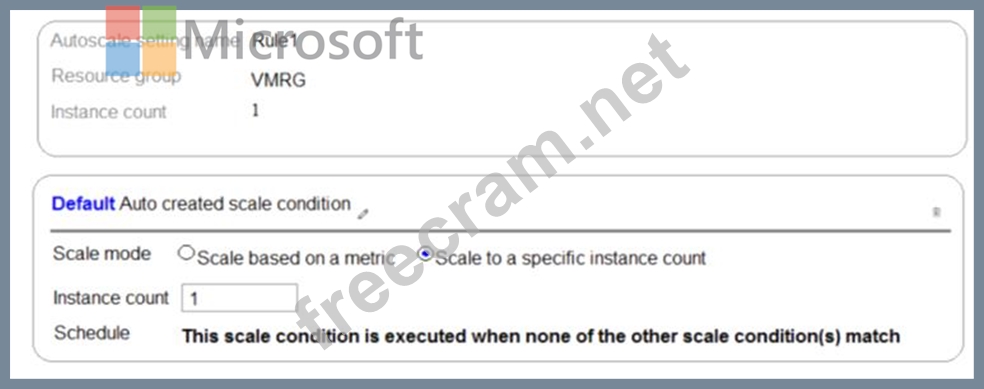

The scale out and scale in rules are configured to have a duration of 10 minutes and a cool down time of five minutes.
Use the drop-down menus to select the answer choice that completes each statement based on the information presented in the graphic.
NOTE: Each correct selection is worth one point.
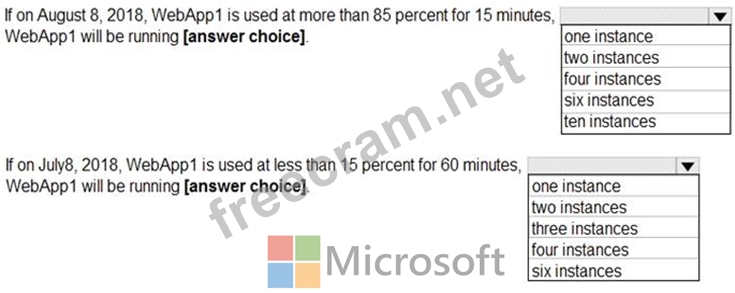
The scale out and scale in rules are configured to have a duration of 10 minutes and a cool down time of five minutes.
Use the drop-down menus to select the answer choice that completes each statement based on the information presented in the graphic.
NOTE: Each correct selection is worth one point.
Correct Answer:
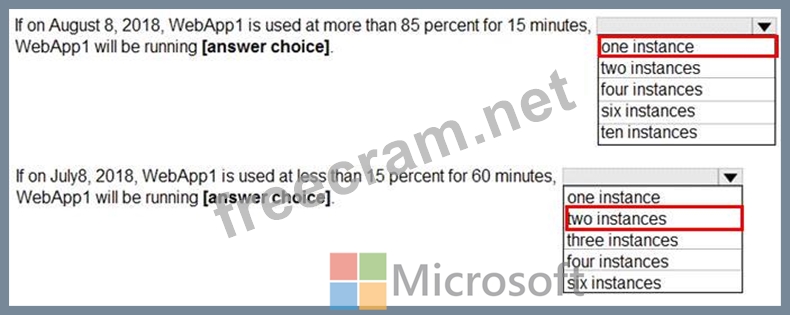
Box 1: one instance
Refer to scaling condition provided in the question, August 8, 2018 is outside the schedule of the scale condition 1, and Default instance count is 1.
Box 2: two instances
The default instance count is important because autoscale scales your service to that count when metrics are not available. Therefore, select a default instance count that's safe for your workloads.
The Default instance count of scale condition 1 is 4, and the Scale in rule decreases the count with 1.
So initial instance count before scale in condition met = 4
CPU utilization was at 15% for 60 mins so after first 10 mins ( The scale out and scale in rules are configured to have a duration of 10 minutes )instance count reduces by 1 hence after first 10 mins instance count is 4-1=3 Now cool down period is 5 mins , after first 15 mins instance count is 3 .
After next 15 mins , instance count will be 3-1=2.
After next 15 mins , instance count will be =2 because minimum instance count must be 2 , it can't get reduced beyond 2.
So after 60 mins instance count will be at 2.
Reference:
https://docs.microsoft.com/en-us/azure/azure-monitor/platform/autoscale-best-practices


- Question List (144q)
- Question 1: You have an Azure subscription that contains a virtual netwo...
- Question 2: You have an Azure Resource Manager template named Template1 ...
- Question 3: You are the global administrator for an Azure Active Directo...
- Question 4: You have the App Service plans shown in the following table....
- Question 5: From Azure Active Directory (AD) Privileged Identify Managem...
- Question 6: You have an Azure subscription named Subscription1. Subscrip...
- Question 7: Note: This question is part of a series of questions that pr...
- Question 8: A web developer creates a web application that you plan to d...
- Question 9: You have an Azure subscription named Subscription1. Subscrip...
- Question 10: You create an Azure subscription that is associated to a bas...
- Question 11: You have an Azure virtual network named VNet1 that connects ...
- Question 12: You have an Azure Subscription named Subcription1.has Subcri...
- Question 13: You are troubleshooting a performance issue for an Azure App...
- 1 commentQuestion 14: You have a hybrid infrastructure that contains an Azure Acti...
- Question 15: Note: This question is part of a series of questions that pr...
- Question 16: You have an Azure subscription that contains the resource gr...
- Question 17: You have an Azure Active Directory (Azure AD) tenant named c...
- Question 18: You have an Azure subscription named Subscription1. In Subsc...
- Question 19: You have an Azure subscription named Subscription1 that cont...
- Question 20: VM1 is running and connects to NIC1 and Disk1. NIC1 connects...
- 1 commentQuestion 21: You have an Azure subscription that contains the resources s...
- Question 22: Note: This question is part of a series of questions that pr...
- Question 23: You need to recommend a solution for App1. The solution must...
- Question 24: You have an Azure Active Directory (Azure AD) tenant named c...
- Question 25: You have an Azure subscription. Users access the resources i...
- Question 26: You have an Azure subscription named Subscription1 that is u...
- Question 27: You have an Azure subscription that contains the identifies ...
- Question 28: You have an Azure Migrate project that has the following ass...
- Question 29: You have an Azure subscription that has a Recovery Services ...
- Question 30: You have an Azure subscription that contains the hierarchy s...
- Question 31: You have an Azure Active Directory (Azure AD) tenant that sy...
- Question 32: You need to meet the technical requirement for VM4. What sho...
- Question 33: Your company has offices in New York and Los Angeles. You ha...
- Question 34: You have an on premises data center and an Azure subscriptio...
- 1 commentQuestion 35: You deploy an Azure Application Gateway. You need to ensure ...
- Question 36: You have an Azure virtual machine named VM1 that connects to...
- 1 commentQuestion 37: Your on-premises network contains an Active Directory domain...
- Question 38: You have an Azure subscription that contains the Azure virtu...
- Question 39: You have a Recovery Service vault that you use to test backu...
- Question 40: You have an Azure subscription. The subscription contains vi...
- Question 41: You have an Azure web app named webapp1. You have a virtual ...
- Question 42: You have an Azure subscription that contains a virtual netwo...
- Question 43: You have an Azure subscription that contains 100 virtual mac...
- Question 44: Note: This question is part of a series of questions that pr...
- Question 45: You have an Azure subscription named Subscription1. You depl...
- Question 46: You are configuring serverless computing in Azure. You need ...
- Question 47: You discover that VM3 does NOT meet the technical requiremen...
- Question 48: You have an Azure subscription that contains a user named Us...
- Question 49: Note: This question is part of a series of questions that pr...
- Question 50: You need to resolve the Active Directory issue. What should ...
- Question 51: Note: This question is part of a series of questions that pr...
- Question 52: You need to meet the connection requirements for the New Yor...
- Question 53: You create an Azure subscription named Subscription1 and an ...
- Question 54: You have an Azure web app named WebApp1. You need to provide...
- Question 55: You have an Azure subscription named Subscription1 that cont...
- Question 56: Note: This question is part of a series of questions that pr...
- Question 57: Note: This question is part of a series of questions that pr...
- Question 58: You have an Azure subscription that contains the resources s...
- Question 59: You have an Azure subscription that contains the virtual mac...
- Question 60: You have an Azure subscription named Subscription1 that cont...
- Question 61: You have an on-premises server that contains a folder named ...
- Question 62: You have several Azure virtual machines on a virtual network...
- Question 63: You need to define a custom domain name for Azure AD to supp...
- Question 64: You create an Azure Migrate project named TestMig in a resou...
- Question 65: You have an Azure subscription named Subscription1 that cont...
- Question 66: You have an Azure Active Directory (Azure AD) tenant named c...
- Question 67: You are evaluating the name resolution for the virtual machi...
- Question 68: You have an Azure subscription that contains the resources s...
- Question 69: Your network contains an Active Directory domain. The domain...
- Question 70: You have Azure subscription that includes following Azure fi...
- Question 71: You have an Azure subscription that contains three virtual n...
- Question 72: Note: This question is part of a series of questions that pr...
- Question 73: Note: This question is part of a series of questions that pr...
- Question 74: You have an Azure subscription that includes data in followi...
- Question 75: You have an Azure subscription that contains a virtual machi...
- Question 76: You have an Azure subscription. You enable multi-factor auth...
- Question 77: You create an Azure web app named WebApp1. WebApp1 has the a...
- Question 78: You plan to deploy an Azure container instance by using the ...
- Question 79: You have a service deployed to a Kubernetes cluster. Another...
- Question 80: You plan to deploy several Azure virtual machines that will ...
- Question 81: You have an Azure subscription. The subscription includes a ...
- Question 82: You have an Azure subscription that contains the resources s...
- Question 83: Note: This question is part of a series of questions that pr...
- Question 84: You have an Azure web app named webapp1. Users report that t...
- Question 85: You have an Azure App Service plan that hosts an Azure App S...
- Question 86: You have an Azure subscription that contains the following r...
- Question 87: Note: This question is part of a series of questions that pr...
- Question 88: You have a resource group named RG1. RG1 contains an Azure S...
- Question 89: Note: This question is part of a series of questions that pr...
- Question 90: You have an Azure subscription. You have 100 Azure virtual m...
- Question 91: You have an Azure Service Bus. You need to implement a Servi...
- Question 92: You have an Azure tenant that contains two subscriptions nam...
- Question 93: You have an Active Directory forest named contoso.com. You i...
- Question 94: You need to prepare the environment to meet the authenticati...
- Question 95: You have an Azure subscription that contains two resource gr...
- Question 96: You create an App Service plan named App1 and an Azure web a...
- Question 97: You have an Azure subscription that contains the following s...
- Question 98: You have an on-premises file server named Server1 that runs ...
- Question 99: You have an Azure subscription that contains a resource grou...
- Question 100: You have a public load balancer that balances ports 80 and 4...
- Question 101: You have peering configured as shown in the following exhibi...
- Question 102: You have an Azure virtual machine that runs Windows Server 2...
- Question 103: You create an Azure file sync group named Sync 1 and perform...
- Question 104: You have an Azure subscription named Subscription1. You have...
- Question 105: Your network contains an on-premises Active Directory forest...
- Question 106: You create the following resources in an subscription: * An ...
- Question 107: You have two Azure virtual machines named VM1 and VM2. VM1 h...
- Question 108: Note: This question is part of a series of questions that pr...
- Question 109: You have an Azure subscription that contains the following u...
- Question 110: You have an Azure Active Directory (Azure AD) tenant named c...
- Question 111: You have an Azure subscription that contains several virtual...
- Question 112: You have an Azure subscription that contains a resource grou...
- Question 113: You have an Azure Active Directory (Azure AD) tenant that co...
- Question 114: Note: This question is part of a series of questions that pr...
- Question 115: Note: This question is part of a series of questions that pr...
- Question 116: You have an on-premises network that includes a Microsoft SQ...
- Question 117: You have an Azure Active Directory (Azure AD) tenant that ha...
- Question 118: Your VMware vSphere on-premises infrastructure hosts 600 vir...
- Question 119: You have an Azure subscription named Subscription1 that cont...
- Question 120: You have an Azure Active Directory tenant named Contoso.com ...
- Question 121: Note: This question is part of a series of questions that pr...
- Question 122: Note This question is part of a series of questions that pre...
- Question 123: Note: This question is part of a series of questions that pr...
- 1 commentQuestion 124: Note: This question is part of a series of questions that pr...
- Question 125: You have an Azure virtual machine that runs Windows Server 2...
- Question 126: You have an Azure subscription that contains the resources i...
- Question 127: You have an Azure policy as shown in the following exhibit. ...
- Question 128: This question is part of a series of questions that present ...
- 1 commentQuestion 129: You need to deploy two Azure web apps named WebApp1 and WebA...
- Question 130: You have an Azure subscription named Subscription1. Subscrip...
- Question 131: You have an Azure virtual machine named VM1. The network int...
- Question 132: Note: This question is part of a series of questions that pr...
- Question 133: Note: This question is part of a series of questions that pr...
- Question 134: Note: This question is part of a series of questions that pr...
- Question 135: You need to identify the storage requirements for Contoso. F...
- Question 136: Which blade should you instruct the finance department audit...
- Question 137: Note: This question is part of a series of questions that pr...
- Question 138: You onboard 10 Azure virtual machines to Azure Automation St...
- Question 139: You need to recommend a solution to automate the configurati...
- Question 140: You have an Azure virtual machine named VM1 that runs Window...
- Question 141: You deploy a load balancer that has the following configurat...
- Question 142: You have an Azure App Service plan named AdatumASP1 that hos...
- Question 143: You have an app named App1 that runs on an Azure web app nam...
- Question 144: You have an Azure subscription that contains an Azure Storag...
