<< Prev Question Next Question >>
Question 11/29
You have a Microsoft Foundry project that processes procurement documents submitted by suppliers.
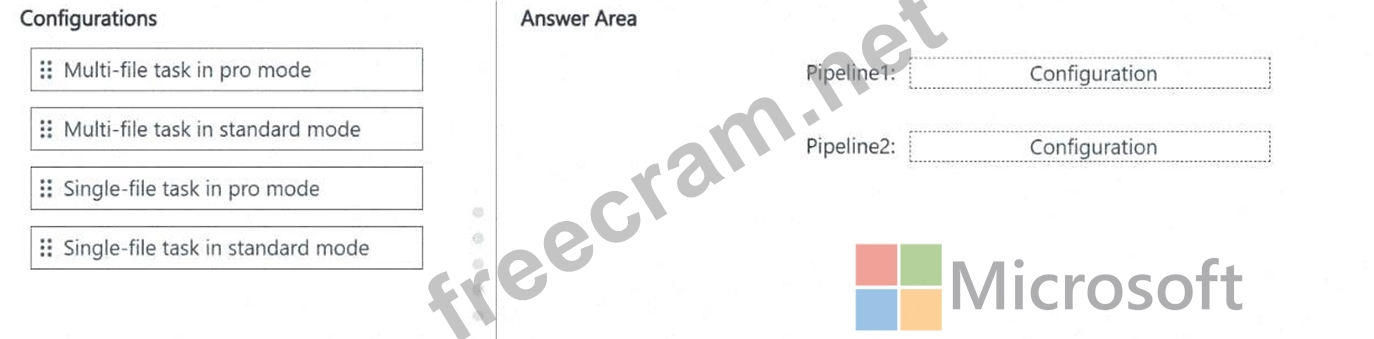
You need to implement two pipelines by using Azure Content Understanding in Foundry Tools. The solution must meet the following requirements:
* Include a pipeline named Pipeline1 that supports cost-effective, high-volume processing of standalone PDF invoices.
* Include a pipeline named Pipeline2 that supports cross-document validation by using multi-step reasoning and reference data.
How should you configure each pipeline? To answer, drag the appropriate configurations to the correct pipelines. Each configuration may be used once, more than once, or not at all. You may need to drag the split bar between panes or scroll to view content.
NOTE: Each correct selection is worth one point.
You need to implement two pipelines by using Azure Content Understanding in Foundry Tools. The solution must meet the following requirements:
* Include a pipeline named Pipeline1 that supports cost-effective, high-volume processing of standalone PDF invoices.
* Include a pipeline named Pipeline2 that supports cross-document validation by using multi-step reasoning and reference data.
How should you configure each pipeline? To answer, drag the appropriate configurations to the correct pipelines. Each configuration may be used once, more than once, or not at all. You may need to drag the split bar between panes or scroll to view content.
NOTE: Each correct selection is worth one point.


