- Home
- Microsoft
- Designing and Implementing a Microsoft Azure AI Solution
- Microsoft.AI-102.v2026-03-30.q159
- Question 47
Valid AI-102 Dumps shared by EduDump.com for Helping Passing AI-102 Exam! EduDump.com now offer the newest AI-102 exam dumps, the EduDump.com AI-102 exam questions have been updated and answers have been corrected get the newest EduDump.com AI-102 dumps with Test Engine here:
Access AI-102 Dumps Premium Version
(425 Q&As Dumps, 35%OFF Special Discount Code: freecram)
<< Prev Question Next Question >>
Question 47/159
You are developing an application that will recognize faults in components produced on a factory production line. The components are specific to your business.
You need to use the Custom Vision API to help detect common faults.
Which three actions should you perform in sequence? To answer, move the appropriate actions from the list of actions to the answer area and arrange them in the correct order.
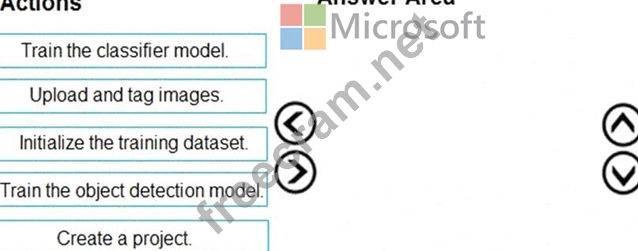
You need to use the Custom Vision API to help detect common faults.
Which three actions should you perform in sequence? To answer, move the appropriate actions from the list of actions to the answer area and arrange them in the correct order.
Correct Answer:
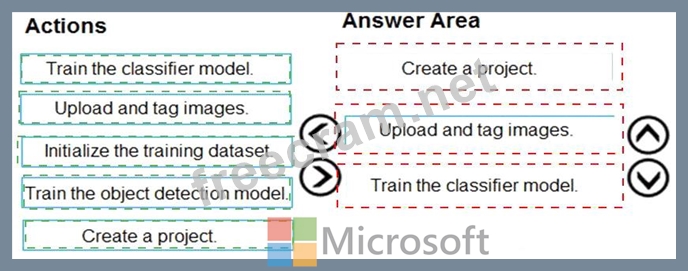
Explanation:
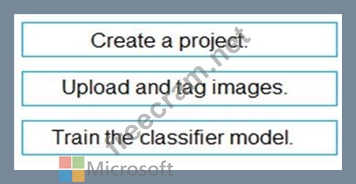
Comprehensive Detailed ExplanationYou are tasked with building a solution using Custom Vision to detect faults in factory components. Custom Vision follows a defined workflow:
* Create a project
* Before anything else, you must create a Custom Vision project in the Azure AI portal.
* This project specifies the type of model you are building: classification (classifying entire images) or object detection (locating items within images).
* Since the question is about detecting faults in specific components (a business-specific scenario), it aligns with classification unless explicitly stated otherwise.
* Upload and tag images
* You must provide training data.
* Upload a set of images showing both faulty and non-faulty components.
* Tag each image correctly so that the model can learn from labeled examples.
* Train the classifier model
* Once images are tagged, you run training on the dataset to generate the classifier model.
* The model can then be published and used for inference via API calls.
* Initialize the training dataset: This is not a direct step in Custom Vision; instead, uploading and tagging images inherently prepares the training dataset.
* Train the object detection model: Object detection is used if you need bounding boxes around items within an image. Since the question is about recognizing faults in a component (faulty vs non-faulty), a classifier model is appropriate.
Why not the other options?
Correct Sequence:
* Create a project
* Upload and tag images
* Train the classifier model
* Quickstart: Build an image classification project with the Custom Vision portal
* Custom Vision overview
* Train and test a Custom Vision model
Microsoft References


- Question List (159q)
- Question 1: You need to measure the public perception of your brand on s...
- Question 2: You have an Azure subscription. You are building a chatbot t...
- Question 3: You have an Azure subscription that contains an Azure Al Lan...
- Question 4: Your company wants to reduce how long it takes for employees...
- Question 5: You are developing a text processing solution. You have the ...
- Question 6: You are developing an app that will use the text-to-speech c...
- Question 7: You are building a natural language model. You need to enabl...
- Question 8: Note: This question is part of a series of questions that pr...
- Question 9: Select the answer that correctly completes the sentence. (Ex...
- Question 10: You are developing a photo application that will find photos...
- Question 11: You have a factory that produces cardboard packaging for foo...
- Question 12: You have an Azure Cognitive Search instance that indexes pur...
- Question 13: You have an Azure subscription that contains an Azure Al ser...
- Question 14: You have an Azure Cognitive Search resource named Search 1 t...
- Question 15: Select the answer that correctly completes the sentence. (Ex...
- Question 16: You are developing an app that will use the Speech and Langu...
- Question 17: You are building a Conversational Language Understanding mod...
- Question 18: You are building an app that will share user images. You nee...
- Question 19: Note: This question is part of a series of questions that pr...
- Question 20: Note: This question is part of a series of questions that pr...
- Question 21: You have a Language Understanding solution that runs in a Do...
- Question 22: You have an Azure subscription. You need to deploy an Azure ...
- Question 23: You are designing a solution that will answer questions abou...
- Question 24: You have an Azure Cognitive Search solution and an enrichmen...
- Question 25: Select the answer that correctly completes the sentence. (Ex...
- Question 26: You need to ensure that the chatbot can classify user input ...
- Question 27: You are building an app that will include one million scanne...
- Question 28: You are building an app that will perform speech translation...
- Question 29: You have a blog that allows users to append feedback comment...
- Question 30: For each of the following statements, select Yes if the stat...
- Question 31: You are building an app that uses a Language Understanding m...
- Question 32: You have an Azure Al Speech service resource named Resource1...
- Question 33: You have 100,000 documents. You are building an app that wil...
- Question 34: You are building a chatbot. You need to configure the bot to...
- Question 35: You are developing the shopping on-the-go project. You are c...
- Question 36: You are developing an application that includes language tra...
- Question 37: You plan to build a chatbot to support task tracking. You cr...
- Question 38: Match the Azure Cosmos DB APIs to the appropriate data struc...
- Question 39: You are building an app that will automatically translate sp...
- Question 40: You are developing a new sales system that will process the ...
- Question 41: You are building a solution that will detect anomalies in se...
- Question 42: You have an Azure OpenAI model named All. You are building a...
- Question 43: You have a chatbot that uses a QnA Maker application. You en...
- Question 44: You have a collection of press releases stored as PDF files....
- Question 45: You have an Azure subscription that contains an Azure AI Doc...
- Question 46: You are developing the chatbot. You create the following com...
- Question 47: You are developing an application that will recognize faults...
- Question 48: Select the answer that correctly completes the sentence. (Ex...
- Question 49: You plan to use a Language Understanding application named a...
- Question 50: You are building a chatbot by using the Microsoft Bot Framew...
- Question 51: You are developing a method that uses the Computer Vision cl...
- Question 52: You are building an app by using the Semantic Kernel. You ne...
- Question 53: You are training a Language Understanding model for a user s...
- Question 54: You have a custom agent named Agent1. You need to control ac...
- Question 55: You have a computer that contains the files shown in the fol...
- Question 56: Note: This question is part of a series of questions that pr...
- Question 57: Select the answer that correctly completes the sentence. (Ex...
- Question 58: You are building an app that will analyze documents by using...
- Question 59: You have an Azure subscription that contains an Azure Al Con...
- Question 60: You have an Azure subscription that contains an Azure Al Doc...
- Question 61: You have an app that uses the AI Language custom question an...
- Question 62: You have an Azure subscription that contains an Azure OpenAl...
- Question 63: Your company has a repotting solution that has paginated rep...
- Question 64: You have an Azure subscription that contains an Azure Al Con...
- Question 65: You have an Azure Cognitive Search solution and a collection...
- Question 66: You are developing an application that will detect faulty co...
- Question 67: You are building a phone call handling solution that will us...
- Question 68: You are developing the document processing workflow. You nee...
- Question 69: You have a Docker host named Host1 that contains a container...
- Question 70: You build a bot by using the Microsoft Bot Framework SDK and...
- Question 71: You have 100,000 images. You need to build an app that will ...
- Question 72: You have a mobile app that manages printed forms. You need t...
- Question 73: You have an Azure subscription. You are building a social me...
- Question 74: You are building an app that will use Azure AI to monitor wo...
- Question 75: You are building an app that will use the Azure Video Indexe...
- Question 76: You have a Microsoft OneDrive folder that contains a 20-GB v...
- Question 77: You are building an agent by using the Semantic Kernel. The ...
- Question 78: You are developing an app that will use the Azure AI vision ...
- Question 79: Note: This question is part of a series of questions that pr...
- Question 80: You are building a chatbot. You need to use the Content Mode...
- Question 81: You are reviewing the design of a chatbot. The chatbot inclu...
- Question 82: You are developing a custom analyzer by using Azure Content ...
- Question 83: Note: This question is part of a series of questions that pr...
- Question 84: You are building a multilingual chatbot. You need to send a ...
- Question 85: Note: This question is part of a series of questions that pr...
- Question 86: You need to develop an extract solution for the receipt imag...
- Question 87: Note: This question is part of a series of questions that pr...
- Question 88: You need to develop a solution to provide data to executives...
- Question 89: You have an Azure subscription You need to create a new reso...
- Question 90: What is used to define a query in a stream processing jobs i...
- Question 91: You have a Language Understanding resource named lu1. You bu...
- Question 92: You build a chatbot by using Azure OpenAI Studio. You need t...
- Question 93: You need to create a visualization of running sales totals p...
- Question 94: You have an Azure subscription that contains a multi-service...
- Question 95: You are building a social media messaging app. You need to i...
- Question 96: You successfully run the following HTTP request. POST https:...
- Question 97: You build a custom Form Recognizer model. You receive sample...
- Question 98: You have an app that analyzes images by using the Computer V...
- Question 99: You have a local folder that contains the files shown in the...
- Question 100: You have a bot that was built by using the Microsoft Bot Fra...
- Question 101: You have an Azure DevOps pipeline named Pipeline1 that is us...
- Question 102: You are building a call handling system that will perform th...
- Question 103: You have an Azure subscription that contains an Al enrichmen...
- Question 104: For each of the following statements, select Yes if the stat...
- Question 105: You train an Azure Custom Vision object detection model to i...
- Question 106: You have an Azure Cognitive Search solution and a collection...
- Question 107: You are building a call handling system that will receive ca...
- Question 108: You are building a solution in Azure that will use Azure AI ...
- Question 109: You are building a chatbot for a travel agent. The chatbot w...
- Question 110: You have an Azure subscription that contains an Azure OpenAI...
- Question 111: You are building an app that will process incoming email and...
- Question 112: You are building an Azure Weblob that will create knowledge ...
- Question 113: You plan to build an app that will generate a list of tags f...
- Question 114: You have an Azure subscription that contains an Azure Al Con...
- Question 115: You create a knowledge store for Azure Cognitive Search by u...
- Question 116: You are developing an application to recognize employees' fa...
- Question 117: You have a custom analyzer named analyzer1 that performs the...
- Question 118: You are designing a content management system. You need to e...
- Question 119: What are two benefits of platform as a service (PaaS) relati...
- Question 120: You are developing a service that records lectures given in ...
- Question 121: You have an Azure subscription that contains an Azure Al Con...
- Question 122: You train a Custom Vision model used in a mobile app. You re...
- Question 123: You have receipts that are accessible from a URL. You need t...
- Question 124: You are building a chatbot. You need to ensure that the bot ...
- Question 125: You have a monitoring solution that uses the Azure Al Anomal...
- Question 126: Select the answer that correctly completes the sentence. (Ex...
- Question 127: You are developing an internet-based training solution for r...
- Question 128: You have an Azure Al Search resource named Search1. You have...
- Question 129: You are building an agent by using the Azure Al Foundry Agen...
- Question 130: You are building an agent that will retrieve the current tim...
- Question 131: You have an Azure subscription that contains an Azure OpenAI...
- Question 132: You are building a chatbot for a Microsoft Teams channel by ...
- Question 133: You are developing the smart e-commerce project. You need to...
- Question 134: You use the Microsoft Bot Framework Composer to build a chat...
- Question 135: Match the types of workloads to the appropriate scenarios. T...
- Question 136: You are developing a new sales system that will process the ...
- Question 137: You are building a chatbot by using the Microsoft Bot Framew...
- Question 138: You have a Computer Vision resource named contoso1 that is h...
- Question 139: You are building a Language Understanding model for an e-com...
- Question 140: You are building a chatbot by using the Microsoft Bot Framew...
- Question 141: You have a chatbot that uses Azure OpenAI to generate respon...
- Question 142: You have a chatbot that was built by using the Microsoft Bot...
- Question 143: You Build a bot in JavaScript. From the Azure Command-Line i...
- Question 144: You have 1,000 scanned images of hand-written survey respons...
- Question 145: You are building an app that will scan confidential document...
- Question 146: You have the following C# method for creating Azure Cognitiv...
- Question 147: You are building a customer support chatbot. You need to con...
- Question 148: You are building a chatbot by using the Microsoft Bot Framew...
- Question 149: You have a chatbot that was built by using Microsoft Bot Fra...
- Question 150: You are building a social media messaging app. You need to i...
- Question 151: Select the answer that correctly completes the sentence. (Ex...
- Question 152: You have an Azure subscription that contain an Azure OpenAI ...
- Question 153: Note: This question is part of a series of questions that pr...
- Question 154: You are building a chatbot by using Microsoft Bot Framework ...
- Question 155: You need to measure the public perception of your brand on s...
- Question 156: You have an Azure OpenAI model. You have 500 prompt-completi...
- Question 157: You plan create an index for an Azure Cognitive Search servi...
- Question 158: You are building a transcription service for technical podca...
- Question 159: Which statement is an example of Data Manipulation Language ...
