- Home
- Microsoft
- Designing and Implementing a Microsoft Azure AI Solution
- Microsoft.AI-102.v2025-12-20.q211
- Question 145
Valid AI-102 Dumps shared by EduDump.com for Helping Passing AI-102 Exam! EduDump.com now offer the newest AI-102 exam dumps, the EduDump.com AI-102 exam questions have been updated and answers have been corrected get the newest EduDump.com AI-102 dumps with Test Engine here:
Access AI-102 Dumps Premium Version
(425 Q&As Dumps, 35%OFF Special Discount Code: freecram)
<< Prev Question Next Question >>
Question 145/211
SIMULATION
You need to create and publish a bot that will use Language Understanding and QnA Maker. The bot must be named bot12345678. You must publish the bot by using the User1-
[email protected] account.
NOTE: Complete this task first. It may take several minutes to complete the required deployment steps. While this is taking place, you can complete tasks 2-6 in this lab during the deployment.
To complete this task, use the Microsoft Bot Framework Composer.
You need to create and publish a bot that will use Language Understanding and QnA Maker. The bot must be named bot12345678. You must publish the bot by using the User1-
[email protected] account.
NOTE: Complete this task first. It may take several minutes to complete the required deployment steps. While this is taking place, you can complete tasks 2-6 in this lab during the deployment.
To complete this task, use the Microsoft Bot Framework Composer.
Correct Answer:
Step 1: Sign in to the QnAMaker.ai portal with your Azure credentials. Use the User1-
[email protected] account
Step 2: Publish the knowledge base. In the QnA Maker portal, select Publish. Then to confirm, select Publish on the page.
The QnA Maker service is now successfully published. You can use the endpoint in your application or bot code.

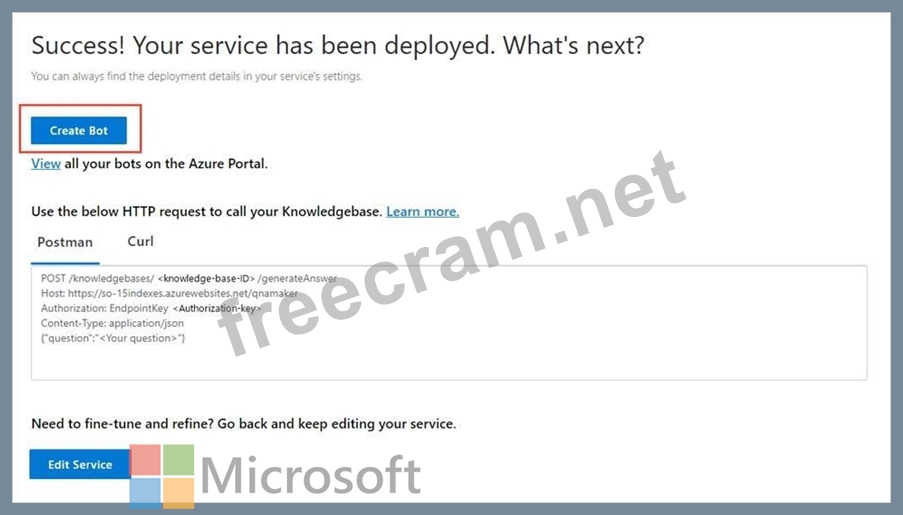
Step 3: In the QnA Maker portal, on the Publish page, select Create bot.
This button appears only after you've published the knowledge base.
After publishing the knowledge base, you can create a bot from the Publish page.
Step 4: A new browser tab opens for the Azure portal, with the Azure Bot Service's creation page.
Configure the Azure bot service.
Bot name: bot12345678
The bot will be created.
Reference:
https://docs.microsoft.com/en-us/azure/cognitive-services/qnamaker/quickstarts/create-publish- knowledge-base
[email protected] account
Step 2: Publish the knowledge base. In the QnA Maker portal, select Publish. Then to confirm, select Publish on the page.
The QnA Maker service is now successfully published. You can use the endpoint in your application or bot code.
Step 3: In the QnA Maker portal, on the Publish page, select Create bot.
This button appears only after you've published the knowledge base.
After publishing the knowledge base, you can create a bot from the Publish page.
Step 4: A new browser tab opens for the Azure portal, with the Azure Bot Service's creation page.
Configure the Azure bot service.
Bot name: bot12345678
The bot will be created.
Reference:
https://docs.microsoft.com/en-us/azure/cognitive-services/qnamaker/quickstarts/create-publish- knowledge-base


- Question List (211q)
- Question 1: You have a computer that contains the files shown in the fol...
- Question 2: You have an Azure subscription that contains an Azure OpenAI...
- Question 3: You have the following data sources: - Finance: On-premises ...
- Question 4: Note: This question is part of a series of questions that pr...
- Question 5: Case Study 1 - Wide World Importers Overview Existing Enviro...
- Question 6: Hotspot Question You are building an agent that will retriev...
- Question 7: What is a primary characteristic of a relational database?...
- Question 8: You have an Azure AI Services model named Model1 that identi...
- Question 9: Hotspot Question You are developing an app that will use the...
- Question 10: You are building a Conversational Language Understanding mod...
- Question 11: Drag and Drop Question You are building a customer support c...
- Question 12: Hotspot Question You have a collection of press releases sto...
- Question 13: Hotspot Question You have an Azure subscription. You plan to...
- Question 14: You are developing a method that uses the Azure AI Vision cl...
- Question 15: Case Study 2 - Contoso, Ltd. General Overview Contoso, Ltd. ...
- Question 16: You have the following C# method. (Exhibit) You need to depl...
- Question 17: Hotspot Question You are building an app that will share use...
- Question 18: Hotspot Question You have a chatbot that uses Azure OpenAI t...
- Question 19: You successfully run the following HTTP request. POST https:...
- Question 20: SIMULATION You need to configure bot12345678 support the Fre...
- Question 21: You are developing an app that will use the Speech and Langu...
- Question 22: SIMULATION Use the following login credentials as needed: - ...
- Question 23: Case Study 2 - Contoso, Ltd. General Overview Contoso, Ltd. ...
- Question 24: Hotspot Question You have a collection of press releases sto...
- Question 25: Hotspot Question You plan to deploy an Azure OpenAI resource...
- Question 26: Hotspot Question You have an app named App1 that uses Azure ...
- Question 27: You have a file share that contains 5,000 images of scanned ...
- Question 28: SIMULATION Use the following login credentials as needed: - ...
- Question 29: Drag and Drop Question You have an app that manages feedback...
- Question 30: Hotspot Question You are building an app that will perform s...
- Question 31: Case Study 2 - Contoso, Ltd. General Overview Contoso, Ltd. ...
- Question 32: You have an Azure subscription. You plan to build an app tha...
- Question 33: Hotspot Question You are building a chatbot that will provid...
- Question 34: Drag and Drop Question You have a web app that uses Azure AI...
- Question 35: Drag and Drop Question You are building a phone call handlin...
- Question 36: Hotspot Question You are building a model that will be used ...
- Question 37: Hotspot Question You are developing an application that will...
- Question 38: What ate two uses of data visualization? Each correct answer...
- Question 39: Note: This question is part of a series of questions that pr...
- Question 40: Drag and Drop Question You have a Custom Vision resource nam...
- Question 41: You are building a chatbot. You need to configure the bot to...
- Question 42: You have an Azure DevOps pipeline named Pipeline1 that is us...
- Question 43: You have an Azure subscription that contains an Azure OpenAI...
- Question 44: You are building an internet-based training solution. The so...
- Question 45: Hotspot Question You plan to provision Azure AI Services res...
- Question 46: You are building a bot by using Microsoft Bot Framework. You...
- Question 47: Note: This question is part of a series of questions that pr...
- Question 48: Drag and Drop Question Match the types of workloads to the a...
- Question 49: Note: This question is part of a series of questions that pr...
- Question 50: You are examining the Azure AI Language service output of an...
- Question 51: Hotspot Question You have a chatbot that uses the Azure AI L...
- Question 52: Hotspot Question You have an Azure subscription. You need to...
- Question 53: Hotspot Question You are developing an application that will...
- Question 54: Note: This question is part of a series of questions that pr...
- Question 55: You are developing an app that will use the text-to-speech c...
- Question 56: You have an Azure subscription that contains an Azure OpenAI...
- Question 57: Hotspot Question You have an Azure OpenAI resource named AI1...
- Question 58: You are building a chatbot. You need to configure the chatbo...
- Question 59: Hotspot Question You have a library that contains thousands ...
- Question 60: You have a Speech resource and a bot that was built by using...
- Question 61: Hotspot Question Select the answer that correctly completes ...
- Question 62: Note: This question is part of a series of questions that pr...
- Question 63: You have an Azure subscription that contains an Azure AI Lan...
- Question 64: Drag and Drop Question You have a collection of Microsoft Wo...
- Question 65: You need to build an app that will capture video meetings an...
- Question 66: Hotspot Question You are developing a text processing soluti...
- Question 67: Hotspot Question You have an Azure subscription that contain...
- Question 68: Hotspot Question You are building an app that will analyze t...
- Question 69: Your company has a repotting solution that has paginated rep...
- Question 70: You have an Azure subscription that contains an Azure AI Ano...
- Question 71: Hotspot Question For each of the following statements, selec...
- Question 72: You are building a conversational language understanding mod...
- Question 73: Your organization wants to create an application that monito...
- Question 74: Drag and Drop Question You have an app that uses Azure AI an...
- Question 75: You use the Microsoft Bot Framework Composer to build a chat...
- Question 76: You are developing a new sales system that will process the ...
- Question 77: SIMULATION Use the following login credentials as needed: - ...
- Question 78: You are building a flight booking bot by using the Microsoft...
- Question 79: Note: This question is part of a series of questions that pr...
- Question 80: You are building a chatbot. You need to ensure that the chat...
- Question 81: Hotspot Question You have an Azure subscription that contain...
- Question 82: Hotspot Question You need to create a new resource that will...
- Question 83: Hotspot Question You develop an application that uses the Fa...
- Question 84: You have the following Python function. (Exhibit) You call t...
- Question 85: Note: This question is part of a series of questions that pr...
- Question 86: Drag and Drop Question You have a question answering project...
- Question 87: Your company wants to reduce how long it takes for employees...
- Question 88: Hotspot Question Select the answer that correctly completes ...
- Question 89: Hotspot Question You have an Azure subscription. You plan to...
- Question 90: Drag and Drop Question You have a Docker host named Host1 th...
- Question 91: Case Study 2 - Contoso, Ltd. General Overview Contoso, Ltd. ...
- Question 92: You have an Azure subscription that contains an Azure OpenAI...
- Question 93: Hotspot Question You are building an app that will analyze t...
- Question 94: Drag and Drop Question You have an Azure subscription that c...
- Question 95: You have an app that analyzes images by using the Azure AI C...
- Question 96: You are building an app that will process scanned expense cl...
- Question 97: Which object should you use to specify that the speech input...
- Question 98: Hotspot Question You have an Azure subscription that contain...
- Question 99: You are building an app that will use Azure AI Language to e...
- Question 100: Hotspot Question You have an Azure subscription that contain...
- Question 101: Hotspot Question You are developing a service that records l...
- Question 102: Drag and Drop Question You have an Azure subscription. You a...
- Question 103: You have an Azure AI Search solution and a collection of han...
- Question 104: Note: This question is part of a series of questions that pr...
- Question 105: Hotspot Question You are developing an application to recogn...
- Question 106: Hotspot Question You are developing a streaming Azure AI Spe...
- Question 107: SIMULATION Use the following login credentials as needed: - ...
- Question 108: You are developing a method that uses the Azure AI Vision cl...
- Question 109: You have an Azure subscription that contains an Azure OpenAI...
- Question 110: Hotspot Question You have an app that uses the Azure AI Lang...
- Question 111: You are building an app that will share user images. You nee...
- Question 112: Hotspot Question You are developing a text processing soluti...
- Question 113: Hotspot Question You run the following command. (Exhibit) Fo...
- Question 114: You require to add a multi-turn context for a question in an...
- Question 115: You have an Azure subscription that contains an Azure OpenAI...
- Question 116: Hotspot Question You have a chatbot that uses Azure OpenAI t...
- Question 117: SIMULATION You plan to create a solution to generate caption...
- Question 118: You are building an image sharing app that will use Azure AI...
- Question 119: You have a chatbot that uses Custom question answering based...
- Question 120: You need to build a solution that will use optical character...
- Question 121: Drag and Drop Question You develop an app in C# named App1 t...
- Question 122: Hotspot Question You are building a model to detect objects ...
- Question 123: Hotspot Question You are developing an application that incl...
- Question 124: You train a Conversational Azure AI Language Understanding m...
- Question 125: Drag and Drop Question You have an Azure subscription that c...
- Question 126: You have an Azure subscription. The subscription contains an...
- Question 127: Hotspot Question You build a bot named app1 by using the Mic...
- Question 128: You have a product support manual. You need to build a produ...
- Question 129: You have a training dataset that contains 10,000 PDF documen...
- Question 130: Hotspot Question For each of the following statements, selec...
- Question 131: You are building a social media messaging app. You need to i...
- Question 132: You are building a Conversational Language Understanding mod...
- Question 133: Drag and Drop Question You have a factory that produces card...
- Question 134: Hotspot Question You are building an app that will provide u...
- Question 135: You are building an app that will use the Azure AI Video Ind...
- Question 136: Note: This question is part of a series of questions that pr...
- Question 137: You have an Azure subscription. You need to deploy an Azure ...
- Question 138: Hotspot Question You are building an app that will enable us...
- Question 139: Note: This question is part of a series of questions that pr...
- Question 140: Drag and Drop Question You develop a Python app named App1 t...
- Question 141: You are developing a solution to generate a word cloud based...
- Question 142: Which database transaction property ensures that transaction...
- Question 143: Drag and Drop Question Match the Azure services to the appro...
- Question 144: You build a bot by using the Microsoft Bot Framework SDK and...
- Question 145: SIMULATION You need to create and publish a bot that will us...
- Question 146: Hotspot Question You are building an app that will perform t...
- Question 147: You plan to build an agent that will combine and process mul...
- Question 148: Hotspot Question You are building content for a video traini...
- Question 149: You have an Azure AI Search instance that indexes purchase o...
- Question 150: Hotspot Question You have a chatbot. You need to test the bo...
- Question 151: Hotspot Question You create a knowledge store for Azure AI S...
- Question 152: Case Study 2 - Contoso, Ltd. General Overview Contoso, Ltd. ...
- Question 153: Hotspot Question You are building an Azure web app named App...
- Question 154: You have an Azure subscription that contains an Azure OpenAI...
- Question 155: Your company needs to implement a relational database in Azu...
- Question 156: Hotspot Question You are developing a text processing soluti...
- Question 157: You are training a Language Understanding model for a user s...
- Question 158: Hotspot Question You have a Computer Vision resource named c...
- Question 159: Hotspot Question You are building an app that will answer cu...
- Question 160: Hotspot Question You are building an agent by using the Azur...
- Question 161: Note: This question is part of a series of questions that pr...
- Question 162: Note: This question is part of a series of questions that pr...
- Question 163: Note: This question is part of a series of questions that pr...
- Question 164: You are building an internet-based training solution. The so...
- Question 165: Hotspot Question You are reviewing the design of a chatbot. ...
- Question 166: You are developing an app that will use the Decision and Lan...
- Question 167: You build a conversational bot named bot1. You need to confi...
- Question 168: You have a collection of 50,000 scanned documents that conta...
- Question 169: Hotspot Question You are developing a text processing soluti...
- Question 170: SIMULATION You need to create a Text Analytics service named...
- Question 171: You have a local folder that contains the files shown in the...
- Question 172: You are building a chatbot for a travel agent. The bot will ...
- Question 173: Drag and Drop Question You plan to build a chatbot to suppor...
- Question 174: You are developing a method for an application that uses the...
- Question 175: You have receipts that are accessible from a URL. You need t...
- Question 176: You are building an app named App1 that will use Azure AI Do...
- Question 177: Drag and Drop Question You plan to use containerized version...
- Question 178: You have a product support manual. You need to build a produ...
- Question 179: Drag and Drop Question You have an Azure subscription that c...
- Question 180: Hotspot Question Select the answer that correctly completes ...
- Question 181: Hotspot Question You are building a text-to-speech app that ...
- Question 182: Hotspot Question Select the answer that correctly completes ...
- Question 183: Hotspot Question Select the answer that correctly completes ...
- Question 184: Drag and Drop Question You plan to use a Conversational Lang...
- Question 185: You have used Azure Machine Learning to train a machine lear...
- Question 186: How can you enable a conversational customer support solutio...
- Question 187: You have an Azure subscription that contains an Azure AI Con...
- Question 188: Drag and Drop Question You are building a bot. You need to t...
- Question 189: You need to recommend a non-relational data store that is op...
- Question 190: Hotspot Question You are building an app by using the Azure ...
- Question 191: Hotspot Question You have 100,000 documents. You are buildin...
- Question 192: You are building a chatbot. You need to ensure that the bot ...
- Question 193: You are building an app that will include one million scanne...
- Question 194: Hotspot Question You make an API request and receive the res...
- Question 195: You have an Azure subscription that contains an Azure AI Doc...
- Question 196: Hotspot Question Select the answer that correctly completes ...
- Question 197: You deploy a web app that is used as a management portal for...
- Question 198: Hotspot Question You are building a call handling system tha...
- Question 199: You have a Video Indexer service that is used to provide a s...
- Question 200: Hotspot Question You have an Azure subscription that contain...
- Question 201: You have an Azure subscription that contains an Azure App Se...
- Question 202: Hotspot Question You are building a chatbot. You need to use...
- Question 203: You plan to perform predictive maintenance. You collect IoT ...
- Question 204: You have an Azure subscription that contains a Language serv...
- Question 205: You have an Azure AI service model named Model1 that identif...
- Question 206: You have the following C# function. (Exhibit) You call the f...
- Question 207: You have the following Python method. (Exhibit) You need to ...
- Question 208: Drag and Drop Question You have an Azure subscription that c...
- Question 209: You build a bot. You create an Azure Bot resource. You need ...
- Question 210: You have an Azure subscription and 10,000 ASCII files. You n...
- Question 211: Your organization uses speech synthesis and now you want to ...
