- Home
- Microsoft
- Designing and Implementing an Azure AI Solution
- Microsoft.AI-100.v2020-11-12.q57
- Question 6
Valid AI-100 Dumps shared by ExamDiscuss.com for Helping Passing AI-100 Exam! ExamDiscuss.com now offer the newest AI-100 exam dumps, the ExamDiscuss.com AI-100 exam questions have been updated and answers have been corrected get the newest ExamDiscuss.com AI-100 dumps with Test Engine here:
Access AI-100 Dumps Premium Version
(163 Q&As Dumps, 35%OFF Special Discount Code: freecram)
<< Prev Question Next Question >>
Question 6/57
You plan to deploy the Text Analytics and Computer Vision services. The Azure Cognitive Services will be deployed to the West US and East Europe Azure regions.
You need to identify the minimum number of service endpoints and API keys required for the planned deployment.
What should you identify? To answer, select the appropriate options in the answer area.
NOTE: Each correct selection is worth one point.
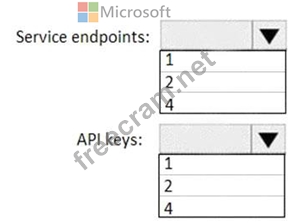
You need to identify the minimum number of service endpoints and API keys required for the planned deployment.
What should you identify? To answer, select the appropriate options in the answer area.
NOTE: Each correct selection is worth one point.
Correct Answer:
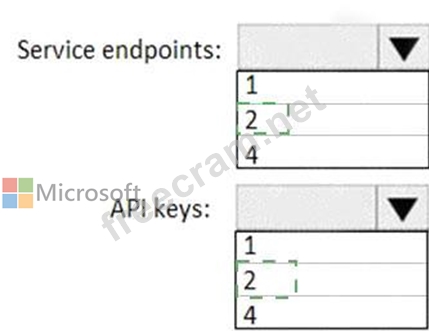
Explanation
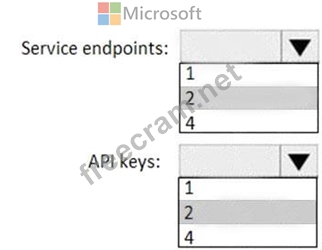
Box 1: 2
After creating a Cognitive Service resource in the Azure portal, you'll get an endpoint and a key for authenticating your applications. You can access Azure Cognitive Services through two different resources: A multi-service resource, or a single-service one.
Multi-service resource: Access multiple Azure Cognitive Services with a single key and endpoint.
Note: You need a key and endpoint for a Text Analytics resource. Azure Cognitive Services are represented by Azure resources that you subscribe to.
Each request must include your access key and an HTTP endpoint. The endpoint specifies the region you chose during sign up, the service URL, and a resource used on the request Box 2: 2 You need at least one key per region.
References:
https://docs.microsoft.com/en-us/azure/cognitive-services/cognitive-services-apis-create-account


- Question List (57q)
- Question 1: You plan to deploy an Azure Data Factory pipeline that will ...
- Question 2: You plan to implement a new data warehouse for a planned AI ...
- Question 3: Your company plans to build an app that will perform the fol...
- Question 4: You are designing an AI solution in Azure that will perform ...
- Question 5: Your company has an on-premises datacenter. You plan to publ...
- Question 6: You plan to deploy the Text Analytics and Computer Vision se...
- Question 7: You are configuring data persistence for a Microsoft Bot Fra...
- Question 8: You are designing an AI solution that will use IoT devices t...
- Question 9: You need to recommend a data storage solution that meets the...
- Question 10: You have a Face API solution that updates in real time. A pi...
- Question 11: You need to build an interactive website that will accept up...
- Question 12: You have an Azure Machine Learning experiment that must comp...
- Question 13: Note: This question is part of a series of questions that pr...
- Question 14: Your company has several AI solutions and bots. You need to ...
- Question 15: Your company is building a cinema chatbot by using the BOT F...
- Question 16: Note: This question is part of a series of questions that pr...
- Question 17: You plan to build an application that will perform predictiv...
- Question 18: You are designing an AI solution that will be used to find b...
- Question 19: You need to create a bot to meet the following requirements:...
- Question 20: You have a solution that runs on a five-node Azure Kubernete...
- Question 21: Your company manages a sports team. The company sets up a vi...
- Question 22: You have an app that uses the Language Understanding (LUIS) ...
- Question 23: You have thousands of images that contain text. You need to ...
- Question 24: Note: This question is part of a series of questions that pr...
- Question 25: You are designing a solution that will analyze bank transact...
- Question 26: You deploy an application that performs sentiment analysis o...
- Question 27: Note: This question is part of a series of questions that pr...
- Question 28: Your company develops an AI application that is orchestrated...
- Question 29: You deploy an Azure bot. You need to collect Key Performance...
- Question 30: You have an Azure Machine Learning experiment. You need to v...
- Question 31: Your company plans to deploy several apps that will use Azur...
- Question 32: You have thousands of images that contain text. You need to ...
- Question 33: Note: This question is part of a series of questions that pr...
- Question 34: You are designing an AI solution that will use IoT devices t...
- Question 35: You build an internal application that uses the Computer Vis...
- Question 36: You need to design the Butler chatbot solution to meet the t...
- Question 37: You create an image classification model in Azure Machine Le...
- Question 38: You have an intelligent edge solution that processes data an...
- Question 39: Note: This question is part of a series of questions that pr...
- Question 40: Your company recently deployed several hardware devices that...
- Question 41: You have an app that records meetings by using speech-to-tex...
- Question 42: You need to create a new app that will consume resources fro...
- Question 43: Your company has recently purchased and deployed 25,000 IoT ...
- Question 44: You design an AI solution that uses an Azure Stream Analytic...
- Question 45: You are designing an Al workflow that will aggregate data st...
- Question 46: You need to build a sentiment analysis solution that will us...
- Question 47: You plan to perform analytics of the medical records of pati...
- Question 48: Note: This question is part of a series of questions that pr...
- Question 49: You are developing an application that will perform optical ...
- Question 50: You have Azure IoT Edge devices that collect measurements ev...
- Question 51: Your company plans to develop a mobile app to provide meetin...
- Question 52: Note: This question is part of a series of questions that pr...
- Question 53: You have a real-time scoring pattern that uses deep learning...
- Question 54: You deploy an Azure bot. You need to collect Key Performance...
- Question 55: You have an Azure Machine Learning model that is deployed to...
- Question 56: You use an Azure key vault to store credentials for several ...
- Question 57: You have a Bing Search service that is used to query a produ...
