Valid AB-730 Dumps shared by EduDump.com for Helping Passing AB-730 Exam! EduDump.com now offer the newest AB-730 exam dumps, the EduDump.com AB-730 exam questions have been updated and answers have been corrected get the newest EduDump.com AB-730 dumps with Test Engine here:
Access AB-730 Dumps Premium Version
(88 Q&As Dumps, 35%OFF Special Discount Code: freecram)
<< Prev Question Next Question >>
Question 11/51
Hotspot Question
Select the answer that correctly completes the sentence.
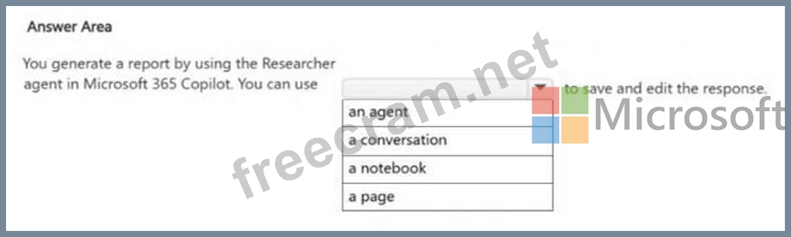
Select the answer that correctly completes the sentence.
Correct Answer:
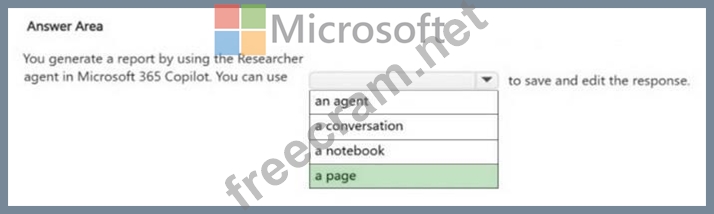
Explanation:
Box: a page
You generate a report by using the Researcher agent in Microsoft 365 Copilot. You can use
_______ to save and edit the response.
To save and edit a report generated by the Researcher agent in Microsoft 365 Copilot, you should primarily use Microsoft 365 Pages (part of Loop) or Microsoft Word.
Key Tools for Saving and Editing
*-> Microsoft 365 Pages: This is the most integrated way to handle Researcher output. After the report is generated, you can select "Edit in Pages" directly below the response. This creates a collaborative page side-by-side with your chat, allowing you to refine the content with your team.
Microsoft Word: You can export the report directly to Word to apply professional formatting and perform detailed editing. This is often the recommended step after initial collaboration in Pages.
Microsoft PowerPoint: For presentations, you can use the PowerPoint Copilot feature to generate slides directly from your saved Word document or export the report as a presentation if that option is available in your interface.
New Export Formats: Depending on your current rollout version, you may also see options to export the report as a PDF, Infographic, or even an Audio Overview


- Question List (51q)
- Question 1: How does AI help businesses detect fraud?...
- Question 2: You are comparing the difference between Microsoft 365 Copil...
- Question 3: Hotspot Question For each of the following statements, selec...
- Question 4: Hotspot Question Select the answer that correctly completes ...
- Question 5: What is a potential benefit of using AI in business operatio...
- Question 6: You are creating a prompt in Microsoft 365 Copilot to get in...
- Question 7: You create a prompt and add several files from your Microsof...
- Question 8: What is the primary goal of using AI in business?...
- Question 9: You create a Microsoft 365 Copilot notebook and add a file n...
- Question 10: Hotspot Question You plan to create an agent by using the Mi...
- Question 11: Hotspot Question Select the answer that correctly completes ...
- Question 12: Which AI technology is used to understand and interpret imag...
- Question 13: Hotspot Question For each of the following statements, selec...
- Question 14: Hotspot Question You are evaluating the features of Microsof...
- Question 15: You use Microsoft 365 Copilot. You discover that you had a c...
- Question 16: You are a project coordinator for a small consulting firm. Y...
- Question 17: You plan to use a notebook in Microsoft 365 Copilot. What is...
- Question 18: Which of the following is a typical use case for AI in marke...
- Question 19: You are creating a custom analytics agent in the Microsoft 3...
- Question 20: You use the Researcher agent in Microsoft 365 Copilot to gen...
- Question 21: What is a key challenge businesses face when implementing AI...
- Question 22: You sign in to the Microsoft 365 Copilot app by using your w...
- Question 23: Which of the following is a key capability of Natural Langua...
- Question 24: You run a saved prompt and receive the following response: "...
- Question 25: Hotspot Question From Microsoft 365 Copilot, you add custom ...
- Question 26: Hotspot Question You have a Microsoft 365 Copilot license. Y...
- Question 27: Hotspot Question Select the answer that correctly completes ...
- Question 28: You are a marketing assistant preparing for a budget meeting...
- Question 29: You use Microsoft 365 Copilot. You need to delete all your c...
- Question 30: Hotspot Question You run a prompt by using the Researcher ag...
- Question 31: In Microsoft 365 Copilot, you save a prompt. Which two actio...
- Question 32: Hotspot Question For each of the following statements, selec...
- Question 33: Hotspot Question Select the answer that correctly completes ...
- Question 34: You are discussing Microsoft 365 Copilot with a colleague. T...
- Question 35: What is the purpose of predictive analytics in business?...
- Question 36: Hotspot Question Select the answer that correctly completes ...
- Question 37: Hotspot Question For each of the following statements, selec...
- Question 38: You have a Microsoft 365 Copilot license. You are preparing ...
- Question 39: Hotspot Question For each of the following statements, selec...
- Question 40: You are creating a custom agent in the Microsoft 365 Copilot...
- Question 41: You need to access Microsoft 365 Copilot from a web browser....
- Question 42: Hotspot Question Select the answer that correctly completes ...
- Question 43: Hotspot Question For each of the following statements, selec...
- Question 44: Hotspot Question Select the answer that correctly completes ...
- Question 45: You attend many Microsoft Teams meetings. You want to ensure...
- Question 46: Which of the following AI applications helps personalize cus...
- Question 47: What does "AI bias" refer to?
- Question 48: You use Microsoft 365 Copilot. You regularly upload the same...
- Question 49: What is the purpose of a recommendation system in AI?...
- Question 50: You join an internal Microsoft Teams meeting late and want t...
- Question 51: Hotspot Question What are two limitations of prompt scheduli...
