- Home
- Microsoft
- Server Virtualization with Windows Server Hyper-V and System Center
- Microsoft.74-409.v2018-05-01.q99
- Question 76
Valid 74-409 Dumps shared by EduDump.com for Helping Passing 74-409 Exam! EduDump.com now offer the newest 74-409 exam dumps, the EduDump.com 74-409 exam questions have been updated and answers have been corrected get the newest EduDump.com 74-409 dumps with Test Engine here:
Access 74-409 Dumps Premium Version
(99 Q&As Dumps, 35%OFF Special Discount Code: freecram)
<< Prev Question Next Question >>
Question 76/99
DRAG DROP
You administer a Hyper-V environment that includes two servers named SERVER1 and SERVER2.
SERVER1 runs Windows Server 2008 R2 SP1. SERVER2 runs Windows Server 2012 R2. Both servers have the Hyper-V role installed.
SERVER1 contains a virtual machine named VM-APP1. VM-APP1 runs Windows Server 2003 R2 SP2.
You plan to migrate VM-APP1 from SERVER1 to SERVER2. To test the process, you migrate a copy of VM-APP1 from SERVER1 to SERVER2 and observe that the mouse does not function. The mouse on VM- APP1 must work correctly after you migrate it to SERVER2.
You need to migrate the VM-APP1.
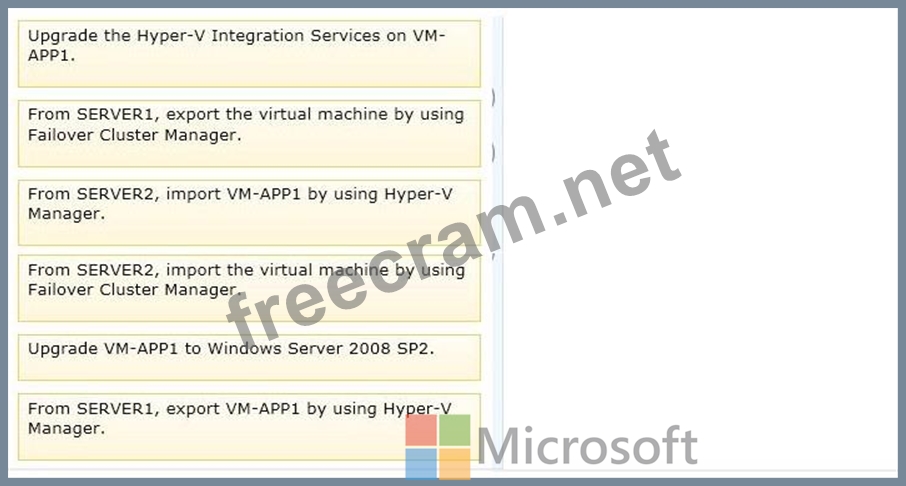
Which three actions should you perform in sequence? To answer, move the appropriate actions from the list of actions to the answer area and arrange them in the correct order.
Select and Place:
You administer a Hyper-V environment that includes two servers named SERVER1 and SERVER2.
SERVER1 runs Windows Server 2008 R2 SP1. SERVER2 runs Windows Server 2012 R2. Both servers have the Hyper-V role installed.
SERVER1 contains a virtual machine named VM-APP1. VM-APP1 runs Windows Server 2003 R2 SP2.
You plan to migrate VM-APP1 from SERVER1 to SERVER2. To test the process, you migrate a copy of VM-APP1 from SERVER1 to SERVER2 and observe that the mouse does not function. The mouse on VM- APP1 must work correctly after you migrate it to SERVER2.
You need to migrate the VM-APP1.
Which three actions should you perform in sequence? To answer, move the appropriate actions from the list of actions to the answer area and arrange them in the correct order.
Select and Place:
Correct Answer:
Explanation/Reference:
Note:
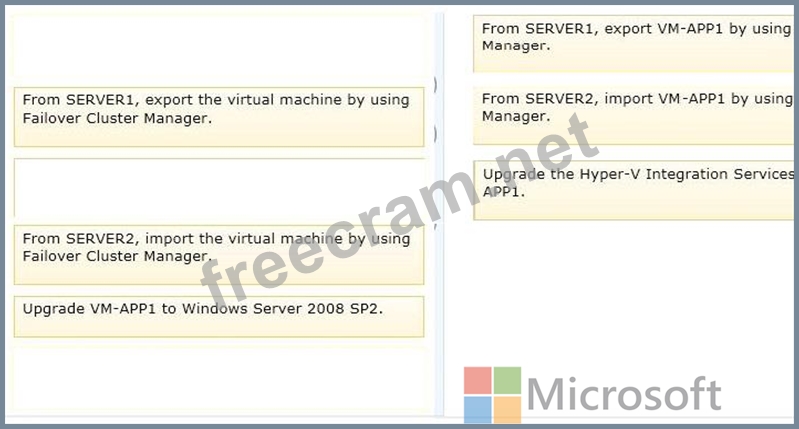
* You want to move one or more virtual machines to a new host server. Microsoft makes this possible through the Hyper-V Manager's Import and Export functions.
Explanation:
- You want to move one or more virtual machines to a new host server. Microsoft makes this possible through the Hyper-V Manager's Import and Export functions.
- To ensure the mouse works, Hyper-V integration services must be updated.
You can install this after you boot up the VM and log in with an administrative account.
Alternatively, navigate to the device containing the ISO image and double click on it to invoke the setup process.
If an earlier version of Hyper-V Integration Services is detected by the setup process, the option will be provided to install the latest release in place of the old release.
Once completed, the guest system will need to be rebooted before the services will be active.


- Question List (99q)
- Question 1: A company has a Windows Server 2012 R2 server named NYC-HOST...
- Question 2: An organization has private and public cloud resources. The ...
- Question 3: A company consolidates multiple data centers into a single c...
- Question 4: A company has a new Hyper-V host server that runs Windows Se...
- Question 5: You administer a Virtual Desktop Infrastructure (VDI). The e...
- Question 6: An organization has two teams of developers. One team develo...
- Question 7: You administer three Windows Server 2012 R2 servers named Se...
- Question 8: You administer the virtual machines and the Hyper-V host ser...
- Question 9: DRAG DROP A company has a single-domain Active Directory Dom...
- Question 10: You administer a Windows Server 2012 R2 Hyper-V host server ...
- Question 11: HOTSPOT A company has a Windows Server 2012 R2 Hyper-V envir...
- Question 12: You administer a server that runs Windows Server 2012 R2 wit...
- Question 13: A company plans to create a Hyper-V test environment that wi...
- Question 14: HOTSPOT A company has six physical Windows Server 2012 R2 se...
- Question 15: You administer four servers that run Windows Server 2012 R2....
- Question 16: You administer an environment that uses a Windows Server 201...
- Question 17: You administer a Windows Server 2012 R2 server that has the ...
- Question 18: DRAG DROP You are the virtualization administrator for an or...
- Question 19: A company has Active Directory Domain Services (AD DS) domai...
- Question 20: DRAG DROP You administer a Windows Server 2012 R2 server tha...
- Question 21: DRAG DROP You have a Windows Server 2012 R2 server that has ...
- Question 22: A company has an environment that runs System Center 2012 R2...
- Question 23: HOTSPOT A company has a Hyper-V environment that includes th...
- Question 24: A company has Windows Server 2012 R2 servers that have the H...
- Question 25: An organization uses System Center 2012 R2 Data Protection M...
- Question 26: A company has an Active Directory Domain Services (AD DS) en...
- Question 27: HOTSPOT A company has a single Active Directory Domain Servi...
- Question 28: A company uses System Center 2012 R2 Operations Manager and ...
- Question 29: DRAG DROP You administer the following Windows Server 2012 R...
- Question 30: A company has a network that contains one Active Directory D...
- Question 31: HOTSPOT A company has a single Active Directory Domain Servi...
- Question 32: HOTSPOT You administer the Hyper-V environment for a company...
- Question 33: A company has Active Directory Domain Services (AD DS) domai...
- Question 34: DRAG DROP You administer a Hyper-V environment that uses Win...
- Question 35: A company has Windows Server 2012 R2 servers that have the H...
- Question 36: An organization has a private cloud infrastructure. The orga...
- Question 37: Your environment contains one Active Directory Domain Servic...
- Question 38: A company has a server that has System Center 2012 R2 Virtua...
- Question 39: You use System Center 2012 R2 Operations Manager to monitor ...
- Question 40: HOTSPOT You are the virtualization administrator for an orga...
- Question 41: You have a Windows Server 2012 R2 server with the Hyper-V ro...
- Question 42: You administer an environment that contains a Windows Server...
- Question 43: You administer a Windows Server 2012 R2 server that has the ...
- Question 44: A company uses System Center 2012 R2 Virtual Machine Manager...
- Question 45: An organization has private and public cloud resources. The ...
- Question 46: A company has a virtualization infrastructure that consists ...
- Question 47: A company has a Windows Server 2012 R2 server that has the H...
- Question 48: DRAG DROP A software company has a Windows Server 2012 R2 se...
- Question 49: A company has offices in Hamburg, New York, and San Francisc...
- Question 50: DRAG DROP You are the virtualization administrator for an or...
- Question 51: You are the virtualization administrator for an organization...
- Question 52: HOTSPOT You plan to implement guest clustering. You review t...
- Question 53: A company has Active Directory Domain Services (AD DS) domai...
- Question 54: DRAG DROP A company uses System Center 2012 R2 Virtual Machi...
- Question 55: A company uses Windows Server 2012 R2 servers that have the ...
- Question 56: A company has the following servers: (Exhibit) You are imple...
- Question 57: You are the virtualization administrator for an organization...
- Question 58: HOTSPOT You have an environment that contains the servers as...
- Question 59: DRAG DROP A company uses System Center 2012 R2 Virtual Machi...
- Question 60: A company has two offices in New York and one office in San ...
- Question 61: You have three Windows Server 2012 R2 servers that are set u...
- Question 62: DRAG DROP You have a Windows Server 2012 R2 server that has ...
- Question 63: You administer two Windows 2012 R2 servers that have the Hyp...
- Question 64: HOTSPOT A company has a Windows Server 2012 R2 Hyper-V envir...
- Question 65: You administer two Windows 2012 R2 servers that have the Hyp...
- Question 66: You are the virtualization administrator for an organization...
- Question 67: DRAG DROP You administer a Windows Server 2012 R2 server tha...
- Question 68: DRAG DROP A company has one Active Directory Domain Services...
- Question 69: HOTSPOT You administer two Windows 2012 R2 servers named SER...
- Question 70: A company has one central data center and five branch office...
- Question 71: A company has seven Windows Server 2012 R2 virtual machines ...
- Question 72: A company has servers that run Windows Server 2012 R2. The c...
- Question 73: You administer the Hyper-V environment for a large organizat...
- Question 74: You are the virtualization administrator for an organization...
- Question 75: DRAG DROP A company uses System Center 2012 R2 Virtual Machi...
- Question 76: DRAG DROP You administer a Hyper-V environment that includes...
- Question 77: A company has Hyper-V host servers that run Windows Server 2...
- Question 78: You administer two Windows Server 2012 R2 servers that have ...
- Question 79: A company has a Windows Server 2012 R2 Hyper-V host server n...
- Question 80: A company has one Active Directory Domain Services (AD DS) f...
- Question 81: You manage a virtualization environment that contains Window...
- Question 82: A company has Hyper-V host servers and virtual machines (VMs...
- Question 83: You administer a Windows Server 2012 R2 server that has the ...
- Question 84: You have a Windows Server 2012 R2 Hyper-V environment that i...
- Question 85: A Windows Server 2012 R2 Hyper-V host server has four networ...
- Question 86: DRAG DROP A company has a Hyper-V host server that runs Wind...
- Question 87: You administer a server that runs Windows Server 2012 R2 tha...
- Question 88: You have a Windows Server 2012 R2 Hyper-V environment that i...
- Question 89: DRAG DROP You administer a Windows Server 2012 R2 server wit...
- Question 90: DRAG DROP You use System Center 2012 R2 Virtual Machine Mana...
- Question 91: You administer two servers that run Windows Server 2012 R2. ...
- Question 92: A company has a server that runs Windows Server 2012 R2. The...
- Question 93: You plan to use a Hyper-V host server to host virtual deskto...
- Question 94: Contoso, Ltd. has a Windows Server 2012 R2 server with the H...
- Question 95: A company has a Hyper-V failover cluster that consists of si...
- Question 96: A company has a Windows Server 2012 R2 server that has the H...
- Question 97: A company has a highly-secure network infrastructure environ...
- Question 98: A company plans to create a Hyper-V environment that will co...
- Question 99: HOTSPOT You plan to implement guest clustering that contains...
